



 +31 20 820 3777
 Compliance
  Support
  Documentation
 Login
Login 




In 2006, Amazon launched a service called Simple Storage Service. The idea seemed simple: provide users with an interface to store files of any type without worrying about the file system, partition size, or all the other complexities that usually come with disk storage. Nineteen years later, the acronym S3 (Simple Storage Service) has become practically a generic term for an entire class of storage solutions. Any cloud provider wanting to offer something similar makes their service "S3-compatible."
Interestingly, the technology itself is not as simple as the name suggests. Behind an interface of three HTTP (Hypertext Transfer Protocol) methods lies a distributed system with its solutions for replication, consistency and addressing. Many non-obvious aspects of its operation only become clear when you encounter them in practice.
In the article, we will try to break down exactly what happens when a file is "stored in S3" and why this approach has become so widespread. It is impossible to cover the entire topic in one article, so we will focus on key areas: architecture, main trade-offs and typical use cases.
What is S3 Storage in Simple Terms
If we strip away the marketing, S3 is a remote storage where files are uploaded and downloaded via HTTP. Each file receives a unique identifier used to access it. There is no folder hierarchy in the traditional sense. What looks like "folders" in interfaces is actually just prefixes in object names. This approach may seem unfamiliar after working with file systems, but there are reasons for it, which I will address shortly.
From a developer's perspective, working with S3 is relatively simple. There is an application programming interface (API) with several main operations: put an object, get an object, delete an object and list objects. Each request receives an HTTP response. Authorization occurs via a pair of keys that sign every request with a cryptographic signature. No sessions, nothing complicated.
The simplicity of the interface is deceptive; internally, everything is significantly more complex. Speed, reliability and cost all depend on implementation details. Externally, it is always the same three or four operations, which is the main value of the standard. You can write code once and run it against any S3-compatible storage, changing only the service endpoint and keys.
S3 Architecture: Buckets, Objects and Keys
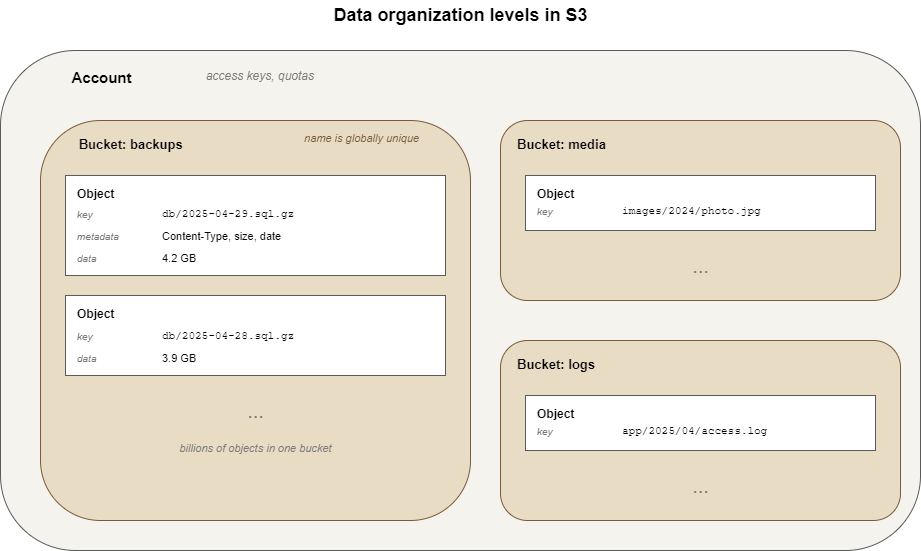
S3 has three levels of data organization. You can imagine them as a set of nesting dolls.
The top level is the Account. It belongs to the user or organization and is associated with access keys and quotas. A single client can have several independent accounts, which is standard practice for isolating data from different projects.
The Bucket acts as a container for objects within an account. A bucket has a name that must be unique across the entire storage system, not just within the account. This is an interesting point. If someone registers a bucket named "backups," no one else can create a bucket with the same name. The reason lies in the addressing mechanism, which we will discuss next.
The Object is the file itself and its metadata. Metadata includes standard headers (content type, length, modification date) and custom headers that can be attached manually. Each object has a key. This is a string that looks like a path, although the path is conditional. For S3, “images/2024/photo.jpg” is simply a string identifier. No real folders are created.
An object's address consists of three parts: the endpoint, the bucket name and the object key. In a URL, this looks approximately like this:
https://endpoint/bucket-name/object-keyA virtual host variant is also possible and is allowed by the standard:
https://bucket-name.endpoint/object-key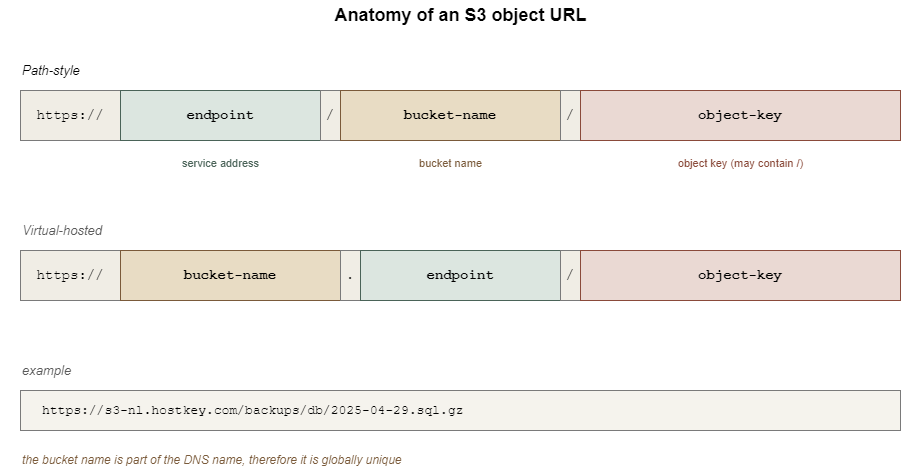
From this scheme, it is immediately clear why bucket names must be unique. They become part of the address and two points with the same address cannot exist. This leads to strict naming rules in S3 in general: only lowercase letters, numbers and hyphens; length from 3 to 63 characters; cannot start or end with special characters. The bucket name must be suitable for a DNS record.
Object names, on the other hand, are almost unrestricted. You can put almost anything inside the key, including slashes and UTF-8 characters. The fact that slashes work as "folders" in graphical clients is a convention of the graphical interface. When a client requests a bucket listing with the prefix “images/2024/” and the delimiter “/”, it receives objects whose keys start with this prefix, grouped by the delimiter character. The illusion of a file system arises on the client side.
How Object Storage Differs from File and Block Storage
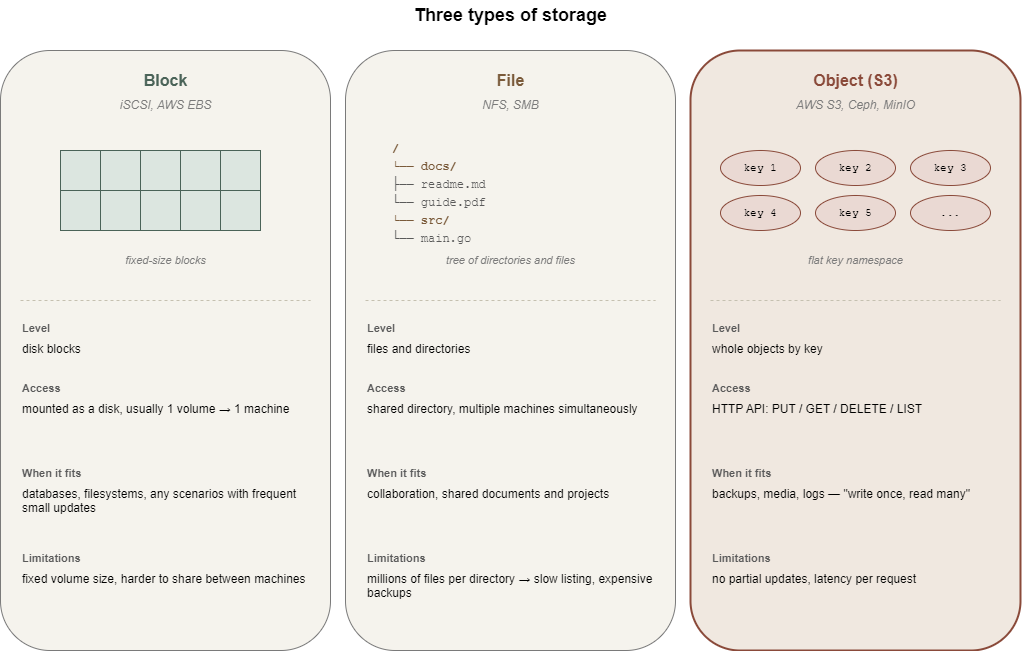
It is worth pausing here because the question "Why do we need another storage if we have a file system?" is the most common. Very briefly, the difference lies in the level at which the storage delivers data and how it interacts with it.
Block storage works with disk blocks. This is the level at which the operating system sees a "disk." A volume connected via the iSCSI protocol is indistinguishable from a local disk from the system's perspective. You can create file systems, partitions, databases, or anything else on it. The downside is that the volume must be mounted and maintained and is usually connected to only one machine.
File storage operates with files and directories. You can connect to a shared directory via NFS or SMB, where multiple machines work with the same files simultaneously. This is a familiar paradigm that is convenient for collaborative work. File systems have their limits. When a directory contains millions of files, operations like listing begin to slow down, metadata takes up a disproportionate amount of space and backups become expensive.
Object storage works with whole objects. You can only retrieve or store an object entirely, although for large files there is multipart upload, where the client breaks the file into chunks and reassembles it on the service side. The architecture is designed from the ground up for horizontal scaling and the number of objects in a bucket is practically unlimited - millions and billions are routine figures, not the upper limit. Access to a specific object by its key remains fast at any scale.
This leads to a not-so-obvious conclusion. S3 is poorly suited for scenarios requiring frequent small changes to existing data. For example, placing a PostgreSQL database in object storage is pointless because the DBMS works at the block level and constantly modifies small sections of files. Every such change in S3 effectively means rewriting the entire object. However, S3 works excellently where data is written once and then read. Backups, media files, logs, static sites, etc. fit the “write once, read many” pattern.
It's not the amount of data or the type of file that makes the difference between "fits" and "doesn't fit." It's the way operations work.
How S3 Works
The external API is clear. What happens when a request reaches the server? This is where things get interesting and simultaneously the most ambiguous, because the specific implementation depends on the provider. For AWS, it is a closed system that can only be studied via whitepapers and publications. Most S3-compatible storage systems are built on one of the open-source solutions. Most commonly, this is Ceph, MinIO or SeaweedFS. It will be convenient to talk about a specific implementation, so let's take Ceph. The client request first hits a gateway called RADOS Gateway. The gateway parses the incoming S3 API request, verifies its signature and translates it into operations of the cluster's internal protocol. Then the cluster itself works, where data is distributed across multiple storage nodes.
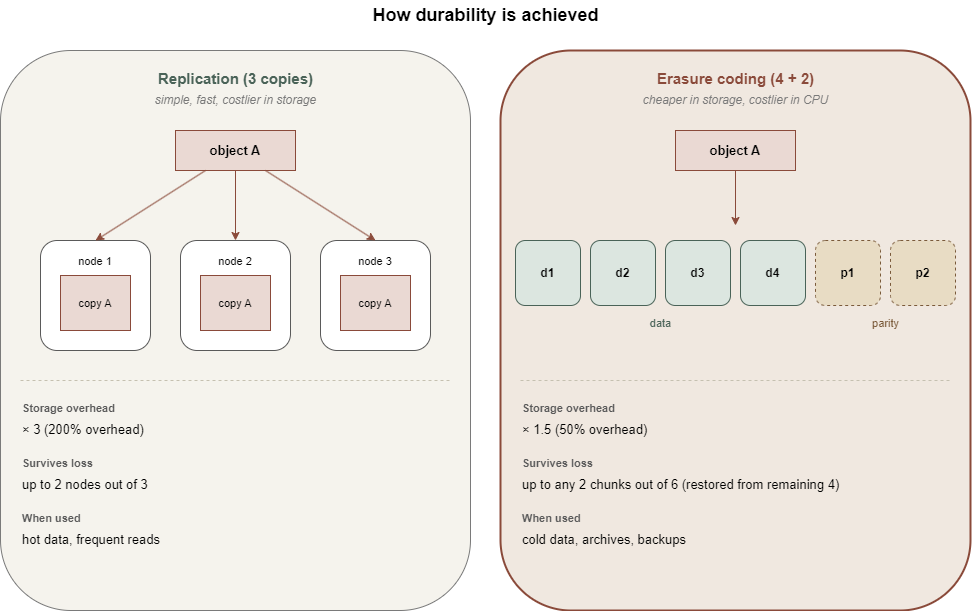
If the gateway is the entrance, data distribution is the kitchen itself. When an object enters the cluster, it does not simply sit on one disk. It is broken into parts and each part is copied to several nodes simultaneously. The exact number of copies is determined by the replication policy. The standard option assumes three copies. If one node fails, the data is still available on others. The cluster monitors the state of replicas and automatically restores them in case of failures.
An alternative approach is called “Erasure Coding” and works roughly like RAID 5 for distributed systems. The object is split into N data shards and K parity shards. To reconstruct the object, any N out of the (N+K) shards are sufficient. Erasure coding saves space compared to full replication but is more CPU-intensive on reads and writes. Therefore, it is usually used for infrequently accessed data, while hot data remains on simple replication.
The advertised durability of cloud storage is often quoted as “eleven nines." This means the probability of losing one object per year is on the order of 10⁻¹¹. The number is beautiful, but it is a statistical model based on assumptions about hardware failure rates and recovery time. Real-world durability depends on how the specific cluster is configured. One provider has three copies of data in one data center, while another spreads copies across different regions. The numbers in marketing materials may match, but actual disaster resilience can differ by orders of magnitude.
The consistency model for S3 has also changed over time. Until 2020, Amazon S3 operated under an eventual consistency model. After writing an object, subsequent reads could return an old version or a "not found" error for some time. Later, they moved to strong read-after-write consistency. For most S3-compatible solutions based on Ceph, the consistency model is also strong, but the details should be verified for a specific service. Eventual consistency is treacherous: the bugs it causes are rare and hard to reproduce.
Among the additional features available in the S3 standard, two are worth mentioning. Versioning works such that when an object is overwritten, the old version is not deleted but saved as a separate version with its identifier. This is good protection against accidental overwrites and deletions. It is enabled separately for each bucket. It comes at a cost: storage usage grows because every version is kept.
Lifecycle policies are rules by which objects automatically change their storage class or are deleted on a schedule. For example, 30 days after upload, an object moves to a colder and cheaper storage and after 90 days, it is deleted entirely. This is a convenient mechanism for managing costs, especially for logs and backups.
Both features are in the S3 API specification, but not every S3-compatible storage fully supports them. It is worth checking before incorporating them into your architecture.
S3 Storage Use Cases
It should be clear by now where object storage makes sense, but a few specifics won't hurt.
Backups and Archives
One of the most obvious scenarios. Backup systems like Restic, BorgBackup and Duplicati can write backups directly to S3. Object storage is almost ideal here. Data is written once, read rarely and volumes can be large. Lifecycle policies allow for the automatic deletion of old backups.
Static Content and Media File Distribution
Images, videos and documents for website or application users. You can serve them directly from S3 or via a CDN (Content Delivery Network) that caches content on edge nodes. This reduces load on the application and simplifies scaling. This scenario has a pitfall related to access control. A bucket configured for public read access can easily become a source of leaks if files that shouldn't be there end up in it.
Big Data and Data Exchange Between Microservices
Apache Spark, Hadoop and analytical systems like Trino work well with data in S3. The "write once, read many times" paradigm fits perfectly here. On top of that, S3 works well as a shared data bus between services: one writes its result as an object and another picks it up.
Static Site Hosting
If a site has no server-side logic (only HTML, CSS, JS, images), it can be hosted directly from a bucket. It turns out to be cheap and scalable. Suitable for documentation, landing pages and portfolios. Not suitable for anything requiring server-side request processing.
Log and Metric Storage
Observability platforms often offload aggregated logs to S3 for long-term retention. Hot data is stored in Elasticsearch or Loki, while cold data is in S3 with a lifecycle policy. Searching cold logs is slower, but it is also needed less frequently.
The list can continue; these scenarios are the most common. They share one thing: data is either immutable (a backup is uploaded and doesn't change) or updated entirely, not piecemeal.
Advantages of Object Storage
If we try to gather the strong points of S3 into one list, it would look roughly like this:
- Horizontal Scalability: The architecture is designed for distributed storage and adding new nodes to the cluster is a routine operation. Volumes are measured in petabytes without major issues.
- Simple Access Model: HTTP API, two keys for authorization, no sessions or complex protocols. This is simpler than configuring NFS mounting with permissions and network policies.
- Compatibility with the Tool Ecosystem: Since the S3 API has become a standard, many libraries, utilities and applications have been written for it. If you need to do something with data in S3, there is likely already a ready-made tool.
- API-Based Management: Bucket creation, permission granting, lifecycle policies and versioning are all configured via API. It is also suitable for Infrastructure as Code.
- Flexible Permission Models: ACLs, bucket policies, temporary signed URLs. You can grant public access to one file while keeping the rest of the bucket closed. You can also generate a link with a limited lifetime and send it to a user who does not have rights to the bucket as a whole.
There is another point, less obvious but important. S3 is usually billed by the actual volume occupied, not by an allocated quota. This is more convenient than paying for a fixed-size volume that is only ten percent full.
Limitations to Remember
It would be dishonest to talk about S3 without caveats. This architecture has downsides:
- Traffic Costs: For most providers, the cost of outgoing traffic from S3 is significantly higher than storage costs. When an application actively serves data to users, the monthly bill can be surprising and sometimes shocking. This is where the economic trade-off gets interesting: Is it cheaper to host static content in S3 with a CDN or to spin up a dedicated server?
- Latency: Each request is effectively an HTTP call to a remote service that passes through a gateway, authentication and cluster routing. For a single object, this is tens of milliseconds. If an application makes many small requests, the latency becomes a problem. Solutions exist (batching, caching, multipart upload), but the process complicates the code.
- No Partial Updates: You cannot change a byte in the middle of a large object. Only a full rewrite is possible. For most scenarios, this limitation is not a problem, but sometimes it becomes a bottleneck.
- The last problem is not technical but human: S3 quickly becomes a place where everything is dumped according to the principle of "too lazy to figure out where to put it." Without discipline (a prefix structure, tags, lifecycle policies), buckets quickly turn into a dumping ground where you can't tell what's where or whether it's safe to delete. The architecture offers tools for order but does not force you to use them.
HOSTKEY S3-Compatible Storage
To conclude, a few words about HOSTKEY's own S3 service. The service is deployed in the Netherlands, with a backend built on Ceph using RADOS Gateway. For connection, the endpoint “s3-nl.hostkey.com” is used, with authorization via AWS Signature Version 4. That is, everything is the same as described above. Any S3-compatible client can connect, from the AWS CLI to graphical utilities.
HOSTKEY's S3-compatible storage is available under the Standard Storage plan. The plan includes a quota:
- 250 GB of storage
- 1 TB of outbound traffic
- 1,500 command requests per month are included.
Anything above those limits is charged daily based on usage. Inbound traffic is free. Each storage account can have up to 100 buckets and you can have multiple independent storage instances that are billed separately.
This isolation is useful in practice. If you're a freelancer hosting sites for multiple clients, you can give each client their own storage instance and their own set of credentials. This way access to one does not mean access to any of the others.
You can connect through the Invapi control panel, where the keys are also issued. Then, a standard S3-compatible client works. With the AWS CLI, you connect by passing the “--endpoint-url” flag. For GUI clients like S3 Browser, choose the S3 Compatible Storage type (not Amazon S3) and point it at the same endpoint.
What's Next
S3 is not a black box but a fairly understandable architecture with its own strengths and weaknesses. Its strengths show up in scalability, API simplicity and tool compatibility. The weaknesses show up in traffic costs, per-request latency and a poor fit for frequent small changes.
There’s no right or wrong answer here and which provider you go with is a different conversation. AWS, GCS, Azure Blob, Russian clouds, S3-compatible services from hosting providers, etc. all have their own features and they need to be compared against specific criteria that are important for a given task.
Price per gigabyte, price for outgoing traffic, data center geography, support for additional API features, legal restrictions on data processing - all of this matters, but a ranking is impossible outside the context.
If you want to get hands-on, the logical next step is the practical side. A separate article will cover exactly how to connect to S3 storage from various tools (AWS CLI, graphical clients, Python code).