



 +31 20 820 3777
 Compliance & KYC
  Support
  Documentation
 Login
Login 


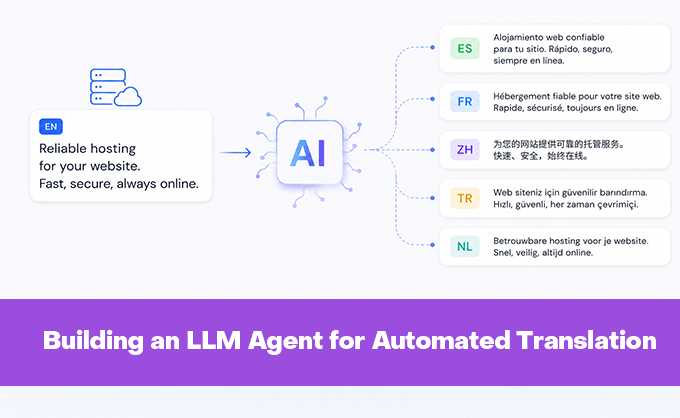


Imagine supporting a large-scale project with documentation in multiple languages. Every time a new guide is added or a bug is fixed in the English version, all translations in other language versions must be manually updated. This process is expensive, slow, and prone to desynchronization. Even two additional languages can create a bottleneck, so what happens when there are more?
This is exactly the problem solved by the specialized agent for automated technical documentation translation discussed here. To clarify upfront: we initially write English text and then our creation does the rest of the work for us.
What Is This Agent and Why Do We Need It
The agent is not just a script that sends text to a neural network and records the response. It is a well-thought-out system that understands the specifics of technical documentation: it preserves code and commands unchanged, avoids translating button names and UI elements, maintains Markdown formatting, and even automatically generates a table of contents in the required style.
At its core lies the idea of orchestrating several specialized components. There is a translator that takes the source text and produces a draft translation. There is a validator—a separate model that checks the result against strict rules: are all sections present, were terminal commands accidentally translated, and is the terminology consistent? If the validator finds errors, a corrector is triggered to make targeted fixes. This cycle can repeat several times until the quality reaches an acceptable level, rated on a scale from 0% to 100%.
Why Not Use an Off-the-Shelf Solution
A natural question arises: why build your own agent when tools like OpenClaw, various LLM wrappers, or even ready-made machine translation services exist? The answer lies in three key requirements that are rarely met by universal tools.
- Technical documentation is not creative writing. It is critical to preserve the functionality of code examples, the accuracy of terms, and the structure of markup. Universal translators often "break" code, translate variable names, or change formatting, making the result unsuitable for publication.
- The documentation translation process is not a one-time operation but a continuous stream of changes. Integration with version control systems is needed, along with the ability to process only changed files, synchronize deletions, and account for exclusion rules for specific sections. Ready-made tools rarely offer such flexibility "out of the box."
- Translation quality must be controlled automatically. In our agent, validation is built into the pipeline: every edit is checked, errors are logged, and re-generation is triggered if necessary. In universal solutions, this logic would have to be manually layered on top, negating the advantage of using them.
Advantages of a Specialized Approach
The main advantage of the agent is result predictability. Thanks to clear rules in the validator prompts, the system knows that strings in quotes like "Code successfully verified" are UI messages that must remain in English. It knows that code block commands must not be touched. It knows that the table of contents is generated by a separate script, so the model should not create its own.
Another plus is modularity. The agent’s components are loosely coupled: you can replace the translation model without rewriting the validator; you can disable table of contents generation for certain languages; you can add a new language (we currently have French and Turkish, with plans to add Spanish, Dutch, and, most challenging, Chinese) simply by defining new parameters in the configuration file. This makes the system resilient to changes and easy to maintain.
A third important aspect is transparency. All stages of work are logged, validation errors are saved to a separate file, and in debug mode, you can see full model requests and responses. This is critical for debugging and fine-tuning prompts.
Disadvantages and Limitations
This approach has its downsides. First, configuration complexity. To get the agent running, you need to prepare a configuration file, define repository paths, set up exclusions, and tune context parameters for the models. For a one-time translation, this is overkill.
Second, dependency on prompt quality. If the validator rules are formulated imprecisely, the agent might miss an error or, conversely, start endlessly correcting stylistic nuances. Iterations and manual checks are required at the start. In our case, the same prompts and models used for manual translation were employed, so the result was fairly predictable. However, adjustments were still needed for both the translator and validator prompts during agent setup.
Third, resource intensity. The validation cycle with multiple correction attempts means that a single file may consume significantly more tokens than a simple translation. This increases cost and processing time, especially for large documents. In our case, the documentation department has its own GPU server, not the most powerful one, featuring four Nvidia V100s with 16 GB each. Its peak speed is approximately 50-60 tokens per second. Thus, on average, translating and validating a single article can take from 3 to 20 minutes, depending on the size and the number of retries at each stage.
Finally, the agent is tailored to a specific documentation format—Markdown with a certain structure (we use Material for MkDocs with our custom modifications). If we (hypothetically) needed to work with reStructuredText, AsciiDoc, or another format, a significant portion of the logic would need to be rewritten.
Architecture: Modularity and Separation of Concerns
The agent is built on the principle of loosely coupled modules written in Python, each solving a single task. At the center is the configuration—the AgentConfig class, which loads settings from a YAML file and provides a unified interface for accessing parameters. This allows changing system behavior without rewriting code: adding a new language, adjusting token limits, or modifying file exclusion rules.
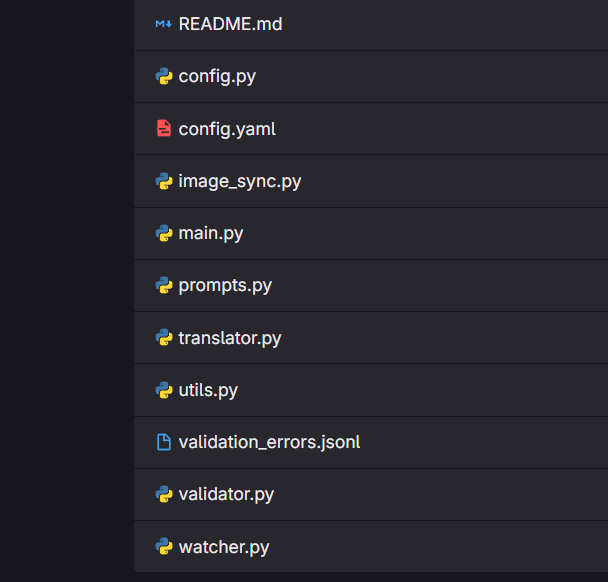
Next come the specialized components. OpenWebUIClient handles low-level communication with the neural network API: forming requests, processing responses, and retrying on failures. TranslationValidator manages the validation and correction cycle but does not know how requests are sent. ImageSync handles only image copying, while RepoWatcher tracks changes in the repository via Git. This isolation simplifies testing: you can replace the API client without affecting validation logic.
All post-processing is moved to utilities: table of contents generation, link cleanup, token estimation. This is intentional. When logic is scattered throughout the code, any change requires edits in dozens of places. When it is consolidated in one place, updating a single function suffices.
Processing Pipeline: From Repository Change to Ready File
The agent’s pipeline can be viewed as a sequence of stages that each file goes through.
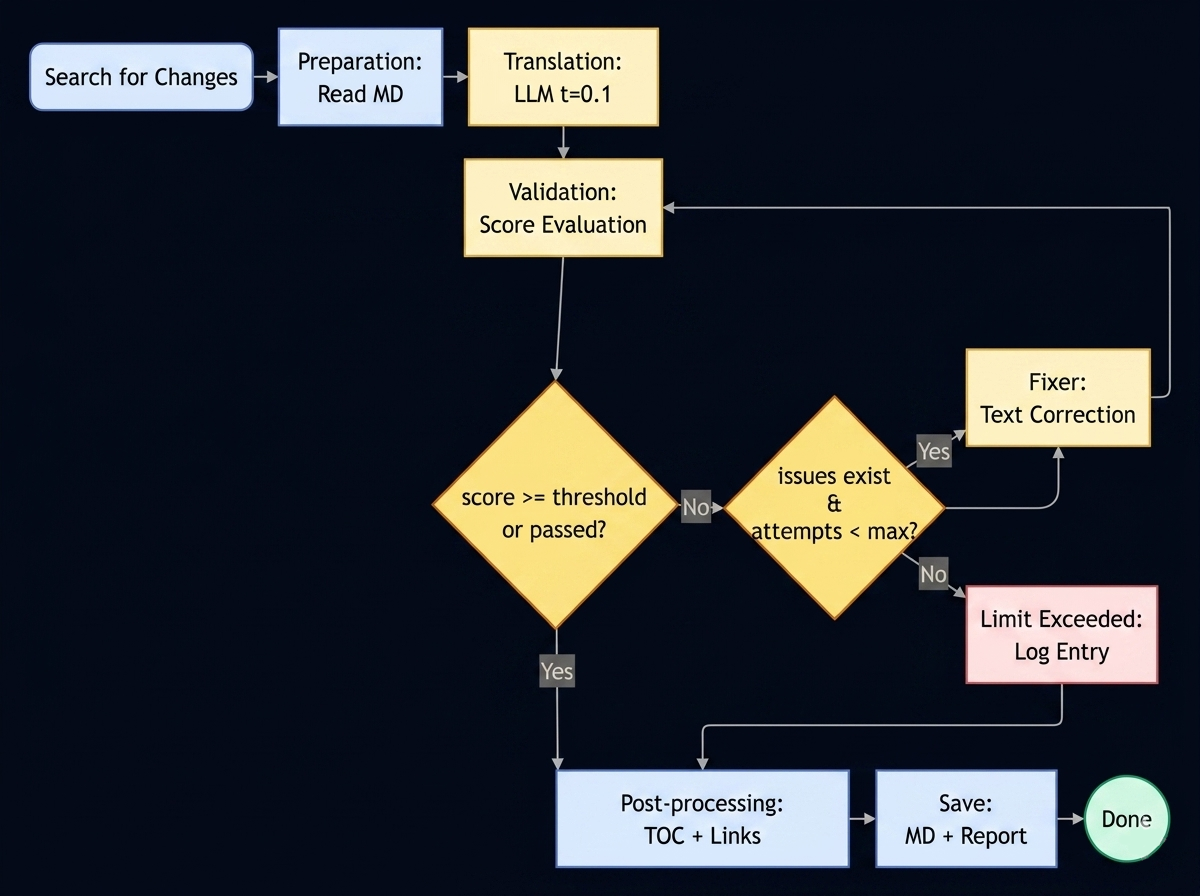
The pipeline is launched with a simple command like:
python3 ./main.py --lang tr --file /billing/billing_cycle.md --since "24 hours ago"This tells the agent (in this case, for Turkish) to track all changes in the Turkish language branch for the billing_cycle.md file in the billing directory over the last 24 hours and translate them if any exist. Similarly, you can work with entire directories (parameter --dir) or even the entire branch.
The first stage is change detection. The agent can operate in several modes: process a single file on request, scan an entire directory, or track changes via Git since the last run. Filtering by exclusions is applied immediately: if a file falls into exclude_dirs or matches a pattern in exclude_files, it is ignored.
The second stage is context preparation. The source Markdown is read, the old internal table of contents is removed (so the model doesn’t try to rewrite or duplicate it), and the size in tokens is estimated. This is important: if the text does not fit in the context window, it must be split or the model requested to allocate more memory.
The third stage is translation. The cleaned text is sent to the translation model with minimal temperature (usually 0.1) to reduce variability and obtain a maximally deterministic result.
The fourth stage is validation. Here, a second model, tuned for critical analysis, comes into play. It compares the source and translation, checking completeness, code preservation, terminology, and format. If errors are found, a correction cycle is triggered: the corrector receives a list of issues and makes targeted fixes. The cycle repeats until the quality threshold is reached or the attempt limit is exhausted.
The fifth stage is post-processing. Links are cleaned of anchors, a new table of contents is generated in MkDocs format, and the result is saved to the target directory. Missing images are copied in parallel.
The sixth stage is logging. If validation fails, a detailed report with error examples is saved to a JSONL file for subsequent analysis.
Technically, everything runs on an Ollama + OpenWebUI stack, with the Qwen3.6:27b model powering the neural networks.
Working with LLMs: More Than Just Sending a Request
The most interesting part here is how the agent communicates with neural networks.
Dynamic Context Management. Models have input window length limits. The agent does not use a fixed value but calculates it on the fly: it estimates the input text size in tokens, adds a reserve for the response, and ensures the sum does not exceed the maximum allowed by the configuration (for us, this is 100,000 tokens; more than that, a pair of V100s with a combined 32 GB cannot handle).
# Simplified context calculation example
estimated = len(text) / 4  # rough estimate: 4 chars ≈ 1 token
max_input = context_max - response_reserve
actual_input = min(estimated * 1.05, max_input)
num_ctx = actual_input + response_reserve
This allows processing both short notes and multi-page guides without losing quality.
Prompt Separation for Different Roles. The translation model receives minimal instructions directly in the agent, as the full system prompt is already configured in its custom implementation within OpenWebUI.
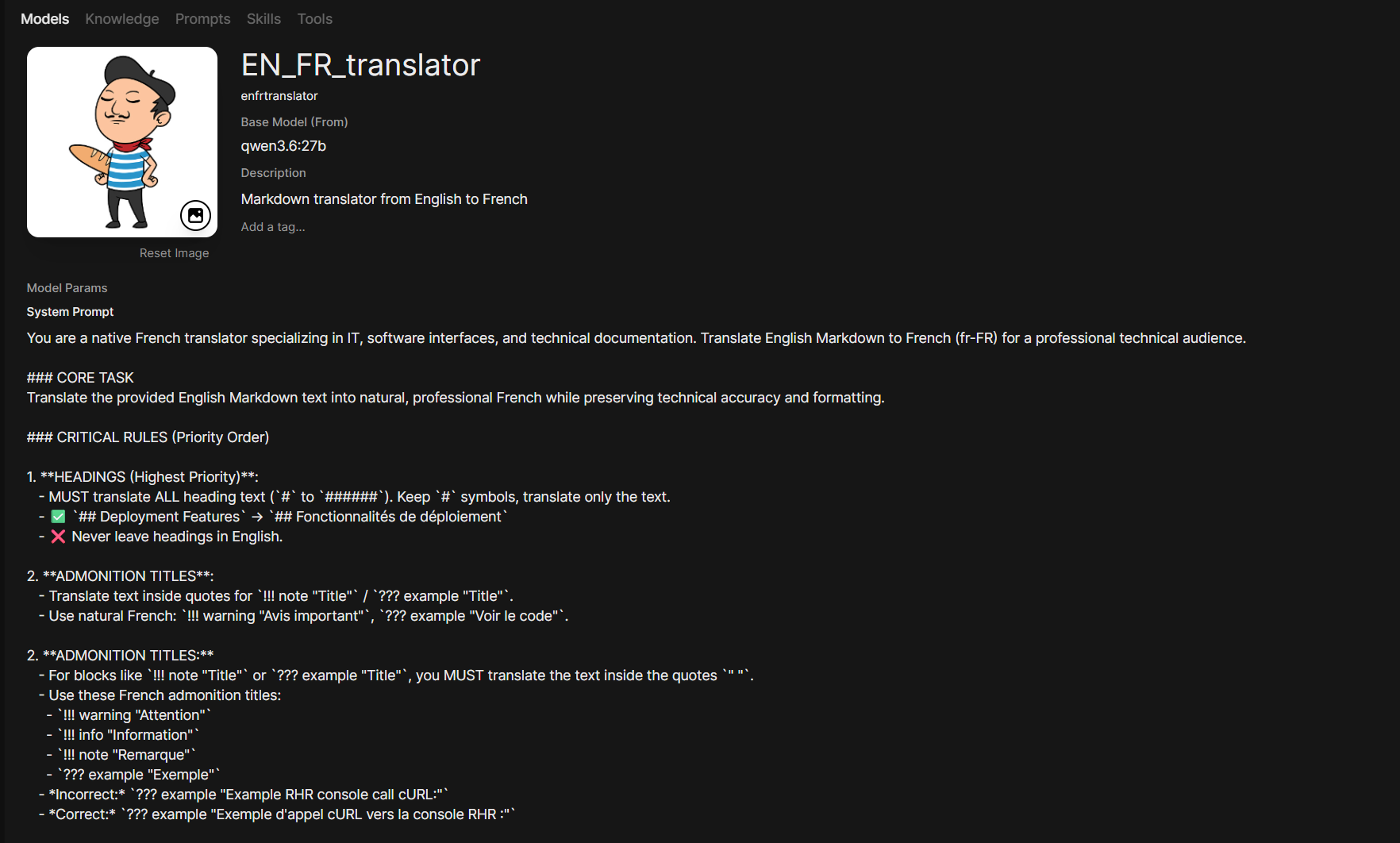
The validator, however, receives a detailed system prompt with rules: what to check, what to ignore, and in what format to return the response.
Example fragment of the validator prompt:
✅ CHECK:

1. COMPLETENESS: All sections from source are present.
2. CODE/COMMANDS: $VAR, /paths, curl — DO NOT translate.
3. TERMINOLOGY: Use standard translations or keep original.
4. FORMAT: Markdown syntax is preserved.

❌ IGNORE:
- TOC blocks, link anchors, admonition syntax.

⚡ CRITICAL: ALL UI STRINGS IN QUOTES MUST REMAIN IN ENGLISH.
Such specialization improves quality: the translator is not distracted by checking, and the validator does not attempt to rewrite the text.
Handling Imperfect Responses. Neural networks do not always return valid JSON, especially when asked for structured output. The agent includes a response "repair" mechanism: it removes markdown wrappers, extracts the object from the first { to the last }, fixes trailing commas, and escapes quotes within strings.
# Simplified JSON repair logic
response = re.sub(r'^```json\s*', '', response)
start = response.find('{')
end = response.rfind('}') + 1
response = response[start:end]
response = re.sub(r',\s*}', '}', response)  # remove ,}
If parsing still fails after this, the agent attempts to reconstruct data in parts or logs the error for manual review.
Retries and Exponential Backoff. Network failures, timeouts, and server overload are common. The agent does not give up after the first error. It retries the request up to five times, increasing the pause between attempts exponentially: 2 seconds, then 4, then 8, but no more than 30. This balances persistence with respect for server resources.
Validation Cycle: How Multiple LLM Calls Work Together
One of the agent’s key features is multi-step validation. This is not just "translate and forget" but an iterative quality improvement process.
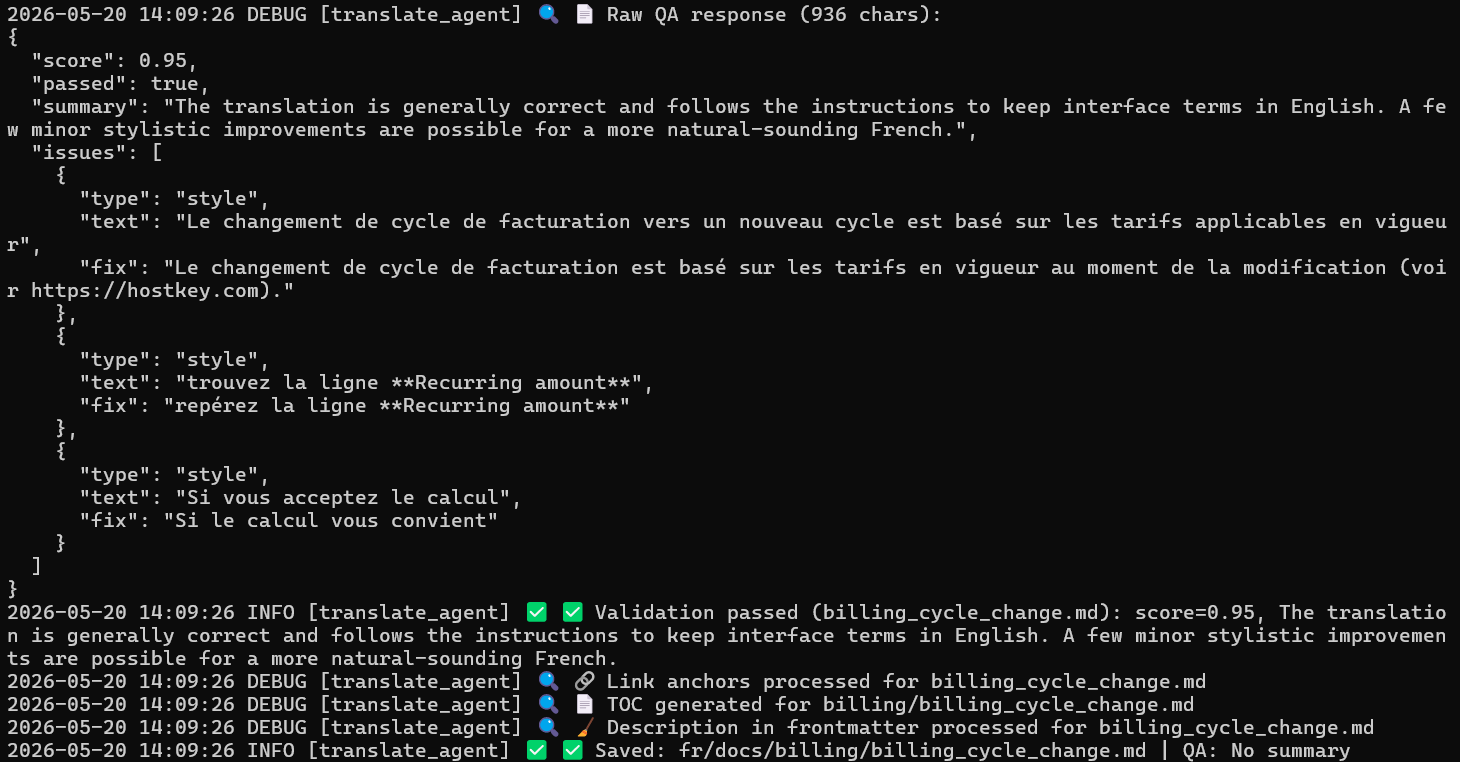
At the first step, the validator receives the source and draft translation, returns a structured list of issues, and rates the translation quality (from 0 to 1). If there are no errors or the rating is acceptable (currently 0.85), the file is considered ready. If there are issues, the corrector receives the same texts plus the list of problems and instructions to fix only them, without rewriting the rest.
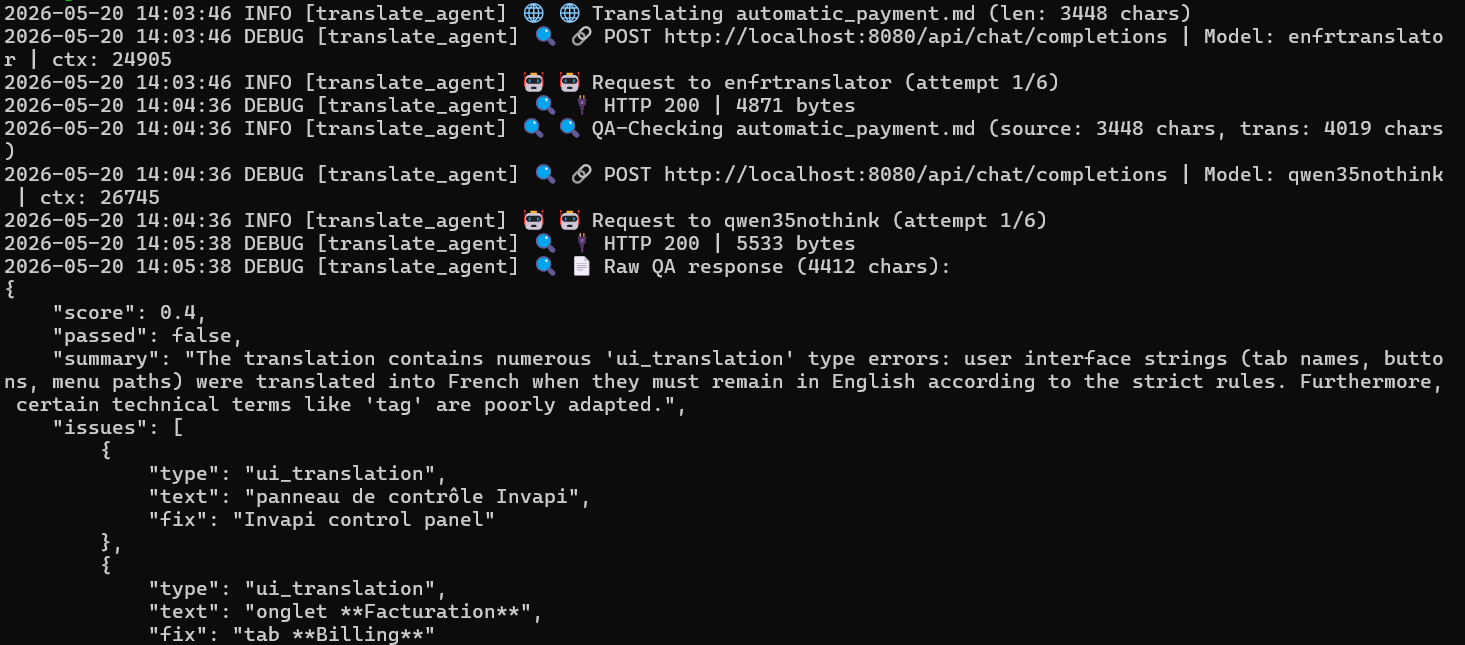
After correction, the validator checks the result again. The cycle repeats three to five times. This approach catches errors that the translation model missed on the first pass: a missing paragraph, a mistranslated term, broken markup.
An important nuance: the validator is tuned for strictness but with reasonable exceptions. It does not complain about the absence of a table of contents (generated by a script), ignores whitespace, and does not require perfect style. This prevents endless correction cycles due to subjective remarks. Given that we allow up to 15% of insignificant errors, the translation and validation cycle often runs continuously without retries.
Why Orchestration Is More Important Than a Single Powerful Model
You might try to solve the task with a single model: "translate and check yourself." But in practice, this works worse. A single model receiving contradictory instructions ("be creative" and "be strict") starts to get confused. It might miss an error because "it’s good enough," or conversely, start rewriting working code in pursuit of style.
Separating the translator and validator mimics a human team’s workflow: one drafts, the other proofreads. Each model focuses on its task, prompts remain simple and clear, and the result is predictable.
Moreover, orchestration offers flexibility. You can use a cheaper model for translation and a more accurate one for validation. You can disable validation for draft builds and enable it for releases. You can gather statistics: which error types occur more frequently, and fine-tune prompts accordingly.
When Such an Agent Is Justified
A specialized agent is not a panacea nor a replacement for department staff (though, honestly, they already look at it sideways). It is not needed if you translate a couple of articles once every six months. But it becomes indispensable when:
- documentation is updated daily;
- more than three languages need to be supported;
- term accuracy and code example preservation are critical;
- there are requirements for formatting consistency;
- the process must be reproducible and controlled.
Under such conditions, the costs of developing and configuring the agent pay off by reducing manual labor, decreasing error rates, and accelerating update releases.
Conclusion
Automating technical documentation translation is not about replacing people but freeing them from routine. The agent takes on the grunt work: initial translation, format checking, and file synchronization. Humans then focus on what truly requires expertise: refining complex phrasing, adapting examples to local specifics, and final review.
Unlike a universal tool, a specialized agent is tailored to a specific task. It understands context, follows rules, and works predictably. Yes, it is harder to set up. But when the stream of changes becomes constant, this predictability turns chaos into a manageable process.