



 +31 20 820 3777
 Compliance
  Support
  Documentation
 Login
Login 




Recent versions of OpenWebUI introduced Skills, and I immediately put them to work. One key use case was validating URLs generated by a support chatbot: the model must answer questions based on documentation, construct valid links to articles, and avoid hallucinating non-existent endpoints or URLs.
At first glance, this seems like a simple task: just add "Verify links before sending" to the system prompt. However, the model cannot perform HTTP requests. It is a text generator, not a browser. This raised a critical question:
In the current OpenWebUI ecosystem, we have three levels of abstraction:
- System Prompt — Instructions for the LLM
- Skills — Post-processors for model responses
- MCP Tools — Executable code for actions in the "real world"
In this article, I will break down the differences between these components, how they interact, and how to build a robust URL validation pipeline using them. All code is production-ready, featuring error handling and logging.
The Territory Map: Three Architectural Layers
Before diving into the code, let's visualize how data flows through the system:

Each layer addresses a specific task. Let's examine them in order.
Level 1: System Prompt — The "Job Description"
The System Prompt is the textual context that "tunes" the language model's behavior before response generation. It is not code or configuration; it is natural language that the model interprets as behavioral rules. In our case, these are rules for searching the knowledge base, interpreting content, and formatting output.
Here is a brief example of the initial block and the link-generation logic:
<role>
HOSTKEY Technical Support AI Assistant. Objective: Provide assistance regarding servers, the Invapi panel, and hostkey.com documentation.
</role>

<rules>
### 🌐 LANGUAGE (Priority #1)
- Respond **only** in English, regardless of the query language.

### 🔗 LINKS — ALGORITHM (Strict)
File format in database: `<section>@<topic>@en.md`
Transformation steps:
1. Remove `@en.md` → `faq@network_settings`
2. Split by `@` → `["faq", "network_settings"]`
3. Construct URL: `https://hostkey.com/documentation/faq/network_settings/`
</rules>
What the System Prompt does in this scenario:
- Defines the role, tone, and topic of responses;
- Trains the model to construct links according to the business algorithm;
- Prohibits undesirable actions (code blocks, hallucinated URLs).
What it does not do:
- Verify if the link actually exists;
- Perform network requests;
- Know about the existence of the url_fetch_mcp tool — to the model, this is "magic."
The System Prompt is the employee's job description. It knows how to write the report but cannot go out into the field to verify the data.
Level 2: Skills — The "Editor with a Magnifying Glass"
The new Skills toolkit in OpenWebUI consists of declarative scripts (Markdown format with YAML metadata) that execute after the model generates a response. They can:
- Parse and analyze the response text;
- Invoke external tools (MCP Tools);
- Modify the output before sending it to the user.
While a system prompt is tied to a specific model, Skills can be shared across different models. You simply specify them when creating a custom model in the Workspace. For instance, we reuse this Skill in our translation workflows to prevent "broken" links.

In our case, we need a URL validator: the url-validator-with-mcp Skill.
---
name: url-validator-with-mcp
description: Validates URLs via url_fetch_mcp, removes invalid ones,
             and ensures proper formatting for valid links.
version: "2.0"
tags: [validation, urls, links, mcp, formatting, self-check]
requires_tools: ["url_fetch_mcp"]
---
# 🔗 URL Validator Skill (MCP-backed + Format Enforcement)

## 🎯 Purpose
After generating a response containing URLs:
1. **Validate accessibility** using `url_fetch_mcp`
2. **Remove entirely** invalid/unreachable links (text + URL)
3. **Enforce proper formatting** for valid links
4. Output ONLY the cleaned, validated response — no logs, no commentary
Note the section between the ---. Here, you describe the Skill and define which Tools it requires. Also, remember to enable the Skill in the group settings for your users.
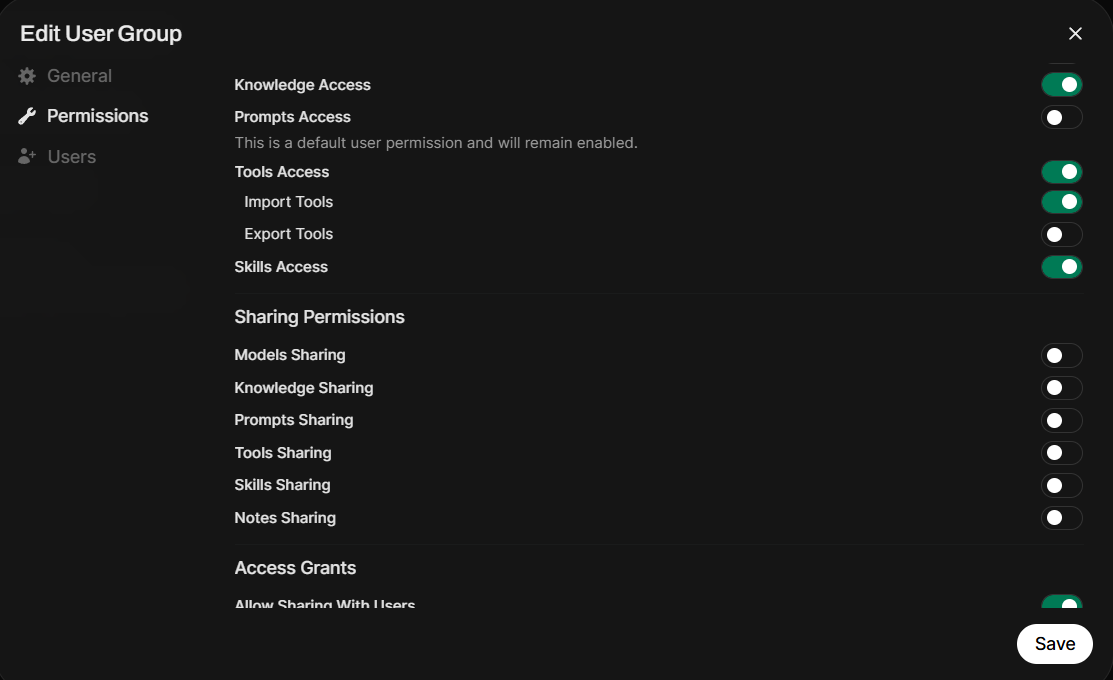
Let's break down how our Skill works:
- It finds URLs in the generated response (parses the text);
- It invokes the url_fetch_mcp MCP Tool, passing the found URLs sequentially;
- It applies business rules: remove broken links, format valid ones;
- It returns a "clean" response without meta-comments.
What our Skill does not do:
- Teach the model how to build links (that's the System Prompt's job);
- Replace business logic;
- Work autonomously; it requires a connected MCP Tool because it cannot traverse a link and check the server response on its own.
Level 3: MCP Tools — The "Courier with a Meter"
MCP (Model Context Protocol) Tools are external executable code (usually Python/Node.js) that performs specific actions: API requests, URL checks, file operations. OpenWebUI offers three mechanisms for usage: built-in tools, Tools, and external MCP Tools.
In our case, we already have a special server called mcpo (MCP over HTTP) from the same developers, hosting the Invapi toolkit, so adding another tool was straightforward. However, nothing prevents you from implementing the same code via OpenWebUI's internal Tools.
In essence, the tool is a simple fastmcp server with Python code that checks the links. mcpo acts as the "translator" between the world of local CLI tools (MCP) and web applications (OpenWebUI).
A benefit of mcpo is the interactive Swagger-format documentation available at /docs.
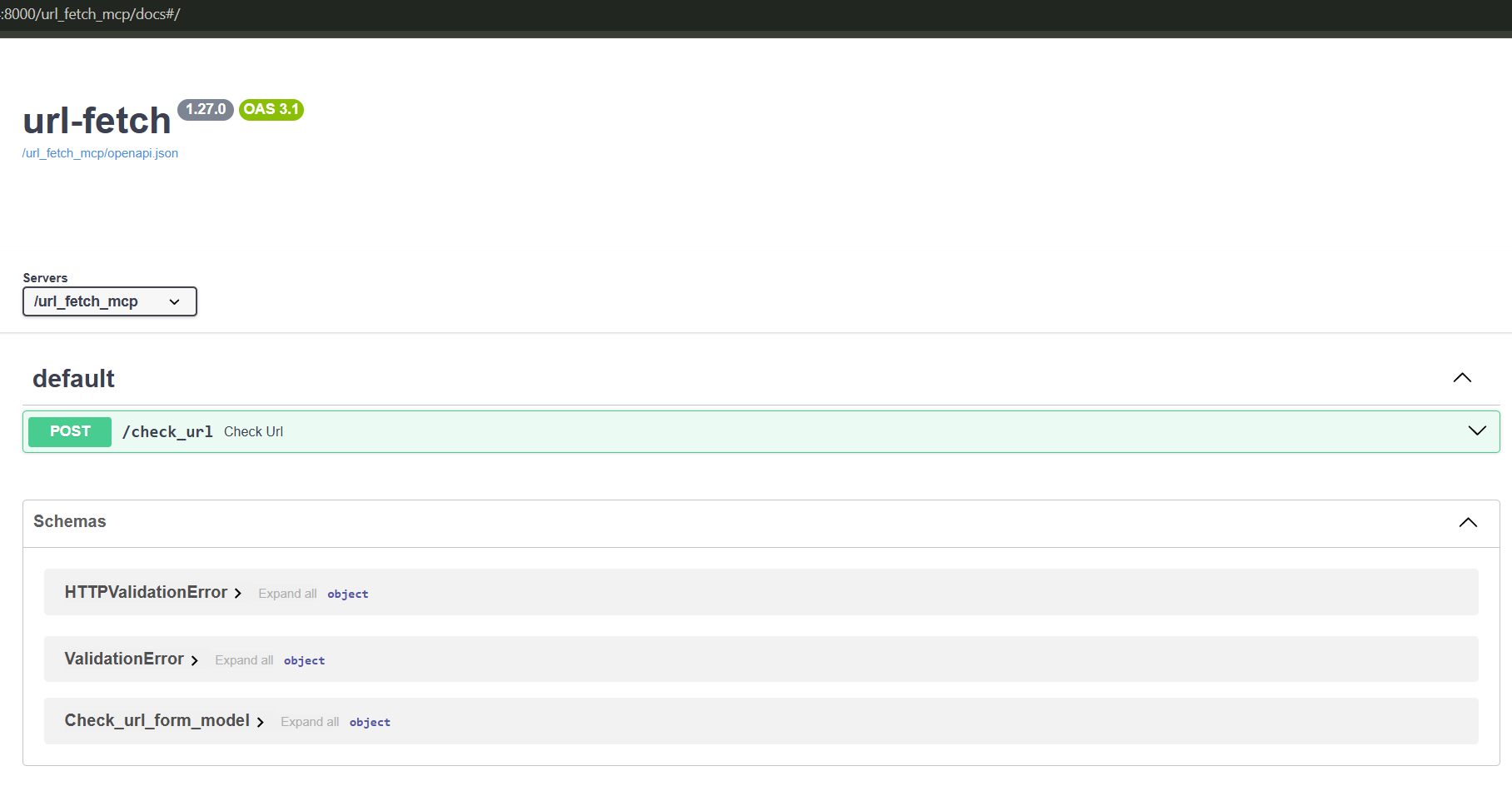
Our MCP tool is named check_url():
from __future__ import annotations
import logging, re, sys, time
from dataclasses import asdict, dataclass
from typing import Optional
from urllib.parse import urlparse
import requests

logging.basicConfig(
    stream=sys.stderr,
    level=logging.INFO,
    format='%(asctime)s [URL_FETCH] %(levelname)s: %(message)s'
)
logger = logging.getLogger(__name__)

DEFAULT_TIMEOUT = 5.0
USER_AGENT = "Mozilla/5.0 (Windows NT 10.0; Win64; x64)..."

@dataclass
class URLCheckResult:
    valid: bool
    url: str
    normalized_url: Optional[str] = None
    status_code: Optional[int] = None
    response_time_ms: Optional[float] = None
    error: Optional[str] = None
    content_type: Optional[str] = None
    final_url: Optional[str] = None
    ssl_valid: Optional[bool] = None

    def to_dict(self) -> dict:
        return {k: v for k, v in asdict(self).items() if v is not None}

def check_url(
    url: str,
    timeout: float = DEFAULT_TIMEOUT,
    follow_redirects: bool = True,
    check_ssl: bool = True
) -> dict:
    """MCP Tool: Check URL accessibility"""
    logger.info(f"MCP call: check_url(url='{url}')")

    # 1. Format validation
    is_valid, err = _validate_url_format(url)
    if not is_valid:
        return URLCheckResult(valid=False, url=url, error=err).to_dict()

   # 2. HTTP request with error handling
    try:
        response = requests.head(url, timeout=timeout,
                                allow_redirects=follow_redirects,
                                verify=check_ssl)
        # ... response analysis ...
        return URLCheckResult(valid=True, status_code=response.status_code,
                             response_time_ms=...).to_dict()

    except requests.exceptions.Timeout:
        return URLCheckResult(valid=False, error="Timeout").to_dict()
    except requests.exceptions.SSLError:
        return URLCheckResult(valid=False, error="SSL error").to_dict()
    # ... other exceptions ...
What our validator does:
- Actually "knocks" on the link (network request);
- Returns a structured result: status_code, response_time_ms, error;
- Handles exceptions: timeouts, SSL errors, redirects.
Additionally, it can be used not only in our specific Skill but in others as well, or directly within models.
However, since it is just Python code, it lacks dialogue context (who the user is, what the question is). It does not make decisions like "delete this link or not" (that is the Skill's logic) and does not format the final response; it only returns data in JSON format.

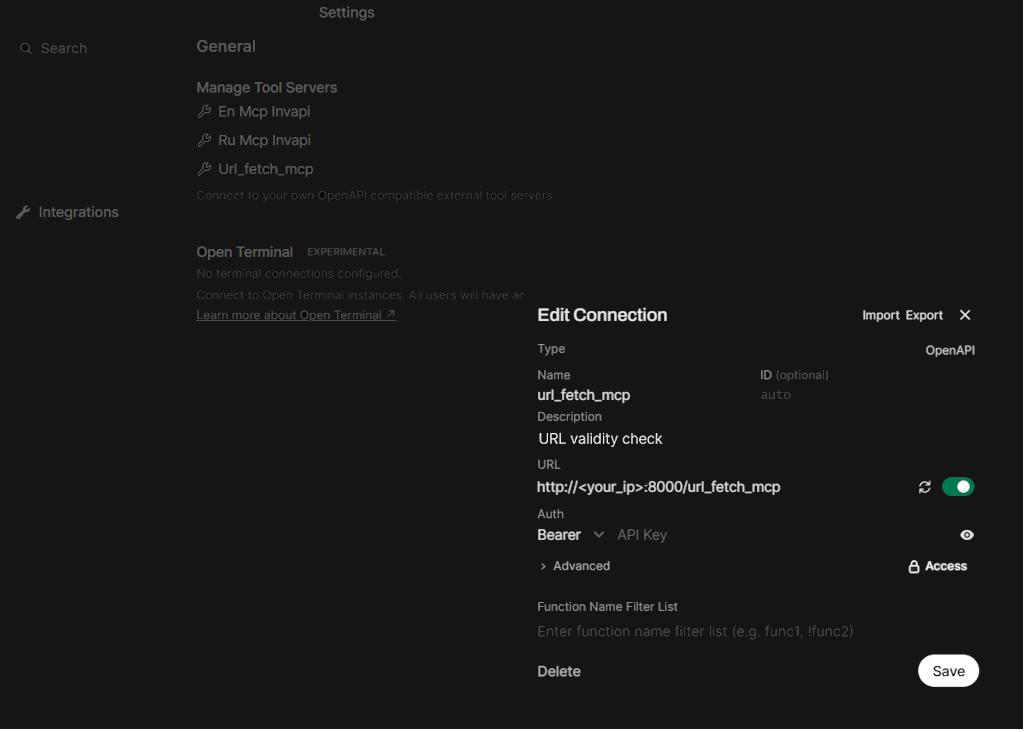
After this, you just need to configure our MCP Tool in OpenWebUI.
The Full Cycle: From Question to Answer
Let's trace how the entire chain works in a real scenario.
Input: User Asks
"How do I configure the network interface in the Invapi panel?"
Step 1: Model + System Prompt
-
The LLM receives the question + system prompt;
-
Finds the document in the knowledge base: controlpanel@[email protected];
-
Applies the algorithm:
"remove @en.md" → ["controlpanel","network_interface"] → "https://hostkey.com/documentation/controlpanel/network_interface/"
-
Generates a draft:
"Open the Invapi panel → 'Network' → 'Interfaces'. For more details: [Network Interface Configuration] (https://hostkey.com/documentation/controlpanel/network_interface/)"
Step 2: Skill (url-validator-with-mcp)
-
The Skill receives the draft;
-
Parses the text and finds 1 link;
-
Invokes the MCP Tool:
url_fetch_mcp(url="https://.../network_interface/")
-
Receives the result:
{ "valid": true, "status_code": 200, "response_time_ms": 342 }
-
Checks format: Markdown - Yes, HTTPS - Yes, Text ≠ Question - Yes;
-
Returns the response unchanged (everything is valid).
Step 3: What if the link is invalid?
-
The MCP Tool returns:
{ "valid": false, "error": "HTTP 404" }
-
The Skill removes the [text](link) construct from the response;
-
Outputs the response without the link:
"Open the Invapi panel → 'Network' → 'Interfaces'. I couldn't find a specific instruction. For assistance: Technical Support."
Comparison of Approaches
So, what is better: System Prompt, Skill, or MCP Tool? We've summarized the main criteria in a table below to help you choose the most suitable tool.
|
Criterion |
System Prompt |
Skill |
MCP Tool |
|---|---|---|---|
|
When it executes |
Before response generation |
After generation |
On call from Skill |
|
Implementation Language |
Natural Language |
Markdown + Logic |
Python/JS Code |
|
Network Access |
No |
Only via Tools |
Yes |
|
Dialogue Context |
Full |
Model Response |
Only Parameters |
|
Primary Task |
Behavior, Rules |
Post-processing, Coordination |
Specific Action |
|
Flexibility |
High (Text) |
Medium (Template) |
Low (Code) |
|
Maintenance Complexity |
Low |
Medium |
High |
Conclusion
Building a reliable AI assistant isn't just about having a "smart model." It's about architecture, where each component does its job:
- System Prompt — Handles assistant behavior, rules, and business logic ("Know how it should be done");
- Skill — Handles post-processing and coordination ("Check what was done");
- MCP Tool — Executes specific actions in the "real world" ("Do it and report back").
When each component knows its zone of responsibility, the system becomes predictable, testable, and easily extensible. And the user gets exactly what they need: in our case, an accurate answer with working links.
Useful Links
- Official OpenWebUI Skills Documentation
- Model Context Protocol Specification
- Documentation on MCP and mcpo in OpenWebUI