



 +31 20 820 3777
 Compliance & KYC
  Support
  Documentation
 Login
Login 




Eight billion parameters at four bits take up about 4.5 GB, which is why Llama 3.1 8B is often called a model for any gaming GPU. But open up its full declared context of 128,000 tokens, and the KV cache in FP16 will need roughly another 17 GB, almost four times the size of the model weights. A 16 GB card can no longer hold this configuration, and what happens next depends on the software running the model. Some programs crash with an out-of-memory error, others offload some layers to system RAM and slow down noticeably, while Ollama, for example, runs by default with a context much shorter than the declared one and silently truncates anything that doesn’t fit.
GPU rankings usually compare gaming performance and price, whereas for large language models (LLMs) other characteristics matter more, and some of them depend on the model itself and on how it is run. The first limit you hit is VRAM capacity, and it has to be calculated with context and parallel requests in mind, since the model weights alone give a significant underestimate. Generation speed is most often limited by memory bandwidth, because for every new token the card has to read all the weights again. Then there are the number formats that tensor cores support in hardware, and every GPU generation has its own set. For example, FP8 in tensor cores only appeared with the Ada Lovelace generation (RTX 40). An FP8 model will run on an RTX 3090, but the weights will be unpacked to FP16 before computation, so you save memory but gain no compute speed.
In the fall of 2026, the cost of memory joined the list of problems when choosing a card. The RTX 5090 sells at US retail for $7,000 or more (against an MSRP of $1,999), and the RTX 50 Super refresh with 24 GB has been postponed three times. Meanwhile, in datacenters, NVIDIA began shipping Rubin with HBM4 and AMD its MI455X.
In this article, we take a detailed look at memory and speed requirements for inference, fine-tuning, and training, review the hardware available today, from a GPU for local LLM experiments to datacenter accelerators, and sum up the critical mistakes people make when choosing a GPU for LLMs in 2027.
What’s New in Server GPUs for LLMs in 2026
Among the NVIDIA datacenter accelerators you can currently find in the cloud, three generations coexist: Hopper, Blackwell, and Rubin. Blackwell Ultra (B300) got 288 GB of HBM3e at 8 TB/s, the same bandwidth as the B200; the gains over its predecessor came in memory capacity and FP4 compute. According to NVIDIA specifications, Rubin in Vera Rubin NVL72 racks has the same 288 GB, but of HBM4 with up to 22 TB/s, so with the same capacity, memory is read 2.75 times faster. Rubin has been shipping to the largest clouds since the second half of 2026, but real availability for rent is expected only in 2027. The rated 22 TB/s may not hold for the first batches, though: earlier this year analysts reported that HBM4 suppliers had not reached the required speed in mass production, and the first systems would get around 20 TB/s. In that case, Rubin’s memory-read advantage over the B300 would shrink to about 2.5 times.
AMD responded by betting on memory capacity. The MI355X was released in June 2025 with 288 GB of HBM3E, and the MI455X from the MI400 series got 432 GB of HBM4, 1.5 times more than Rubin. The MI455X bandwidth is more confusing: the figure quoted earlier was 19.6 TB/s, while AMD’s detailed architecture breakdown cited 23.3 TB/s, and until independent measurements appear, we wouldn’t rely on either. If the second figure is accurate, the MI455X is practically on par with Rubin in memory read speed.
The situation with desktop GPUs is the opposite: memory capacity hasn’t grown over the year, but prices have risen noticeably as memory production shifts toward server accelerators. The RTX 5090, with an MSRP of $1,999, sells in the US in October 2026 from $4,300, and some marketplace listings reach $9,600, almost five times the MSRP. The RTX 5080 Super with 24 GB of GDDR7, expected back at the start of the year, has still not been officially announced. According to industry sources, on October 1 AMD raised GDDR6 prices for its partners for the fourth time in ten months, although the company itself has not yet confirmed the increase.
The third category, machines with unified memory shared by the CPU and GPU, has made notable gains. The Mac Studio on M5 Ultra, announced on August 25, offers up to 512 GB at 1.2 TB/s, and the 512 GB configuration is only now going on sale, in late October 2026. DGX Spark and mini-PCs on the Ryzen AI Max+ 395 offer 128 GB each, but their bandwidth is 273 and 256 GB/s respectively, about 4.5 times lower than the M5 Ultra.
The models have changed too. Among large open-weight models, the Mixture-of-Experts (MoE) architecture is now the most common, and a telling example is OpenAI’s gpt-oss-120b, which has 117 billion parameters, of which only 5.1 billion are active for each token. For memory, such a model has to be sized by its total parameter count, since the weights of all experts must sit in VRAM at the same time, while the compute per token is determined by the active parameters. In practice, this means gpt-oss-120b needs as much space as a model with over a hundred billion parameters, but in per-token compute it is closer to a five-billion-parameter model. To make gpt-oss-120b fit on a single GPU with 80 GB of memory, OpenAI quantized the expert weights to MXFP4, about 4.25 bits per parameter.
Why GPU Compute Power Isn’t Everything for LLMs
VRAM capacity determines whether a model fits on the GPU entirely. If the weights, KV cache, and working buffers don’t fit in VRAM, some layers move to system RAM. The model keeps running, but generation speed is now set by the bandwidth of DDR5 RAM and the PCIe bus. Dual-channel DDR5 gives about 90 GB/s, while an RTX 5090 with GDDR7 gives about 1.8 TB/s, a roughly twentyfold difference, and for server accelerators with HBM the gap is even larger.
Once the model fits entirely in VRAM, text generation speed is determined by memory bandwidth. For every new token, the GPU has to read all the weights involved in computing it from memory again. When serving a single user, the GPU spends most of its time waiting for data while its compute units sit idle. That is why an RTX 5090 with 1792 GB/s of bandwidth generates text faster than a DGX Spark, even though the DGX Spark has four times as much memory, 128 GB versus 32 GB. The DGX Spark’s bandwidth is 273 GB/s, about 6.5 times lower. The comparison only holds if the model fits in the RTX 5090’s 32 GB of VRAM; a larger model will run faster on the DGX Spark, because on the RTX 5090 some layers will be offloaded to system RAM.
During prompt processing (prefill), the entire input passes through the model in a single pass, and weights read from memory once are used for thousands of tokens at a time. Here, speed is limited by the tensor cores. This is especially noticeable for agents and coding assistants, where prompts easily grow to tens of thousands of tokens and the time to the first token of the response becomes noticeable. Training and fine-tuning work similarly, only the load is heavier: at each step, the model makes a forward pass, then a backward pass that costs roughly twice as much as the forward one, and the optimizer updates the weights.
It is also worth checking which number formats the GPU supports in hardware. The Ampere generation (RTX 3090, A100) has no FP8 support, Ada (RTX 4090) and Hopper (H100, H200) introduced it, and Blackwell (RTX 5090, RTX PRO 6000, B200, B300) added FP4, including the NVFP4 format. A model saved in MXFP4 or FP8 will still run on a GPU without hardware support for that format, but the weights will be unpacked to BF16 or FP16 on the fly, and matrix operations will run at that precision. AMD RDNA4 GPUs have hardware FP8 but don’t support FP4, so the stock vLLM build emulates MXFP4 via BF16, and enthusiasts are writing their own kernels for the Radeon AI PRO R9700 that store weights in four bits but compute via hardware FP8.
With multiple GPUs, the link between cards comes into play as well. NVLink on the B300 provides 1.8 TB/s per GPU, i.e. 900 GB/s in each direction, while PCIe 5.0 x16 gives about 64 GB/s in each direction, roughly 14 times less, and the consumer RTX 4090 and 5090 have no NVLink at all. So two 32 GB gaming cards are not equal to one 64 GB card: the model is split between them, but every tensor-parallel step goes through PCIe.
What Matters for LLMs but Doesn’t Show Up in GPU Specs
Peak TFLOPS in GPU specifications are often quoted with sparsity, which ordinary dense models don’t use. On such a model, real performance can be half the advertised figure. With Rubin, things are even more confusing. NVIDIA quotes 50 petaflops of NVFP4 for running a trained model and 35 petaflops for training, and according to NVIDIA VP Ian Buck, the higher figure comes from a new adaptive compression mechanism rather than classic sparsity, although some publications still label it as a sparsity figure. So it is easy to make mistakes when comparing generations by their headline specs alone.
The 128 GB of shared memory in mini-PCs like the DGX Spark is often treated as the same thing as 128 GB of VRAM. In terms of capacity it is, and a hundred-billion-parameter model really does fit, but this memory is read at 273 GB/s, 6.5 times slower than the RTX 5090’s VRAM. On top of that, the DGX Spark’s memory is shared between the CPU and GPU, so part of it is taken by the operating system and running programs.
A claim that a 70B model “fits in 24 GB” most often means either very aggressive quantization to two or three bits per parameter with a noticeable loss of quality, or offloading some layers to system RAM, which significantly reduces generation speed. At the usual 4.5 bits per parameter, the weights of Llama 3.1 70B alone take about 40 GB, so not even they fit in 24 GB, and the KV cache comes on top of the weights.
The bandwidth in the specification is also theoretical, and real generation, according to measurements on various platforms, usually reaches 60–80% of the calculated ceiling. For MoE models the share can be even lower, partly because each token activates its own set of experts, so weights are read from memory in scattered chunks.
What Makes Up LLM VRAM Usage
The memory a running model uses consists of several parts: weights, the KV cache, and service buffers (the CUDA or ROCm context, activations, the engine’s own buffers), which usually take from one to several GB. Weight size is easy to calculate: multiply the number of parameters by the bits per parameter and divide by eight. BF16 is two bytes per parameter, FP8 and INT8 are one byte, and the popular four-bit quantization type Q4_K_M in the GGUF format comes to about 4.8 or 4.9 bits including metadata. For example, a 70-billion-parameter model takes about 140 GB in BF16, 70 GB in FP8, and about 42 GB in Q4_K_M. The KV cache size is calculated with the following formula:
KV = 2 × L × H_kv × d_head × b × T × N
L is the number of layers, H_kv the number of KV heads, d_head the head dimension, b bytes per element (2 for FP16), T the context length in tokens, and N the number of parallel requests. All values except the last two can be found in the model’s config.json under the names num_hidden_layers, num_key_value_heads, and head_dim. For Llama 3.1 70B, this gives 80 × 8 × 128 × 2 × 2 = 327,680 bytes, or 320 KB per token, while the 8B model with its 32 layers needs 2.5 times less, 128 KB.
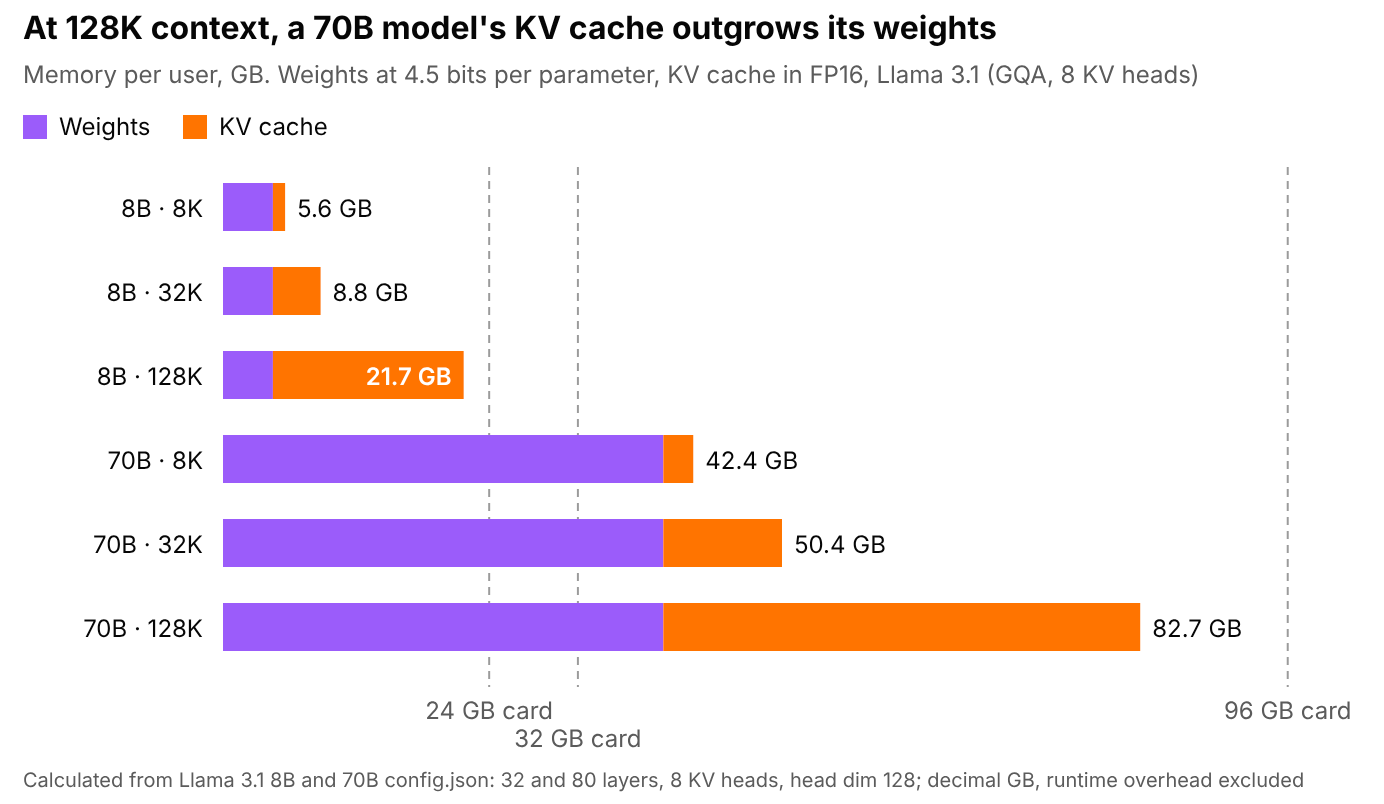
Calculation based on config.json for Llama 3.1 8B and 70B: 32 and 80 layers, 8 KV heads, head dimension 128; decimal GB
Even a small model takes up almost all 24 GB of an RTX 4090 if given its full context. An 8-billion-parameter model with Q4_K_M weights and the full 128,000-token context takes about 22 GB, 16 GB of which is the BF16 KV cache, and fits with almost no headroom. A 70-billion-parameter model in the same format doesn’t fit even in the RTX 5090’s 32 GB with a short context, since its weights alone take about 42 GB. With a 128,000-token context, a 70-billion-parameter model needs about 83 GB, meaning a card in the RTX PRO 6000 class with 96 GB of memory.
On a production server, the KV cache is multiplied by the number of simultaneous users. Ten requests of 32,000 tokens each to the same 70B model hold about 107 GB in the KV cache, roughly 2.5 times the size of the weights. For a service under load, memory capacity almost always matters more than for personal use. This is linked to a possible source of confusion with vLLM, which by default grabs 90% of VRAM at startup for weights and the paged KV cache, however small the model. An almost full card in nvidia-smi doesn’t mean a memory leak. For the same reason, a second vLLM process on the same card won’t start without manually tuning gpu-memory-utilization, since there will be no free memory left for it.
The formula above holds for models with standard GQA, but some architectures organize the KV cache differently. Models with Multi-head Latent Attention (MLA), such as the DeepSeek V3 family, store a compressed latent representation instead of full keys and values, and in gpt-oss half of the layers use a sliding window and keep only the last 128 tokens in the cache, so for both groups the formula noticeably overestimates usage. Regardless of the architecture, the KV cache can also be quantized, which roughly halves its size. In llama.cpp this is done with the --cache-type-k and --cache-type-v parameters set to q8_0, and quantizing the value cache requires flash attention to be enabled (-fa); in vLLM, --kv-cache-dtype fp8 does the same.
Generation Speed and Memory Bandwidth
The upper limit of generation speed for a single user can be calculated: just divide the memory bandwidth by the amount of data that has to be read for one token. For a dense 32-billion-parameter model with 4.5-bit weights, this is about 18 GB, and such a model is convenient for comparison because its weights fit on every device in the chart, starting with 24 GB GPUs. For example, the RTX 5090 with its 1792 GB/s hits a ceiling of about 100 tokens per second, the RTX 4090 with 1008 GB/s about 56, and the DGX Spark with 273 GB/s about 15.
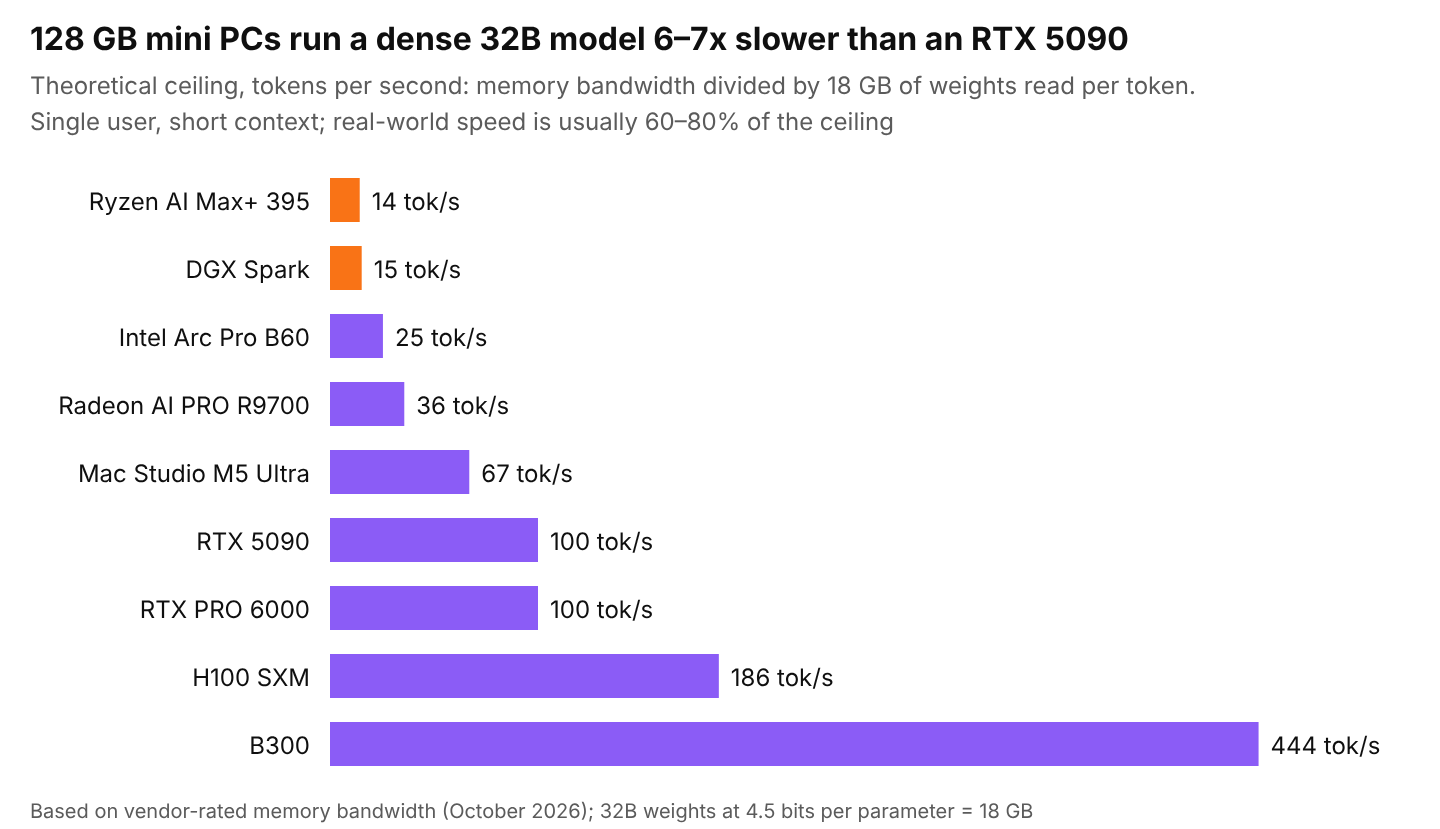
Calculation based on rated memory bandwidth (manufacturer data as of October 2026); 32B weights at 4.5 bits per parameter = 18 GB
With MoE models, only some of the experts are read for each token, which has made machines with large memory and modest bandwidth interesting again for running models locally. gpt-oss-120b in MXFP4 weighs about 60 GB, but uses only 5.1 billion active parameters per token, meaning it reads less than 3 GB from memory. On the DGX Spark and Ryzen AI Max+ 395 in llama.cpp, it delivers 50 to 55 tokens per second, which is more than comfortable for chat. A dense 70B model on the same machines hits a ceiling of about seven tokens per second, since every token requires reading all 40 GB of weights, and in practice delivers about five, almost ten times slower.
Generation slows down as context grows, and benchmarks on a short prompt don’t show it. At each step, the model reads not only the weights but the entire accumulated KV cache, so for Llama 3.1 70B in Q4_K_M with a 128,000-token context, each token already requires about 83 GB instead of 42. The RTX PRO 6000’s ceiling drops from 43 to 22 tokens per second by the end of a long conversation, almost by half.
Input processing speed, by contrast, depends on compute power rather than memory.
How Much Memory LLM Training and Fine-Tuning Take
In training, gradients and optimizer states sit in memory next to the weights. For mixed precision with Adam, the ZeRO authors counted 16 bytes per parameter: two for the FP16 weights, two for the gradients, and twelve for the FP32 copy of the weights and the two Adam moments. For Llama 3.1 8B that is already 128 GB, so full training of even such a small model doesn’t fit on one 80 GB card, and for a 70B model it comes to more than a terabyte. On top of that, memory is taken by activations, whose size depends on sequence length and batch size. They can be reduced with gradient checkpointing, where intermediate results are not stored but recomputed during the backward pass, at the cost of about a third more time.
Fine-tuning with adapters avoids most of these costs, because the base weights are frozen, and gradients and optimizer states are needed mainly for the small LoRA matrices, which usually make up less than 1% of the model’s parameters. With this approach, the same Llama 3.1 8B in BF16 needs about 16 GB for the weights plus memory for activations, so instead of 128 GB it fits on a single 24 GB card at moderate sequence lengths. In QLoRA, the frozen model is additionally stored in four bits, and in the paper by the method’s authors, a 65-billion-parameter model was fine-tuned on a single 48 GB card.
|
Method |
Bytes per parameter, excluding activations |
8B |
70B |
Typical hardware |
|
Full training, BF16 + Adam |
~16 |
~128 GB |
~1.1 TB |
8B on 2–4 GPUs with FSDP or ZeRO, 70B on an 8×B300 node or larger |
|
LoRA, weights in BF16 |
~2 |
~16 GB |
~140 GB |
8B on 24–32 GB cards, 70B on a B200 or a pair of H200s |
|
QLoRA, weights in 4 bits |
~0.5–0.6 |
~5 GB |
~40 GB |
8B on 12–16 GB cards, 70B on a 48–96 GB card |
The table doesn’t include activations, which grow with example length, so a fine-tuning run that has been going smoothly for several hours can crash with out of memory on a long example from the dataset. It makes sense to check memory on the longest example rather than the average one, or to cap the length in advance with the max_seq_length parameter.
Which GPU to Choose for LLM Depending on the Task
The table lists devices that can be bought or rented as of late October 2026, plus two generations that have only just started shipping. Prices change weekly, so treat them as a guide.
|
Device |
Memory |
Bandwidth |
Hardware FP8 / FP4 |
Price or rent, October 2026 |
|---|---|---|---|---|
|
RTX 3090 (used) |
24 GB GDDR6X |
936 GB/s |
no / no |
second-hand market only |
|
RTX 4090 |
24 GB GDDR6X |
1008 GB/s |
yes / no |
mostly second-hand market |
|
Intel Arc Pro B60 |
24 GB GDDR6 |
456 GB/s |
no / no |
from $799 |
|
Radeon AI PRO R9700 |
32 GB GDDR6 |
640 GB/s |
yes / no |
about $1,400–1,900 |
|
RTX 5090 |
32 GB GDDR7 |
1792 GB/s |
yes / yes |
from $4,300 with an MSRP of $1,999 |
|
RTX PRO 6000 Blackwell |
96 GB GDDR7 ECC |
1792 GB/s |
yes / yes |
about $15,000; rent about $1.5/hour |
|
Ryzen AI Max+ 395 |
128 GB unified LPDDR5X |
256 GB/s |
no / no |
mini-PC about $3,600 |
|
DGX Spark (GB10) |
128 GB unified LPDDR5X |
273 GB/s |
yes / yes |
depends on the manufacturer |
|
Mac Studio M5 Ultra |
96, 256, or 512 GB unified |
1.2 TB/s |
via MLX |
from $5,499 |
|
H100 SXM |
80 GB HBM3 |
3.35 TB/s |
yes / no |
rent $2.2–4/hour |
|
H200 |
141 GB HBM3e |
4.8 TB/s |
yes / no |
rent $3.6–6.4/hour |
|
B200 |
180–192 GB HBM3e |
8 TB/s |
yes / yes |
rent $5.5–8.4/hour |
|
B300 |
288 GB HBM3e |
8 TB/s |
yes / yes |
rent about $6.7–6.9/hour |
|
MI355X |
288 GB HBM3E |
8 TB/s |
yes / yes |
rent $3–8.6/hour |
|
Rubin (Vera Rubin NVL72) |
288 GB HBM4 |
up to 22 TB/s |
yes / yes |
largest clouds; wide availability for rent from 2027 |
|
MI455X |
432 GB HBM4 |
19.6–23.3 TB/s |
yes / yes |
Helios racks from Q3 2026 |
Rental price ranges are taken from the Silicon Data and Ornn indices and price lists of specialized clouds for October 8–22, 2026. On the major cloud platforms, the same H100 costs noticeably more. On AWS, for example, it is about $6.88 per hour per card on the eight-GPU p5.48xlarge instance.
Best GPU for Local LLM
GPUs with 16 GB comfortably run models of up to 14 billion parameters at four bits, as well as gpt-oss-20b, which according to OpenAI needs just 16 GB of memory.
24 and 32 GB GPUs cover the most in-demand class: dense models from 27 to 32 billion parameters and MoE models of 30 or 35 billion. Long context is realistically available only on 32 GB cards or with MoE models, since a dense 32-billion-parameter model at four bits leaves only about 4 GB for the KV cache on a 24 GB card. In terms of price to speed, the used RTX 3090 still wins here. The Radeon AI PRO R9700 offers 32 GB in a new card with a warranty, but its software environment is noticeably more complicated. The RTX 5090 remains the fastest consumer GPU, although at its current real price of about $5,000, a gigabyte of its VRAM costs roughly as much as on professional cards.
Machines with 128 GB of unified memory suit those who need large MoE models running quietly and at low power, with speed being secondary. The DGX Spark is more expensive, but it has CUDA, noticeably faster prompt processing, and proper fine-tuning support. A mini-PC on the Ryzen AI Max+ 395, with almost the same generation speed, costs 1.5–2 times less, since the DGX Spark has cost $4,699 since the February price increase. For models with hundreds of billions of parameters, the Mac Studio on M5 Ultra with 512 GB remains the option, since the only desktop machine with more memory, the DGX Station on GB300, costs about $95,000. Apple has also demonstrated clustering several Mac Studios via RDMA over Thunderbolt 5, and on four such machines the 816-billion-parameter Muse Spark Open MoE model generates about 37 tokens per second.
Best GPU for LLM Inference in a High-Load Service
In a service under load, the main resource becomes memory for the KV cache of many users, so the H200 with 141 GB is often a better deal than the H100. The H200 has three-quarters more memory, and renting it from specialized clouds costs about 20% more, although some price indices show the difference reaching twofold. The H100 remains the most affordable server accelerator with FP8 and mature engine support, but for a 70-billion-parameter FP8 model with a dozen parallel conversations its 80 GB is no longer enough. The B200 with 192 GB and the B300 with 288 GB suit large MoE models and long context. The RTX PRO 6000, renting for about $1.50 per hour, works as a cheap 96 GB node, for example for gpt-oss-120b, which fits on one such card without any inter-GPU link. The MI355X with 288 GB is worth considering if your engine officially supports ROCm and you have tested it with your model in advance.
GPU for Fine-Tuning a Language Model
QLoRA for models of up to 32 billion parameters fits in 24 or 32 GB of VRAM, while a 70-billion-parameter model needs 48 to 96 GB on a single GPU, and here the RTX PRO 6000 is the simplest option. LoRA for a 70-billion-parameter model in BF16 already requires a B200 or a pair of H200s, since the BF16 weights alone take about 140 GB. Full fine-tuning with the Adam optimizer costs 16 bytes per parameter, counting the weights, gradients, the FP32 copy of the weights, and two optimizer states, so even an 8-billion-parameter model needs about 128 GB before activations. With activations, the task goes beyond a single H200 and usually runs on several GPUs with FSDP or DeepSpeed ZeRO.
Best GPU for LLM Training from Scratch
For training from scratch, you choose an entire platform, and as of late 2026 that means HGX B300 nodes and GB300 NVL72 racks, Vera Rubin NVL72 in the largest clouds since the second half of 2026, and, from AMD, the MI355X and Helios racks on the MI455X. For a team without its own cluster, the realistic path is renting ready-made nodes with InfiniBand, since buying a rack for a single project almost never pays off.
NVIDIA or AMD for Language Models
AMD is in a noticeably better position than a couple of years ago, but whether things work has to be checked for the specific combination of card, distribution, and engine. The Radeon AI PRO R9700 is officially supported in ROCm, but only on a limited list of distributions, including Ubuntu 24.04 and 22.04, and RHEL 10.1 and 9.7. vLLM runs on RDNA4, but its ROCm builds are aimed at Instinct server cards. llama.cpp has both ROCm and Vulkan backends, and on RDNA4 and Strix Halo the Vulkan backend outperforms ROCm in a number of tests when generating with small and MoE models, while ROCm stays faster on large dense models and prompt processing. On Instinct (MI300X, MI355X), vLLM and SGLang support is considerably more mature.
Intel promotes the Arc Pro B60 through its own containers with an optimized vLLM stack under Project Battlematrix, and with generic vLLM builds the card performs noticeably worse than within that stack.
On Apple hardware, MLX and llama.cpp with the Metal backend are available. There is no CUDA, so some familiar tools, such as bitsandbytes and TensorRT-LLM, are unavailable on Mac or work through substitutes, and the Mac Studio is less suited to fine-tuning than to inference.
Most Common Mistakes When Choosing a GPU for LLM
- Counting only the weights. Context and parallel requests add tens of GB, and with long context the KV cache easily outgrows the model itself.
- Using a shared-memory machine for agents and coding assistants. Generation on it is tolerable, but every 20–30 thousand-token prompt takes tens of seconds to process, and in interactive work this is felt more than slow output.
- Expecting two gaming cards to add up to one big card. Memory does add up, speed does not: without NVLink, data between cards goes over PCIe, and by default llama.cpp simply distributes layers across the cards, which then work in turn.
- Comparing TFLOPS from marketing presentations without checking whether they are quoted with sparsity and in which format.
- Buying Ampere for an FP8 model. The RTX 3090 and A100 will run it by unpacking the weights to FP16, and the speed gain you were counting on won’t materialize.
- Forgetting about power and cooling. The RTX 5090 draws up to 575 W, the RTX PRO 6000 up to 600 W, the B300 up to 1,400 W, and a server with four 5090s won’t run on a regular office power circuit.
- Choosing hardware for a single model. Six months later, a 200B MoE model with the same active parameters comes out, and a 32 GB card bought for a dense 32B model can no longer hold it.
Buy or Rent a GPU for LLM
In 2026, an H100 costs from $25,000 to $40,000, while specialized clouds rent it for about $3 per hour. At an accelerator price of $30,000, the purchase pays off after 10,000 hours, or about 14 months of round-the-clock load, and that’s without the cost of the server, electricity, and engineers’ salaries. At eight hours of load per day, the payback period triples to three and a half years, and by then more than one accelerator generation will have come and gone.
The math for the RTX 5090 is similar. Here at HOSTKEY, you can rent a server with one from €0.624 per hour, which comes to about €455 per month of 24/7 operation, while the card itself costs $4,300–5,000 at US retail. At an exchange rate of about $1.15 per euro, that equals eight to ten months of renting an entire server, and buying also locks you into a single generation.
Buying makes sense with a stable load of 60–70% or higher over a two-to-three-year horizon, or when there are strict requirements on where data is physically stored. For experiments, one-off fine-tuning, and testing hypotheses, renting almost always comes out cheaper and also lets you compare three or four different GPUs on your own task within a few hours.
How to Test a GPU on Your Model Before Buying
The cheapest test costs just a few hours of renting the target card, plus your own model in the quantization you need and three measurements at the context length you will actually work with.
# prompt processing and generation speed at different context depths
llama-bench -m model.gguf -fa 1 -ngl 999 -p 2048 -n 128 -d 0,8192,32768

# load with parallel requests via vLLM
vllm serve <model> --max-model-len 32768
vllm bench serve --model <model> --dataset-name random \
 --random-input-len 8192 --random-output-len 512 \
 --max-concurrency 16 --num-prompts 200
# actual memory usage during the test
nvidia-smi --query-gpu=memory.used,memory.total --format=csv -l 1
The slowdown toward the end of a long conversation is easiest to see with the -d parameter in llama-bench, which pre-fills the context with a given number of tokens, and that is exactly how participants in the discussion in the llama.cpp repository measured the DGX Spark. vllm bench serve shows the time to first token and overall throughput for a given number of concurrent requests; when the KV cache runs out, vLLM starts queuing requests and the time to first token rises sharply. On AMD GPUs, memory usage is shown by amd-smi or the older rocm-smi; on a Mac, asitop or Activity Monitor is more convenient. If quality matters as well as speed, run twenty to thirty of your typical queries through the chosen four-bit version and through BF16.
What to Keep in Mind When Choosing a GPU for LLM in 2027
The prices and timelines in this article were collected in October 2026, and some of them will be outdated before the article is even published. The RTX 5080 Super with 24 GB is still known only from leaks, wide availability of Rubin for rent is expected in 2027, and the real bandwidth of the first HBM4 batches has not yet been confirmed by independent measurements. Networking in multi-node clusters, cooling, and comparing inference engines with each other were left out of scope, and each of these topics deserves a separate deep dive.
In short, memory capacity decides whether a model will run with the context and number of users you need, bandwidth determines generation speed, and compute and number formats matter for long prompts and training. So first calculate memory including the KV cache, then the speed ceiling from bandwidth, and only after that look at TFLOPS, price, and the ecosystem.