



 +31 20 820 3777
 Compliance
  Support
  Documentation
 Login
Login 




Most people comparing a GPU VPS vs dedicated GPU server start with the price. The same RTX 4090 with 24 GB of VRAM in our catalog costs €299 per month (excluding VAT) as a GPU VPS and €449 as a GPU dedicated server, so the dedicated option is 1.5 times more expensive. The graphics card is identical in both cases, and in the virtual machine it is also dedicated to a single client and is not shared with neighbors. The difference lies in the surrounding hardware. The virtual machine has eight dedicated vCPUs on an EPYC 7402, 64 GB of RAM, and 240 GB of NVMe storage, while the dedicated server has sixteen Ryzen 9 5950X cores, 128 GB of RAM, and a 1 TB drive.
For image generation in Stable Diffusion, eight cores provide more than enough headroom, since almost all the work is performed on the GPU. However, for training on a dataset of several million images, where each frame must be decoded and augmented on the CPU before being fed to the card, eight cores can easily become a bottleneck. In such cases, the GPU you are paying €299 a month for spends a significant share of its time simply waiting for data. Yet the plan name mentions only the GPU model, so the CPU and disk are usually the last things people check.
Below, we break down what is actually sold as a GPU VPS, where a GPU VPS hits its limits compared with a bare metal GPU server, and how to check a server you already rent with a couple of commands.
What Is Actually Sold as a GPU VPS
Different hosting companies offer three technically distinct products under the same name, so you cannot compare their prices directly.
The simplest option is PCIe passthrough, also known as GPU passthrough. The hypervisor allocates the entire physical card to one virtual machine, the driver in the guest system works with it almost as it would on bare metal, and the entire VRAM capacity belongs to a single client. In real-world workloads, the GPU performance loss from passthrough is usually negligible: computations run on the card itself, and the hypervisor is barely involved.
The second option is based on software partitioning, and it is important to know which type of partitioning is being used. In NVIDIA vGPU, each virtual machine receives a profile with a fixed amount of VRAM isolated from neighbors, while the card's compute time is shared between machines by a scheduler. The hosting company chooses the scheduler policy, so your machine's speed depends on both that policy and the load from neighbors. A completely different approach is time-slicing for containers in Kubernetes via the NVIDIA GPU Operator, where NVIDIA documentation explicitly states that there is no memory or fault isolation between replicas. This is where noisy neighbors become a real problem: if a neighboring container takes almost all the VRAM, yours may run out of memory, and a crash in someone else's task can affect yours.
The third option, MIG (Multi-Instance GPU), is available on certain NVIDIA cards, primarily datacenter A100 and H100 models, and in the Blackwell generation also the RTX PRO 6000, which can be split into four instances. The card is hardware-partitioned into independent instances with their own memory, cache, and compute units. For example, an A100 with 40 GB can be split into a maximum of seven 5 GB instances. MIG provides hardware isolation, though you might rent only a portion of the card even if the plan is simply named "A100".
Our GPU VPS plans use passthrough: the graphics card is dedicated entirely to the virtual machine. For the GeForce RTX 4090 and RTX 5090, there is no other option in a virtual machine, because NVIDIA vGPU supports only datacenter and professional cards. A consumer card therefore cannot be split between virtual machines with NVIDIA's tools and can only be provided in its entirety. "Before comparing GPU VPS prices across different companies, you should clarify whether you are getting the whole card, because with vGPU or MIG, a plan named after a flagship card might include only a portion of it," says Alexander Kazantsev, Documentation and Content Manager at HOSTKEY.
What a GPU VPS Cannot Provide, Even with a Full Card
Passthrough solves the graphics card issue, but everything else on the physical host remains shared. The hypervisor distributes CPU cores among virtual machines. If the plan uses shared cores, part of your machine's CPU time goes to neighbors under load, which shows up as CPU steal time (the steal metric). Our GPU virtual servers belong to the VDS line with dedicated vCPUs; however, many companies use shared cores in their GPU VPS, and checking steal will reveal this immediately. Disks and the host's network port also remain shared. For a model that responds to requests, this is almost unnoticeable, since the card is busy most of the time. For training, where the CPU prepares each batch and data is continuously read from the disk, the difference becomes measurable.
The second limit is the number of cards. A virtual machine with a GPU typically receives one card, and configurations with two cards are significantly rarer, whereas distributed training and large models require multiple cards or even multiple servers. Furthermore, even a multi-GPU dedicated server does not guarantee fast interconnect between the cards, as the RTX 4090 and RTX 5090 lack NVLink entirely. In a server with two or three such cards, communication goes over the PCIe bus, which is noticeably slower during training with frequent gradient synchronization than on an A100 or on professional RTX A6000 and RTX A5000 cards, which are connected via an NVLink bridge. The RTX A4000 also lacks an NVLink connector.
The third limit concerns management. Inside a virtual machine, you have root access: you can install your own CUDA or ROCm drivers and any frameworks, and in case of a boot failure, there is a KVM console to view the virtual machine's screen. However, you do not have access to the BIOS or the physical server's management controller. A dedicated server typically provides a remote IPMI or iDRAC console, though you should verify its availability for a specific configuration before ordering. If the machine stops responding after a kernel or driver update, you can reboot and restore it via the remote console without contacting support. For a production server running 24/7, this matters more than it seems when you place the order.
GPU VPS vs Dedicated GPU Server at a Glance
A GPU virtual machine wins on entry price and deployment speed, while a dedicated server provides more resources around the card, multiple GPUs, and full hardware control.
|
Criterion |
GPU VPS |
Dedicated GPU Server |
|---|---|---|
|
What is rented |
Virtual machine with a GPU on a shared physical host |
Entire physical server |
|
GPU isolation |
Depends on the provider: full card with passthrough, or a share via vGPU, MIG, or time-slicing |
All cards belong to one client |
|
CPU, RAM, disk |
Limited by the plan and shared with host neighbors |
Entire CPU, all RAM, and all server disks |
|
Number of GPUs |
Usually one card |
From one to four or more; NVLink available in custom configurations |
|
Hardware access |
Root access inside the virtual machine |
Root access, IPMI or iDRAC, your own OS |
|
Deployment speed |
Minutes (instant deployment) |
Pre-configured servers in minutes, custom configurations in a few days |
|
Best for |
AI inference, development, experiments, fine-tuning small models |
Model training, multi-GPU setups, 24/7 workloads, custom configurations |
Hardware Around the GPU: Two Configuration Examples
The difference in resources around the same card is evident in our two RTX 4090 plans*.
|
Parameter |
GPU VPS vgpu.v3-4090, Netherlands |
Dedicated server gpu.v3-4090t, Netherlands |
|
CPU |
EPYC 7402, 8 vCPUs, 2.8 GHz |
Ryzen 9 5950X, 16 cores, 3.4 GHz |
|
RAM |
64 GB |
128 GB |
|
Disk |
240 GB NVMe |
1 TB NVMe |
|
Network and traffic |
1 Gbps, 50 TB |
1 Gbps, 50 TB |
|
Price (excl. VAT) |
€299 per month or approx. €0.50 per hour |
€449 per month or approx. €0.75 per hour |
*Monthly billing prices, excluding VAT, as of October 2, 2026. Prices are subject to change.
For an additional €150, the dedicated server provides twice as many cores and twice the RAM, and four times the disk space, while the graphics card remains the same. If your model, data, and training checkpoints fit within the virtual machine's resources, there is no reason to pay extra for a dedicated server. If they do not fit, this difference in resources will determine your processing speed.
How Much VRAM Do I Need for an LLM?
You should choose the rental type after calculating the required VRAM; otherwise, you can easily pick a plan with a card that cannot fit your model. Model weights take up approximately the number of parameters multiplied by the bytes used to store each parameter. At 16-bit precision, this is 2 bytes per parameter; at 8-bit quantization, 1 byte; and at 4-bit, about half a byte. On top of this, you need headroom for the KV cache (key-value cache), activations, and engine buffers. The KV cache size depends on the model architecture, context length, and the number of concurrent requests, so the 1.2–1.3 multiplier below is only a rough estimate for a short context and a single user.
VRAM ≈ parameters × bytes_per_parameter × 1.2…1.3
8B, FP16 → 8 × 2 × 1.2 ≈ 19 GB (fits in an RTX 4090, 24 GB)
70B, 4-bit → 70 × 0.5 × 1.2 ≈ 42 GB (does not fit in a single 24 or 32 GB card)
An 8-billion-parameter model in 16-bit precision runs comfortably on a single RTX 4090 in a GPU VPS. A 70-billion-parameter model, even after 4-bit quantization, needs about 35 GB for the weights alone, so it will not fit on a single 24 GB or 32 GB card. You can split it across two or three such cards, use a single 48, 80, or 96 GB card, or partially offload layers to system RAM at the cost of a significant drop in speed. Note that 80 GB cards are not limited to dedicated servers: our lineup also includes a GPU VPS with an A100 80GB.
A real-world example shows how much memory usage depends on context length. On an RTX 4090 server, we loaded the gemma4:31b-it-qat model in Ollama with a context of 65,536 tokens. The ollama ps command showed a loaded model size of 19 GB, split between devices at 11% CPU and 89% GPU, while nvidia-smi showed 23,090 of 24,564 MiB of VRAM in use. So at this context length a single 24 GB card was no longer enough even for a model with 4-bit weights, so some layers were processed on the CPU, which noticeably slowed down generation.
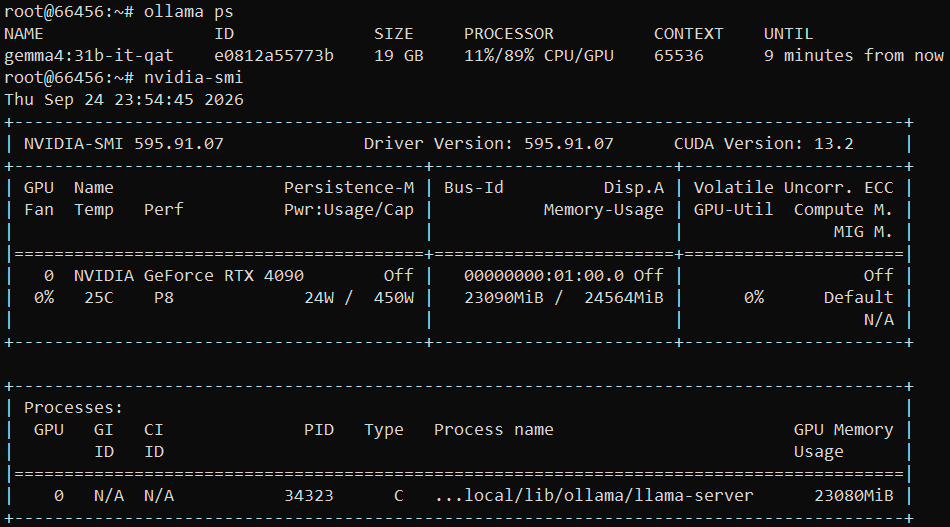
Example output of ollama ps and nvidia-smi on an RTX 4090 server
"The most common mistake is choosing a server by the name of the graphics card, whereas you should first calculate VRAM, taking context length and batch size into account," notes Alexander Kazantsev.
Which Rental Format Suits Which Task
If your task fits on a single card and within the plan's resources, it makes sense to start with a GPU VPS and move to a dedicated GPU server when you need multiple GPUs, more CPU or disk resources than the plan offers, or a 24/7 workload with predictable performance.
|
Task |
Format |
Why |
|
Prototyping, Jupyter, team onboarding |
GPU VPS |
Instant deployment and hourly billing; easy to delete |
|
LLM hosting: models up to 30B parameters in 4-bit quantization, with moderate context length |
GPU VPS with 24 or 32 GB of VRAM |
The model fits on a single RTX 4090 or RTX 5090 |
|
Image generation in Stable Diffusion or Flux |
GPU VPS |
One card is enough; CPU and disk are secondary |
|
LoRA and QLoRA fine-tuning for 7–13B parameter models |
GPU VPS or dedicated server |
One-off runs are cheaper on a VM; regular fine-tuning on large datasets is more convenient on a dedicated server |
|
Models with 70B parameters or more |
Dedicated server with multiple cards, or a VM or server with a single 48–96 GB card |
The model does not fit on a single 24 or 32 GB card |
|
Model training from scratch and distributed training |
Dedicated server with multiple GPUs, with NVLink if needed |
Requires multiple cards and fast interconnect between them |
|
Production services running 24/7 |
Dedicated server |
No noisy neighbors on CPU or disks; IPMI for recovery (check availability per configuration) |
|
3D rendering and simulations |
Dedicated server with multiple GPUs |
Rendering scales well with the number of cards |
How to Check What You Have Rented with nvidia-smi
The virtualization scheme is visible from inside the machine itself, so you do not need to ask support. The nvidia-smi utility shows the card's operating mode: on bare metal it shows None, with passthrough it shows Pass-Through, and with software partitioning it shows VGPU.
nvidia-smi -q | grep -A1 -i "virtualization mode"
# Virtualization Mode : Pass-Through
nvidia-smi -L
# GPU 0: NVIDIA GeForce RTX 4090 (UUID: GPU-...)
# if you see lines like "MIG 1g.10gb Device 0", you have a portion of a card
Noisy neighbors show up in CPU steal time (the steal metric): the share of time the hypervisor gave to other virtual machines while your machine was ready to run. There is no universal threshold, but in practice a few percent is usually harmless, while a sustained 10% or more under load is worth raising with support.
vmstat 1 10      # st column
mpstat 1 10      # %steal column, sysstat package
GPU idling caused by a weak CPU is visible in compute unit utilization during training. For AMD cards, use rocm-smi instead of nvidia-smi.
nvidia-smi dmon -s u    # sm column, compute unit utilization in percent
top                     # CPU usage by data loader processes
If the sm column consistently stays below 60–70% under load while the CPU cores are fully utilized, the GPU is most likely waiting for data. Low compute utilization can also have other causes, such as a small batch size or frequent synchronization, so check CPU usage first. If the CPU is indeed the bottleneck, it often helps to increase the number of data loader processes (num_workers in PyTorch DataLoader), preprocess the dataset in advance, or move to a server with a different CPU-to-GPU ratio.
When to Move from a GPU VPS to a GPU Dedicated Server
A GPU virtual machine is often the first step, used to test a hypothesis before the production workload moves to a dedicated server. The right moment to migrate is usually signaled by several factors at once.
The model or batch no longer fits in the VRAM of a single card, and further quantization degrades response quality. The GPU sits idle because the CPU cannot prepare data fast enough, and adding data loader processes has not helped. Datasets and training checkpoints no longer fit on the plan's disk, and time is lost moving files around. The server runs 24/7, so hourly billing ends up costing more over a month than monthly billing. Finally, predictable response times and the ability to bring a crashed machine back via IPMI without waiting for support have become important for the service.
Common Mistakes When Choosing
The most common mistake is comparing GPU VPS prices across different companies without clarifying the virtualization scheme, even though a full card and a time-sliced share of one are different products. Almost as often, people look only at the GPU model and forget that a weak CPU and a small disk turn an expensive card into an idle one.
The opposite happens when users rent a dedicated GPU server right away for occasional experiments, even though an hourly virtual machine is significantly cheaper for a few hours of use per week. There is also the habit of staying on a virtual machine under a 24/7 workload without calculating how many training epochs or requests per second each euro actually buys.
It is also worth checking the software ecosystem for your chosen card. NVIDIA cards run on CUDA, AMD cards on ROCm, and not every library in your stack supports both equally well. Loading datasets of hundreds of gigabytes also runs into the network port and the traffic allowance, which no GPU can fix.
FAQ
Is a GPU VPS good for AI?
Yes, for AI inference, development, experiments, and fine-tuning small models. A GPU VPS with passthrough gives you the whole card; limits appear when training needs more CPU, more disk, or more than one GPU.
Can I use a GPU VPS for LLM hosting?
Yes, if the model fits into the card's VRAM. A model of up to about 30B parameters in 4-bit quantization fits on a 24 or 32 GB card with a moderate context length; a long context increases the KV cache and may push layers to the CPU.
GPU VPS vs bare metal: what is the difference?
With passthrough, the GPU itself performs almost the same as on bare metal. The difference lies in everything around it: on a GPU VPS the CPU, disks, and network port are shared with the host, while a bare metal GPU server gives you all of its resources plus IPMI or iDRAC access.
Can you run multiple GPUs on a VPS?
A GPU VPS usually gets one card, and two-card configurations are rare. For multi-GPU training or rendering, a dedicated GPU server is the more common choice.
How do I check whether I got a full GPU?
Run nvidia-smi -q and look at Virtualization Mode: Pass-Through means a whole card. Lines like "MIG 1g.10gb Device 0" in the output of nvidia-smi -L mean you have a portion of a card.
Choosing Between a GPU VPS and a Dedicated GPU Server: The Short Version
You need to answer three questions: do you get the whole card, are the resources around it sufficient, and do you need more than one card? Calculate VRAM before ordering, and check the virtualization scheme and CPU steal time right after deployment.
At HOSTKEY, both formats support hourly, monthly or annual billing, with a discount for annual payment. GPU VPS plans and dedicated GPU servers are available in a wide range of configurations, from entry-level cards to multi-GPU servers and custom builds.Most pre-configured servers are deployed in as little as 15 minutes, while custom builds take at least two business days. Lineups and prices change faster than blog posts, so check the current lineup of GPU dedicated servers.
Cloud GPU instances from major platforms, with per-second billing and autoscaling, are outside the scope of this article: they are a separate choice with their own economics.