



 +31 20 820 3777
 Compliance & KYC
  Support
  Documentation
 Login
Login 





Generative models have become more popular than ever, both in Europe and beyond. Naturally, people view them differently: some find them annoying, some are thrilled by the new possibilities for everyday tasks and creative work, and others fear losing their jobs. There is even a wholly irrational view that everything is inexorably heading toward an apocalypse. Still, practically everyone will have to work with generative models sooner or later. Today we look at two approaches to organizing this work and compare LiteLLM and OmniRoute. Both are popular open-source gateways that hide dozens of LLM providers behind a single OpenAI-compatible API endpoint.
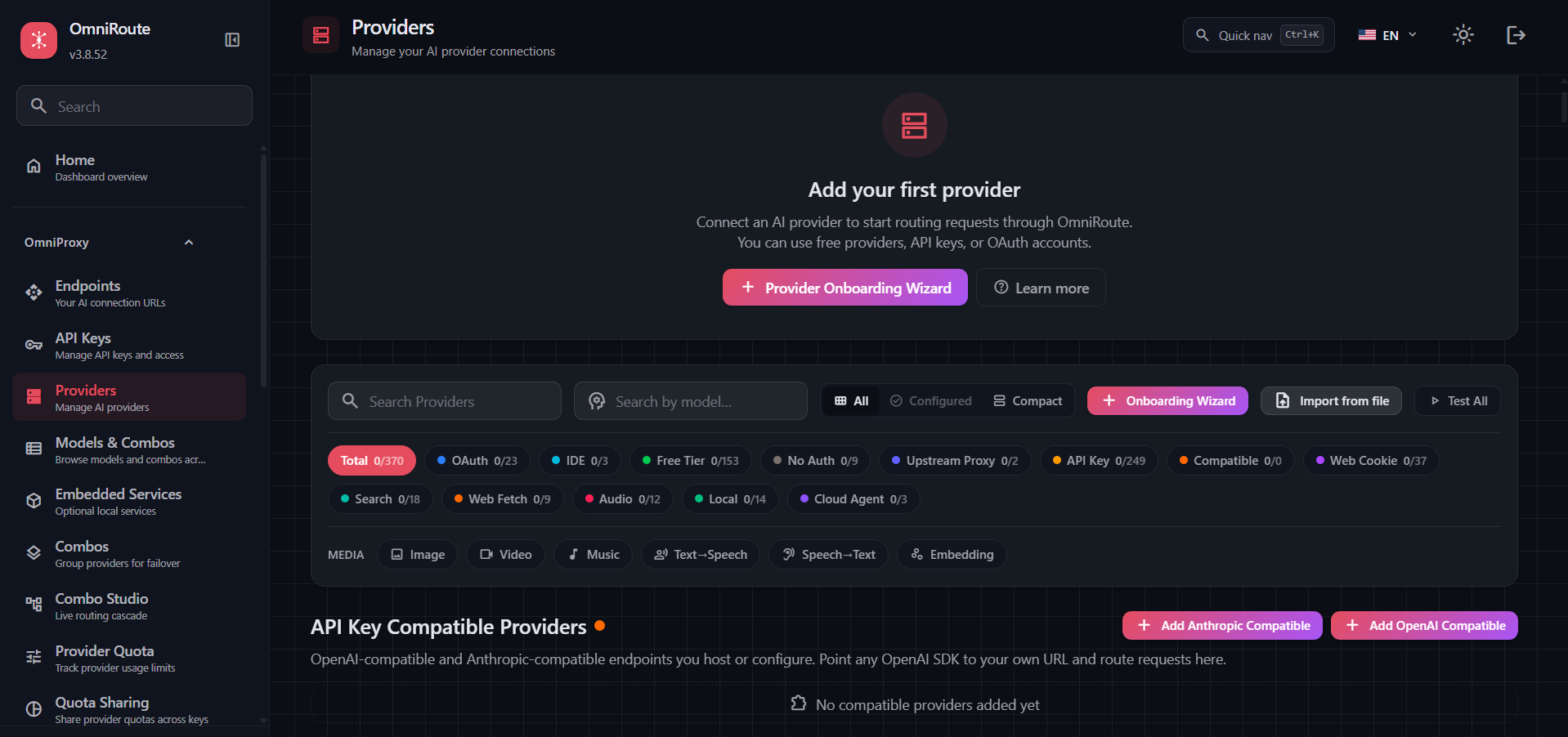
The OmniRoute Providers page lists more than 370 providers, from paid APIs to free tiers and subscriptions
Summary of Results
We measured how much latency the gateways add to a request, how many requests per second they can sustain, and how much memory and CPU they consume.
With a single worker process, LiteLLM wins on standard requests, while OmniRoute leads on streaming output once its rate-limit protection is turned off. Give LiteLLM a second worker process and it overtakes its competitor in both modes, since OmniRoute cannot make use of a second core.
|
LiteLLM, 1 process |
LiteLLM, 2 processes |
OmniRoute |
|
|
Max throughput without streaming, requests per second |
71 |
130 |
36 (about 56 estimated on identical hardware) |
|
Max throughput with streaming, requests per second |
20 |
38.5 |
25 (about 37 estimated on identical hardware) |
|
Overhead per standard request, milliseconds |
14 |
15 |
30 |
|
Peak gateway memory, gigabytes |
0.9 |
2.1 |
1.2 |
|
Default settings suitable for a self-hosted model |
yes |
yes |
no, about 1 request per second |
Why Put a Gateway in Front of LLMs
When an application talks to a single model from one provider, a gateway is unnecessary. But once there are two providers and five consumers of the models, it is more convenient to have a single endpoint with a unified API format. The gateway decides on its own where to route each request. Through it, teams and services get their own keys, budgets are capped, a fallback model kicks in when the primary one fails, and model spending is tracked centrally. In essence, the gateway acts as a convenient coordinator.
The drawback stems from the same convenience: the chain gains an extra link and a potential point of failure. An LLM response takes seconds, so tens of milliseconds spent in the gateway go unnoticed against that backdrop; but with a hundred concurrent clients a queue builds up, and the model behind the gateway may sit idle. In our test, the model was replaced with an instant mock, so all measured time is attributable to the gateway itself.
How LiteLLM and OmniRoute Differ Architecturally
Both gateways expose a single OpenAI-compatible endpoint, but they grew out of different needs, and it shows in their internals. LiteLLM is usually deployed by an engineering team in front of all of a company’s internal services. Each service gets its own key with a monthly dollar limit, and spending across all keys is collected in Postgres, which makes it possible to see what each department spends. OmniRoute is aimed more at an individual developer working with Claude Code, Codex, or Cursor who wants to plug all their subscriptions into them at once. When one provider’s quota runs out, OmniRoute automatically sends the next request to another provider, and the agent keeps working without reconfiguration.
|
LiteLLM |
OmniRoute |
|
|
Language and runtime |
Python, FastAPI |
TypeScript, Next.js on Node.js |
|
Storage |
Postgres (keys, budgets, and spend log) |
Redis and a local data directory |
|
Who deploys it and why |
An engineering team, for a company’s internal services |
A developer, for their own agents |
|
Routing |
Router with retries and fallback models |
“Combos” (model chains with automatic failover) and auto models |
|
Scaling |
The --num_workers flag and multiple instances |
A single Node.js process |
Testing
Ready-made performance tests exist only for LiteLLM, and an important caveat is that they were created by the gateway’s own developers. According to their data, four LiteLLM instances in front of a mock OpenAI API handle about 1,170 requests per second and add 8 milliseconds at the 95th percentile. An independent comparison by the agentgateway team offered more hard data: under load, LiteLLM consumed almost 12 GB of memory with 18 worker processes. We found no published tests for OmniRoute, so we built a test bench of two virtual servers. Each ran three programs: the gateway itself, a client generating the load, and a mock imitating the language model. We gave the gateway two CPU cores and the client and mock one core each, so they would not take CPU time away from the gateway and skew the results.
|
LiteLLM server |
OmniRoute server |
|
|
CPU |
4 vCPUs, AMD EPYC 7542 |
4 vCPUs, AMD EPYC 7702P |
|
Memory and swap |
7.7 GB, no swap |
7.7 GB, 4 GB swap |
|
OS |
Ubuntu 24.04 |
Ubuntu 24.04 |
|
Installation |
Docker, Postgres 16 |
Docker, Redis 8, 4.6 GB container memory limit |
The test setup is as follows:
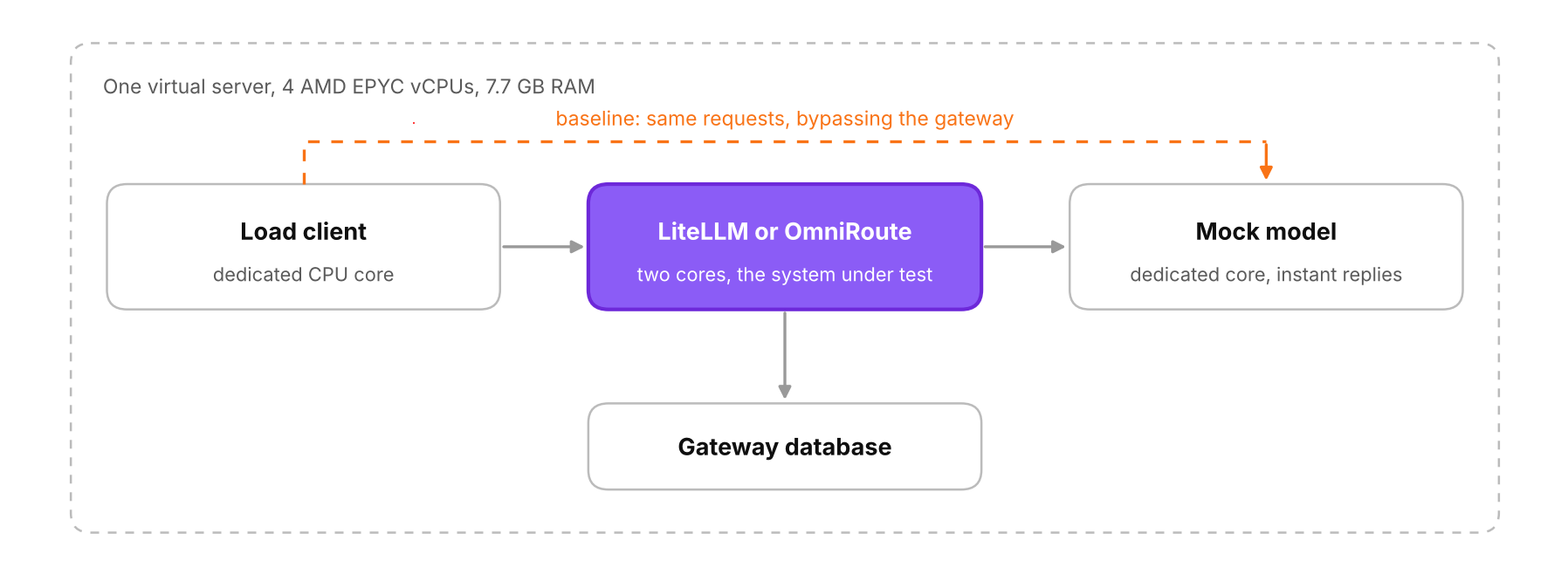
The gateway, client, and mock run on the same server, on separate cores
The model mock runs in a separate Docker container on the same network as the gateway and answers any request immediately, returning 50 tokens either as a single response or as fifty streaming chunks. Requests never left the server, so the network between machines had no effect on the results, and nothing had to be exposed externally.
Before measuring each gateway, the client sent the same requests directly to the mock. This baseline shows how many requests per second the client and mock themselves can handle on a given server; everything beyond that is attributable to the gateway. Without the baseline, comparing results from two servers would be unfair, since the OmniRoute server turned out to be roughly 1.5 times slower.
The load client behaves like a typical application waiting for a model response: it sends a request, waits for the full response, and only then sends the next one. As a result, when the gateway is overloaded, latency grows first, and errors appear only if the gateway itself starts refusing service, as happened with OmniRoute on default settings.
Load was applied in steps: first one client, then 10, 50, 100, and 200 concurrent clients, 30 seconds per step with a short warm-up before each, separately for standard and streaming responses. Once per second we recorded CPU usage and memory consumption for each container. Both gateways were left as they are normally deployed according to their documentation: LiteLLM runs a single worker process and stores data in Postgres, OmniRoute uses Redis. We tested LiteLLM 1.106.0 from the main-stable image and OmniRoute 3.8.52; the load client and mock were written in Python 3.12. Each gateway was run twice: OmniRoute with and without rate-limit protection, and LiteLLM with one and two worker processes.
How Much a Gateway Slows Down a Single Request
With a single client and no queue, LiteLLM adds 14 milliseconds to a standard request and OmniRoute adds 30. On a streaming response of 50 chunks the difference almost disappears: the overhead is 45 and 40 milliseconds. If you subtract the standard-request overhead from the streaming overhead and divide by 50, LiteLLM comes out at about 0.6 milliseconds per chunk and OmniRoute at 0.2, three times less. This is a rough estimate, since some of the time may go to setting up the stream itself, and we tested responses of only one length. At this rate, LiteLLM would lengthen a 500-token response from a real model by about 0.3 seconds, and OmniRoute by about 0.1.
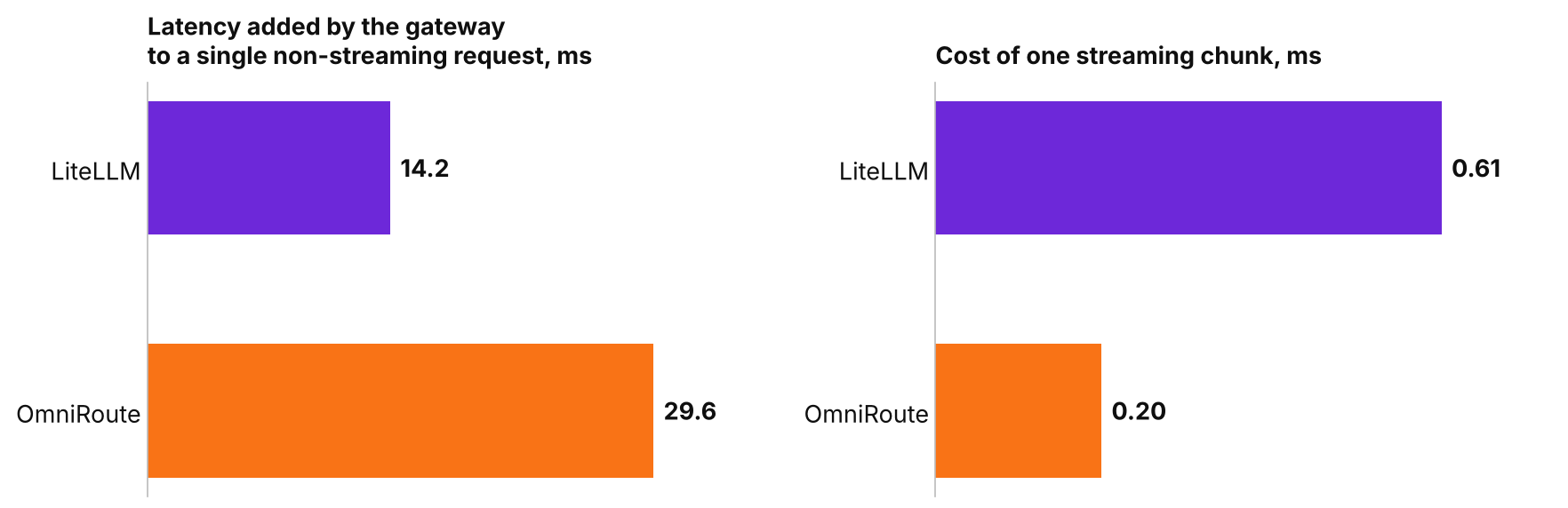
LiteLLM handles the request itself more cheaply, while OmniRoute handles each streaming chunk more cheaply.
Throughput Under Load
Both gateways hit their ceiling at just ten concurrent clients; beyond that, only the queue grows. LiteLLM with one worker process sustains 71 standard requests per second versus 36 for OmniRoute with rate-limit protection disabled, but falls behind on streaming, 20 versus 25.
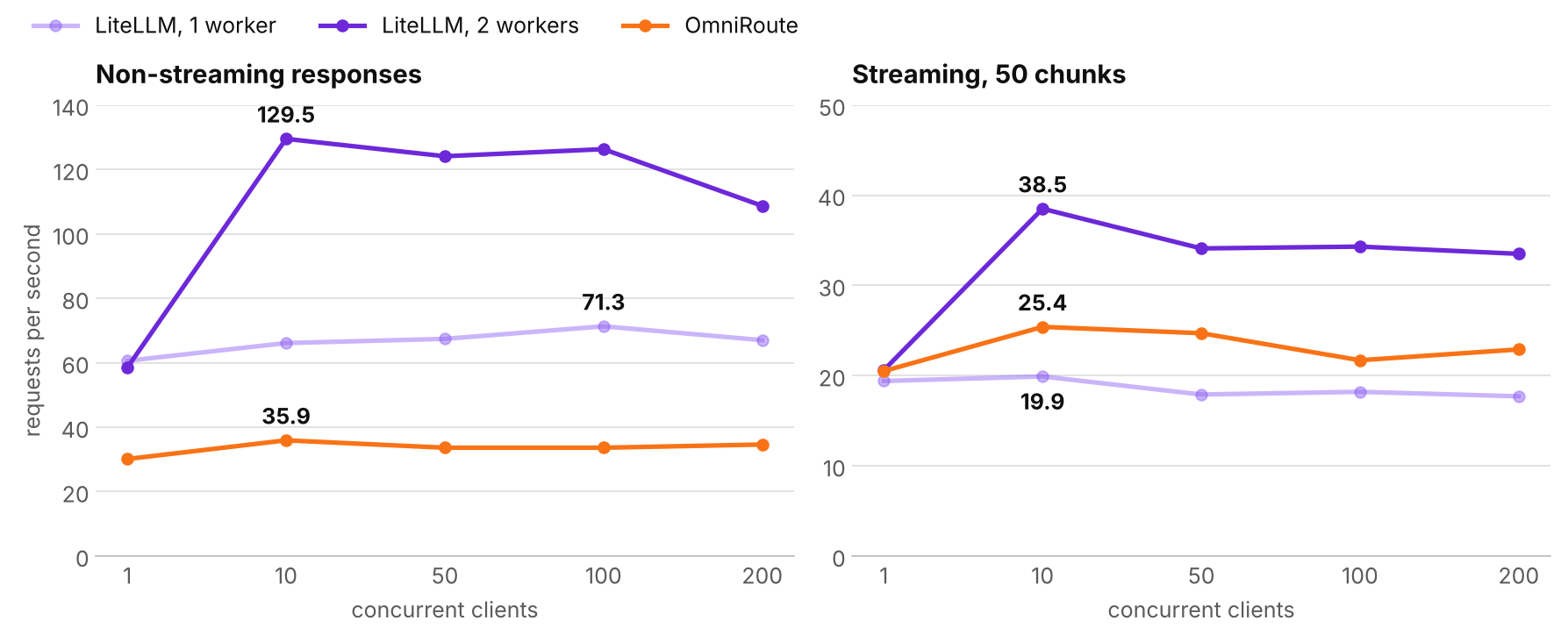
With a second worker process, LiteLLM overtakes OmniRoute in both modes. The gateway was allocated two cores; the OmniRoute server is roughly 1.5 times slower, and the hardware correction is described in the section on testing limitations.
The two halves of the chart have different scales, up to 140 requests per second on the left and up to 50 on the right, so lines at the same height represent different numbers. A streaming response costs the gateway more than a standard one, because instead of a single response it has to pass through fifty separate chunks. This is much more noticeable for LiteLLM with one process: it passes 3.5 times fewer streaming requests than standard ones, 20 versus 71, whereas for OmniRoute the gap is only 1.4 times, 25 versus 36. When LiteLLM runs with two worker processes, its ceiling rises to 130 standard and 38.5 streaming requests per second, nearly doubling in each mode. So on standard responses LiteLLM pulls far ahead, and on streaming it catches up with OmniRoute even after the hardware correction.
Once a gateway is running at its limit, each new client simply lengthens the queue, and latency can be estimated in advance by dividing the number of clients by the throughput. LiteLLM with one process passes about 18 streaming requests per second, so with 200 clients each one would wait about 11 seconds (200/18). In our test, half of the requests did indeed take longer than 10.6 seconds. By the same logic, OmniRoute comes out at about 9 seconds against a measured 8.5, and LiteLLM with two processes at about 6 seconds against a measured 5.8.
The gateways differ most on the slowest requests. Taking standard responses and looking at the 1% of requests that waited longest, OmniRoute took 30 and 35 seconds for them at 100 and 200 clients. For LiteLLM with one process, the same slowest requests took 4.5 seconds at 100 clients and 13.6 seconds at 200. It appears OmniRoute serves its queue less evenly, so some requests wait much longer than others.
Without rate-limit protection there were almost no errors. The only exception was LiteLLM with two processes at 200 clients, where 2 out of 3,420 requests had their connection dropped, or 0.06%.
One Worker Process Uses One Core
Docker reports CPU usage so that 100% corresponds to one fully busy core; with two cores allocated, the limit is 200%. Under load, both gateways on default settings stayed around 100%, meaning they ran on one core while the second sat idle. The maximum throughput of single-process LiteLLM and of OmniRoute from the previous section therefore reflects what one core can do, and only LiteLLM with two processes used both cores, reaching 205%.
|
Peak under load |
LiteLLM, 1 process |
LiteLLM, 2 processes |
OmniRoute |
|
Gateway CPU, median and peak (%) |
102 and 116 |
110 and 205 |
106 and 154 |
|
Gateway memory at start and at peak (MB) |
672 and 910 |
1,713 and 2,104 |
489 and 1,154 |
|
Storage, peak memory (MB) |
Postgres, 200 |
Postgres, 351 |
Redis, 9 |
|
Storage, peak CPU (%) |
41 |
95 |
14 |
In its Docker image, LiteLLM starts as a single Python process by default. With the --num_workers 2 flag the gateway launches a second process, and throughput nearly doubles, from 71 to 130 standard requests per second. Each process keeps its own copy of the gateway in memory, so consumption rose from 0.9 to 2.1 GB. In the agentgateway test, LiteLLM with 18 processes used about 12 GB, or roughly 0.7 GB per process.
In addition, LiteLLM writes a row to the spend log for every request, so Postgres is loaded along with the gateway. With two processes, the database used almost a full core at peak, which is a lot on a four-core server. This load should be taken into account when choosing the number of processes; it may be worth moving the database to a separate server.
OmniRoute processes requests in a single Node.js thread; CPU usage above 100%, up to 154%, comes from the runtime’s background threads. We found no equivalent of --num_workers in OmniRoute, so scaling it will apparently require multiple instances behind a load balancer. We did not test that setup.
Rate-Limit Protection in OmniRoute
Gateways have their quirks. The first OmniRoute run on the test machine produced one request per second: each single request took 350 milliseconds to pass through the gateway, while the model mock behind it responded in two. The container’s CPU was idle, so the delay was being introduced by the gateway itself. The cause was not obvious at first: the OmniRoute dashboard is far from minimalist, and the inconspicuous “Protected” badge made troubleshooting considerably harder.
On default settings, OmniRoute let through about one request per second, kept requests queued for up to 74 seconds, and at 100 and 200 concurrent clients started responding with 502, 503, and 429 errors.
|
Load |
Standard responses |
Streaming output |
|
1 client |
1 request per second, median 350 milliseconds |
2.9 requests per second, median 350 milliseconds |
|
10 clients |
1 request per second, 95th percentile 39.8 seconds |
1 request per second, 95th percentile 42.8 seconds |
|
50 clients |
1.3 requests per second, median 51.5 seconds |
1.3 requests per second, median 51.7 seconds |
|
100 clients |
0.7 requests per second, 40% 502 errors |
1.5 requests per second, 95th percentile 66.8 seconds |
|
200 clients |
all requests failed with 503 and 429 errors |
3 requests per second, 95th percentile 73.4 seconds |
The 350 milliseconds per single request suggested a deliberate pause, because the delays were identical. Half of the single requests completed in under 350 milliseconds and 95% in under 358.2, so the spread was almost zero. With a gateway that is simply slow to process requests, timing varies noticeably from one request to the next. CPU usage confirmed this: during the run the OmniRoute container used about 20% of one core and spent most of the time just waiting.
The pauses are added by rate-limit protection. In the dashboard it is marked with a “Protected” badge, and it is enabled automatically for all providers with an API key, including our mock.
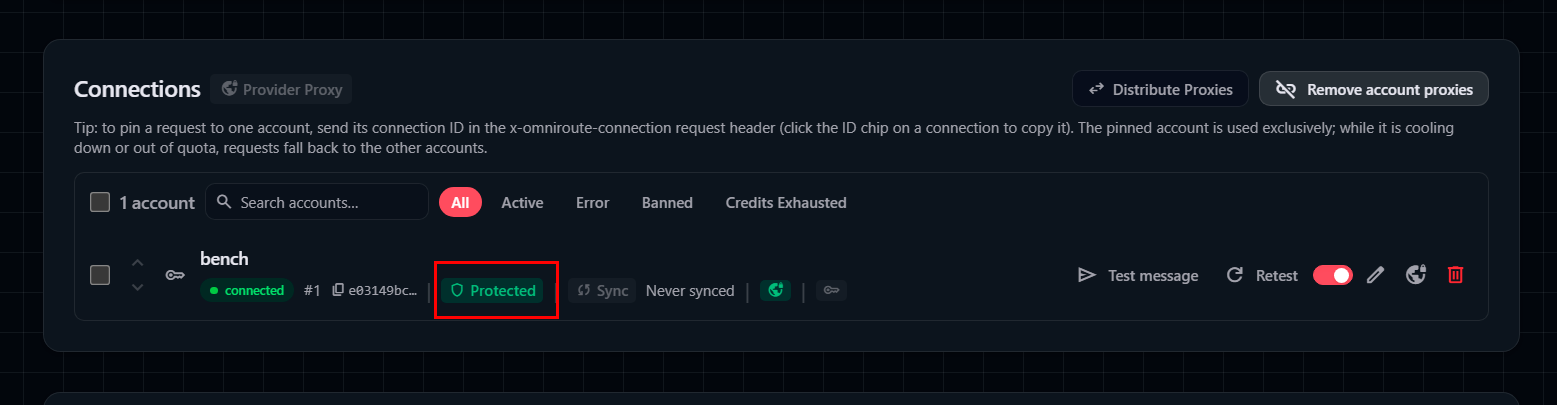
The mock connection in the OmniRoute dashboard, with the “Protected” badge in the middle of the row.
The toggle in the connection settings does not turn protection off; to do that, you have to disable it for the entire gateway with the environment variable RATE_LIMIT_AUTO_ENABLE=false:
omniroute:
    environment:
      - RATE_LIMIT_AUTO_ENABLE=false
After restarting the container, a single request took 31.5 milliseconds instead of 350, the errors disappeared, and all the other OmniRoute figures in this article were taken with this setting. OmniRoute was built primarily for working with free tiers, where accounts get banned for sending requests too often, and there the protection is useful. If the gateway fronts your own self-hosted model or a paid API, it makes sense to turn it off.
Testing Limitations
The gateways ran on different servers, and the OmniRoute server turned out to be roughly 1.5 times slower. We calculated the hardware correction from the baseline measurements: 1.45x for streaming responses and 1.56x for standard ones. This brings one more limitation: the baseline involved only the client and mock written in Python, whereas OmniRoute runs on Node.js, so it is hard to say how accurately the correction carries over to a different runtime.
The load was synthetic, with a 200-word request, a 50-token response, and a single mock instead of a real model. Failover to fallback models, retries, caching, OmniRoute’s model chains, and LiteLLM’s router were not covered by the test.
Conclusion: Which Gateway to Choose
In terms of speed, LiteLLM with two worker processes beats OmniRoute in both modes, but in many situations a difference of 20–70 requests per second per core matters less than what the gateway can do and what job it was designed for.
|
Task |
What to choose |
Why |
|
A company needs to track how much each department spends on LLMs |
LiteLLM |
LiteLLM records spending for each key in Postgres on its own, and the gateway handles more standard requests than OmniRoute |
|
Many short requests without streaming, such as classification or data extraction |
LiteLLM with --num_workers equal to the number of cores |
130 requests per second on two cores |
|
A coding agent with long streaming responses on a server with one core for the gateway |
OmniRoute |
In our single-core test, OmniRoute passed more streaming requests, 25 versus 20 for LiteLLM |
|
Free tiers and subscriptions from different providers |
OmniRoute |
The gateway was built specifically for this kind of work |
|
Your own vLLM, Ollama, or a paid API behind OmniRoute |
OmniRoute with RATE_LIMIT_AUTO_ENABLE=false |
Otherwise you get about one request per second and 429 and 503 errors under load |
With LiteLLM, the first thing to check after installation is the number of worker processes, since out of the box the gateway uses one core no matter how many the container is given. It is also worth keeping the Postgres load in mind. With OmniRoute, the more important decision is what to do with rate-limit protection: for a self-hosted model, it is better to turn it off.