



 +31 20 820 3777
 Compliance & KYC
  Support
  Documentation
 Login
Login 




OpenWebUI is incredibly capable: it supports custom models, Retrieval-Augmented Generation (RAG), tools (MCP/tools), skills, and more. As the platform's feature set expands, it’s tempting to think that building an AI support bot is straightforward—just pick an open-source model like Qwen-3.8 or Gemma 4, attach the necessary tools in the settings, connect a knowledge base, and you're done!
To be honest: that’s exactly how we started at HOSTKEY. But we eventually ended up writing custom Pipes for every support channel managed by a bot, because relying solely on the built-in settings was, to put it mildly, unpredictable.
This article isn't a "how-to" on enabling tools—you can find that in the OpenWebUI documentation. Instead, we're diving into why simply enabling them isn't enough and how our current Pipe architecture works, using our Remote Hands Request support bot as a case study.
The Pitfalls of Relying Solely on Model Settings
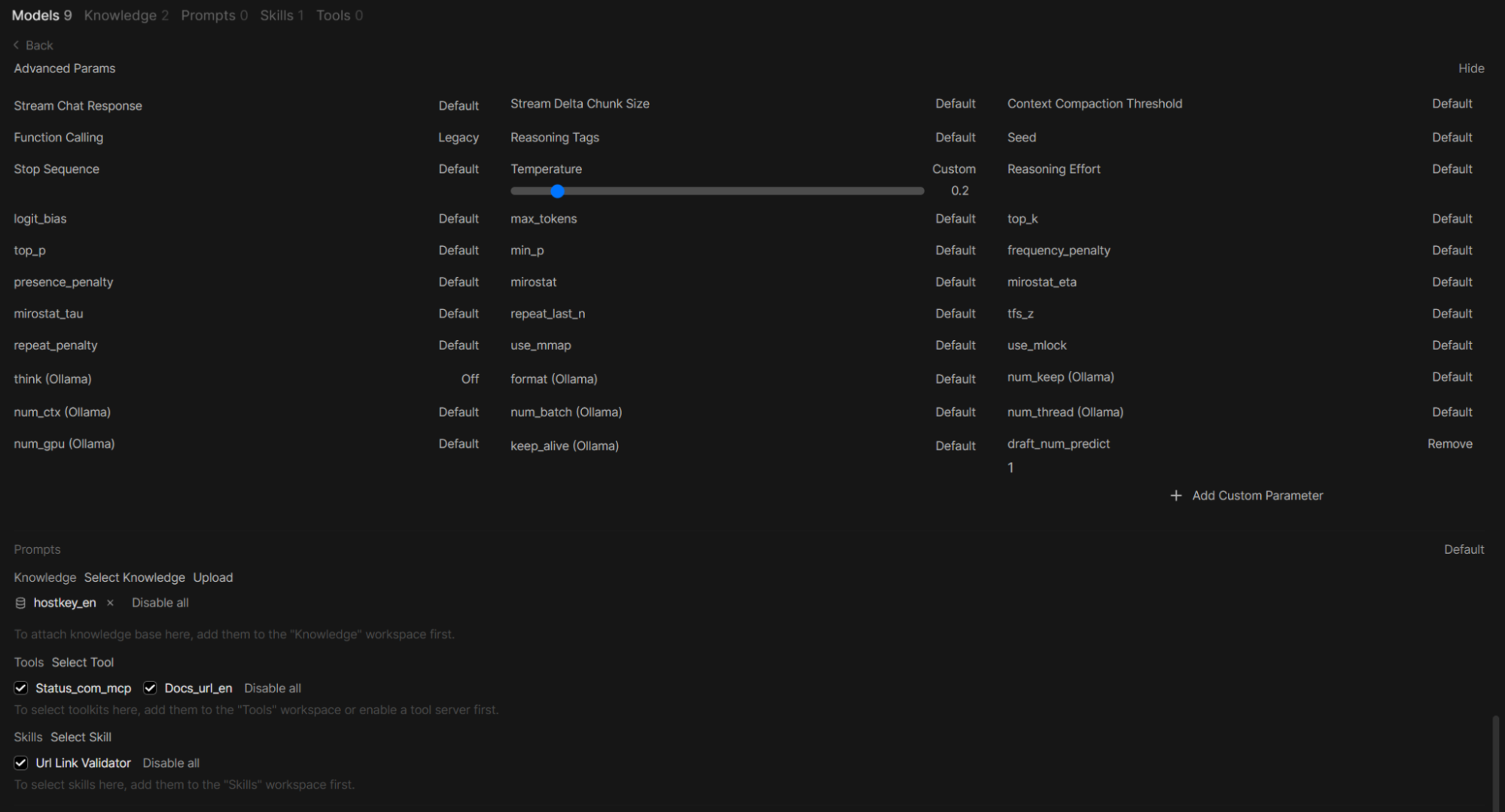
For this example, let's look at a custom model named hostkeyenrhr, based on gemma4:26b-a4b-it-qat. Its configuration (as seen in the OpenWebUI screenshot) includes the following parameters:
- Function Calling — Legacy;
- Temperature — 0.2, think (Ollama) — Off, draft_num_predict — 1;
- Knowledge — hostkey_en collection, based on our client documentation;
- Tools — status_en_mcp and docs_url_en (used to check the status of our website, Invapi, and European/UK/USA data centers, as well as an MCP tool for querying VPS/dedicated server configurations and network traffic).
Let's pose a question for which the model has a corresponding tool. Since the get_vps_list tool from an external MCP returns a list of VPS instances along with their pricing by location, we will ask for a cheap VPS in Germany.

We can request a real-time list of servers and prices via the Invapi API, which is exactly what our MCP server is designed to do. However, the model fails to actually call it. Instead, it relies entirely on RAG: the response looks plausible, but it isn't pulling live system data—it's just paraphrasing instructions from the documentation. If you switch to Native mode, the situation worsens as RAG "breaks" entirely.
When making requests via the API (e.g., via CURL), things get even more chaotic: we receive a raw tool_call with empty content. The client is responsible for executing the call and prompting the model again (which is essentially what OpenWebUI does). Even then, there is no guarantee that the tool will be triggered, that the data will be included in the response, that it won't get mixed up with RAG, or that the final answer will actually be in English.
Before we dive into Pipes, it is important to explain why the model settings are set to Legacy and why you can't simply switch to Native.
Legacy (Default): OpenWebUI does not rely on the model "knowing" how to call specific tools. Instead, data from all connected tools is injected into the general request context (usually mixed into the system prompt), and the model is expected to generate a response in a specific format that is then parsed. This method works with any supported model, but reliability is inconsistent: the model might overcomplicate the call, generate invalid JSON, or simply ignore the tool altogether.
Native (Agentic): The model is passed a list of tools via a specialized API parameter rather than as text within a prompt. A model trained for tool calling recognizes this parameter and generates a structured call. OpenWebUI then receives the direct response from the tool, eliminating any guesswork regarding the model's intent.
While Qwen3 models perform well in both modes, Gemma 4's Native mode requires a specialized approach, even for the it (Instruction-Tuned) version. This is precisely the kind of heavy lifting that a Pipe handles (among other things).
Why choose Gemma over Qwen? It comes down to speed. With reasoning mode disabled, Gemma 4 delivers a comparable (admittedly slightly inferior) response in 5–7 seconds on a setup of two 16 GB A4000s, whereas Qwen 3 "thinks" for 30–40 seconds.
Pipes (Functions) and Valves
A Pipe (also known as a function) is an OpenWebUI plugin that intercepts a request before it is sent to the model. Technically, it is a Python class with a pipe method that receives the request body and returns a string, JSON, or a stream. Inside a Pipe, you are free to call an LLM multiple times, invoke MCP tools, rewrite prompts, or toggle RAG on and off.
It transforms "a single model in a UI" into a deterministic pipeline. In OpenWebUI, a Pipe appears as a separate model, meaning you can configure its permissions, set its own parameters, and call it via API. For external clients, you simply swap the standard model for the Pipe model in your API calls.
Valves are the configurable component of a Pipe that controls how data "flows" through it. Implemented as a nested subclass of BaseModel within the Pipe (plus a separate UserValves for user-specific settings), they hold configurable parameters—such as API keys, URLs, or thresholds. These are stored in the database, displayed in the admin panel, and reloaded for every request, acting as the "knobs" used to tune Pipe behavior without needing to modify the code.
Valves have their limitations, and some things simply don't make sense to expose through them; therefore, we don't use them in our Pipes at all—it's easier for us to simply hardcode the prompts and parameter values directly in the Pipe's logic.
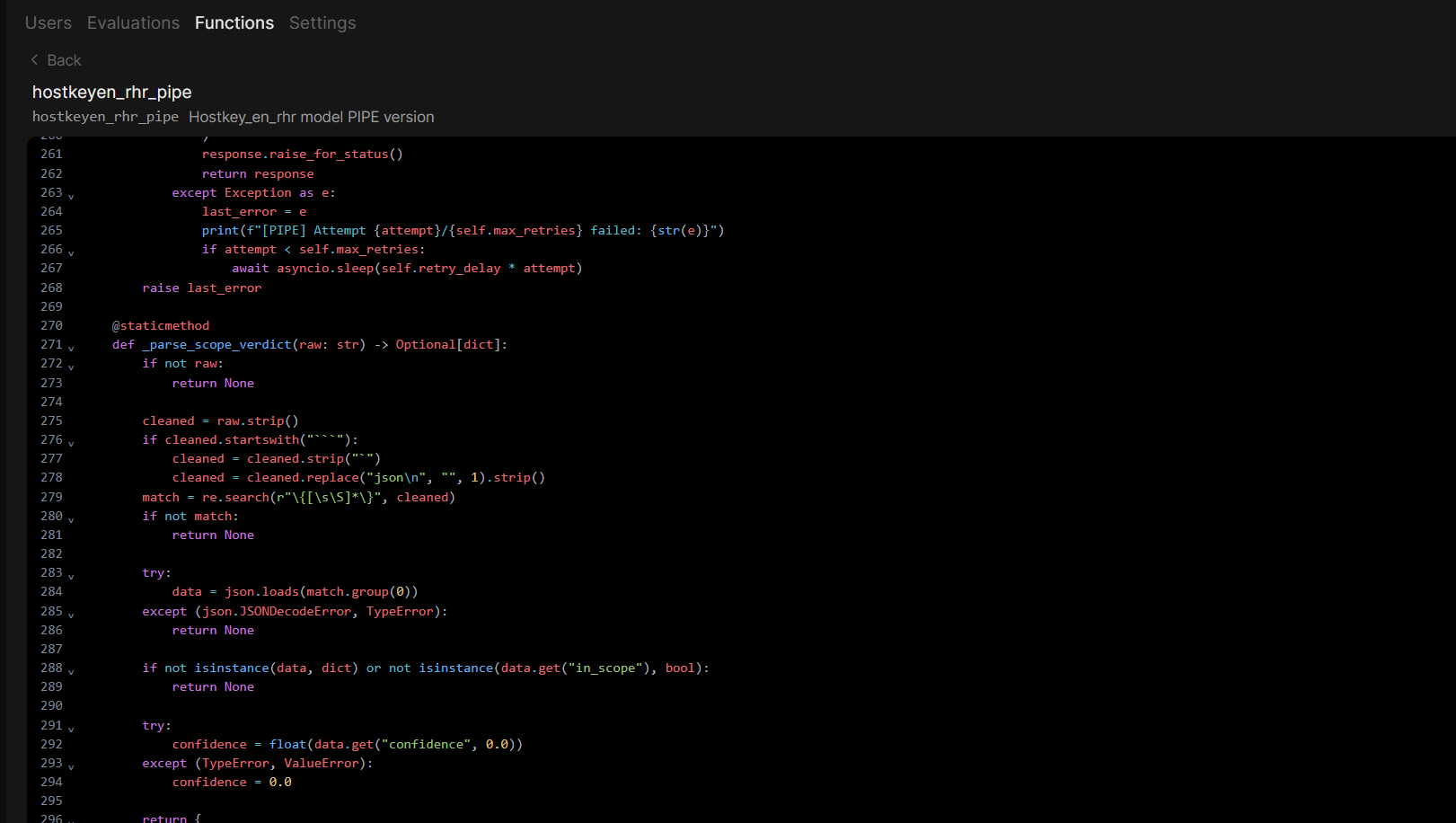
Pipes are created in the Admin Panel under Functions.
Why Model Settings Aren't Enough
Beyond broken tool calls, several other limitations of OpenWebUI's standard mechanisms became deal-breakers for us:
- Lack of Role Separation: The same model handles both decision-making and responding. There is no way to separate roles, such as using a "fast router" to decide the intent and a "RAG-specialized model" to generate the response. Everything goes through a single model with a single set of parameters, one massive system prompt, and a fixed temperature.
- No Control Over Execution Order: Native tool calling does not guarantee a specific sequence of tool invocations. For our use case, we needed a strict sequence: first, a keyword search; then, server availability tools and MCP Invapi calls; and finally, a RAG-augmented response.
- No Granular RAG Control: You cannot disable RAG for specific steps—for example, during tool calls—to prevent data from getting mixed up.
- No Post-processing: We lacked the ability to perform strip service-related metadata, discard "placeholder" text, or implement fallback logic. While you can attempt this via the system prompt, the results are inconsistent at best.
- Manual tool_calls Parsing: When calling via the API, you are forced to manually parse tool_calls because the model returns a raw call rather than a completed response.
- Poor User Experience: The user sees nothing of the internal pipeline logic. When the system performs multiple LLM calls and MCP requests, the UI simply looks "frozen."
Pipe Anatomy
Let's break down a Pipe using hostkeyen_rhr_pipe as an example. This Pipe serves HOSTKEY's English-speaking support: it answers questions regarding VPS, documentation, and common issues, while using MCP tools to pull real-time data from our systems. The final generation is handled by a custom model, hostkeyenrhr. Essentially, the Pipe intercepts the request, performs all the heavy lifting and data gathering, and only in the final step sends an enriched prompt to the model with RAG enabled.
A Pipe receives several arguments from OpenWebUI. The key ones are body (containing messages, model info, flags, tool_ids, and features), __tools__ (a dictionary of available MCP tools and their executable functions), and __event_emitter__ (a channel used to send status updates to the UI):
async def pipe(
    self,
    body: dict,
    __user__: Optional[dict] = None,
    __tools__: Optional[dict] = None,
    __metadata__: Optional[dict] = None,
    __event_emitter__=None,
) -> Union[str, Generator, Iterator, Dict[str, Any]]:
    messages = list(body.get("messages", []))

    if not messages:
        return "Error: empty request."
    user_wanted_stream = body.get("stream", False)
Next, the text is extracted from the user's latest message—carefully, as the message can be multimodal (either plain text or a list of blocks containing both text and images):
for i, msg in enumerate(reversed(messages)):
    if msg.get("role") == "user":
        user_msg_index = len(messages) - 1 - i
        original_content = msg.get("content", "")
        if isinstance(original_content, str):
            user_query_text = original_content
        elif isinstance(original_content, list):
            text_parts = [item.get("text", "") for item in original_content if item.get("type") == "text"]
            user_query_text = " ".join(text_parts).strip()
        break
At this stage, we use pure code without involving any LLMs.
It is worth highlighting the __event_emitter__ argument, which OpenWebUI passes to the Pipe. It is implemented as an async function that allows you to send events directly to the chat, such as intermediate statuses, notifications, or message updates.
The user sees these updates directly in the UI. Instead of an uninformative, "frozen" loading bar, they see a dynamic stream of events: "Analyzing request > Extracting keywords > Searching documentation > Checking tool requirements > Invoking tool > Generating final response."
Technically, this is a wrapper around a status type event:
async def emit_status(description: str, done: bool = False):
    if __event_emitter__:
        await __event_emitter__({
            "type": "status",
            "data": {"description": description, "done": done}
        })
Providing status updates is critical for Pipes that orchestrate multiple sequential LLM and MCP calls. Without these statuses, users have no idea what is happening and often abandon the chat before a result is produced.
Phase -1: RHR Scope Validation—A Three-Tier Cascade
In our original Pipe, there was no "Is this an RHR request?" validation. Consequently, a request like "send me my invoice" and "SSH is not working" would trigger identical responses. This increased the workload for the server administration department, so we decided to offload this filtering to the bot's response stage.
To achieve this, we introduced Phase -1 in the new hostkeyen_rhr_pipe. This isn't just a single LLM call; it is a cascade where each subsequent tier is triggered only if the previous one fails to provide a definitive answer.
Tier 1: Keyword Guard (_keyword_prefilter)
This tier is written in pure Python—no LLM required. The code scans the text for two sets of markers: RHR_KEYWORDS (e.g., ssh, reboot, raid, network, dns, unresponsive...) and CLIENT_SOFTWARE_SIGNALS (e.g., website error, nginx config, wordpress, laravel...).
- If only RHR_KEYWORDS are found: we set in_scope=True, edge, and 0.9.
- If only client_software signals are found: we set in_scope=False, client_software, and 0.9.
- If both or neither are found: we return None and move to the next tier.
This handles common queries without consuming a single LLM token.
Tier 2: LLM Classifier (_classify_rhr_scope + RHR_SCOPE_SYSTEM_PROMPT)
Here, we perform a request to a gemma4nothink model with a temperature of zero. The request prompt embeds the full RHR_REGULATION, five critical rules ("grammatical form does not change scope," "KEYWORD GUARD," "client_software requires explicit signals," "borderline cases = edge," and "confidence calibration"), eight few-shot examples, and a strict JSON response format. The result is parsed into a format digestible by the third tier. If anything fails, we default to: in_scope=True, unknown, 0.0.
Tier 3: Recheck (_recheck_rhr_scope + RHR_RECHECK_SYSTEM_PROMPT)
This is our safety net against false negatives: we don't want a client with a genuine access issue being routed to billing. The recheck is triggered only if the first pass returned in_scope=False, a category of client_software or unknown, and a confidence score in the [0.7, 0.85] range. We do not trigger a recheck for high-confidence categories like billing, client_area, legal, sales, or abuse, nor for edge cases where in_scope=True.
During this process, the user sees evolving statuses: "Verifying Remote Hands scope...", "Borderline case—re-verifying scope..." (only during recheck), "Request outside RHR scope, adding disclaimer," or "Request within RHR scope, proceeding."
Cascade Summary:
|
Query |
Tier |
Verdict |
User Experience |
|---|---|---|---|
|
ssh is not working |
1 |
True, edge, 0.9 |
Standard response |
|
how to fix nginx config |
1 |
False, client_software, 0.9 |
Disclaimer |
|
I want a refund |
2 |
False, billing, 0.95 |
Disclaimer |
|
DO NOT CONNECT VIA ssh! |
2 |
True, edge, 0.95 |
Standard response |
|
website is down, ssh too |
2 $\rightarrow$ 3 |
True, edge, $\ge$ 0.85 |
Standard response |
|
something is weird with the server |
2, fail-open |
True, unknown, 0.0 |
Standard response |
Phase 0: Preliminary Documentation Search
Our first short request is sent to a gemma4nothink model (a base model with reasoning disabled). The goal here is to transform the user's question into 2–3 optimal keywords for searching.
The prompt (which we define within the Pipe, as this is a general-purpose model) strictly limits the query length, because long phrases result in poor search performance:
router_messages = [{
    "role": "system",
    "content": (
        "Paraphrase the user's message into a search query of 2-3 words to search the HOSTKEY documentation. "
        "Output ONLY the keywords separated by spaces. Nothing else. "
        "Good: 'ssh connection', 'gpu nvidia', 'ip address', 'change ip address', 'backups'. "
        "Bad: 'change ip address or additional ip' (too many words). "
        "Strict constraint: 2-3 words."
    )
}, {"role": "user", "content": user_text}]
The result: the model generates the required query, which is then passed to the MCP documentation search tool. In effect, we are opening the client documentation on behalf of the user, entering our query into the search bar, and grabbing the first few results. The tool is called directly (the entire MCP toolset "runs" locally on the same server as Ollama and OpenWebUI). The code handles two execution paths: first, it searches for the tool in __tools__ (the same registry used by OpenWebUI); if it's not found there, it performs an HTTP fallback to a local MCP server:
MCP_BASE_URL = "http://host.docker.internal:8000"
tool_path = "/docs_url_en"
tool_name = "search_hostkey_docs_en"
url = f"{MCP_BASE_URL}{tool_path}/{tool_name}"
response = await self.client.post(url, json={"query": query, "limit": 5})
If the result is too short (less than the docs_retry_threshold, which defaults to 400 characters), the Pipe makes a second request using the user's raw text to ensure no relevant links are lost.
The discovered links are stored in docs_result until the main model is called. This approach helps generate more relevant answers and—crucially—provides direct links to specific documentation sections, which our knowledge base does not explicitly provide.
During this process, the user sees three status updates: "Extracting keywords for search..." before the LLM request, "Searching documentation: {query}" before the MCP call, and "Documentation found" upon success. In the event of an error, the status displays: "Failed to retrieve documentation, continuing..."
Phase 1: MCP Router
The second request is also sent to gemma4nothink, but this time acting as a "tool router." The model first decides whether a specific MCP tool is required and invokes it if necessary.
For this, we use a minimalist system prompt:
tool_checking_messages = [
    {"role": "system", "content": (
        "You are a system router. Your sole objective is to determine "
        "whether an MCP tool needs to be called for the user's request. "
        "If a tool is needed, call it immediately with the correct arguments. "
        "If no tools are needed, do not call anything and simply output: 'skip'."
    )},
    {"role": "user", "content": user_query_text},
]
Before executing the request, the Pipe modifies the request body: it strips out any knowledge/search tools, retains only the English-language tool variants, disables RAG, and strictly overrides the model:
if "tool_ids" in body and body["tool_ids"]:
    body["tool_ids"] = [t for t in body["tool_ids"] if "knowledge" not in t and "search" not in t]
    body["tool_ids"] = self._filter_tool_ids_by_lang(body["tool_ids"])
body["docs"] = []
if "features" in body:
    body["features"]["retrieval"] = False  # RAG is disabled while the router is working
body.setdefault("options", {})["temperature"] = 0
body["model"] = "gemma4nothink"
body["stream"] = False
body["messages"] = tool_checking_messages
The response is parsed by the code. The tool_calls arguments are parsed using json.loads, and the called function is looked up in tools (with a fallback to partial name matching, as the function name in tool_call may not exactly match the key in tools). The result is then aggregated into the final text summary:
for tc in tool_calls:
    func_name = tc.get("function", {}).get("name")
    func_args_str = tc.get("function", {}).get("arguments", "{}")
    try:
        args = json.loads(func_args_str) if isinstance(func_args_str, str) else func_args_str
    except (json.JSONDecodeError, TypeError):
        args = {}
    callable_func = None
    if __tools__:
        if func_name in __tools__:
            callable_func = __tools__[func_name].get("callable")
        else:
            for key, tool_data in __tools__.items():
                if func_name in key or key.endswith(f"_{func_name}"):
                    callable_func = tool_data.get("callable")
                    break
    if callable_func:
        try:
            if asyncio.iscoroutinefunction(callable_func):
                raw_result = await callable_func(**args)
            else:
                raw_result = callable_func(**args)
            if isinstance(raw_result, dict):
                mcp_data_summary += json.dumps(raw_result, ensure_ascii=False, default=str) + "\n"
            else:
                mcp_data_summary += str(raw_result) + "\n"
        except Exception as e:
mcp_data_summary += f"[MCP Error]: {str(e)}\n"
If the user is present in the chat at this stage, they will see a "Checking tool requirements..." message before the request, and "Using tool: {func_name}" before each MCP call. If an error occurs, the user receives: "Tool error: {text}."
If a tool cannot be found in tools (for example, if the model, such as gemma4nothink, does not see the tool in OpenWebUI), the pipeline will not trigger any calls, and the final response will be built solely using RAG. Therefore, a critical requirement: the same tools must be connected to both the general model and the specialized model; otherwise, the router will be unable to invoke them.
Phase 2. Prompt Enrichment
There is minimal neural network involvement here. At this stage, the final prompt is concatenated directly in the code. If tool data is available, the message will include the tool output, the documentation, and the instructions. If no tools are required, only the documentation is included. If documentation is also missing, the only remaining instruction is to respond in English to prevent the model from replying in Arabic or Chinese:
strict_ru_instruction = (
    "\n\n[STRICT INSTRUCTION: Generate the final response EXCLUSIVELY in English. "
    "Do not use Chinese, Arabic, or any other language. "
    "Maintain a professional technical support tone.]"
)

if mcp_data_summary and user_msg_index != -1:
    enriched_text = (
        f"\n\nUser Query: {user_query_text}\n\n"
        f"CURRENT INVAPI SYSTEM DATA (MCP TOOL RESULT):\n{mcp_data_summary}\n\n"
        f"RELEVANT DOCUMENTATION:\n{docs_result}\n\n"
        f"Instruction: Generate the final response for the user. Rely entirely on the INVAPI system data provided above and the documentation from your integrated Knowledge Base (RAG)."
        f"{strict_ru_instruction}"
    )

    if isinstance(original_content, list):                # Preserve screenshot blocks
        original_content.append({"type": "text", "text": enriched_text})
    else:
        messages[user_msg_index]["content"] = f"{original_content}{enriched_text}"
The English language instruction is appended to the message exactly once: either within enriched_text or as a standalone block if no enrichment occurred.
At this stage, it is crucial to strip away any traces of the tool calls and return to the RAG context:
if "tools" in body: del body["tools"]
if "tool_ids" in body: del body["tool_ids"]
if "docs" in body: del body["docs"]
if "features" in body: body["features"]["retrieval"] = True   # Re-enable RAG
body["model"] = "hostkeyenrhr"
Phase 3. Final Generation
In this phase, the primary request is sent to the custom hostkeyenrhr model with RAG enabled and streaming active (if requested by the user):
messages.insert(0, {
    "role": "system",
    "content": (
        "CRITICAL RULE: You MUST respond EXCLUSIVELY in English. "
        "Never use Chinese, Arabic, or any other language. "
        "If you are unsure about something, respond in English. "
        "This is a mandatory requirement—violations are not permitted."
    )
})
body["messages"] = messages
body["stream"] = user_wanted_stream
final_response = await self._post_with_retry(body, headers)
During this phase, the user will see "Generating final response...". This is the last "long-running" stage; until it completes, the user will see that the pipeline is still active.
Phase 4. Post-processing: Placeholder Removal, and Fallback
Post-processing performs two other critical functions that deserve separate mention.
Stripping the "Continue" Footer
The final model appends a prompt at the end of its response: "If your question remains unresolved and needs to be forwarded to our staff, click 'Continue' to send it." This phrase is hardcoded into both the system prompt and the fallback placeholder; consequently, it may appear duplicated in the response or become unnecessary if the query is outside the HR domain. Therefore, it must be stripped.
The challenge is that the pipeline cannot know in advance if this phrase will appear at the end, so simply cutting the last N characters is not an option. To handle this, the pipeline buffers a certain number of characters (the length of the longest possible footer plus a buffer) and only releases them once it is certain it has not reached the end of the response. The tail is validated using _strip_prompt_footer, which includes quote and case normalization.
Stripping Placeholder Paragraphs
If the response is short (less than 800 characters) and one of the fallback markers (FALLBACK_MARKERS)—such as "reviewed by our specialists," "click 'continue'," or "forward the issue to our team"—is found within the first 400 characters, the pipeline splits the response into paragraphs and discards any that contain a marker. This prevents scenarios where the model inserts a placeholder template even when the query falls within the RHR domain.
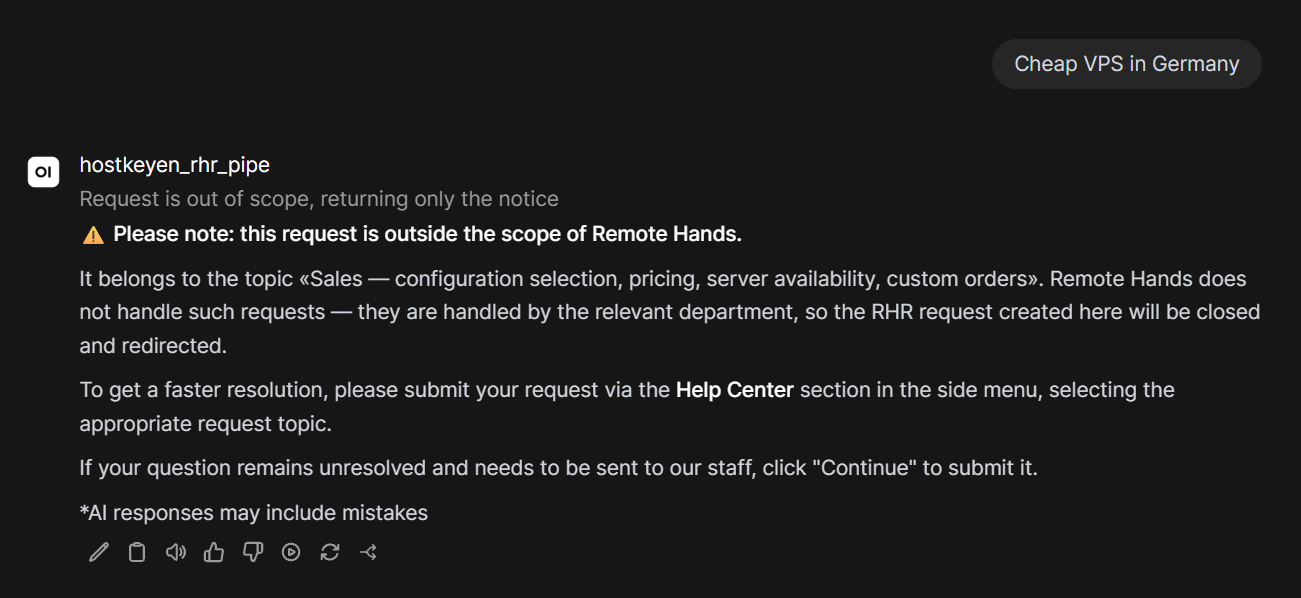
Ultimately, this results in a response that includes a warning. It is not yet perfect, but it is a significant step toward stability.
In terms of pipeline latency, we incur an additional overhead of 5 to 10 seconds due to the extra LLM requests. However, in our case, this isn't a dealbreaker; instead of a 5–10 second response time, we see a 10–20 second turnaround—which is an excellent result given our hardware and model performance.
Pipeline Challenges
To be blunt: a pipeline is more than just a plugin with a few settings; it is code that requires ongoing maintenance. Any architectural changes necessitate manual updates.
- The pipe() signature and __tools__ format are part of the OpenWebUI contract. As the environment evolves, these interfaces may change, requiring us to adapt the pipeline accordingly.
- Debugging is significantly more complex than adjusting model settings. Instead of managing a single prompt (as in our current setup), we are managing five distinct phases, three LLM calls, MCP tool invocations, and post-processing.
- A pipeline is not a replacement for robust RAG or well-crafted system prompts with flexible custom model configurations. It simply provides control over execution phases, ensuring tools are called correctly and preventing RAG data from polluting the context. If your knowledge base is empty or your prompts are poorly constructed, a pipeline won't save you.
- The same tools must be connected to both the general model and the specialized model. Otherwise, the router will fail to detect them and will silently skip the tool call.
Summary
While configuring a custom model in OpenWebUI remains the fastest and simplest way to utilize a knowledge base, connect tools, and fine-tune model calls, it is unfortunately insufficient for production-grade support.
The native tools do not guarantee the order of execution (and through the API, they often fail to trigger tools automatically), they lack the ability to "silence" RAG while tools are running, they do not distinguish between "router" and "responder" roles, and they offer no post-processing capabilities.
The pipeline transforms a "single model in a UI" into a deterministic workflow: a keyword guard and an LLM classifier filter out out-of-scope queries; a dedicated step searches documentation; another invokes MCP tools with RAG disabled; the final model receives an enriched prompt; and finally, post-processing, strips out service metadata or placeholders, and provides a fallback response if needed.
This phased architecture—with explicit RAG management and post-processing—is exactly what allows us to keep support bots predictable: system data doesn't get mixed up with documentation summaries, tools trigger at the precise moment required.