



 +31 20 820 3777
 Compliance
  Support
  Documentation
 Login
Login 




Introduction
In just a couple of years, language models have transformed from a novelty into an everyday professional tool and a subject of constant debate. While it is hard to say which generative models are more popular, there is no doubt that many people rely on cloud services. As long as everything works as expected, few people care about exactly where the model is running. Unfortunately, cloud services do not always work perfectly. Services can suddenly become unavailable due to regional restrictions, or providers may change prices and quotas without warning, raising questions about where the personal data of clients or employees is being sent. Running a model on your own server resolves most of these issues, but it requires diving into the administration of both the server and the model engines themselves. Additionally, you can customize it to your needs—selecting a size that fits your task and budget, fine-tuning it on your own data, locking in a specific version, and ensuring that it will respond almost exactly the same way tomorrow as it does today.
DeepSeek Language Models Overview
Many tutorials still feature DeepSeek models with 7, 33, and 67 billion parameters. This is the first generation from late 2023, when DeepSeek LLM with 7 and 67 billion parameters were released (both are still found in comparative studies as separate base models) and the DeepSeek Coder series, the largest version of which had 33 billion parameters. With current DeepSeek models, this generation shares only the name, so the `ollama run deepseek-coder` command from standard tutorials leads to a model that is almost three years old.
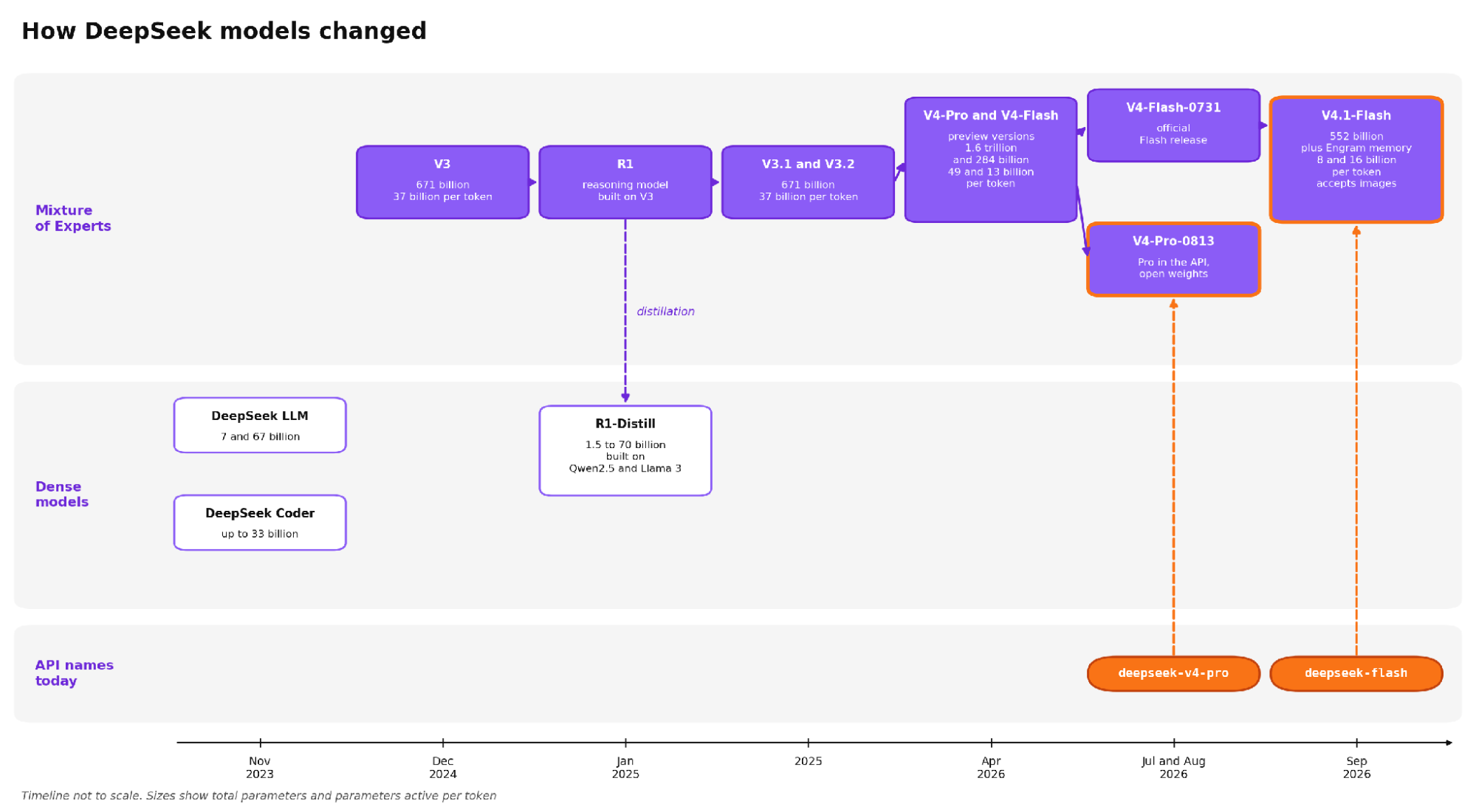
DeepSeek models from 2023 to 2026. Models in the bottom row can be run on a private server with a single GPU.
V4 and V4.1 Lineup
For current models, DeepSeek has chosen a Mixture of Experts (MoE) architecture, so each model lists two parameter counts. In each layer of such a model, instead of one large computational block, there are dozens or hundreds of small blocks ("experts"), and a router selects only a few of them for each token. You can determine if the weights will fit on your server entirely by looking at the total number of parameters. The amount of computation and generation speed depends on the number of parameters used per token; therefore, a trillion-parameter model that uses several dozen billion parameters per token generates text at roughly the same speed as a dense model with several dozen billion parameters.
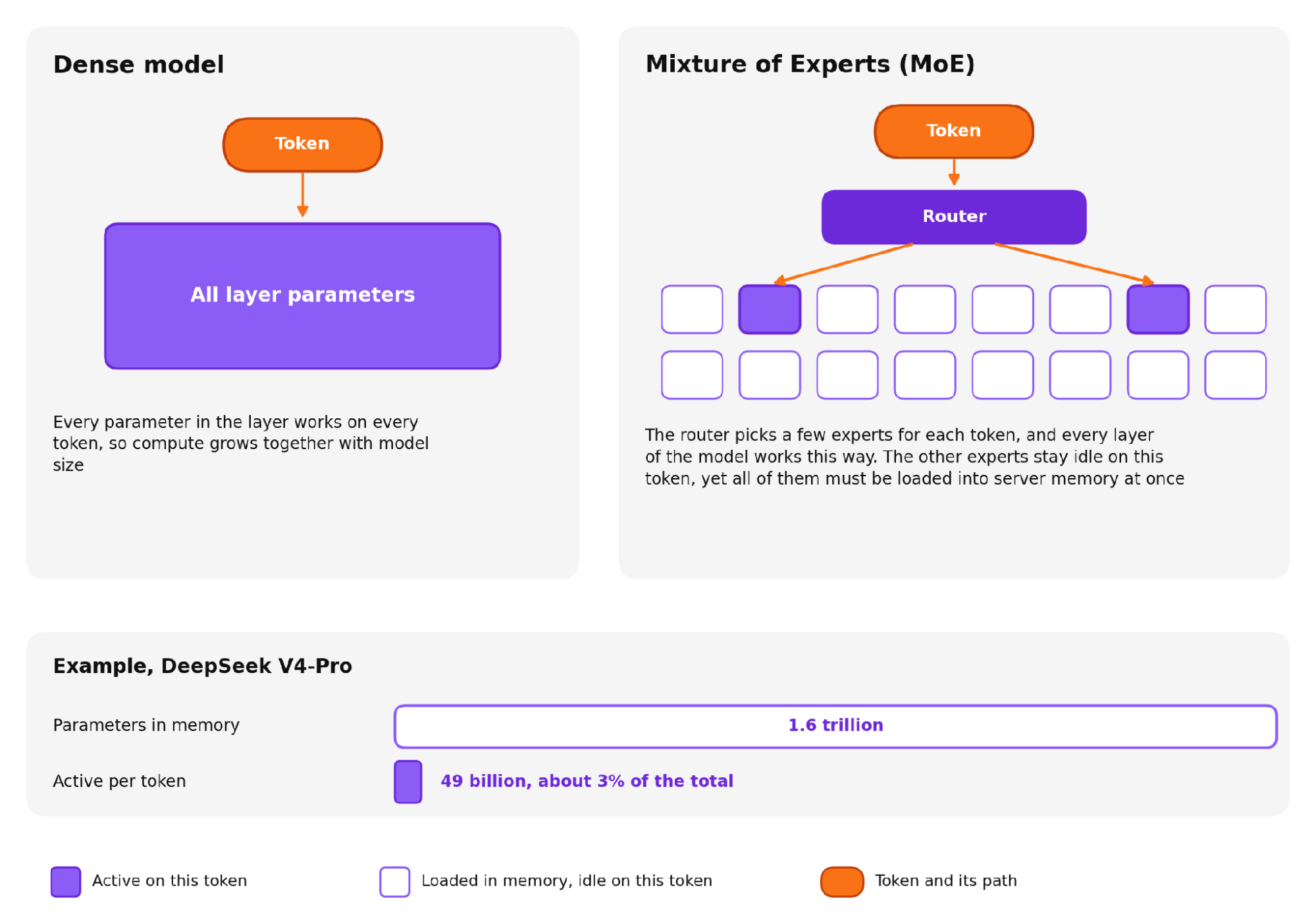
How a token passes through a dense model layer versus an MoE layer
In April 2026, the preliminary versions of V4-Pro were released with 1.6 trillion parameters, using 49 billion per token, and V4-Flash with 284 billion parameters using 13 billion per token, both with a million-token context window. The weights are released under the MIT license, which, according to the card text, applies to both the repository and the weights themselves. Expert parameters are stored in 4-bit FP4 format, while almost all other parameters are in FP8. The developers implemented this precision during training, so standard 16-bit weight versions of the production models do not exist.
In the summer of 2026, the updated V4-Flash-0731 was released, and in early September, DeepSeek released V4.1-Flash, a name that might be slightly confusing. The base of V4.1-Flash grew to 552 billion parameters—nearly double that of V4-Flash. The model learned to accept images, and a conditional Engram memory of 196 billion parameters was added on top of the base, which the model accesses selectively by token. Each layer now contains one shared expert and 384 experts selected by the router, with six of them activated per token. The number of active parameters decreased—eight billion during prompt processing and sixteen during response generation—meaning the "Flash" in the name refers more to the computational cost per token than the weight size.
The V4 developers moved away from the Jinja chat template and instead included an `encoding` folder in the repository containing a Python encoder that assembles the dialogue into a string and decodes the model's response. This approach is described in the V4-Flash and V4-Flash-0731 cards. Later, templates did eventually appear in the repositories, but only thanks to Hugging Face contributors and the community; the note regarding the lack of a native template remains in the cards. For production use, DeepSeek released the deepseek-recipe library in Rust with Python bindings, which handles only request transformation and response parsing; it does not manage model computation or serve as an inference engine. The community learned to run V4-Flash via llama.cpp not immediately; discussions regarding support opened in April, and working weight builds appeared with version 0731, released in late July.
DeepSeek Resource Requirements*
|
Model |
Total parameters (B) |
Active per token (B) |
Context (tokens) |
Weights size (GB) |
|
V4-Pro |
1,600 |
49 |
1M |
865 |
|
V4-Pro-0813 |
1,600 |
49 |
1M |
893 |
|
V4-Flash |
284 |
13 |
1M |
160 |
|
V4-Flash-0731 |
284 |
13 |
1M |
167 |
|
V4.1-Flash |
552 + 196 Engram memory |
8 prefill/16 generation |
1M |
510 |
|
R1-Distill-Qwen-14B |
14 |
14 |
128K |
29.5 BF16, ~9 in 4-bit |
* Sizes obtained by summing files in Hugging Face repositories via the platform API on 23.09.2026.
No model in the V4 lineup fits into 24 or 48 GB of VRAM; even the most compressed community builds weigh over 100 GB.
Gemma 4 (Google)
The Gemma 4 model lineup was released on April 2, 2026, under the Apache 2.0 license. This is significant because Gemma 3 was released under Google's proprietary license, and its weights on Hugging Face are still restricted by a terms-of-use agreement, whereas the Gemma 4 repositories are open. The Gemma Acceptable Use Policy was written as part of the previous terms and is dated February 2024, so when moving the model into industrial production, the legal aspects should be thoroughly verified.
Gemma Model Sizes
|
Model |
Total parameters (B) |
Active per token (B) |
Context (K tokens) |
Modalities |
|
E2B |
5.1 |
2.3 |
128 |
text, image, audio |
|
E4B |
8 |
4.5 |
128 |
text, image, audio |
|
12B Unified |
11.95 |
11.95 |
256 |
text, image, audio |
|
26B A4B |
25.2 |
3.8 |
256 |
text, image |
|
31B |
30.7 |
30.7 |
256 |
text, image |
The "E" in the names of the smaller models stands for "effective" parameters, as these models use layer-wise embedding tables that act as a fast lookup rather than requiring computation. The "Unified" designation for the 12B model indicates the absence of separate encoders, meaning it accepts raw image fragments and audio segments directly into the input space. The 26B A4B MoE variant has 128 experts plus one shared expert in each layer.
Memory Usage*
|
Model |
bfloat16 Weights (GB) |
4-bit Weights (GB) |
8-bit Cache (32k tokens) (GB) |
|
E2B |
4.6 |
0.8 |
0.05 |
|
E4B |
9 |
2.3 |
0.14 |
|
12B |
24 |
7.65 |
0.28 |
|
26B A4B |
52 |
16.2 |
0.28 |
|
31B |
64 |
19.2 |
1.1 |
* Data from Table 3 of the Gemma 4 Technical Report. Compression for E2B and E4B is mobile, using a mix of 2-bit and 4-bit weights; other models use the Q4_0 format
For Gemma 4 12B, the cache for a 32,000-token context takes 280 MB, or about 1% of the weight volume in full precision. This compactness is due to the architecture. For models starting from 12B, there are five local attention layers with a 1024-token window for every one global layer; on global layers, keys are also used as values, and combined with p-RoPE positional encoding, these techniques reduce the global cache by up to 37.5%. Testing on an RTX 4090 testbed confirmed the effectiveness of this approach. For Gemma 4 12B, VRAM usage grew from a 4,000-token window to a 256,000-token window by only 4.2 GB (from 7.9 to 12.1 GB); for Gemma 4 26B A4B, it grew by 5.2 GB (from 15.7 to 20.9 GB), and both models held the entire window on the card. A 14B DeepSeek distillate based on Qwen2.5 would have required about 48 GB of cache alone for the same window—twice the total memory of the card. For Gemma 4 31B, the cache is significantly heavier at 1.1 GB for 32,000 tokens, and it only fits entirely on a 4090 up to a 32,000-token window.
Which Gemma 4 Versions Does Ollama Download?*
|
Tag |
Size (GB) |
Note |
|---|---|---|
|
gemma4 (no tag) |
9.6 |
Same as `gemma4:e4b`, model for laptops and phones |
|
gemma4:12b-it-qat |
7.2 |
|
|
gemma4:26b-a4b-it-qat |
16 |
MoE variant |
|
gemma4:26b |
19 |
26B A4B in q4_K_M compression with a small model for accelerated generation |
|
gemma4:31b-it-qat |
19 |
Largest model, qat compression |
|
gemma4:31b-it-q4_K_M |
20 |
Post-training compression |
* Sizes based on the Ollama tags page. The `ollama list` command on a server shows them about one gigabyte smaller, so the numbers in the measurement tables below differ for the same models.
The `ollama pull gemma4` command without a tag looks like a request for the flagship model, but you actually get the E4B model, which is designed for laptops and phones rather than servers. On the tags page, `gemma4:latest` and `gemma4:e4b` have the same hash, so you should specify the model size in the command..
The "qat" variants were compressed by Google using quantization during training. They weigh less than standard 4-bit versions—19 GB vs 20 GB for 31B and 16 GB vs 18 GB for 26B A4B—and on our testbed, the 31B qat variant was also 5% faster. The `gemma4:26b` tag points to the q4_K_M compression variant. It includes a small model that predicts several tokens ahead, while the main model verifies them in a batch. Google promises up to a 3x speedup; on our testbed, this variant generated 18% faster than the qat variant without the additional model.
Important Considerations When Running Gemma 4
Google recommends a temperature of 1.0, top-p of 0.95, and top-k of 64 for Gemma 4; on our testbed, vLLM automatically pulled these values from the model configuration file. Reasoning mode is enabled by the `<|think|>` token in the system message, and Ollama enables it by default. To disable it, you can use the `--think=false` flag in the command line, the `"think": false` field in the Ollama interface, or the `"reasoning_effort": "none"` parameter in an OpenAI-compatible interface. When reasoning is disabled, all models except E2B and E4B still output an empty thought block. Ollama keeps the image projector in VRAM even during text-only work, which consumes 1.27 GB of context in the largest model. A text-only version without the projector can be built from the same files and fits entirely on an RTX 4090 with a 48,000-token window instead of 32,000; the recipe is in the measurement section.
The training data is cut off in January 2025, so the model only knows about events after that if they are provided in the prompt.
Why Gemma 4 is Suitable for a Single-GPU Server
In the Arena rankings, Gemma 4 31B scored 1451 points compared to 1456 for the 1.6 trillion-parameter DeepSeek V4 Pro, according to Google's technical report. A difference of about one-third of a percent is within the margin of error, yet the model sizes differ by fiftyfold. Gemma 4 26B A4B, with its 1438 points, is comparable to DeepSeek V4 Flash in reasoning mode, which scored 1436 with 284 billion parameters. On our testbed with a single RTX 4090, both large Gemma models fit on the card, albeit with different constraints. Gemma 4 26B A4B generates about 200 tokens per second and maintains the entire 256,000-token window. Gemma 4 31B outputs about 46 tokens per second and only fits entirely up to a 32,000-token window, which can be expanded to 64,000 via cache compression or to 48,000 by disabling the image projector.
Phi by Microsoft
The specialty of Microsoft's Phi lies in its training approach using highly curated, high-quality data like textbooks, allowing it to achieve results comparable to much larger models despite its small size. Phi-4 was trained on 9.8 trillion tokens using 1,920 H100 GPUs over twenty-one days. Multilingual data is limited to about 8%, and Microsoft explicitly states that the model is not intended for languages other than English.
Phi-4 Family Models
|
Model Name |
Parameters (B) |
Context (k tokens) |
Features |
License |
|
Phi-4 |
14 |
16 |
Base model, English-focused |
MIT |
|
Phi-4-mini-instruct |
3.8 |
128 |
Supports 23 languages |
MIT |
|
Phi-4-reasoning-plus |
14 |
32 |
Generates reasoning before response |
MIT |
|
Phi-4-reasoning-vision-15B |
15 |
16 |
Accepts images |
MIT |
Another feature of the Phi-4 family is the unusual distribution of context lengths. The smallest 3.8 billion parameter model has a 128,000-token window (which Ollama confirmed as 131,072 on our testbed), while the larger 14 and 15 billion parameter models have windows of only 16 and 32 thousand tokens, respectively. This makes the smallest model the best choice for long documents within the family.
Which Phi Versions Does Ollama Download?
|
Tag |
Size (GB) |
Context (k tokens) |
|
phi4-mini |
2.5 |
128 |
|
phi4-mini:3.8b-q8_0 |
4.1 |
128 |
|
phi4-reasoning |
11 |
32 |
|
phi4-reasoning:plus |
11 |
32 |
|
phi4-mini-reasoning |
3.2 |
128 |
For the 8-bit Phi-4-mini variant, the tags page shows a 4,000-token window, but `ollama show` reported 131,072 on our testbed, and the model loaded with the same default 32,768 window as the others; the 4,000 value on the website appears to be a display error. With 4.1 GB of weights and that window, the model occupied 8.6 GB according to `ollama ps`, meaning the context cache for small models can easily rival the weight size itself.
How to Run Phi
Phi expects its own dialogue format using `<|im_start|>` and `<|im_sep|>` delimiters. Microsoft has further fine-tuned the "plus" version with reinforcement learning; according to Microsoft, it is more accurate but generates about 1.5x more tokens on average when including reasoning. On our testbed, for the same algebra task, `phi4-reasoning` generated 1,863 tokens in 24 seconds, while `phi4-reasoning:plus` generated 2,893 tokens (55% more) in 38 seconds.
Running DeepSeek, Gemma, Phi on an RTX 4090
To answer what a user renting a server with a single GPU can expect, we used a server with one RTX 4090 and ran nine models from three families, first in Ollama and then in vLLM.
Testbed and Methodology
|
Parameter |
Value |
|
GPU |
GeForce RTX 4090, 24 GB (Ollama sees 23.5 GB) |
|
CPU |
AMD Ryzen 9 7950X, 16 cores, 32 threads |
|
RAM |
128 GB DDR5, four 32 GB modules |
|
Disk |
NVMe, 1 TB |
|
OS |
Ubuntu 24.04.5 LTS, Driver 595.91.07, CUDA 13.2 |
|
Engines |
Ollama 0.34.4, vLLM 0.30.0 in Docker 29.1.3 |
Ollama measurements were conducted using a Python script that calls the Ollama API and polls `nvidia-smi` four times per second to capture peak VRAM usage rather than an average. Generation speed was taken from Ollama's own statistics, so model loading time was not included. Sampling parameters were set according to developer recommendations: temperature 1.0 and top-k 64 for Gemma, 0.6 for the DeepSeek distillate, and 0.8 with top-k 50 for the Phi reasoning versions. vLLM required a separate script since it only provides an OpenAI-compatible interface; vLLM pulled sampling parameters from the model config, which matched the Ollama settings.
Models were downloaded from the Ollama registry directly to the server at approximately 115 MB/s.
All measurements were performed on a card located in a datacenter rack. We ran a continuous 30-minute load with the largest Gemma model to ensure the card does not throttle; the temperature did not exceed 51°C, and the clock speed remained steady at 2790 MHz, meaning the measurements taken at the start and end of the day are comparable.
If Ollama Does Not See the GPU
The server arrived with a clean OS without the NVIDIA driver. The Ollama installer completed without errors and reported readiness, but it downloaded the AMD set because it detected the integrated graphics on the CPU. The service logs showed CPU computation and zero VRAM usage:
inference compute id=cpu library=cpu
vram-based default context total_vram="0 B" default_num_ctx=4096
In this state, models run and respond, but very slowly. For diagnostics, two commands are sufficient: if `nvidia-smi` is not found but `lspci` shows the card, the hardware is present but the driver is missing.
lspci | grep -i nvidia
ubuntu-drivers install && reboot
After rebooting and restarting the service, the logs look like this:
inference compute id=0 library=CUDA compute=8.9 description="NVIDIA GeForce RTX 4090" total="23.5 GiB"
vram-based default context total_vram="23.5 GiB" default_num_ctx=32768
Ollama selects the default context window based on VRAM capacity rather than model capabilities; on a 24 GB card, this is 32,768 tokens (`default_num_ctx`).
Generation Speed
For the first measurement, each model received a short question with an 8,000-token window and produced a 256-token response. All nine models fit entirely on the card.
|
Model |
Ollama Size (GB) |
Generation (tokens/sec) |
VRAM Usage (GB) |
|
gemma4:12b-it-qat |
7.2 |
102.8 |
8.3 |
|
gemma4:26b-a4b-it-qat |
15 |
201.8 |
16.0 |
|
gemma4:26b, q4_K_M with MTP model |
18 |
237.5 |
18.9 |
|
gemma4:31b-it-qat |
18 |
46.5 |
20.1 |
|
gemma4:31b-it-q4_K_M |
19 |
44.2 |
21.1 |
|
deepseek-r1:14b |
9 |
94.4 |
10.1 |
|
phi4-reasoning |
11 |
78.3 |
12.4 |
|
phi4-reasoning:plus |
11 |
78.3 |
12.4 |
|
phi4-mini |
2.5 |
271.6 |
3.9 |
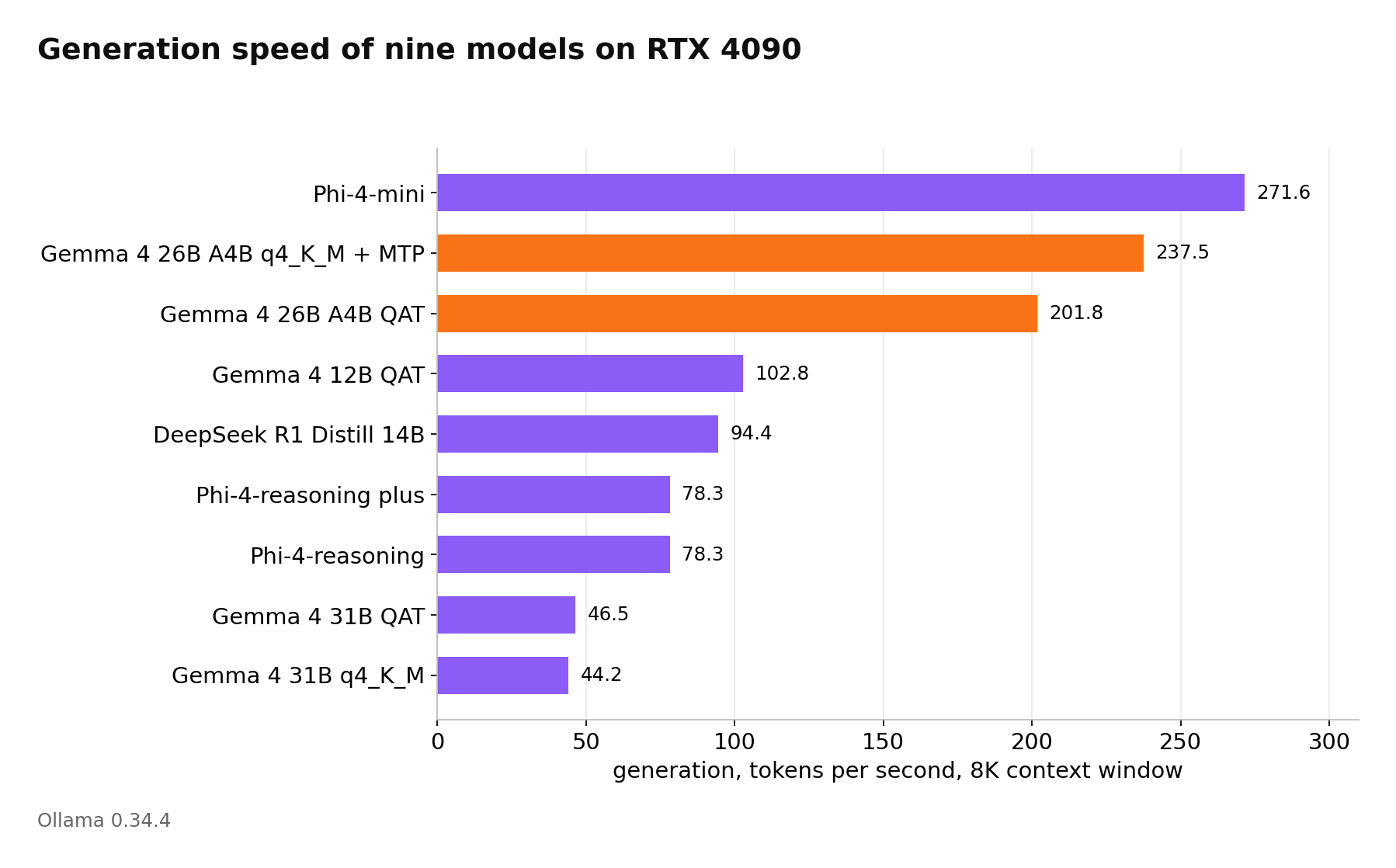
Generation speed of nine models on a single RTX 4090, Ollama 0.34.4
For dense models, generation speed is primarily limited by VRAM bandwidth. For Gemma 4 31B (weights ~17.5 GB), the ceiling is about 57 tokens per second, and our measurement showed 46.5, roughly 80% of the theoretical limit. The fastest result among large models was the Gemma 4 26B A4B MoE at 202 tokens per second, which is twice as fast as the dense 12B and 4.3x faster than the dense 31B.
The `gemma4:26b` tag defaults to the q4_K_M compression variant with a small additional model that suggests draft tokens, which the main model verifies in a batch. Google promises up to a 3x speedup; on our testbed, this variant yielded 237.5 tokens per second compared to 201.8 for the qat variant without the extra model—only an 18% improvement. This is not a perfectly clean comparison as the two tags use different compression, and we did not download the q4_K_M variant without the extra model.
Context Window and Model Offloading to CPU
Ollama reserves the KV cache for the entire context window immediately upon loading the model; the larger the window, the more memory is used beyond the weights. To demonstrate this dependency, we fed three Gemma models a long technical text with windows ranging from 4,000 to 256,000 tokens. The actual request length was about one-third smaller than the window because the text tokenized more compactly than our estimate, which is listed separately in the table.
The 12B and 26B A4B models handled the full 256,000 tokens while remaining entirely on the card. For 12B, VRAM usage grew from 4,000 to 256,000 tokens by only 4 GB; for 26B A4B, it grew by 5 GB. This is likely due to the architecture.
|
Gemma 4 Model |
Window (k tokens) |
Request Length (tokens) |
VRAM Usage (GB) |
Entirely on GPU |
Generation (tokens/sec) |
|
12B qat |
32 |
19 397 |
8.7 |
да |
93.7 |
|
12B qat |
128 |
77 442 |
11.2 |
да |
82.8 |
|
12B qat |
256 |
154 836 |
12.1 |
да |
76.9 |
|
26B A4B qat |
32 |
19 397 |
16.5 |
да |
153.7 |
|
26B A4B qat |
128 |
77 442 |
18.2 |
да |
130.9 |
|
26B A4B qat |
256 |
154 836 |
20.9 |
да |
112.4 |
|
31B qat |
32 |
19 397 |
22.0 |
да |
41.2 |
|
31B qat |
48 |
29 070 |
22.7 |
нет |
27.1 |
|
31B qat |
64 |
38 745 |
22.7 |
нет |
8.7 |
|
31B qat |
128 |
77 442 |
22.6 |
нет |
1.9 |
|
31B qat |
256 |
154 836 |
22.6 |
нет |
0.6 |
Gemma 4 31B shows a different result. Up to a 32,000-token window, the model runs on the GPU at ~41 tokens per second; at a 48,000-token window, some layers offload to the CPU. Despite this, Ollama provides no warning, the request completes normally, and the only sign of an issue is the drop in speed to 27 tokens/sec, to 8.7 at a 64,000-token window, and to 0.6 at 256,000 tokens, a nearly 70x slowdown. The easiest way to diagnose this is via `ollama ps`; in the PROCESSOR column, a non-100% GPU value indicates CPU offloading.
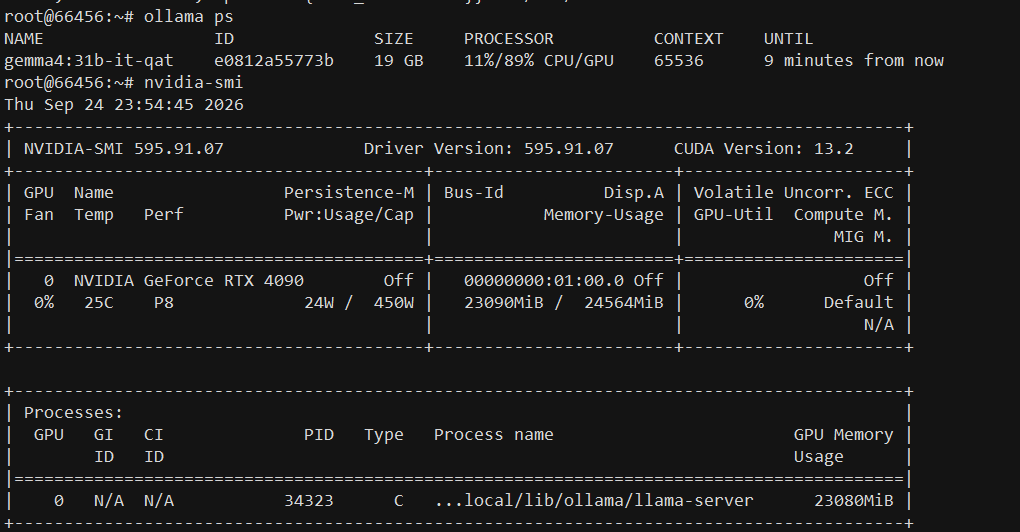
Eleven percent of the model offloaded to the CPU; VRAM is almost full, but there is no error.
The process that keeps the model in VRAM is called `llama-server`; essentially, Ollama runs a `llama.cpp` server internally and inherits all its characteristics, including pre-allocating cache for the entire window.
The context window is passed with every request; if it differs from the window used during model loading, Ollama reloads the entire model, causing a 3-5 second delay. We encountered this by chance during testing when one run used one window and the next used another. In a production environment, this delay is significant. It is better to fix the window size using the `OLLAMA_CONTEXT_LENGTH` environment variable in the service settings, for example, to 16384.
Environment="OLLAMA_CONTEXT_LENGTH=16384"Compressing the KV Cache to 8 Bits
Ollama can store the KV cache in 8-bit format by adding two variables to the service settings:
Environment="OLLAMA_FLASH_ATTENTION=1"
Environment="OLLAMA_KV_CACHE_TYPE=q8_0"|
Window (k tokens) |
VRAM Usage (GB) |
Entirely on GPU |
Generation, 8-bit cache |
Generation, default cache |
|
32 |
20.5 |
да |
37.2 |
41.2 |
|
48 |
21.3 |
да |
34.4 |
27.1 |
|
64 |
22.1 |
да |
31.9 |
8.7 |
|
128 |
22.7 |
нет |
6.5 |
1.9 |
With compressed cache, the model fits entirely on the card up to a 64,000-token window and generates 31.9 tokens/sec instead of 8.7—a 3.7x speedup. The downside is a slight drop in generation speed at a 32,000-token window, from 41.2 to 37.2 tokens/sec.
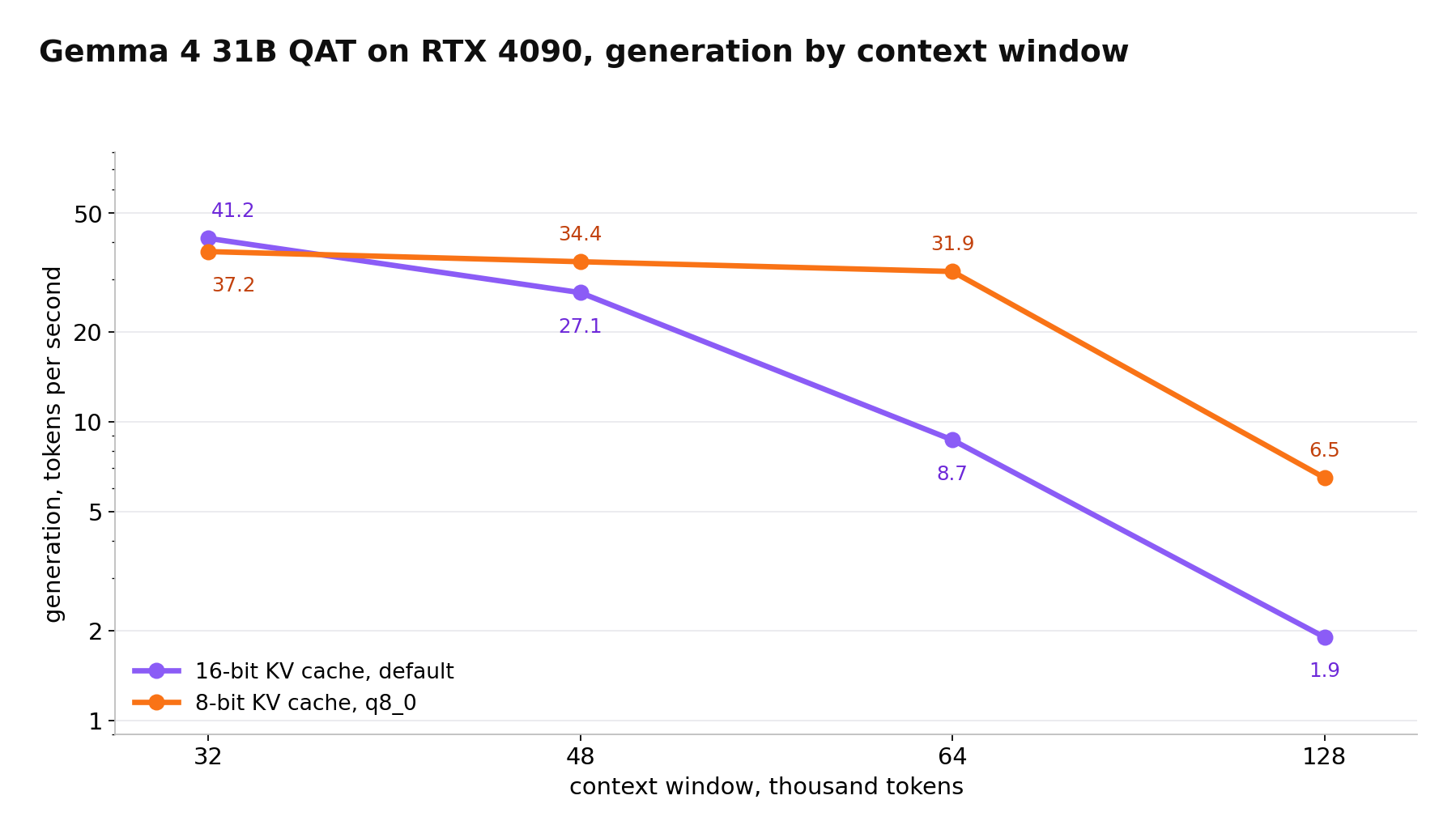
Gemma 4 31B on RTX 4090: Generation speed vs window size with normal and compressed cache
Image Projector
Ollama keeps the image projector in VRAM even when working only with text. To test this, we built a text-only version of the model from the same weight file and loaded both with identical windows.
|
Gemma 4 31B qat |
Window (k tokens) |
VRAM Usage (GB) |
Entirely on GPU |
Generation (tokens/sec) |
|
with projector |
32 |
22.0 |
да |
41.2 |
|
with projector |
48 |
22.7 |
нет |
27.1 |
|
without projector |
32 |
20.8 |
да |
(not measured) |
|
without projector |
48 |
22.0 |
да |
40.1 |
|
without projector |
64 |
22.5 |
нет |
22.7 |
You can build a text-only version from already downloaded files. In the original model's description, there are two `FROM` lines: the first points to the weight file, the second to the projector. Simply delete the second line while keeping the dialogue template and parameters. The resulting model performed identically to the original.
ollama show gemma4:31b-it-qat --modelfile > Modelfile
# remove the second FROM line pointing to the projector
ollama create gemma4-31b-text -f Modelfile
Model Without Cache Savings
For comparison, we ran the same measurement on the 14B DeepSeek R1 distill, which is built on Qwen2.5 and is close in size to Gemma 12B.
|
Context Window (k tokens) |
Request Length (tokens) |
VRAM Usage (GB) |
Entirely on GPU |
Generation (tokens/sec) |
|
32 |
24 690 |
14.7 |
yes |
63.3 |
|
64 |
49 334 |
20.6 |
yes |
48.0 |
|
128 |
98 622 |
22.2 |
no |
1.1 |
The distillate's cache grows by 0.18 GB per 1,000 tokens, compared to ~0.026 GB for Gemma 12B—nearly seven times faster. At a 128,000-token window, the distillate no longer fits on the card and generates only 1.1 tokens/sec.
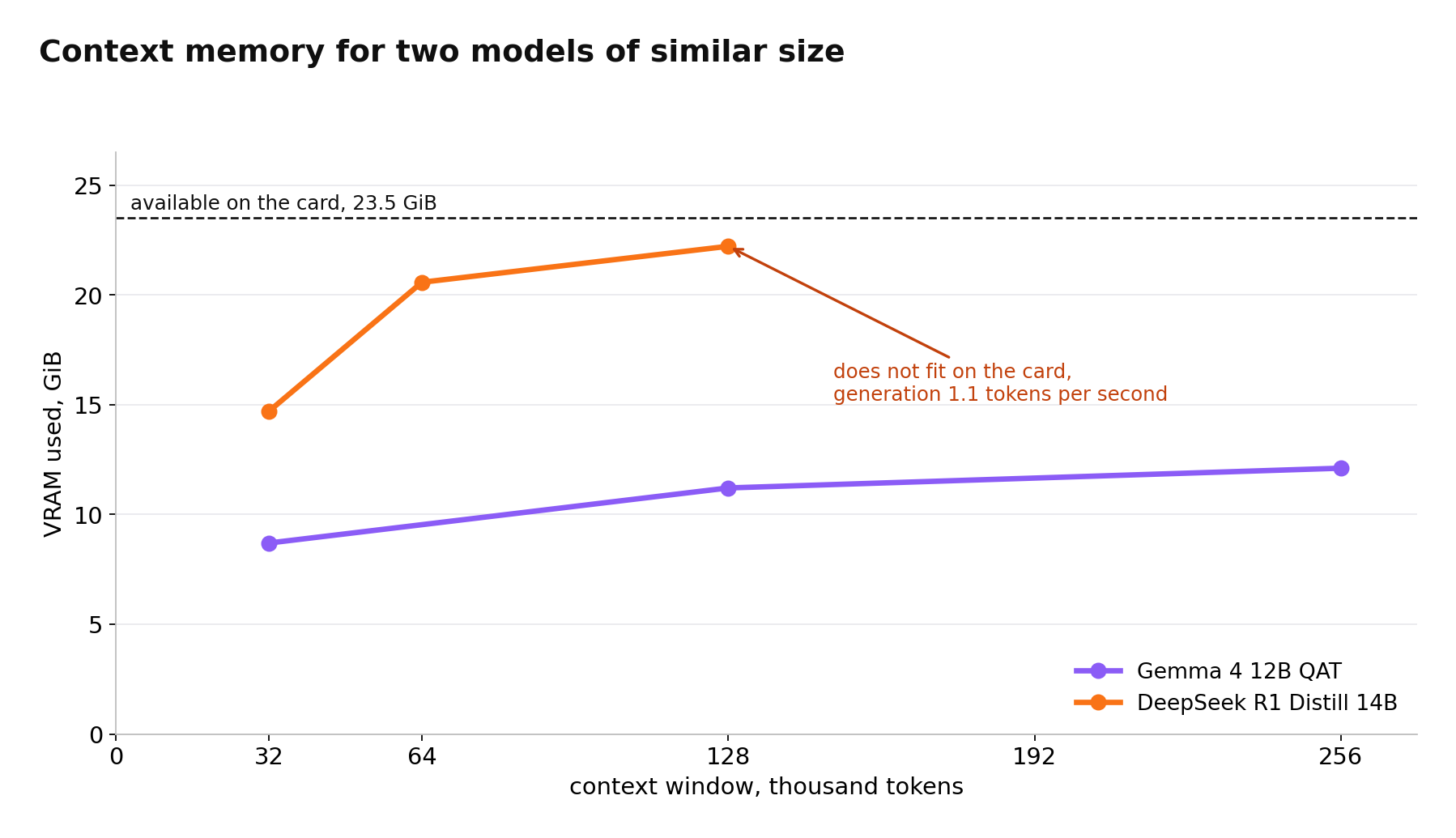
Context memory for two similarly sized models on a single RTX 4090
Fact Finding in Long Documents
To test how the model handles long context, our scenario uses an event log approximately 47,000 tokens long, with eight facts hidden at different depths (e.g., "Engineer Smith keeps the archive access key, the key code is AD-8455"). We then ask the model about each engineer. Temperature is set to zero, reasoning is disabled, and the test was run on three documents with different facts using Gemma 4 26B A4B.
|
Document |
Facts Found |
|
first |
8 of 8 |
|
second |
8 of 8 |
|
third |
7 of 8 |
|
total |
23 of 24 |
The only error was characteristic: the model named a real code from the document but attributed it to the wrong engineer. Fact-finding in long documents is not flawless; for high-stakes tasks, long-document answers should be double-checked.
We also tested the impact of compressed cache on quality using a second set of three longer documents (~57,000 tokens each). With standard cache, the model found 21 of 24 facts; with 8-bit compressed cache, it also found 21. Most errors were identical in both modes, suggesting they are caused by document complexity rather than compression.
The Cost of Reasoning
To see the overhead of reasoning mode, we gave models the same short algebra task: find all integers $x$ where $x^2 - 5x + 6$ is divisible by $x - 1$. The correct answer is -1, 0, 2, and 3.
|
Model, Mode |
Tokens in Response |
Generation Time (sec) |
Generation (tokens/sec) |
Answer |
|
phi4-reasoning |
1 863 |
24.1 |
77.4 |
correct |
|
phi4-reasoning:plus |
2 893 |
37.9 |
76.4 |
correct |
|
gemma4:26b-a4b-it-qat, with reasoning |
1 556 |
8.1 |
195.9 |
correct |
|
gemma4:26b-a4b-it-qat, without reasoning |
606 |
3.2 |
197.7 |
correct |
The "plus" version generated 55% more tokens than the standard Phi reasoning version and took 1.5x longer to answer. For this task, the extra tokens added nothing; both versions answered correctly. Ollama statistics show 485 prompt tokens for a ~30-token question because Ollama automatically inserts a long Microsoft system message from the model template. Reasoning length varies significantly: on a repeat run, `phi4-reasoning` generated 1,944 tokens, while Gemma reasoned for 2,818 tokens compared to 1,556, and both answered correctly. Reasoning time can vary by 1.5x to 2x between requests. In Ollama, Gemma 4 reasons by default; on a one-word greeting, the 12B model spent 211 tokens, only ~10 of which were the actual answer.
Multiple Concurrent Ollama Users
Ollama uses the `OLLAMA_NUM_PARALLEL` variable for concurrent client work. With sixteen slots, the 12B model occupied 23 GB instead of 8 GB and partially offloaded to the CPU.
|
Setting |
gemma4:12b-it-qat usage (GB) per `ollama ps` |
Location |
Context Window (tokens) |
|
OLLAMA_NUM_PARALLEL=16 |
23 |
7% on CPU |
4096 |
|
OLLAMA_NUM_PARALLEL=1 |
8 |
entirely on GPU |
32 768 |
Ollama pre-allocates cache for each slot. Therefore, a setting that appears to allow more users actually multiplies the memory consumption by the number of slots, even for a single request. With ten slots and an 8,000-token window, both medium-sized models fit on the card, receiving identical requests with 512-token responses.
|
Number of Clients |
12B Total |
12B per Client |
26B A4B Total |
26B A4B per Client |
|
1 |
102.9 |
103.9 |
194.5 |
201.3 |
|
3 |
268.1 |
91.7 |
437.9 |
151.0 |
|
10 |
567.9 |
59.3 |
691.6 |
71.8 |
Tokens per second, average of three runs.
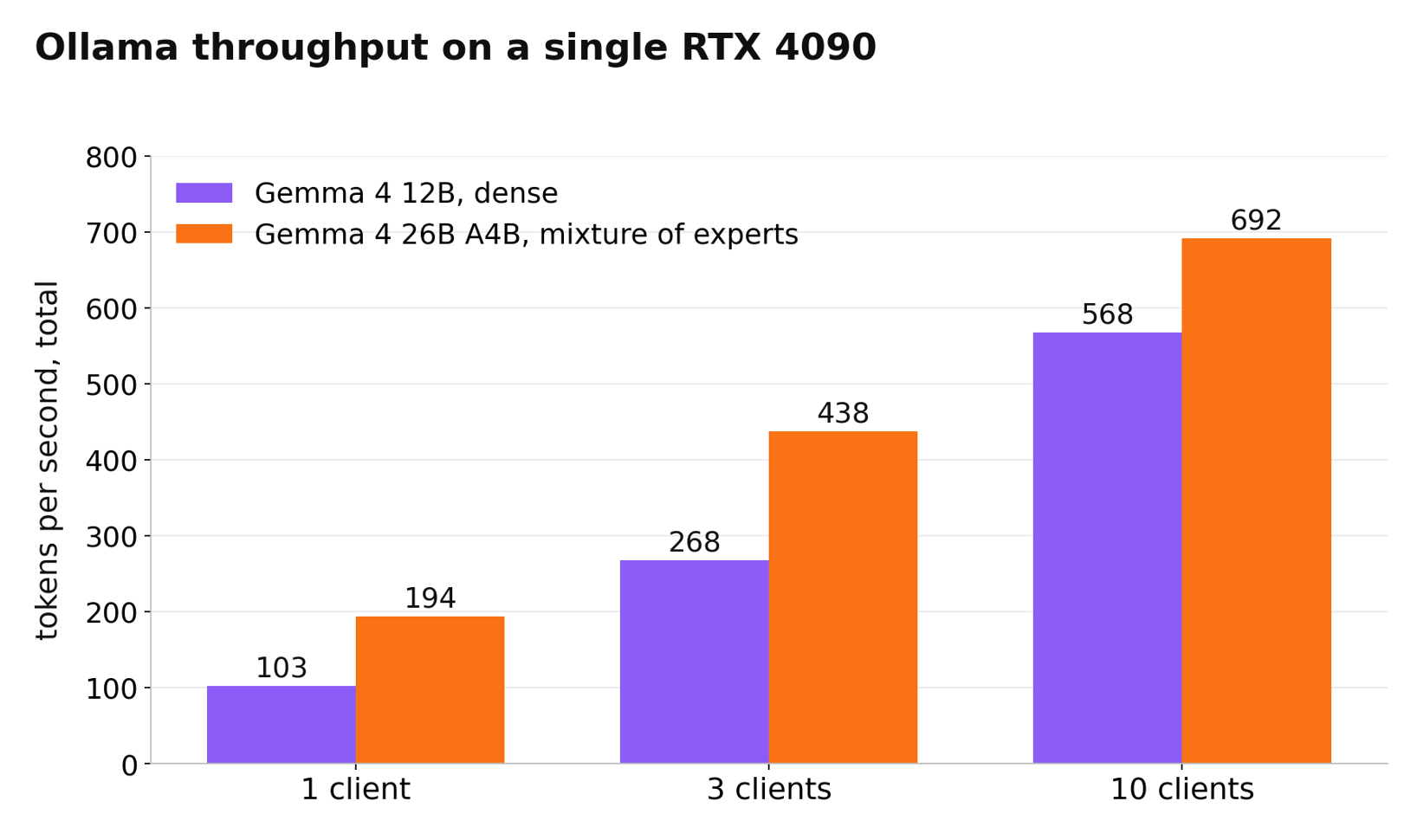
Total Ollama throughput on a single RTX 4090 with one, three, and ten clients
For dense models, total throughput increases 5.5x with ten clients; for MoE, it increases only 3.6x because tokens from different requests select different experts, requiring more model data to be read from memory. The MoE advantage shrinks from 2x with one user to 22% with ten, though it still leads in total throughput (692 tokens/sec vs 568). Under load, MoE also consumes less power—up to 285W compared to 342W for dense models.
Ollama vs vLLM
Ollama is convenient for a single user, but vLLM is typically used for services with many concurrent clients. vLLM's advantage is that it batches tokens from all active requests into a single continuous block at each generation step. For comparison, we ran the same Gemma 4 12B in vLLM, using the official Google 4-bit version in `w4a16` format (optimized for servers) instead of `Q4_0`. This version weighs 10.3 GB compared to 7.2 GB in Ollama because some weights remain in full precision. We stopped the Ollama service before starting vLLM.
Docker and GPU Access
The easiest way to run vLLM is from a pre-built image. This requires installing Docker and the NVIDIA Container Toolkit. Docker is available in the Ubuntu repositories, while the NVIDIA toolkit is from NVIDIA's repository.
apt-get install -y docker.io
curl -fsSL https://nvidia.github.io/libnvidia-container/gpgkey | gpg --dearmor -o /usr/share/keyrings/nvidia-container-toolkit-keyring.gpg
curl -s -L https://nvidia.github.io/libnvidia-container/stable/deb/nvidia-container-toolkit.list | sed 's#deb https://#deb [signed-by=/usr/share/keyrings/nvidia-container-toolkit-keyring.gpg] https://#g' > /etc/apt/sources.list.d/nvidia-container-toolkit.list
apt-get update && apt-get install -y nvidia-container-toolkit
nvidia-ctk runtime configure --runtime=docker && systemctl restart docker
During installation, an issue may occur where the package list update hangs on an Ubuntu mirror; updating only the NVIDIA repository often resolves this.
apt-get update -o Dir::Etc::sourcelist="sources.list.d/nvidia-container-toolkit.list" -o Dir::Etc::sourceparts="-" -o APT::Get::List-Cleanup="0"A container sees the GPU if the following command outputs the same table as `nvidia-smi`:
docker run --rm --gpus all ubuntu nvidia-smiDocker Port
The first run of vLLM with the standard `-p 8000:8000` flag opened the server on all machine addresses (`Starting vLLM server on http://0.0.0.0:8000`). vLLM has no default access control, and Docker writes its own rules into the kernel's packet filter, bypassing `ufw`, so even an enabled firewall will not close this port, and anyone who knows the server address has free access to your GPU. This is fixed by binding the port to a local address; if external access is needed, vLLM supports the `--api-key` parameter.
docker run -d --name vllm --gpus all -p 127.0.0.1:8000:8000 --ipc=host \
  -v /root/.cache/huggingface:/root/.cache/huggingface \
  vllm/vllm-openai:latest \
  --model google/gemma-4-12B-it-qat-w4a16-ct \
  --max-model-len 8192 --gpu-memory-utilization 0.90 --kv-cache-dtype fp8
Results
Each client received the same question as in the Ollama measurements and a 512-token response. We tested 30 or more clients only in vLLM, since with ten slots Ollama simply queues any extra requests.
|
Number of Clients |
Ollama Total |
vLLM Total |
vLLM per Client |
vLLM Total (FP8 Cache) |
|
1 |
102.9 |
95.1 |
95.1 |
96.7 |
|
3 |
268.1 |
276.6 |
92.3 |
(not measured) |
|
10 |
567.9 |
815.6 |
81.6 |
868.3 |
|
30 |
(not measured) |
1 970.2 |
65.8 |
(not measured) |
|
60 |
(not measured) |
2 680.1 |
44.8 |
3 164.8 |
|
100 |
(not measured) |
2 306.8 |
28.0 |
3 278.5 |
|
150 |
(not measured) |
(not measured) |
(not measured) |
3 254.2 |
Tokens per second, average of three runs.
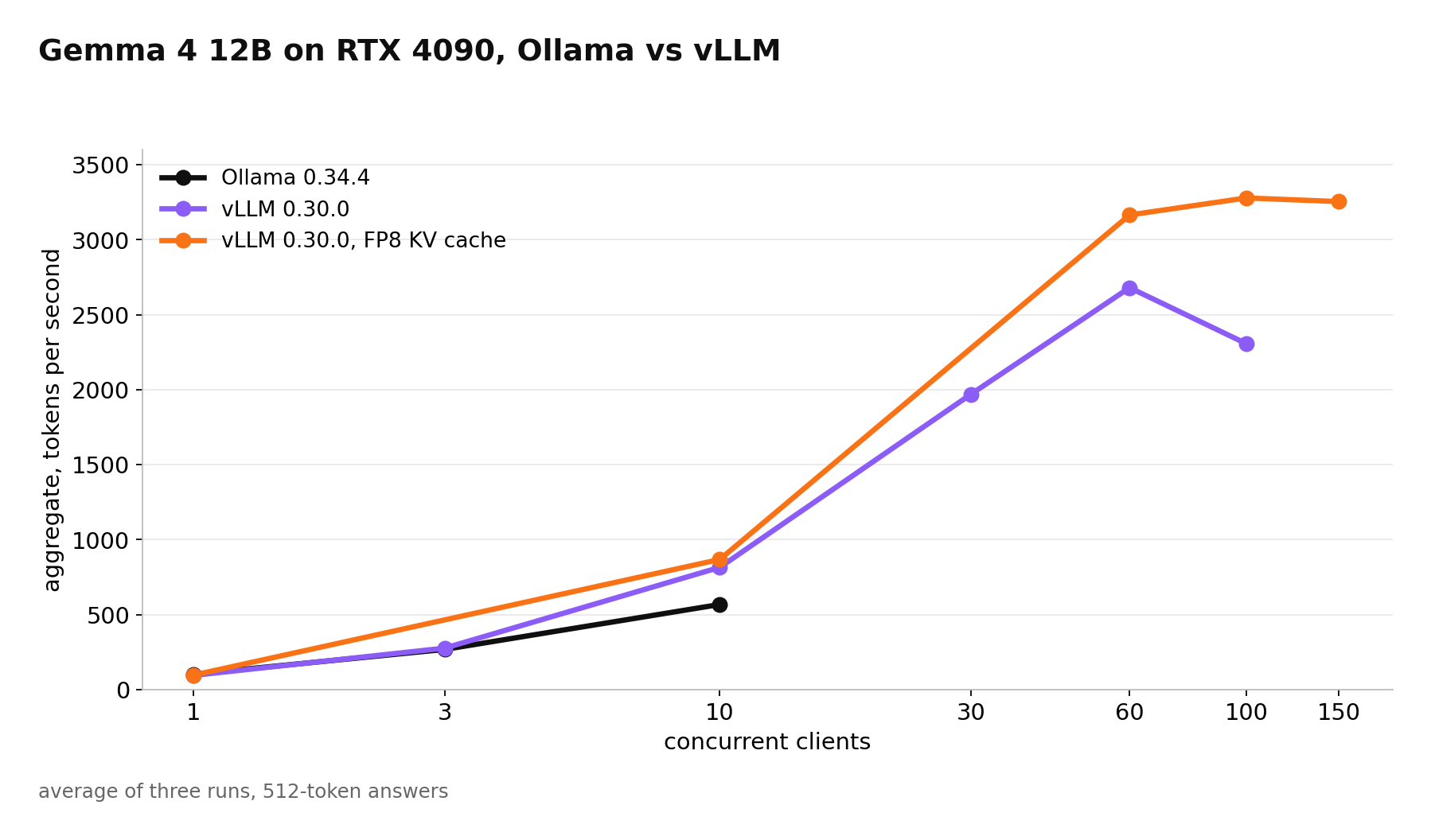
Gemma 4 12B, Ollama vs vLLM by number of clients
At one user, Ollama is about 8% faster; at three, they are nearly equal; at ten, vLLM provides 44% more total throughput, with each user getting responses 38% faster. At 30 clients, vLLM's per-client speed (65.8) is still higher than Ollama's at ten clients.
vLLM Memory Limits
Upon startup, vLLM immediately reserved about 21.6 GB of the 24 GB available, even though the model weighs only ~10 GB. This is not an error but a design feature: the engine pre-allocates 90% of VRAM for the cache. Therefore, comparing VRAM usage between Ollama and vLLM is meaningless.
vLLM logs this reservation at startup; one notable line is:
GPU KV cache size: 47,385 tokens, Maximum concurrency for 8,192 tokens per request: 5.78xThe value 5.78 means that only six requests can fit simultaneously if each uses the full 8,000-token window. Our request (including response) was ~550 tokens, allowing ~86 simultaneous requests; at 100 clients, total throughput actually dropped by 14% because parts of requests had to wait or recompute.
vLLM Cache Compression
With the `--kv-cache-dtype fp8` parameter, vLLM stores the cache in 8-bit format. The 4090 supports this format in hardware, and the cache size in the logs doubled to 94,942 tokens. Unlike Ollama, where compression cost ~10% in speed, in vLLM it actually increased speed: by 2% for one client, 6% for ten, 18% for sixty, and 42% for a hundred. During generation, the GPU reads both the weights and the cache of all active requests at every step. Consequently, with a hundred requests, a halved cache is read significantly faster.
For a single user, Ollama is slightly faster and much easier to configure. For a service with dozens of users, vLLM with compressed cache provides 1.5x more throughput at ten clients and handles nearly a hundred simultaneous dialogues.
Ollama API and Security
By default, the Ollama service listens only on `127.0.0.1:11434`, which we verified using `ss -tlnp`; it is not accessible from outside. You can expose it using `OLLAMA_HOST=0.0.0.0`, but you should not do this without a proxy and access control, as Ollama has no built-in authentication.
In addition to its own interface, Ollama provides an OpenAI-compatible API; any OpenAI library can connect by changing the base URL.
curl -s http://127.0.0.1:11434/v1/chat/completions \
  -H "Content-Type: application/json" \
  -d '{"model":"gemma4:12b-it-qat","reasoning_effort":"none","messages":[{"role":"user","content":"Name the capital of France in one word"}]}'
The reasoning is returned in a separate `reasoning` field, so client code sees a clean response in the `content` field, though reasoning tokens are still generated and take time. With reasoning enabled, a one-word answer took 81 tokens; with `"reasoning_effort": "none"`, it took only 4 tokens, as the model outputs the answer immediately without thinking.
Can You Work Without a GPU?
Ollama automatically uses the CPU if no GPU is detected. On a server with a GPU, you can achieve the same for a specific request by setting `num_gpu` to zero. We used this for testing.
|
Model |
CPU Generation (tokens/sec) |
4090 Generation (tokens/sec) |
Speed Difference |
|
phi4-mini |
17.5 |
271.6 |
15.5 |
|
gemma4:12b-it-qat |
6.1 |
102.8 |
16.9 |
|
gemma4:26b-a4b-it-qat |
16.8 |
201.8 |
12.0 |
|
gemma4:31b-it-qat |
2.5 |
46.5 |
18.6 |
On a CPU, the 26B MoE model generates almost as fast as the 3.8B Phi-4-mini and is 2.75x faster than the dense 12B, making MoE the most sensible choice for a server with sufficient RAM but no GPU.
CPU generation is limited by RAM bandwidth, just as GPU generation is limited by VRAM bandwidth. The 31B weights occupy ~17.6 GB; at 2.5 tokens/sec, the CPU reads ~44 GB/s. The 12B model achieves 6.1 tokens/sec with 7 GB, also ~43 GB/s. For the MoE model, which we estimate reads ~2.6 GB of weights per token, 16.8 tokens/sec again results in ~44 GB/s. Thus, generation speed is roughly equal to memory bandwidth divided by the weight volume read per token.
Prompt processing is also slow on a CPU, which is more critical for long documents than generation. For 12B at 80 tokens/sec, a 20,000-token document takes over four minutes to process before the first word is written, whereas on a 4090 it takes about three seconds.
Cold Start
|
Condition |
gemma4:31b-it-qat Load Time (sec) |
|
File read from NVMe after system cache flush |
10.4 |
|
File already in system memory |
4.4 |
Even from a local NVMe, the first request after a service restart takes ten seconds before the model begins responding. Ollama unloads models after five minutes of inactivity by default; the next user will experience this delay. This can be resolved using `OLLAMA_KEEP_ALIVE=-1`, which keeps the model in memory permanently.
Which Model is Best for Chat, Documents, and Multi-User Services?
|
Task |
Model |
Engine and Settings |
Result on a Single RTX 4090 |
|
Chat or assistant for a single user |
Gemma 4 26B A4B qat |
Ollama |
~200 tokens/sec |
|
Long documents, knowledge base search |
Gemma 4 26B A4B qat |
Ollama, explicit window |
Entire 256k window on GPU, 110+ tokens/sec |
|
Maximum quality on one card |
Gemma 4 31B qat |
Ollama, q8_0 cache or text-only |
Up to 64k window, 32–46 tokens/sec |
|
Service for many users |
Gemma 4 12B qat w4a16 |
vLLM, FP8 cache |
Up to 3,300 tokens/sec total, ~100 short dialogues |
|
Reasoning tasks |
Gemma 4 26B A4B (reasoning) or Phi-4-reasoning |
Ollama |
Gemma is 3x faster than Phi on the same task |
|
Simple tasks on minimal hardware |
Phi-4-mini |
Ollama |
272 tokens/sec (GPU), 17.5 (CPU) |
Common Issues When Running Language Models on a Server
You only need two commands to monitor a server running models: `ollama ps` shows which model is loaded, its context window, and where it is running, while `nvidia-smi` shows VRAM usage, load, temperature, and power consumption.
- The model responds much slower than expected. In the `ollama ps` output, the PROCESSOR column shows a CPU percentage instead of 100% GPU, meaning some layers didn't fit in VRAM. This can be fixed by reducing the context window, using 8-bit cache compression, using the text-only version without the image projector, or using a smaller model. If it shows 100% CPU, the system doesn't see the GPU, which is usually a driver-related (check `nvidia-smi` and `lspci`).
- Memory runs out during a single request. The `OLLAMA_NUM_PARALLEL` variable pre-allocates cache for each slot; sixteen slots can turn a 7 GB model into a 23 GB model.
- The first response takes several seconds. Ollama unloaded the model after five minutes of inactivity, requiring a reload, or the request arrived with a different context window, forcing a model reload. This is fixed by `OLLAMA_KEEP_ALIVE=-1` or `OLLAMA_CONTEXT_LENGTH` with a fixed window.
- The model acts as if it hasn't seen the end of the document. Ollama's default window is based on VRAM; on a 24 GB card, this is 32,768 tokens, and 4,096 without a GPU. Anything longer is truncated without warning. Always set the window explicitly for long documents.
- A simple question takes a long time to process. Gemma 4 in Ollama reasons by default, and short answers can trigger hundreds of reasoning tokens. Disable this with `--think=false`, `"think": false`, or `"reasoning_effort": "none"` in an OpenAI-compatible interface.
- vLLM is slower with 100 clients than with 60. The cache ran out of space, and some requests are waiting or recomputing. FP8 cache helps by doubling the number of tokens that fit; monitor load based on actual dialogue length.
- The model server is visible from the internet. Docker with the `-p 8000:8000` flag opens the port on all addresses, bypassing `ufw`. Bind the port to a local address using `-p 127.0.0.1:8000:8000`, or use a proxy with access control or the `--api-key` parameter in vLLM.
Frequently Asked Questions
Which model is best for code?
According to the Gemma 4 technical report, on LiveCodeBench v6, the 31B model solves 80% of tasks on the first try, 26B A4B solves 77%, and 12B solves 72%. Considering speed, the most reasonable candidate for a code assistant on a single 4090 is the 26B A4B. Microsoft's Phi-4 card warns that the model was trained primarily on Python with standard libraries, so code in other languages should be manually verified.
How much RAM is needed to run a model?
For GPU operation, you should have at least as much RAM as the model file size, ideally twice as much, as the file system cache reduces the loading time of the largest Gemma models from ten seconds to four. For CPU operation, the RAM must accommodate the model plus the context cache; generation speed is then limited by memory bandwidth.
Should I choose Ollama or vLLM?
For a single user, use Ollama; it is slightly faster for single requests and installs with one command. For a service with dozens of concurrent users, use vLLM; on an RTX 4090 with Gemma 4 12B, it provides 1.5x more throughput at ten clients and handles nearly a hundred simultaneous dialogues with ~33 tokens/sec per user when using compressed cache.