



 +31 20 820 3777
 Compliance & KYC
  Support
  Documentation
 Login
Login 




Introduction
The question of how to install software on a server seems settled—until there are two people in a team with different habits. One uses `apt install nginx` and doesn't understand why anyone would make things complicated. The second pulls the same nginx via a container because they know they'll need to roll back in six months, and they don't want to do that via `apt`. This is a typical debate between old-school admins and container enthusiasts found everywhere.
We decided to see what happens when you use a stopwatch as the ultimate argument. The method isn't universal, but it is valid. The results were not exactly what we expected. The time difference between methods was fourfold. Nix turned out to be the fastest, even though it is often considered complex and slow. However, the difference in response time under load was caused not by different installation methods, but by different library versions used by those methods. We also discovered that an interrupted `pip` installation is fatal; the system had to be repaired manually afterward.
Here is the breakdown. First, a map of the methods, since there are more than five. Then, the comparison criteria and methodology, including its weaknesses. Then, the numbers. Finally, a summary table with pros, cons, and scenarios where each method is appropriate.
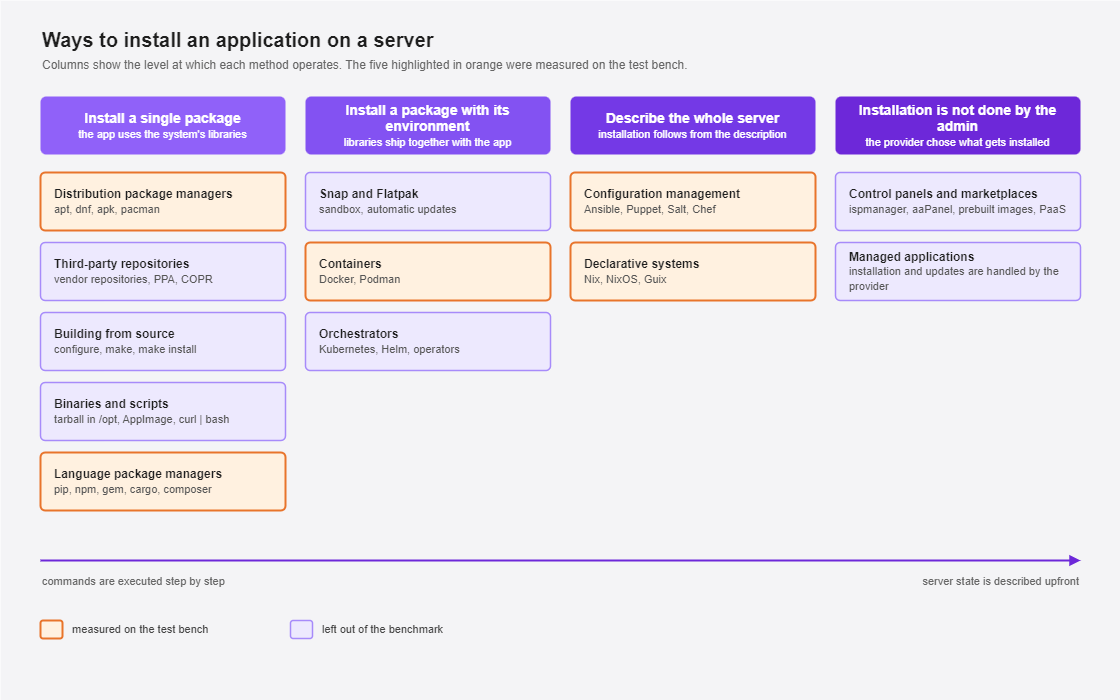
Installation Methods Map
Imperative Installation Methods
There are a dozen ways to install the same application on a server, and they cannot be directly compared or equated. `apt` and building from source only determine where the package comes from and where it is placed. Ansible and Nix describe the server as a whole, so application installation becomes a specific consequence of the general description. A container changes the actual environment in which the application operates, making the question "what is your Python version?" meaningless after the transition. However, each of the listed methods will achieve the desired result and run the software on the server. Therefore, in the second part of the article, we will attempt to compare them based on the result: time to the first successful response, overhead, and what happens during a rollback.
Distribution Package Managers
The standard manager—`apt`, `dnf`, `apk`, or `pacman`—provides signed packages, automatic dependency resolution, and security updates along with the rest of the system. The version is tied to the distribution release. For example, in Ubuntu 24.04, this results in PostgreSQL 16, which will remain version 16 until the end of the release support; for a newer major version, you would need to use a third-party repository.
Third-Party Repositories
Fresh software versions are obtained from the developers' own repositories (where Docker, PostgreSQL, and Nginx builds are located) or from PPA, COPR, and backports. The mechanics are the same as `apt`, and the commands are similar. The key disadvantage of this method is the need to trust the repository owner and the risk that, during a distribution upgrade, the repository might fail to build packages for the new release or might conflict with system packages.
A separate story begins when you create the repository yourself, as the question of repository organization is added to the question of trust.
Building from Source
If there is no option in the distribution or the developer's repository, building from source can help—for example, when you need `nginx` with a module not available in the pre-built package, or when a library needs a patch that hasn't reached a release yet. The procedure remains the same: download the archive, verify the checksum or signature, install a compiler with header packages, and then run `./configure`, `make -j$(nproc)`, and `make install`.
Most of the time is spent resolving dependencies, as `./configure` fails at the first missing package with a `-dev` suffix; you install it, run it again, and fail at the next one. This is exactly what happened with the libraries in our testbed: `psycopg2` requires `libpq-dev`, `cryptography` pulls OpenSSL headers and the Rust compiler, and `Pillow` asks for `zlib` and `libjpeg` headers.
The default result will be located in `/usr/local`, a `systemd` unit must be written manually, and the entire process must be repeated with every update. Rollback only works if you pre-install a versioned prefix like /opt/nginx-1.26 and switch a symlink; otherwise, there is no previous version left after `make install`.
Binaries and Installation Scripts
The program arrives as an archive in /opt, a `systemd` unit is written manually, sometimes you encounter an AppImage, and more and more often, you are offered a `curl | bash` command. This only works if you run a script as `root` that you have likely never seen before and which might overwrite your configuration files—and few people will take the time to read it entirely before running it.
Snap and Flatpak
While package managers remain part of a specific distribution, Snap and Flatpak attempt to live on top of it. The application arrives with its own dependencies and in an isolated environment that updates itself independently of the system. A Snap package is a `squashfs` image mounted as a separate loop device, and strict confinement relies on AppArmor, seccomp, and namespaces, meaning external access is granted through interfaces, some of which must be connected manually. Flatpak works differently: the application is built for a common runtime reused by several programs, and the sandbox accesses host resources through portals, as described in the basic concepts of the format. Portals are designed for user sessions, which typically do not exist on a server.
Both formats are quite rare on servers. By default, `snapd` checks for updates four times a day; the schedule is managed via `refresh.timer`, and a pause can be set with `snap refresh --hold` (including indefinitely), though the system setting `refresh.hold` limits this to 90 days, after which updates will arrive regardless of your preference. Additionally, the system stores several revisions of each snap for rollback; on standard Ubuntu, there are two, on Ubuntu Core there are three, and `refresh.retain` does not accept fewer than two. For a server where versions are planned and deployed alongside everything else, this is inconvenient, although LXD and `certbot` are distributed via Snap, so the format hasn't completely missed the server market.
Language-Specific Package Managers
If the system package manager cannot complete the task, language managers come to the rescue. `pip`, `npm`, `gem`, `cargo`, `go install`, `composer`—each with its own package index and version resolution rules. And, unfortunately, each with its own idea of where to put files. In our experience, these cause the most incidents on a server. For example, running `sudo pip install` over the system Python can break a significant portion of the distribution's utilities that were written in Python and rely on different library versions. Things have improved with PEP 668, as Debian 12 and Ubuntu mark the system Python as "externally managed" (from 23.04), so `pip` no longer writes to it.
The second problem is the supply chain: a package pulls a dependency, which pulls another, and at the third level, you find a library you didn't even know existed. The consequences can be disastrous. For example, in the event-stream incident, a malicious `flatmap-stream` arrived as a direct dependency in version 3.3.6 in September 2018 and stayed in the registry for two and a half months. In October 2021, the `ua-parser-js` developer account was hijacked; malicious versions 0.7.29, 0.8.0, and 1.0.0 hung in the registry for about four hours, which was enough time to infect many machines. Everyone who built their project during that window pulled the malicious software. You can protect yourself from such problems in different ways depending on the language: `npm`, `cargo`, and `composer` write lock files themselves, Go verifies checksums via `go.sum`, and until recently, `pip` relied on `requirements.txt` (as of version 25.1, it has an experimental `pip lock` command following the PEP 751 standard).
Containerized Methods
Containers (Docker and Podman), like declarative systems, solve the problem of reproducibility, but with their own specifics. An application image is described with its own root directory and all libraries, while the kernel remains the host's, and isolation is defined by namespaces and cgroups. The version is fixed by the image tag, and rollback is reduced to running a container with the old tag. It seems simple, but there is always a catch. A tag points to a specific build, and if a minor software update is performed after some time, the same tag might point to a different build version. Only an immutable digest like `postgres@sha256:...` provides a constant link, as it represents a checksum of the content. Docker and Podman differ in that Docker has a daemon running as `root`, while Podman runs containers directly and can operate with standard user privileges, though Docker also has a rootless mode.
Data must be explicitly moved to volumes; otherwise, it will disappear with the container, and logs, by default, go to the `json-driver` and grow until disk space runs out. Additionally, the engine itself requires maintenance. You must monitor its version, the image storage, and ensure there are no conflicts between the container network and the host network.
Beyond maintaining the engine itself, full-scale container usage implies orchestration, monitoring, centralized logging, and service discovery; without this infrastructure, Docker can cause more problems than it solves.
Declarative Installation and Automation
Orchestrators
Kubernetes is rarely used for a single service, as it requires a management layer consisting of `etcd`, an API server, a scheduler, and a controller manager, plus `kubelet` on every node. Helm adds a templating layer with `values` files on top, and operators bring their own resources and controllers, which also need to be run somewhere. There is a lighter option: `k3s` bundles the management layer into a single process and uses significantly less memory, but it remains a separate system with its own characteristics.
Configuration Automation
Ansible, Puppet, Salt, and Chef describe the server as code. Ansible connects to machines via SSH and leaves nothing behind, while Puppet and Chef maintain an agent on the node that pulls configurations. They share the concept of idempotency: a second run does not break what was previously done, because the module first checks the current state and only changes what differs from the desired state defined in the configuration.
Idempotency and reproducibility are different things. An Ansible playbook with `apt install nginx` will run the same way twice in a row, but a year later it might install a different version, because the `present` state simply means the package is installed, while `latest` pulls the newest version from the connected repositories on every run. Reproducibility only occurs with an explicit version like `nginx=1.24.0-2ubuntu7`, and you must similarly fix Ansible collection versions in `requirements.yml`.
Declarative Systems
Nix, NixOS, and Guix exist for reproducibility that imperative automation cannot provide. When using these methods, the entire environment is described, including the versions of all dependencies, and the description is tied to a specific revision of the package tree, which in the case of flake configurations is recorded in `flake.lock`. The result is a stable configuration that will build the same packages a year or two from now, because each of them resides in /nix/store under a name that includes a hash of all the build's input data.
The price for this stability is a high barrier to entry; you need a significant amount of knowledge and experience to work with these installation methods. There is no standard file system hierarchy; instead, there are links in /nix/store, which means a downloaded binary will likely not run because there is nothing at /lib64/ld-linux-x86-64.so.2 in NixOS; such a binary must either be built via Nix or run in a compatible environment. There are many such nuances. Internet recipes are also less likely to work for your specific case than you might hope.
Ready-made Solutions: Panels and Marketplaces
Control panels and marketplaces are in a class of their own because the administrator does not choose the installation method but clicks a button that triggers a pre-prepared software deployment procedure. The key advantage is the low barrier to entry, as the deployment procedure is developed and implemented by hosting engineers, who also fix the installation if a failure occurs.
Alongside international options like aaPanel and CyberPanel, there are `ispmanager` and `FASTPANEL`. Hosting companies' ready-made images can deploy WordPress, GitLab, or Nextcloud in one click, and Platform as a Service (PaaS) can be set up on your own server via tools like Dokku or CapRover. From the client's perspective, the entire process is reduced to choosing a configuration, software, and post-installation scripts (the latter is optional). The deployment itself still uses one of the previously described methods—most often distribution packages or containers—but this is no longer the client's problem.
This logic is most extreme in managed applications, where the question of exactly what is installed and who will administer its infrastructure is handed over to the service provider along with the responsibility.
Criteria for Comparing Software Installation Methods
The twelve listed methods differ fundamentally, from the installation location to the rollback method. Describing them is easy, but not very informative. The discussion becomes substantive when we use axes that provide comparable numbers. We chose six: the first four are measured directly, the fifth is verified by observation, and the sixth is calculated by a tool. In short:
- Time to a working service. The stopwatch stops when the application begins responding to requests, as the return of control from the installation command itself means nothing. The time is broken down into download, unpack, build, and launch phases.
- Overhead.Disk space used, increase in system-wide memory consumption, and response latency under load.
- Reproducibility. Will the same configuration yield the same dependency versions after some time on a different machine?
- Rollback. How long it takes to return to the previous working version and what is lost in the process. In package systems, this is more complex than it seems; you cannot install an earlier version via a standard update, so you must, for example, where a package with a lower version is considered newer.
- Fault Tolerance. What remains in the system if the installation is interrupted halfway, and can the command simply be repeated?
- Known vulnerabilities after installation. How many known CVEs does each package delivery method bring with it?
These tests are approximate. Importantly, it is impossible to test the barrier to entry, the cost of operation, and other non-universal aspects for each method.
Which Methods We Will Test and Why
There is no point in running all twelve methods, as they are not quantitatively comparable, and some will yield results that are known without measurement. We took one representative from each family and added the method that is most frequently a source of problems.
`apt` is our baseline, as it installs ready-made binary packages without building, adding nothing to the system beyond the packages themselves. `pip` combined with `venv` is interesting due to the number of incidents. Docker is the most controversial of the five; its supporters and opponents are roughly equal in number—supporters see it as the standard, while opponents see it as just extra overhead on a server. Ansible is interesting because it looks declarative from the outside but calls `apt` on the inside. Nix sits at the declarative pole, making it a good point of comparison for the rest.
Methodology
We conducted measurements on what an average person would use: five rented virtual machines in a single datacenter, one machine per method, with five runs and the same application for all installation methods. Note that this setup answers "how long will it take" rather than providing an ideal benchmark for choosing a software installation method; it is not a laboratory study in ideal conditions on bare metal.
The application required native dependencies, otherwise half of the interesting problems wouldn't appear, so we built a service on FastAPI that requires `psycopg2`, `Pillow`, and `cryptography`, alongside PostgreSQL and Nginx. The `psycopg2-binary` package was intentionally avoided so that the native code would be built from source. The service has two routes: `/health` returns success when the application is up (this is when readiness is recorded), and `/api/test` reads a fixed string from the database, resizes the same image, and returns the result. PostgreSQL is installed using the same method as the application. The only exception is `pip`, as it cannot install server packages, so the database was ultimately provided via `apt`.
|
Server |
CPU, 1 thread |
CPU, 4 threads |
Write operations |
Write latency, 99th percentile, ms |
|
apt |
901,3 |
3677,6 |
12 856 |
3,88 |
|
pip |
930,4 |
3758,8 |
12 178 |
3,88 |
|
Ansible |
919,1 |
3653,9 |
11 974 |
3,92 |
|
Nix |
933,7 |
3741,8 |
26 652 |
1,22 |
|
Docker |
977,6 |
3820 |
32 038 |
1,16 |
The CPU data showed the servers were quite similar, with extreme values differing by 8.5% in single-thread and only 4.6% in four-thread tests. However, the disks differed by a factor of 2.7, as Docker and Nix were on noticeably faster storage, where write latency was three times lower. This significantly influences how we interpret the tables below. A difference of a few percentage points is negligible, but the impact of fast disks is shown in the control series in the next section.
Results
The rejection threshold for CPU time selected by the hypervisor was 5%, and no run exceeded this, as peak values stayed around 0.26%, with only one Ansible run jumping to 1.49%.
Time to a Working Service
|
Method |
Run 1 |
Run 2 |
Run 3 |
Run 4 |
Run 5 |
Median |
|
apt |
33.15 |
32.58 |
32.45 |
32.15 |
31.70 |
32.45 |
|
pip |
76.83 |
57.72 |
57.33 |
57.17 |
58.41 |
57.72 |
|
Ansible |
111.88 |
110.32 |
111.46 |
111.27 |
110.57 |
111.27 |
|
Nix |
32.48 |
31.86 |
27.12 |
26.49 |
26.27 |
27.12 |
|
Docker |
110.48 |
108.02 |
109.14 |
110.79 |
110.52 |
110.48 |
The median was calculated from the five runs in the series. A trial run performed on a fresh machine before the series to ensure the script worked was not included, as background package update timers had not yet run on a fresh machine, making the conditions different from the other repeats.
The variance between repeats is small for all methods, except for the first `pip` run (76.83 seconds vs. approximately 57.5 for the others). This difference is explained by the breakdown of phases. Installing build tools the first time took 21.44 seconds compared to 5.22 in subsequent runs, and PostgreSQL installation took 20.28 vs 16.09. The `apt` cache was not cleared between runs, so from the second run, `build-essential` and headers were taken from the disk rather than the network. This isn't due to building native extensions, as the `pip` cache was cleared before each run, and `psycopg2` and `Pillow` were recompiled every time; the "pip install" phase stayed at 25.92 seconds in all five runs.
Nix's median of 27.12 seconds looks like a victory for the declarative approach, but it was achieved on a machine where the /nix storage was already populated, as we deleted profiles and cleaned up garbage between repeats while leaving the package manager itself. This is why the Nix installation phase in the table is only 0.10 seconds. On a clean machine, the first installation including the storage download took 86.44 seconds and failed at the service launch stage, so a readiness metric could not be captured.
Control Series
The machines diverged in calibration more than expected. While single-thread CPU divergence was 8.5%, the difference in disk write operations reached 2.7x because the Docker and Nix servers had noticeably faster disks. To see if the disks were the cause, we ran `apt` five times on the machine reserved for Nix.
|
apt, 12,856 operations |
nix, 26,652 operations |
Difference |
|
|
Time to service |
32.45 sec. |
34.22 sec. |
+5,3 percent |
|
Requests per second |
63.51 |
60.55 |
−4,7 percent |
The machine with a twice-faster disk gave a slightly worse result, which likely means the disk subsystem was not the bottleneck. However, the comparison of Nix and `apt` on the same machine was clean, where Nix won by 21.4% in time to service and 49.7% in requests per second.
Response Under Load
|
Method |
Median Latency, sec. |
99th Percentile, sec. |
Requests per second |
|
apt |
0.323 |
0.401 |
63.51 |
|
pip |
0.332 |
0.425 |
61.15 |
|
Ansible |
0.339 |
0.430 |
60.19 |
|
Nix |
0.221 |
0.317 |
90.62 |
|
Docker |
0.292 |
0.377 |
69.90 |
The 1.5x difference between Nix and Ansible on the same application code looks suspicious, and checking the versions reveals the reason:
|
Method |
Python |
Pillow |
psycopg2 |
|
apt |
3.12.3 |
10.2.0 |
2.9.9 |
|
Nix |
3.12.8 |
11.0.0 |
2.9.9 |
|
Docker |
3.12.14 |
11.1.0 |
2.9.10 |
The `/api/test` handler spends most of its time resizing an image (working inside `Pillow`), and the `Pillow` versions differ across the tested methods. It turns out that on this axis, we compared library builds rather than installation methods.
Space and Memory
|
Method |
Artifacts, MB |
Root Partition Increase, MB |
dpkg Packages |
|
apt |
46 |
266 |
+58 |
|
pip |
98.3 |
387 |
+34 |
|
Ansible |
46 |
888 |
+80 |
|
Nix |
1357.6 |
53 |
0 |
|
Docker |
632.9 |
2 078 |
+14 |
The first two columns require a brief explanation: `du` only counts the directories of the specific method, while `df` counts the entire server including `/usr`, caches, and logs, hence the different scales. Docker is the most expensive, adding two gigabytes compared to 266 megabytes for `apt`, while Nix stands alone in this table because its 1357.6 MB storage was already filled before the run and was not included in the increase.
Memory variance is small and predictable:
|
Method |
Megabytes |
|
apt |
543.5 |
|
pip |
538.2 |
|
Ansible |
609.7 |
|
Nix |
641.9 |
|
Docker |
673.2 |
Docker requires about 130 MB more memory than `apt`, and it also brings 15 new `systemd` units compared to 5 for `apt` and 2 for Nix.
Reproducibility
The full version list hash matched for all methods across all five runs, except for `apt`, where the first run gave one hash and the next four gave another. The control series on the second machine gave the same hash as the later runs, so the issue is not the machine; it must be investigated separately. Here, we also hit another limitation of our methodology: reproducibility should ideally be tested over a year, not a few days.
Vulnerabilities
|
Scanned |
Critical |
High |
Medium |
Low |
|
apt |
114 |
2327 |
26 634 |
2655 |
|
pip |
119 |
2493 |
28 689 |
2846 |
Both rows were taken using the command `trivy fs --scanners vuln /` on the same system, so the extra 5 critical and 166 high vulnerabilities in `pip` are due to additional packages installed by the `pip` script, specifically `python3-dev`, `build-essential`, and library headers for building `psycopg2` and `Pillow`. Docker, Ansible, and Nix require different scanning methods, so their results are not in this table.
What Went Wrong
The most interesting findings were in the failures.
Ansible on Ubuntu 22.04 fails to install Galaxy collections because `ansible-core` version 2.12 is incompatible with the current dependency resolution mechanism, so the pilot runs on this system had to be abandoned.
An interrupted `pip` installation at the 40-second mark left the system in a state that a second run of the script could not fix, and the database cluster had to be created manually via `pg_createcluster`. This is the "fault tolerance" axis we mentioned in the criteria, and `pip` failed it.
The Nix installer fails on its own backups of system files when restarted, and `nix-collect-garbage -d` deletes the superuser profile along with the `nix` binary. Both cases can occur during normal operation.
Which Method to Choose for Which Task
|
Installation Method |
Pros |
Cons |
Best For |
|
Distribution Package Managers |
Signed packages, security updates; well-known and familiar to Linux users. |
Major versions are not updated until the end of the release support. |
Nginx, PostgreSQL, and other software if the distribution version is acceptable. |
|
Third-Party Repositories |
Fresh software versions; same mechanics as `apt`. |
Requires trusting the repository owner; security risks; risk of conflicts during distribution upgrades. |
Docker, PostgreSQL, Nginx, and all software when a fresh version is required.. |
|
Building from Source |
Control over compilation flags; ability to apply custom patches; build any required version. |
Requires manual dependency configuration; package managers and vulnerability scanners won't see the program. |
When a module or patch is needed that is not in pre-built packages. |
|
Binaries and `curl \| bash` |
Installs in a minute; built by the software author rather than a distribution maintainer. |
Scripts run as `root`; no standard update or rollback mechanism. |
Utilities without data or dependencies that are easier to reinstall than to fix if they fail. |
|
Snap and Flatpak |
Isolation; works on top of any distribution. |
Updates arrive automatically; updates can be delayed up to 90 days; old package revisions remain on disk. |
LXD, `certbot`, and other software distributed only this way by the vendor. |
|
Language-Specific Package Managers |
Access to all language packages, including those not in the distribution, with versions released before they hit repositories. |
Installs packages over the system Python and can break distribution utilities; native extensions are recompiled every time; risk of malicious packages. |
Libraries for your own application that are not in the distribution repository. |
|
Containers |
Environment travels with the application; rollback via tag change; isolation. |
The daemon consumes memory (673 MB vs 543 MB for `apt` in our tests); images and build layers consumed two gigabytes of disk; host scanners don't see vulnerabilities inside the image. |
When a machine runs several services with different library versions, or when quick rollback to a previous version is critical. |
|
Orchestrators |
Services migrate between nodes automatically; failed containers restart without human intervention; load is distributed across the cluster. |
The management layer (etcd, API server, scheduler, controllers) consumes resources whether running one application or forty. |
When there is a need to support many services on multiple nodes, downtime is unacceptable, and there is a person managing the cluster. |
|
Configuration Automation |
Server is described as code; idempotency; convenient for large fleets of machines. |
The same playbook might install different package versions a year later if not explicitly pinned; Ansible installation took 68 seconds of our 111-second runs. |
A fleet of identical servers, e.g., application nodes with Nginx, PostgreSQL, and a monitoring agent. |
|
Declarative Systems |
The same configuration builds the same package versions a year later; rollback restores the entire system with one command; installation was 21% faster than `apt` on a full storage. |
Proprietary build model and configuration language; downloaded binaries won't run; the `/nix` directory takes 1.5 GB and grows with every generation. |
Long-lived services that must be reproducible a year later; requires someone willing to learn Nix. |
|
Panels and Marketplaces |
Low barrier to entry; application is deployed by choosing from a list; installation playbooks are written and maintained by hosting engineers who fix failures. |
The host determines the deployment procedure and composition, meaning you don't choose the app version or dependencies; moving to another provider requires a rebuild from scratch. |
Standard applications like WordPress or GitLab when you don't have time for server administration and need a standard setup. |
Summary
The installation method itself rarely speeds up or slows down the software, but it can affect the initial deployment process and future software updates. You must choose based on more than just installation time.
`apt` provides predictability at the cost of frozen versions, while language managers provide fresh libraries at the cost of system conflicts and dozens of extra packages on the server.
Containers allow for rollback via a tag change but add a constantly running daemon, vulnerabilities inside the image that host scanners don't see, and consume two gigabytes of disk. Nix provides reproducibility at the cost of a high barrier to entry and its own file hierarchy.
Standalone automatically deployed panels and marketplaces allow you to install the required software without any administration skills, but they do not allow you to control exactly what is installed.
All of the above applies to a single server; for a fleet of machines, the choice of installation method is compounded by questions of lifecycle, building, and distributing packages across sites.