



 +31 20 820 3777
 Compliance & KYC
  Support
  Documentation
 Login
Login 



WordPress is far more than just a blogging platform. According to W3Techs, it powers nearly half of all websites on the internet, and one in five online stores worldwide runs on it. The reason is clear: full control over your site, data, and costs without being tied to closed platforms that take a percentage of turnover and penalize growth.
That said, WordPress out of the box is a content management system, not a store. Catalog, cart, payment, shipping, receipts — all of this only appears once you add plugins. Picking the right one isn't easy: the official wordpress.org catalog lists dozens of solutions, and every one of them claims to be the best.
We hope this article will simplify your choice. We'll walk through ten plugins, their real prices, pros and cons, and — most importantly — answer the question of who each one is actually suitable for.
Plugin Selection Criteria
Before looking at specific solutions, it's worth defining your evaluation criteria. Marketing copy is written by marketers — they praise everything, and choosing based on it is pointless. In practice, store owners tend to get burned by the same things: picking a plugin that's no longer maintained, overpaying for extensions they didn't budget for, or being left without support at a critical moment. So when choosing, check a few things:
- Functionality. Don't focus on the number of options in the list — focus on what actually fits your needs. Physical goods that ship digital products with licenses, content subscriptions, and one-time payments for services are different models, and each has its own optimal solution.
- Compatibility. WordPress updates regularly, and so does PHP. A plugin that hasn't been updated in a year is a compatibility and security risk. Every plugin's page on wordpress.org/plugins/ shows the date of the last update and the WordPress version it was tested against. That's the first thing to look at.
- Support. Free plugins live on the wordpress.org forums — the quality of answers varies, and response speed is unpredictable. Paid plugins usually provide a ticket system with guaranteed response times. For a store that brings in revenue, the difference between "they'll answer eventually" and "they'll answer within 24 hours" is significant.
- Price. Most serious plugins run on a "freemium" model: basic functionality is free, but the features you actually need cost money. WooCommerce is free, but the necessary extensions can run $200–500 a year. Calculate the total cost of ownership, not just the starting price on the homepage.
- Reviews. Star ratings on wordpress.org and the number of active installations give a general sense of a plugin's reliability. But it's more useful to read the negative reviews — that's where real problems surface, the kind marketing materials never mention.
Top 10 E-commerce Plugins
The market for WordPress e-commerce plugins is large, and every solution has its own niche. Some are built for physical goods, others for digital products, and some aren't about catalogs at all but about accepting payments or gating content. The list is intentionally diverse — it covers a range of scenarios, from a small store with a few dozen items to a large B2B operation with thousands of SKUs and complex pricing logic. Below are ten plugins most commonly encountered in real projects, with a breakdown of what each can do and who it actually suits.
1. WooCommerce
WooCommerce is practically synonymous with WordPress e-commerce. More than 4 million stores worldwide, 31% of the top million e-commerce sites — the numbers speak for themselves. The plugin first appeared in 2011 as a product of WooThemes, which was acquired by Automattic in 2015 — the same company behind WordPress.com. Since then, WooCommerce and WordPress have evolved within a single ecosystem, which largely explains its dominant market position.
Out-of-the-Box Features
The basic functionality covers most scenarios: physical and digital goods, inventory management, variations (size, color, material), coupons, taxes, shipping, and reports. For the B2B segment, there's role-based pricing, wholesale orders, and customer-specific catalogs. For international stores: multi-currency, multi-language, and regional tax settings.
A separate plus is the API. You can build headless stores, mobile apps, and integrate with anything: NetSuite, Salesforce, HubSpot, Akeneo. Norwegian electronics importer Kellox runs on WooCommerce with a catalog of 800,000+ SKUs and updates 500,000 items at a time.
Pricing
The plugin itself is free and open source. Real costs come down to hosting, extensions, and development. Extensions from WooCommerce itself cost $49–299 per year each; third-party developers are usually cheaper. Total cost depends on what functionality you need, but compared to SaaS platforms like Shopify Plus it's more predictable, since there's no percentage cut on turnover and no penalties for growth.
For large stores, there's Woo Enterprise: a dedicated success manager, priority technical support, managed hosting, and custom WooPayments rates.
Pros
- Free core functionality
- Huge ecosystem: 1,000+ extensions, hundreds of partner agencies
- Full control over data and code
- Suitable for both small stores and high-load projects
- No platform transaction fees
Cons
- Large catalogs require proper hosting and caching configuration
- The cost of necessary extensions adds up
- Complex tasks require a developer
Suitable for: a universal choice — from a small store to an enterprise with thousands of SKUs and complex B2B logic.
2.Easy Digital Downloads
Easy Digital Downloads (EDD) is a plugin for selling digital goods: software, e-books, music, templates, courses. WooCommerce can sell digital products too, but there it's just one feature among many. EDD is built specifically for this — no shipping calculators or stock-management logic you'll never use.
Out-of-the-Box Features
A complete digital commerce toolkit without additional extensions: automatic file delivery after payment, software license management, subscriptions and free trial periods, content protection, multi-currency, support for Stripe, PayPal, and Apple Pay. Most extra features are available without separate extensions: abandoned cart recovery, AI-based recommendations, customer wishlists, and fraud protection.
Pricing
Three paid plans (prices discounted at the time of writing):
- Extended — $199.50/year (1 site): subscriptions, multi-currency, coupons, EU VAT, Zapier integration, standard support.
- Professional — $299.50/year (2 sites): everything in Extended plus software licensing via API, multi-vendor marketplace, partner payouts, post-purchase funnels.
- All Access — $499.50/year (3 sites): full feature set, including a loyalty program, advanced analytics, bulk discount generation, direct messaging to buyers, and premium support.
There's also a free version with basic functionality.
Pros
- Lightweight and fast — no extra code for physical goods
- Software licensing and subscriptions included in the plan, no separate extensions needed
- Full control over data: everything is stored on your server
- No sales commissions or listing fees
- Quick start: per the developers, a store can be launched in 10 minutes
Cons
- The free version is heavily limited — real work starts at a paid plan
- Not suitable for physical goods (only in Professional and above, and even then as an add-on)
- Smaller extension ecosystem than WooCommerce
Suitable for: developers, designers, course authors, musicians — anyone selling something that can be downloaded or activated via license.
3. MemberPress
MemberPress is a plugin for monetizing a site through memberships and subscriptions. If the business is built on gated content, online courses, consulting, or communities, MemberPress covers all of this in one tool, without the need to assemble a solution from several plugins. Content creators have collectively earned over $2.5 billion through the plugin.
Out-of-the-Box Features
At its core is content access management: a paywall system, drip content with opening timers, and flexible access rules by membership level. A built-in course builder with drag-and-drop elements, quizzes, assignments, and certificates. A coaching platform, CoachKit, with personal programs and client management. Forums and member directories via ClubSuite.
Payment tools available in the plugin include Apple Pay, Google Wallet, credit cards, ACH/direct debit, Cash App, and installment plans. Corporate accounts for B2B sales: an organization buys a membership package and distributes seats among employees. Upsells directly on the checkout page via Order Bumps.
Integrations include Mailchimp, HubSpot, Salesforce, Zapier, Zoom, Discord, Slack, ActiveCampaign, and many others.
Pricing
Three plans (discounted prices):
- Launch — $199.50/year: unlimited courses and members, Stripe only, basic content protection, standard support. Note: applies to every payment at this tier.
- Growth — $349.50/year: no transaction fees, adds PayPal and Square, drip content, forums and member directories, priority support.
- Scale — $499.50/year: full feature set, including the Easy Affiliate partner program, corporate accounts, gift cards, Amazon S3 integration, file management, and a developer API.
There's no free version. A "turnkey site" service is available, where the developers set everything up for the client; turnaround starts at 21 days, with cost depending on the package.
Pros
- All-in-one: courses, consulting, community, and membership without assembling separate plugins
- Drip content with flexible settings
- Corporate accounts for B2B sales
- Rating of 4.7–4.8 on Capterra, G2, and Trustpilot
- Works with any WordPress theme
Cons
- No free version
- The 4.9% fee on the entry-level plan eats into margins significantly
- The Growth or Scale plan is needed for full functionality
- Overkill for a simple store without a subscription model
Suitable for: online course creators, consultants, paid-newsletter and community authors, and media projects with paid content access.
4. SureCart
SureCart is a relatively new player in the WordPress e-commerce plugin market, but it's growing quickly: a 4.8 rating on wordpress.org, 4.7 on G2, and 4.3 on Trustpilot. It's positioned as a replacement for a stack of several plugins — one tool covering sales, subscriptions, affiliate programs, and analytics without additional extensions.
Out-of-the-Box Features
Physical and digital goods, services, subscriptions, software licenses, donations — all in one plugin. Product variation management with individual prices and media files for each variation. A built-in drag-and-drop checkout builder, conditional fields, multiple templates. Multi-currency and support for multiple payment methods.
Tools for increasing average order value: post-purchase upsells without re-entering payment details, additional offers on the checkout page (order bumps), dynamic pricing, and abandoned cart recovery. Built-in affiliate program with a partner dashboard, click tracking, and commission settings.
For subscriptions: free and paid trial periods, trial abuse prevention, card expiration reminders, and cancellation surveys with discount or plan change offers.
Agency tools: centralized management of client stores from one panel, client accounts, and agency commissions.
Pricing
- Launch — Free (1 store): full functionality with a 1.9% fee on each transaction.
- Pro (annual) — $179/year: no transaction fees, up to 5 stores.
- Pro (one-time) — $599: lifetime license, no fees, no store limits.
Pros
- Free plan with full functionality — rare on the market
- Built-in affiliate program without a separate plugin
- Lifetime license for a one-time payment
- High ratings across all major review platforms
- Upsells and order bumps without additional extensions
Cons
- The 1.9% fee on the free plan eats into margins as sales grow
- Younger than WooCommerce, which means a smaller integration ecosystem
- A paid plan is needed to remove the fee
Suitable for: launch-stage projects, freelancers, and small stores that need a modern, broadly capable tool without large upfront investment — and agencies managing stores for multiple clients.
5. BigCommerce for WordPress
BigCommerce for WordPress is a hybrid approach to e-commerce: WordPress handles content and presentation, while BigCommerce runs the backend — catalog, payment processing, logistics, security. The result is a headless storefront without the technical complexity of a true headless build.
Out-of-the-Box Features
The plugin pulls the product catalog from BigCommerce into WordPress and automatically creates all the necessary pages: cart, checkout, account, order history, gift certificates. Most features work out of the box, without installing additional extensions: multi-currency, taxes, shipping calculation, promotion management.
The catalog is built for complex structures: up to 600 variants per product and 250 values per option. Multi-channel sales are supported directly from the dashboard: eBay, Amazon, Facebook, Google Shopping, Square.
The plugin supports over 65 payment gateways, covering 100+ countries and 250 local payment methods. PCI DSS compliance is handled by BigCommerce itself, meaning buyer payment data never passes through the WordPress server.
The plugin ships as open source, supports standard WordPress template overrides, and offers hooks and filters. It works with any WordPress theme and supports Gutenberg.
Pricing
The plugin itself is free, but it requires a BigCommerce subscription to operate. BigCommerce plans start at $39/month. 24/7 technical support via phone, chat, and email is included in all plans.
Pros
- Store load doesn't affect the speed or availability of the WordPress site
- PCI DSS compliance handled on BigCommerce's side — nothing to manage yourself
- Sell across multiple sites from a single dashboard
- Built-in ERP, PIM, and OMS integrations without additional extensions
- 65+ payment gateways out of the box
Cons
- Requires a BigCommerce subscription on top of WordPress hosting
- Less flexibility in checkout customization compared to WooCommerce
- Overkill for a small store with a simple catalog
Suitable for: medium and large businesses with a large catalog, strict security and uptime requirements, or those selling across multiple platforms simultaneously.
6. Ecwid Ecommerce Shopping Cart
Ecwid is a cloud store that integrates with WordPress via a plugin (add-on). The key difference from WooCommerce: the entire backend runs on Ecwid's servers, with WordPress acting only as the storefront. The site stays lightweight and fast because it isn't carrying the store logic.
Out-of-the-Box Features
Right after installation, the plugin gives you product, order, and payment management from a single dashboard, including a mobile app for iOS and Android. Built-in analytics: traffic, conversion rate, comparison of new vs. returning buyers, checkout funnel by step. Multi-channel sales: social media, eBay, Amazon, Google Shopping all connect from one interface. Automatic tax calculation, multi-language store, Google Analytics integration, CSV export.
Pricing
Four plans, priced in euros (annual subscription pricing):
- Starter — €5/month: up to 10 products, basic templates, email support.
- Venture — €29/month: up to 100 products including digital goods, social media sales, built-in analytics, coupons, customizable checkout.
- Business — €49/month: up to 2,500 products, marketplace sales, subscriptions, wholesale pricing, multi-language store, 2 staff accounts, abandoned cart recovery.
- Unlimited — €119/month: unlimited products, POS integration, unlimited staff, priority support, up to 500 scheduled promotions.
Pros
- Starter plan at €5 — low barrier to entry
- Multi-channel sales out of the box without additional extensions
- The site isn't burdened with store logic, so speed stays high
- Mobile app for store management
- Built-in analytics from the Venture plan onward
Cons
- Limited customization: checkout and store logic live on Ecwid's side
- Pricing in euros — exchange-rate swings affect cost
- The Starter plan is heavily limited in product count
- Store data is stored on Ecwid's servers, not yours
Suitable for: small and medium businesses that want to sell across multiple channels with minimal technical setup.
7. WP EasyCart (formerly Cart66)
WP EasyCart is the successor to Cart66, which for over ten years positioned itself as a WordPress store "for people, not just developers." The product has been completely redesigned and renamed. The philosophy is the same: everything you need in a single plugin, no extra extensions.
Out-of-the-Box Features
Physical and digital goods, subscriptions, memberships, donations, event registration — all available without additional extensions. Built-in SMTP server for notifications, secure file storage, PCI-compliant payment platform, customer account without WordPress dashboard access. Over 100 built-in payment gateways. You can bypass the cart and send the buyer straight to checkout via a "Buy Now" button.
Marketing tools: automated email sequences, list segmentation, automated newsletters, and autoresponders.
Pricing
- Free — Free: basic functionality, 2% fee on each sale, Stripe / Square / PayPal only, no coupons, subscriptions, or digital goods.
- PRO — $69/year: all basic features, 30+ payment gateways, coupons, abandoned cart recovery, real-time shipping rates, automatic tax calculation via TaxCloud, 0% fees.
- Premium — $89/year: everything in PRO plus iOS and Android mobile apps, a Windows app, social media sales, integrations with Shippo, ShipStation, QuickBooks, AffiliateWP, 0% fees.
Pros
- Low price: full functionality from $69/year
- All-in-one — no need to buy additional modules
- Built-in email marketing and automation
- Zero fees on paid plans
- PCI compliance out of the box
Cons
- Smaller ecosystem and community compared to WooCommerce
- The free version's 2% fee is unprofitable at any sales volume
- Not suitable for very large catalogs with exotic requirements
Suitable for: authors, consultants, freelancers, and small stores that want a simple solution without learning the WooCommerce ecosystem or spending heavily on extensions.
8. Shopify Buy Button
Shopify Buy Button isn't a full-fledged WordPress plugin — it's an embeddable buy button. If you already have a Shopify store and need to sell products directly from WordPress pages without redirecting visitors to a separate store, this is the simplest way to do it.
How It Works
In the Shopify dashboard, you create a button for a specific product or an entire collection, generate the HTML code, and paste it into any WordPress page. The buyer clicks it and lands on Shopify checkout without leaving the site (or in a separate window, depending on settings). All orders are managed from the Shopify dashboard.
The button is customizable: colors, font, size, click behavior (add to cart, go straight to checkout, or open the product card). The mobile version adapts automatically.
Pricing
Shopify Buy Button is included in all Shopify plans, including Starter at $5/month. You don't need a full Shopify store — the Starter plan is enough.
Pros
- Simple way to add sales to an existing site in 15 minutes
- PCI compliance on Shopify's side
- Works on any site: WordPress, Squarespace, Wix, any HTML page
- Low cost of entry — $5/month
Cons
- No catalog, filters, or product search on the WordPress side
- Customization limited to the button editor
- Requires an active Shopify subscription
- Not suitable for a store with a large catalog
Suitable for: bloggers, authors, designers, photographers — anyone who wants to sell one or a few products directly from site pages without building a full store.
9. WP Simple Pay
WP Simple Pay is a plugin for accepting payments via Stripe without a full store. No cart, no catalog, no product pages — just a payment form on any page of your site. More than 14,000 sites use the plugin to collect payments.
Out-of-the-Box Features
Drag-and-drop form builder: text fields, dropdowns, checkboxes. Support for 10+ payment methods: cards, Apple Pay, Google Pay, US bank accounts, SEPA Direct Debit, Afterpay, Klarna, Affirm, Cash App Pay, and others. One-time and recurring payments, installment plans, free trials, and setup fees. Automatic tax calculation based on buyer geolocation. Option to pass Stripe fees on to the buyer. Standalone landing pages for payment forms, so you don't need to create dedicated WordPress pages. All payment data is processed on Stripe's servers — nothing touches yours.
Pricing
Four paid plans (discounted prices, renewal at full price):
- Personal — $49.50/year (1 site): basic payment forms, cards, Apple Pay, Google Pay, subscriptions, no platform fees.
- Plus — $99.50/year (3 sites): everything in Personal plus automatic invoicing, renewal reminders, user-managed subscriptions.
- Professional — $199.50/year (10 sites): all payment methods, including Klarna and Afterpay, installment plans, automatic taxes, form landing pages, priority support.
- Elite — $299.50/year (unlimited sites): full feature set, unlimited sites and forms.
There's no free version. 14-day money-back guarantee.
Pros
- Quick start: per the developers, setup in 5 minutes
- No platform fees on any paid plan
- Wide choice of payment methods, including installment plans
- All payment data on Stripe's side — no manual PCI DSS configuration needed
Cons
- Stripe only — no other payment processors supported
- No product catalog — not suitable for a full store
- No free version
- Renewal prices are higher than initial pricing
Suitable for: freelancers, consultants, non-profits, small services — anyone who needs to accept payments without building a full store.
10. Restrict Content Pro
Restrict Content Pro is a plugin for restricting content access by membership level. Simpler and lighter than MemberPress, but with fewer capabilities. If your business model is built on gated material — articles, videos, courses — and you don't need complex infrastructure, this plugin will handle the job without the bloat.
Out-of-the-Box Features
Restricts access to posts, pages, categories, and tags by user role or membership level. Unlimited tiers with price, duration, and access-rights settings. Member account with subscription and payment management. Automatically created pages: registration, account, profile editing, card update. Customizable email notifications, coupons and discounts, user import via CSV.
The paid version adds PayPal and Braintree alongside Stripe, free trial periods, drip content, group accounts for B2B, password-sharing protection, detailed analytics, and integrations with Mailchimp, AWeber, ConvertKit. A total of 34 add-ons are included in all paid plans.
Pricing
There's a free version on wordpress.org. Worth noting: the free version adds a 2% fee on Stripe payments, which the paid version removes. Paid plans come with a 30-day money-back guarantee.
Pros
- A working free version to get started
- 34 add-ons included in all paid plans at no extra cost
- Simpler and lighter than MemberPress for basic scenarios
- Drip content and group accounts on the paid plan
Cons
- The free version's 2% Stripe fee is unprofitable as sales grow
- No built-in course builder — content access restriction only
- Fewer capabilities for communities and consulting compared to MemberPress
Suitable for: authors, journalists, niche media projects — anyone who needs to gate part of their content behind a subscription without building a full course or community platform.
Essential Additional Plugins
No e-commerce plugin works in a vacuum. Here's what should be added to your toolkit regardless of which solution you choose.
Payment Gateways
The de facto standards are Stripe and PayPal — WooCommerce ships with PayPal out of the box, and Stripe connects via an official extension. For broader international coverage, Adyen and Mollie are strong options, as is Square for businesses combining online and in-person sales.
Shipping Plugins
WooCommerce includes basic shipping settings. For more complex scenarios — ShipperHQ (rate calculation by dimensions, address, customer group) or Shippo (shipment automation and tracking). For US shipping, integrations with USPS, UPS, FedEx, and DHL are widely available; for the EU and UK there are ready-made plugins for major regional carriers.
SEO Plugins
Yoast SEO is a proven option with a clear interface: meta tag management, XML sitemap, Schema.org markup, readability scoring. Rank Math is more flexible and offers more in its free version than Yoast does in its paid one — it's been gaining popularity quickly. All in One SEO is a market veteran — a solid choice for long-time users who don't want to switch.
Security Plugins
Wordfence is a firewall and malware scanner with a free version sufficient for most sites. Sucuri is a cloud firewall plus domain reputation monitoring. Solid Security (formerly iThemes Security) is good for closing typical WordPress vulnerabilities without deep technical knowledge.
Backup Plugins
UpdraftPlus is the market standard: scheduled backups to Google Drive, Dropbox, Amazon S3. The free version covers basic needs. BlogVault specializes in WordPress and can restore WooCommerce stores without losing orders. That matters for e-commerce: a simple file backup isn't enough — you need synchronous database snapshots.
Comparison Table
|
Plugin |
Product Type |
Starting Price |
Free Version |
Best For |
|
WooCommerce |
Any |
Free |
Yes |
Universal |
|
Easy Digital Downloads |
Digital |
From $199.50/year |
Yes (limited) |
Authors, developers |
|
MemberPress |
Subscriptions, content |
From $199.50/year |
No |
Courses, online communities |
|
SureCart |
Any |
Free (1.9% fee) |
Yes (1.9% fee) |
Small business, authors |
|
BigCommerce for WP |
Any |
From $39/month |
No |
Medium and large business |
|
Ecwid |
Any |
From €5/month |
No |
Multi-channel sales |
|
WP EasyCart |
Any |
From $69/year |
Yes (2% fee) |
Small business, authors |
|
Shopify Buy Button |
Any |
From $5/month |
No |
Small business, authors |
|
WP Simple Pay |
One-time payments |
From $49.50/year |
No |
Small business, authors |
|
Restrict Content Pro |
Subscriptions, content |
Free |
Yes |
Courses, online communities |
How to Choose a Plugin for Your Needs
Physical or Digital Goods
If you sell physical goods with shipping — WooCommerce. If digital (no shipping, with licenses or downloads) — Easy Digital Downloads, or WooCommerce with the right settings. EDD is simpler and more intuitive here: no extra shipping fields, better license management.
Catalog Size
Up to 100 products — any plugin will handle it. 100 to 1,000: look at WooCommerce with good hosting and caching. Over 1,000 — plan for performance from the start. You'll likely need a dedicated server or cloud, a solid CDN, and database optimization. Or consider BigCommerce: its backend can handle more without additional configuration.
Payment Types
One-time payments without a catalog — WP Simple Pay. Content subscriptions — MemberPress or Restrict Content Pro. Full store with subscriptions — WooCommerce with the WooCommerce Subscriptions extension. Selling across multiple channels at once — Ecwid. Already on Shopify and need to add sales to a WordPress site — Shopify Buy Button.
Installing and Configuring WooCommerce
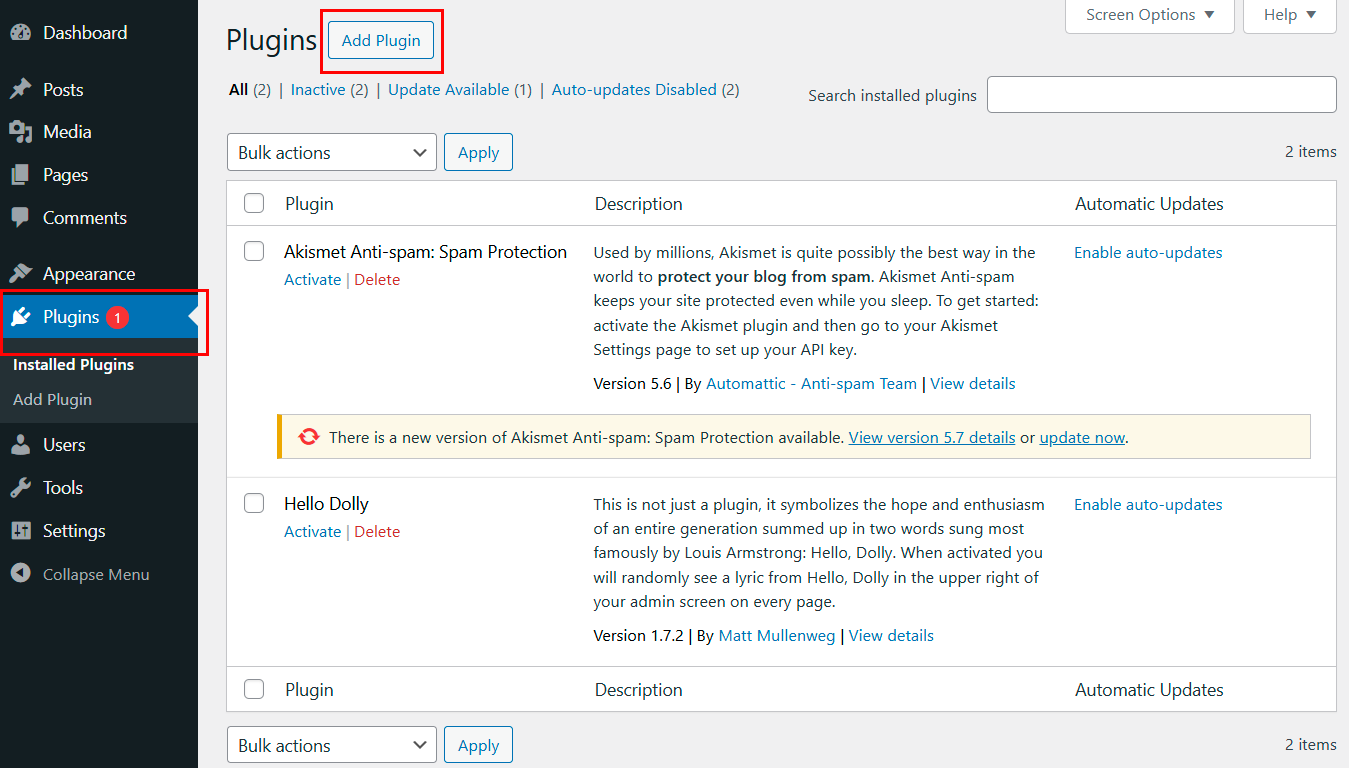
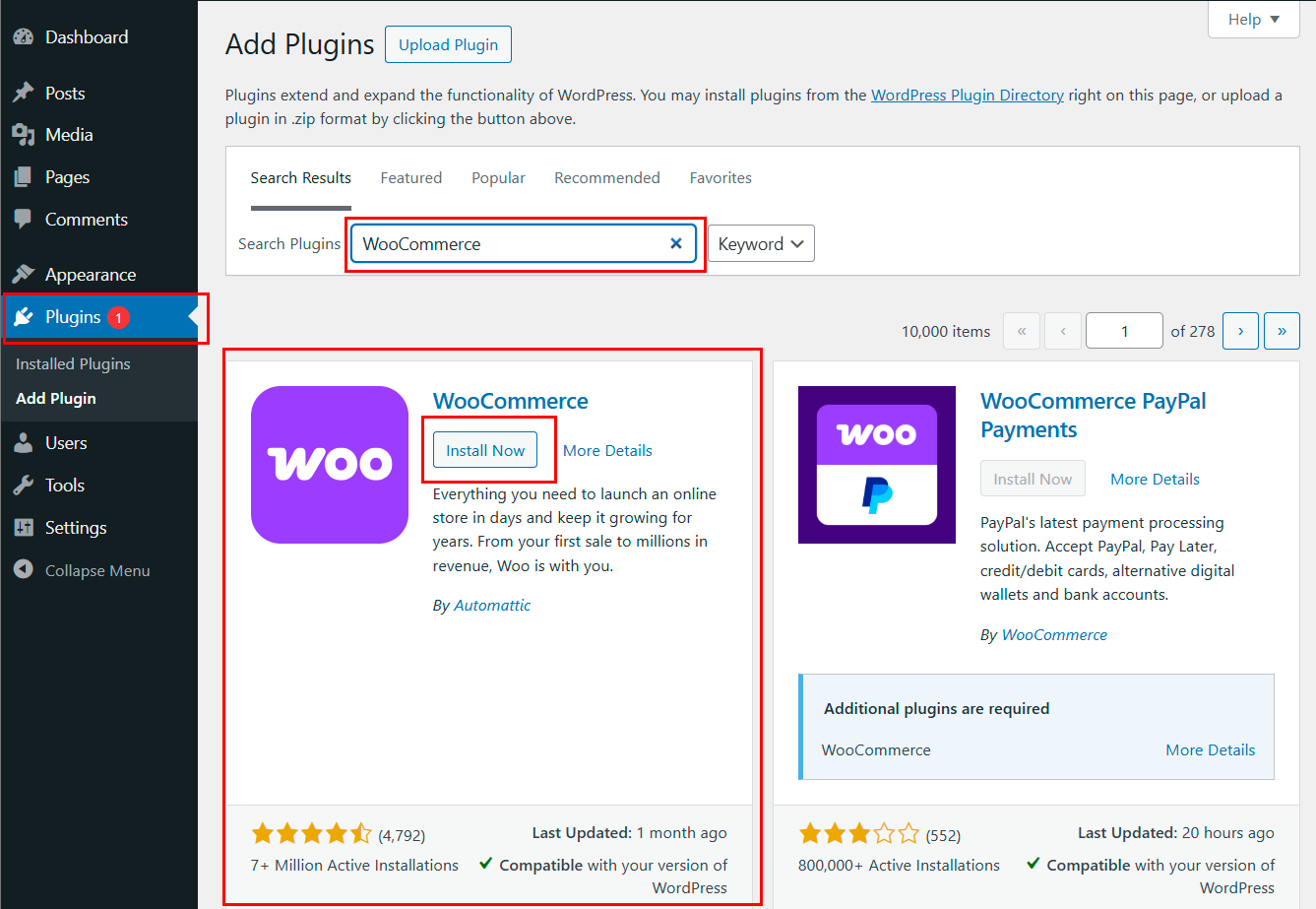
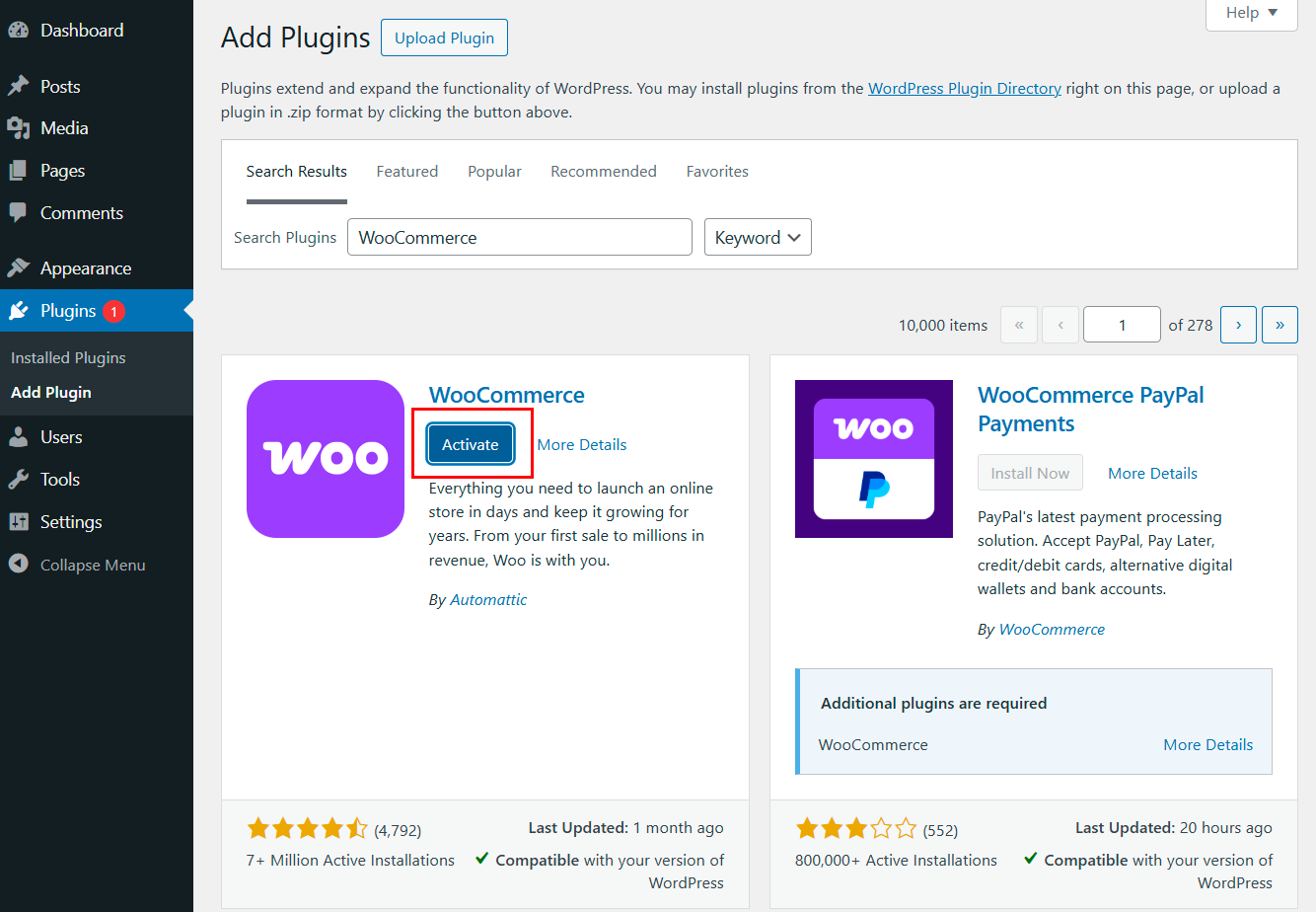
WooCommerce installs like any WordPress plugin: Plugins → Add New → search "WooCommerce" → Install → Activate. After activation, the setup wizard launches. Important: don't skip it — it configures the basics in a few steps.
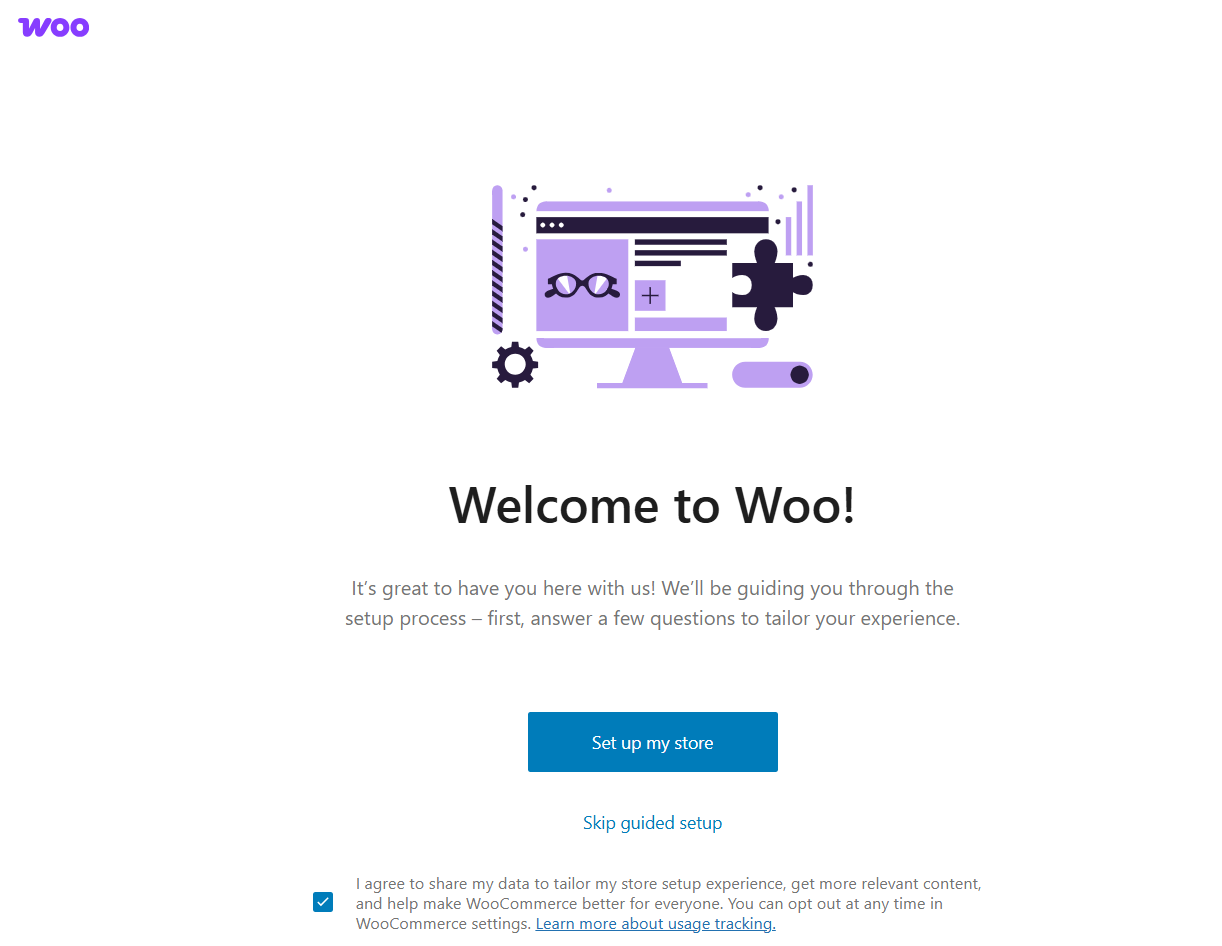
The wizard will ask for country and currency, product type (physical, digital, or both), preferred payment method, and basic shipping parameters. After that, the store is technically ready to operate.
A few things to configure right after installation: taxes (Settings → Taxes), shipping zones (Settings → Shipping), and email notifications (Settings → Emails — verify the addresses are correct). WooCommerce automatically creates cart, checkout, and account pages, so don't delete them.
FAQ
Which plugin is better: WooCommerce or Easy Digital Downloads?
Depends on what you're selling. WooCommerce is universal — great for physical goods, decent for digital. EDD is built specifically for digital products: no extra shipping fields, better license and download management. If your catalog is mixed — WooCommerce. If it's digital only — EDD is more convenient.
Can I create an online store for free?
Technically yes: WooCommerce is free, the Storefront theme is free. But hosting costs money, and so does a domain. Payment gateways take a fee on every transaction. A realistic budget for launching a minimal store is a few dollars per month plus transaction fees.
Do I need additional plugins?
Yes. The minimum stack for a serious store: an SEO plugin (Yoast or Rank Math), a security plugin (Wordfence), backup (UpdraftPlus), and a caching plugin (WP Super Cache, W3 Total Cache, or LiteSpeed Cache). Without caching, WooCommerce will lag under load. Without backups, you'll eventually lose order data.
Conclusion
For most stores, the decision is simple: WooCommerce covers the vast majority of scenarios. It's free, flexible, and backed by a huge ecosystem — and if you need something specific tomorrow, there's probably already a ready-made extension for it.
Easy Digital Downloads — if you sell only digital goods and want a cleaner solution. MemberPress or Restrict Content Pro — if your business is built on gated content. WP Simple Pay — if you just need a payment form without a catalog. BigCommerce — if you've outgrown WooCommerce or infrastructure reliability is critical. Ecwid — if it's important to sell everywhere at once: on the site, on social media, on marketplaces, with unified management from a single dashboard.
One final tip: before committing, install the plugin on a staging site and walk through the full buyer journey yourself, from viewing a product to the order confirmation email. Theoretical advantages sometimes look different in practice.