EN
EN
 All others
0%
All others
0%



Run Windows applications 24/7 with full control and predictable performance. Get an always-on Windows Server VPS with guaranteed CPU, RAM and storage. Manage IT easily via Remote Desktop from anywhere.
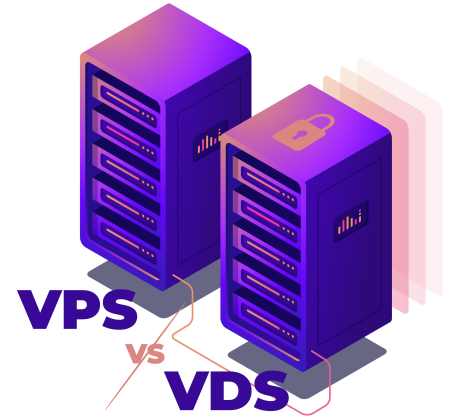
Shares physical resources with other virtual servers on the same physical machine. You are allocated a specific portion of CPU (cores), RAM, and disk space. However, access to these resources may be limited or affected by other users on the server, unlike with a VDS.
Provides fully dedicated resources such as CPU cores, RAM, and disk space. This guarantees consistent performance and ensures your server operates independently from others on the same physical host.
Each VPS comes with a fully dedicated GPU — one physical GPU per virtual server, without sharing. This guarantees consistent GPU performance for compute-intensive workloads such as ML, rendering, or video processing. CPU and RAM resources, however, are shared among all VPS on the host, allowing for efficient resource utilization while keeping costs reasonable.
Full remote control, HTML5 console, automated reinstall, ISO library, high-availability VM, free daily backups, 1GBps Internet access, Deployed in several minutes.
Please, note that instant cheap windows VPS servers come in a set configuration. If you need a custom dedicated server, use our online configurator instead.
Our VPS are fully managed through an API or a control panel. Thus, you will be able to use the HTML5 console, perform power actions, reboot, automatically reinstall cheap windows server hosting from standard OS images or do it manually from our ISO library. Buy cheap Windows VPS in a couple of clicks. Cheap Windows Server hosting is more cost-effective than a Windows cloud server.
Most popular apps pre-installed on your VPS servers.
Server Control Panel & API
Windows VPS hosting is commonly used when applications depend on Windows-specific technologies such as ASP.NET, .NET Framework, MSSQL, or commercial software that does not run on Linux. Windows VPS plans are usually more expensive due to licensing, which is a trade-off for compatibility and operational stability.
CPU, RAM, and storage are allocated exclusively to your virtual server.
Licensed Windows Server OS with full Microsoft ecosystem compatibility.
Administrator privileges for system configuration and management.
Freedom to install required applications and services.
Server access via Remote Desktop Protocol.
Better stability and isolation than shared hosting.
 Windows Server Operating Systems
Licensed versions of Windows Server that are ready for production.
Windows Server Operating Systems
Licensed versions of Windows Server that are ready for production.
 Dedicated Resources
Assured amount of CPU, RAM and storage. No shared resources at OS level.
Dedicated Resources
Assured amount of CPU, RAM and storage. No shared resources at OS level.
 NVMe or SSD Storage
High-performance storage, which is suitable for databases and I/O intensive workloads.
NVMe or SSD Storage
High-performance storage, which is suitable for databases and I/O intensive workloads.
 Full Administrator Access
Full control of the server configuration and the installed software
Full Administrator Access
Full control of the server configuration and the installed software
 Remote Desktop Access
Native RDP access for simple management and troubleshooting of the server.
Remote Desktop Access
Native RDP access for simple management and troubleshooting of the server.
 Windows Expertise
Support teams that have real experience in the Windows Server environment. This is important when problems are not generic.
Windows Expertise
Support teams that have real experience in the Windows Server environment. This is important when problems are not generic.
 Windows App Support
Compatibility with ASP.NET, MSSQL, IIS and other Windows dependency applications.
Windows App Support
Compatibility with ASP.NET, MSSQL, IIS and other Windows dependency applications.
 Integrated Active Directory
Ability to integrate with Active Directory for centralized authentication and user management. Normally used in corporate or hybrid setups.
Integrated Active Directory
Ability to integrate with Active Directory for centralized authentication and user management. Normally used in corporate or hybrid setups.
 High-Speed Network
Up to 10 Gbps connectivity depending on location and plan.
High-Speed Network
Up to 10 Gbps connectivity depending on location and plan.
 DDoS Protection
Basic network-level protection was included by default.
DDoS Protection
Basic network-level protection was included by default.
 Multiple Data Center Locations
Choice of regions in Europe and US for Latency and Compliance needs.
Multiple Data Center Locations
Choice of regions in Europe and US for Latency and Compliance needs.
 Scalability
Resource upgrades that can usually be done without redeployment.
Scalability
Resource upgrades that can usually be done without redeployment.








Windows VPS is often used for ERP systems, CRMs and other applications that are developed for the Windows ecosystem. This seems to make sense when software requires Windows Server, IIS or specific Microsoft components.
A Windows VPS can be used as a shared or individual remote desktop environment. Teams use it to access tools and files from anywhere without decentralizing data.
Developers use Windows VPS to test updates, patches and configurations in an isolated environment. This lowers the risk of the break-in production systems.
For projects that are based on ASP.NET or need the IIS, Windows VPS is a reasonable option. It provides full control over server settings as compared to shared hosting.
Some enterprise or legacy software only runs on the Windows operating system and requires certain versions of the OS. A Windows VPS makes it possible to keep such systems running without the need to maintain physical servers.
 Windows Server Licensing
 Additional IP Addresses
Backup Services
Additional IP Addresses
Backup Services
 DDoS Protection
Increased Bandwidth and Traffic Packages
Custom VPS Configurations
DDoS Protection
Increased Bandwidth and Traffic Packages
Custom VPS Configurations





Resources

Knowledge base


FAQ

Technical support
Windows VPS hosting is a Windows Server based virtual private server. You get dedicated resources, access to the OS administrator and complete control over the OS. It's used when the software requires Windows or specific Microsoft technologies. This is a reasonable alternative to physical servers.
Access is done using Remote Desktop Protocol (RDP). You connect from any Windows, macOS, or Linux device to RDP clients. The login credentials are sent after deployment.
There is no best option that is universal. Windows Server 2022 is a good option for stability and security and 2019 is good for legacy software. Newer versions may have more features but they may have higher requirements. Choice depends on workload and software compatibility.
Select a Windows VPS plan on the HOSTKEY website, select the necessary version of the Windows Server and complete the order. This licensing is managed by HOSTKEY. Deployment begins immediately upon payment.
In most cases, the deployment will be a few minutes to one hour. This is time dependent upon the configuration selected and the version of the OS. Delays are a rarity, but possible on a peak load.
Windows VPS plans that are affordable will typically come with Windows Server 2019 and 2022. Newer versions can be available at a higher cost. Exact availability is dependent on the provider and licensing model.
Start Your Windows VPS Today Сreate your own Windows VPS including Windows Servers.
 +31 20 820 3777
 Support
  Documentation
 Login
Login