


 +31 20 820 3777
 Compliance & KYC
 Support
 Documentation

 Login




The RTX 5090 and RTX PRO 6000 Blackwell are built on the same GB202 chip and have the same memory bandwidth, 1,792 GB/s. Yet the NVIDIA spec lists the GeForce card at 209.5 teraflops of FP16 with FP32 accumulation, while the RTX PRO document gives 503.8 teraflops for the Workstation Edition, 2.4 times more. A factor of two comes from the GeForce Tensor Cores running operations with FP32 accumulation (as used in BF16) at half the rate of FP16 accumulation, and the professional card's 188 active streaming multiprocessors versus 170 and its higher clock speed widen the gap by another 1.2 times, which together gives 2.4. This is the mode typically used for mixed-precision training, and it is rarely found in marketing tables, which quote AI TOPS, i.e. FP4 performance with sparsity.
The NVIDIA lineup has many discrepancies like this. The A100 came out in 2020 and is still rented out. CoreWeave has extended A100 rentals until 2029, and in August 2026 Jensen Huang wrote that the A100 fleet will remain usable until 2029 as well. Specialized cloud providers rent out the H100 for $2–4 per hour, although its rental price rose again in 2026, and the card remains the reference platform that server software is built for first. Professional RTX PRO cards now carry up to 96 GB of memory, which arguably makes them the cheapest way to hold a large model on a single card. GeForce is in a worse position. Gaming cards are getting more expensive because of the memory shortage, and their driver is formally not licensed for data center use, with the license making an exception only for blockchain processing.
To help you pick the best NVIDIA GPU for AI, we compare the A100, H100, H200, Blackwell B200 and B300, the professional RTX PRO Blackwell, L40S, RTX 6000 Ada and RTX A6000, as well as the GeForce RTX 5090 and 4090. All specifications have been checked against NVIDIA datasheets and prices were collected in October 2026. The final sections cover usage scenarios, common selection mistakes and the question of whether to buy a card or rent one.
What Has Changed in the NVIDIA Lineup by the End of 2026
Data centers now run four generations at once: Ampere (A100), Hopper (H100 and H200), Blackwell (B200 and B300) and Rubin, which began shipping to the largest clouds in the second half of 2026. In the past, an older generation left the market fairly quickly, but demand for inference keeps all four in use. CoreWeave has extended A100 rentals until 2029, and Silicon Data's H100 rental index stood at $2.82 per hour on October 10, compared with $2.37 when the index was launched.
NVIDIA has updated the Blackwell lineup as well. According to the NVIDIA developer blog, Blackwell Ultra, which the B300 is built on, has 288 GB of HBM3E instead of the original Blackwell's 192 GB and 15 petaflops of dense NVFP4 instead of 10, with the same 8 TB/s of memory bandwidth and the same 5 petaflops of dense FP8. Power draw rose from 1,200 to 1,400 W, or about 17%. In the professional lineup, the RTX 6000 Ada has been succeeded by the RTX PRO Blackwell series, from the 16 GB RTX PRO 2000 to the 96 GB RTX PRO 6000, plus the RTX PRO 6000 Server Edition. The RTX PRO 5000 now comes in a 72 GB version alongside the original 48 GB one.
Gaming cards are in the worst position. Memory makers are shifting capacity to server demand, so in October 2026 the RTX 5090, despite its $1,999 MSRP, sold in the US from $4,299 at the few retailers with stock to as much as $8,500 from third-party sellers on Amazon. The RTX 50 Super refresh with 24 GB has still not been officially announced, and when reports appeared that GB202 chips for the RTX 5090 were no longer being produced and were going to RTX PRO cards instead, NVIDIA responded that the card had not been discontinued.
Which GPU Specs to Compare and What Spec Sheets Won't Tell You
Every card in this article runs the current CUDA stack, and for AI workloads CUDA core counts matter far less than Tensor Core throughput, so the comparison focuses on memory, bandwidth and Tensor Core performance. Memory capacity (VRAM) determines whether a model fits on the card together with the KV cache for its context, and for training also with gradients and optimizer states. Memory bandwidth sets text generation speed, because the card re-reads all of the weights for every new token (for mixture-of-experts models, only the weights of the active experts). Tensor Core compute matters where each weight read involves a lot of computation, i.e. in training, long-prompt processing, image generation and batch processing of many concurrent requests.
Peak performance figures need a closer look. On the H100 page, the figures of 1,979 teraflops BF16 and 3,958 teraflops FP8 carry a "with sparsity" footnote, and for ordinary dense models they must be halved. AI TOPS for RTX and RTX PRO are also counted in FP4 with sparsity, while the RTX 4090 has no FP4 at all, so its 1,321 AI TOPS mean FP8 with sparsity and cannot be compared directly with the 3,352 of the RTX 5090.
GeForce cards have one more limitation. On gaming cards, tensor operations with FP32 accumulation take twice as long as with FP16 accumulation, while professional and server cards have no such cut. For the RTX 5090 this means 209.5 teraflops FP16 versus 503.8 for the RTX PRO 6000 on the same chip, and BF16 and FP16 training almost always accumulates in FP32 so as not to lose precision. In the Ampere specification, the RTX 3090 is listed at 142 teraflops FP16 with FP16 accumulation and 71 with FP32 accumulation, while the RTX A6000 on the same GA102 chip has 154.8 for both, so on paper the professional card has 2.2 times the training throughput. Earlier still, the Turing-based GeForce RTX 2080 had the same ratio, 84.8 versus 42.4, and about the only exception among gaming cards was the Titan RTX, where both figures matched at 130.5.
Beyond compute, there are other differences:
- Number formats. FP8 arrived in hardware with Ada and Hopper, FP4 with Blackwell. The A100 supports neither, and an FP8 model runs on it by unpacking the weights to 16 bits.
- Card-to-card connectivity. NVLink is available on SXM server modules and, via bridges, on the A100 PCIe, H100 NVL and H200 NVL. The L40S does not have it, and neither do RTX PRO Blackwell or GeForce cards, which exchange data over PCIe.
- MIG, i.e. partitioning a card into isolated instances. The A100, H100 and H200 support up to seven instances, the RTX PRO 6000 up to four; the L40S and GeForce cards do not support MIG.
- Form factor and variants of the same model. The H100 SXM has 80 GB at 3.35 TB/s, while the H100 NVL has 94 GB at 3.9 TB/s but 15% less compute. The 40 GB A100 reads memory at 1,555 GB/s and the 80 GB version at up to 2,039 GB/s. A rental listed as "A100" or "H100" can be any of these variants, so check which one you will get.
- Power and cooling. From 70 W for the RTX PRO 2000 to 700 W for the H100 SXM and 1,400 W for the B300; the latter require suitable data center infrastructure.
NVIDIA GPU Comparison for AI: Summary Table
Specifications are taken from official NVIDIA pages and datasheets; prices and rental rates were collected in October 2026 and are for reference only. Power is the maximum per specification.
|
Card |
Memory |
Bandwidth |
FP8 / FP4 in hardware |
NVLink |
Power |
Price or rental, October 2026 |
|---|---|---|---|---|---|---|
|
A100 80GB SXM |
80 GB HBM2e |
2,039 GB/s |
no / no |
600 GB/s |
400 W |
rental about $1–1.4/hr |
|
H100 SXM |
80 GB HBM3 |
3.35 TB/s |
yes / no |
900 GB/s |
700 W |
purchase $25–40k, rental $2.2–4/hr |
|
H100 NVL |
94 GB HBM3 |
3.9 TB/s |
yes / no |
600 GB/s (bridge) |
350–400 W |
rental about $2.6–2.7/hr |
|
H200 SXM |
141 GB HBM3e |
4.8 TB/s |
yes / no |
900 GB/s |
700 W |
rental $3.6–6.4/hr |
|
B200 |
180–192 GB HBM3E |
8 TB/s |
yes / yes |
1.8 TB/s |
up to 1,200 W |
rental $5.5–8.4/hr |
|
B300 |
288 GB HBM3E |
8 TB/s |
yes / yes |
1.8 TB/s |
up to 1,400 W |
rental about $6.7–6.9/hr |
|
Rubin |
288 GB HBM4 |
up to 22 TB/s |
yes / yes |
3.6 TB/s |
not disclosed |
largest clouds; broad rental expected in 2027 |
|
L40S |
48 GB GDDR6 ECC |
864 GB/s |
yes / no |
no |
350 W |
rental about $1/hr |
|
RTX PRO 6000 Blackwell |
96 GB GDDR7 ECC |
1,792 GB/s (Server Edition 1,597) |
yes / yes |
no |
600 W |
purchase about $15k, rental about $1.5/hr |
|
RTX PRO 5000 Blackwell |
48 or 72 GB GDDR7 ECC |
1,344 GB/s |
yes / yes |
no |
300 W |
72 GB from $9,200 |
|
RTX PRO 4500 Blackwell |
32 GB GDDR7 ECC |
896 GB/s |
yes / yes |
no |
200 W |
check with vendors |
|
RTX PRO 4000 Blackwell |
24 GB GDDR7 ECC |
672 GB/s |
yes / yes |
no |
145 W |
check with vendors |
|
RTX PRO 2000 Blackwell |
16 GB GDDR7 ECC |
288 GB/s |
yes / yes |
no |
70 W |
check with vendors |
|
RTX 6000 Ada |
48 GB GDDR6 ECC |
960 GB/s |
yes / no |
no |
300 W |
check with vendors |
|
RTX A6000 |
48 GB GDDR6 ECC |
768 GB/s |
no / no |
112.5 GB/s (bridge for 2 cards) |
300 W |
check with vendors |
|
RTX 5090 |
32 GB GDDR7 |
1,792 GB/s |
yes / yes |
no |
575 W |
from $4,300 vs. $1,999 MSRP |
|
RTX 4090 |
24 GB GDDR6X |
1,008 GB/s |
yes / no |
no |
450 W |
mostly secondary market |
Rental price sources: Ornn Compute Price Index, the IntuitionLabs summary and Frenzy Capital, as well as GPUPerHour for October 8–22, 2026; RTX PRO purchase prices from TensorRigs. Hyperscalers charge noticeably more: for example, an H100 in an AWS p5.48xlarge instance costs $55.04 per hour for eight cards, or $6.88 per card. B200 memory is given as a range because the chip itself has 192 GB, while for the HGX B200 platform NVIDIA specifies 1.4 TB across eight cards, or about 180 GB per card. Rental rates are per GPU per hour; the ranges reflect differences between providers, regions, rental types (on-demand, spot or reserved) and bundled CPU and RAM, so they are indicative rather than directly comparable.
Training Compute Without the Marketing
All figures below are reduced to a single mode: dense BF16 or FP16 teraflops with FP32 accumulation, without sparsity. This is the mode typically used for mixed-precision training and fine-tuning, and it is the hardest one to find in manufacturer tables. These are theoretical peaks from NVIDIA documents, and real workloads reach only part of them.
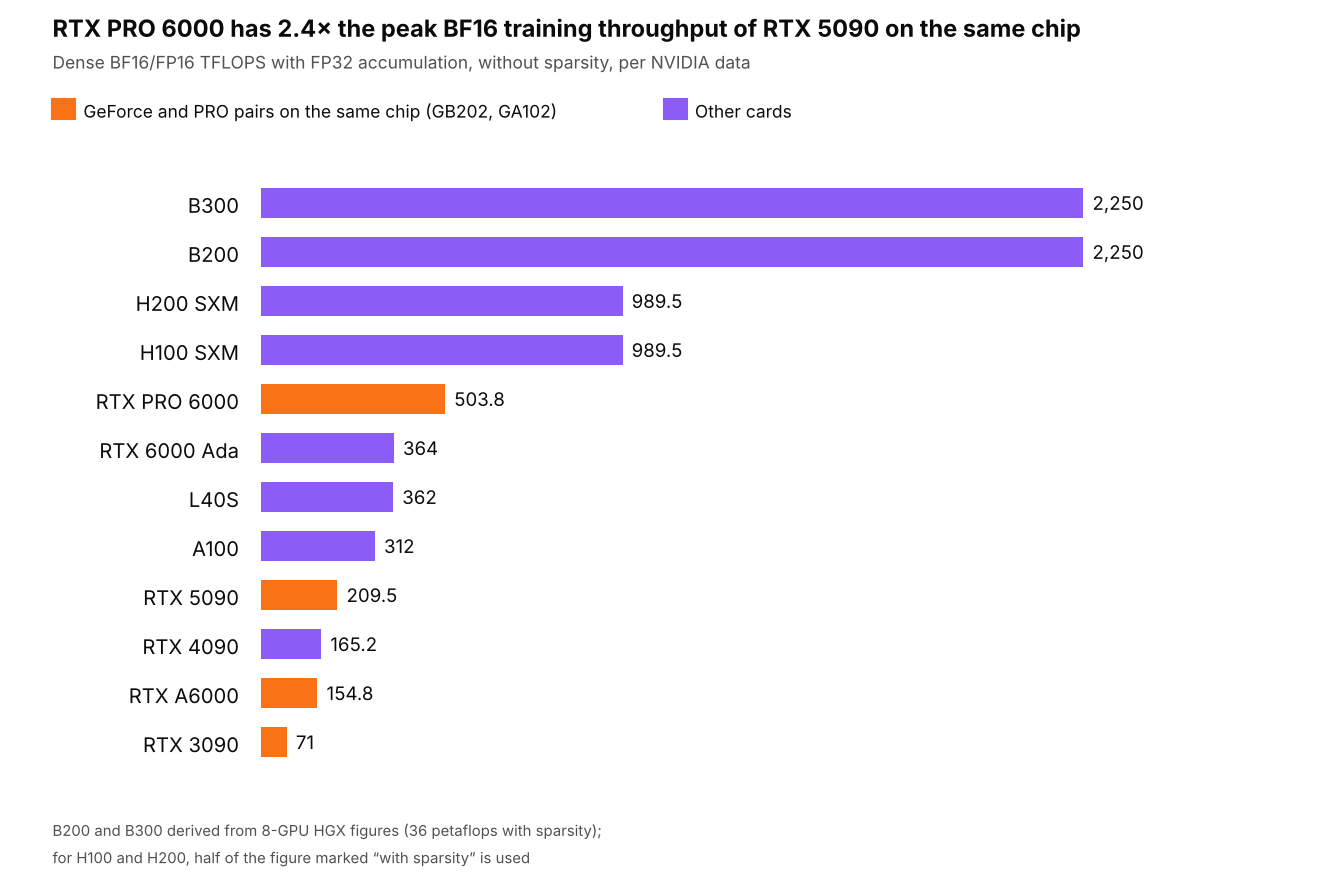
A100, H100, H200 and L40S datasheets, HGX page, RTX Blackwell and RTX PRO Blackwell architecture documents (NVIDIA), October 2026
By this metric the H100 is roughly twice as fast as the RTX PRO 6000 and three times as fast as the A100, and the B200 and B300 are another 2.3 times faster than the H100. The B200 and B300 are equal in BF16, because the B300's gains went into FP4, memory capacity and attention-layer acceleration. In this specific mode, the theoretical peak of the RTX 5090 is even lower than that of the six-year-old A100. When a model generates a response for a single user, the RTX 5090's lag is barely noticeable, since generation is bound by memory, but in compute-bound fine-tuning the gap shows clearly. Real training speed also depends on memory capacity and card-to-card connectivity, so the chart shows only the theoretical ceiling, and epoch time cannot be derived from it directly.
NVIDIA Server Accelerators: A100, H100, H200, B200 and B300
A100
In 2026 the A100 became the cheapest way to get 80 GB of server memory with NVLink and MIG, and it rents for about a dollar per hour on the market. It has no FP8 or FP4, so modern quantized models run on the A100 but compute in 16 bits. It is still a good fit for classic machine learning, computer vision, fine-tuning small models in BF16, and splitting the card among several small services with MIG (up to seven 10 GB instances). When renting, check which version you will get: the 40 GB A100 has half the memory and also reads it about a quarter slower, 1,555 GB/s versus 2,039.
H100
The H100 remains the default card for server LLM work, and not only because of its price. FP8 and the Transformer Engine give it roughly a threefold advantage over the A100 in BF16 and twice that in FP8, and practically all training recipes and inference engines are validated on it first. The H100's weak point is memory capacity. A 70-billion-parameter model in FP8 takes about 70 GB and only just fits into 80 GB, with no headroom for the KV cache. The H100 NVL partly solves this with 94 GB of faster memory, and it fits into a standard PCIe server with air cooling.
H200
The H200 has the same compute as the H100 SXM and differs only in memory, with 141 GB at 4.8 TB/s instead of 80 GB at 3.35 TB/s. This adds little for training, but when serving many users with long contexts, memory capacity determines how many requests the card can handle at once. The same 70B model in FP8 takes about 70 GB, which leaves under 10 GB for the KV cache on the H100 and about 60 GB on the H200, and generation on the H200 is roughly 1.4 times faster thanks to bandwidth. Based on median figures from the AIMultiple, Uvik and Mercatus indices, renting an H200 in autumn 2026 costs 15–35% more than an H100, although the Ornn index, built on actual transactions, showed a nearly twofold gap at the end of October.
B200 and B300
Blackwell added hardware FP4 and doubled NVLink bandwidth to 1.8 TB/s per card. The B200 carries 180–192 GB and the B300 288 GB, and both read memory at 8 TB/s, 1.7 times faster than the H200. These cards make sense for large MoE models, high-load serving and training where FP4 and FP8 are already built into the recipes. With up to 1,200 and 1,400 W per card, an eight-GPU server draws about 10 kW on its own, not counting CPUs and networking, so most teams rent them rather than buy.
Rubin
Rubin, with 288 GB of HBM4 and up to 22 TB/s of bandwidth according to preliminary NVIDIA data, is currently available mainly to the largest clouds, and for decisions over the coming months it is more of a reference point than a practical option. In NVIDIA's HGX table, Rubin is listed at 4 petaflops of dense BF16, about 1.8 times more than the B200, with memory that reads 2.75 times faster.
Professional RTX PRO Blackwell, RTX 6000 Ada, RTX A6000 and L40S
RTX PRO 6000 Blackwell
The RTX PRO 6000 is currently the best option for anyone who needs a lot of memory without server infrastructure. Its 96 GB of GDDR7 with ECC hold gpt-oss-120b, which weighs about 61 GB in MXFP4, with room to spare for context, as well as a 70B model in 4 bits with the full 128K-token context. Unlike GeForce, the card computes BF16 with FP32 accumulation at full speed and supports MIG, so it can be split into four 24 GB instances or two 48 GB ones.
The card comes in three variants. The Workstation Edition draws up to 600 W. The Max-Q is designed for multi-GPU workstations and, according to NVIDIA, computes about 13% slower with the same memory. The Server Edition, with passive or liquid cooling, is built for racks and has slightly slower memory, 1,597 GB/s instead of 1,792. The main limitation is shared by all three: there is no NVLink, and a model that does not fit into 96 GB has to be split across cards over PCIe.
RTX PRO 5000, 4500, 4000 and 2000
The main appeal of the lower-end cards in the series is their power draw. The 72 GB RTX PRO 5000 offers three quarters of the RTX PRO 6000's capacity at 300 W and a price from $9,200, although its memory reads a quarter slower, at 1,344 GB/s. The 32 GB RTX PRO 4500 draws 200 W, the 24 GB RTX PRO 4000 140 W, and the 16 GB RTX PRO 2000 just 70 W, which fits within PCIe slot power, whereas the higher models need a 16-pin connector. All of them support FP8 and FP4 and have ECC, but the RTX PRO 2000's memory bandwidth of 288 GB/s is comparable to a DGX Spark, which is too little for text generation with large models.
L40S and RTX 6000 Ada
The L40S and RTX 6000 Ada belong to the previous Ada Lovelace generation; both have 48 GB of GDDR6 with ECC and hardware FP8. The L40S is common in clouds at about a dollar per hour, the same as the A100, and the choice between them depends on the task. For text generation the A100 80GB is noticeably faster, since it reads memory 2.4 times faster (2,039 versus 864 GB/s). For image and video generation, computer vision and FP8 models the L40S wins, thanks to FP8 and its dedicated ray-tracing and video-encoding hardware. The L40S has neither MIG nor NVLink.
RTX A6000
The Ampere-based RTX A6000 came out at the end of 2020 and is still common in rentals as an inexpensive 48 GB card with ECC. According to NVIDIA's specification, it has 768 GB/s of bandwidth, draws 300 W and, unlike newer professional cards, has an NVLink bridge that connects two cards at 112.5 GB/s bidirectional. A pair of A6000s with a bridge gives 96 GB of memory, but each card reads its own memory 2.3 times slower than the RTX PRO 6000, and Ampere has no FP8. On the other hand, in BF16 with FP32 accumulation the A6000 delivers 154.8 teraflops, nearly as much as the RTX 4090 and, in peak tensor core throughput, twice as much as the RTX 3090 on the same chip. This is enough for running mid-sized models, QLoRA fine-tuning, rendering and virtual workstations, but for modern FP8 and FP4 models Ada or Blackwell cards are a better deal.
GeForce RTX 5090, 4090 and 3090 for AI
The 32 GB GDDR7 RTX 5090 has the same memory bandwidth as the RTX PRO 6000 and also supports FP4, so it generates text no slower than the professional card as long as the model fits into 32 GB. That covers models of up to 32 billion parameters in 4 bits and mid-sized mixture-of-experts models. Image generation is compute-bound, so in BF16 or FP8 the RTX 5090 can fall behind just as it does in training, where its theoretical gap to the RTX PRO 6000 reaches 2.4 times, mainly because of the halved FP32 accumulation rate. Speed is comparable only in FP4. The gaming card has also lost most of its advantage in price per gigabyte of memory. At today's $5,000–5,400, a gigabyte on the RTX 5090 costs $156–168, on the RTX PRO 6000 at $16,000 about $167, and on the 72 GB RTX PRO 5000 at $10,900 about $151.
The RTX 4090, with 24 GB and 1,008 GB/s, supports FP8 but not FP4 and is now sold mostly on the secondary market. A used RTX 3090 with the same 24 GB, 936 GB/s and 350 W generates text almost as fast, since generation is memory-bound and its bandwidth is only 7% lower. Unlike the 4090 and 5090, it also has a connector for a two-card NVLink bridge, although in practice it is hard to use. GeForce bridges were made only in a 4-slot version, so two free slots must be left between the cards, and back in autumn 2020 buyers complained on the NVIDIA forum that 2- and 3-slot versions did not exist. However, it is still Ampere without FP8 and with 71 teraflops of BF16 with FP32 accumulation, so in theoretical peak training throughput it is more than four times behind the A100, and on cards of this age the condition of the memory and cooling should be checked separately.
All GeForce cards share one legal caveat. The GeForce driver license contains clause 2.1.3, "No Datacenter Deployment," under which the software is not licensed for deployment in a data center, except for blockchain processing. The clause appeared at the end of 2017, enforcement has varied, and many providers offer servers with GeForce cards. For a large in-house deployment or a project with vendor legal review, this clause should be taken into account up front, and NVIDIA makes the RTX PRO 6000 Server Edition and L40S specifically for server racks.
Choosing an NVIDIA GPU for AI by Task
The best NVIDIA GPU server or card for AI depends on model size, workload type and where it will run.
|
Task |
What to choose |
Why |
|---|---|---|
|
Running LLMs locally, up to 32B |
RTX 5090, RTX 4090, RTX 3090 (used), RTX PRO 4500 |
24–32 GB is enough for a 4-bit model; speed is set by bandwidth |
|
70–120B models on a single card |
RTX PRO 6000, RTX PRO 5000 72GB |
the only way to get 72–96 GB on one card without a server platform |
|
LLM inference under load |
H200, H100; B200 and B300 for large MoE |
memory for many users' KV cache, FP8 and FP4, NVLink for tensor parallelism |
|
LoRA and QLoRA fine-tuning up to 70B |
RTX PRO 6000, H100, H200 |
memory capacity and full-speed BF16 with FP32 accumulation |
|
Full training and training from scratch |
HGX H100, H200, B200, B300 nodes |
NVLink within a node and fast networking between nodes matter more than any single card |
|
Image and video generation, computer vision |
L40S, RTX 5090, RTX PRO 4000 and 4500 |
compute and FP8 matter more here, and 24–48 GB is usually enough |
|
Several small services on one card |
A100, H100, RTX PRO 6000 |
MIG splits the card into isolated instances with their own memory |
|
Classic machine learning and minimum-budget experiments |
A100 (rented), RTX PRO 2000 |
server memory for about a dollar per hour, or 16 GB at 70 W |
For LLMs, we cover a detailed memory calculation including KV cache and generation speed in a separate article on choosing a GPU for LLMs.
The Most Common Mistakes When Choosing an NVIDIA GPU
- Comparing figures with and without sparsity. On the H100 and H200 pages, peak figures are given with sparsity; the A100 datasheet shows both figures separated by a slash; and RTX AI TOPS hide FP4 with sparsity. Before comparing, bring all figures to the same format and to dense mode, as in the chart above.
- Treating the RTX 5090 as a cheap substitute for the RTX PRO 6000 for training. Despite identical memory speed, the gaming card has 2.4 times lower peak BF16 throughput with FP32 accumulation and three times less memory.
- Renting an "H100" or "A100" without checking the variant. SXM versus PCIe and 40 versus 80 GB make up to a quarter of difference in memory speed, and PCIe variants often come without NVLink at all.
- Choosing the A100 for FP8 and FP4 models. The model will run, but the weights will be unpacked to 16 bits, and the speed gain you picked the format for will not materialize.
- Paying for an H200 or B200 where an H100 would do. For training small models, the H200's extra memory brings nothing, since its compute is the same as the H100's.
- Using several cards without NVLink for tensor parallelism. RTX PRO and GeForce cards exchange data over PCIe 5.0 at about 64 GB/s in each direction, whereas NVLink on the H100 SXM provides 900 GB/s in total, or about 450 in each direction.
- Forgetting about power. The RTX 5090 draws up to 575 W, the RTX PRO 6000 up to 600 W, the H100 SXM up to 700 W and the B300 up to 1,400 W, and four such cards can no longer be powered from a regular office circuit.
Buy or Rent an NVIDIA GPU
For the H100 and RTX PRO 6000, the payback period of a purchase is almost the same. An H100 at $30,000, with the rental index at $2.82 per hour, pays for itself after 10,600 hours, and an RTX PRO 6000 at $15,000, at $1.49 per hour, after 10,000 hours; in both cases this is about 14 months of round-the-clock utilization. The calculation does not include the server, electricity, cooling or staff, and at eight hours of use per day the period grows to three and a half years, during which NVIDIA will release more than one new generation.
Buying is justified with steady utilization above 60–70% over a two-to-three-year horizon, or with strict requirements on where the data physically resides. For experiments, one-off fine-tuning and comparing several cards on your own task, renting is almost always cheaper. At HOSTKEY, NVIDIA GPU servers for AI are available with hourly or monthly billing, from an RTX A4000 at €0.252 per hour (including VAT) to configurations with the RTX 5090, A100, H100 and the 96 GB RTX PRO 6000.
How to Check You Got the Card You Paid For
Once you have access to the server, it takes a minute to confirm that the card variant, memory size, power limit and card-to-card connectivity match your expectations.
# Model, memory capacity and power limit
nvidia-smi --query-gpu=name,memory.total,power.limit,pcie.link.gen.current,pcie.link.width.current --format=csv
# Topology: NV# means NVLink, PIX/PXB/SYS means a PCIe connection
nvidia-smi topo -m
 # NVLink status and MIG mode
nvidia-smi nvlink --status
nvidia-smi --query-gpu=mig.mode.current --format=csv
A name like "H100 80GB HBM3" with a 700 W limit means the SXM version, while "H100 NVL" with 94 GB and a 350–400 W limit means the PCIe version. If you then need to compare real speed on your own model, a few hours of renting each candidate and running your framework's standard benchmarks at your working batch size and sequence length is enough.
What to Keep in Mind When Choosing an NVIDIA GPU in 2027
Prices and timelines in this article were collected in October 2026, and amid the memory shortage they change faster than specifications. NVIDIA still calls the Rubin specifications preliminary, the 24 GB RTX 50 Super exists only in leaks, and RTX 5090 supply remains uncertain despite NVIDIA denying that production has ended. AMD and other vendors' accelerators, as well as the networking side of multi-node clusters, are outside the scope of this article.
For inference, the deciding factors are memory capacity and speed. For training, they are dense teraflops with FP32 accumulation and NVLink, and for any task, the number formats the card supports. Take specifications from NVIDIA datasheets and architecture documents rather than marketing tables, and test a card on your own workload before buying it.