



 +31 20 820 3777
 Compliance & KYC
  Support
  Documentation
 Login
Login 





The NVIDIA DGX B200 page, which describes a system with eight B200 accelerators, leads with 144 petaflops of FP4, and that can make it look as if the new generation is several times faster than the previous one at any task. A footnote on the same page explains that this figure assumes sparsity and that dense performance is half as high, while the dense FP8 figure is just 36 petaflops, a quarter of the headline number. Impressive on paper, but picture a team that rents one of these cards, runs its 8-billion-parameter language model on it, and finds that generation got faster roughly in proportion to the increase in memory bandwidth, not the increase in TFLOPS.
Choosing a GPU for AI is tricky because training, fine-tuning, and inference (running the model on incoming requests) are held back by different parts of the hardware. Training needs compute and fast links between cards. Text generation for a single user is usually limited by how much VRAM the card has and how fast that memory can be read. LoRA and QLoRA fine-tuning sits somewhere in between and, with sensible settings, often fits on a single card.
Below, we look at which specs actually determine speed for each of these workloads, which cards matter in 2027 across three segments, and where common sense parts ways with the rankings.
What Limits Training and Inference
In full training, VRAM has to hold the model weights, gradients, and optimizer states at the same time, and together they take up several times more space than the same weights do during inference. Every training step consists of a huge number of matrix multiplications, so BF16 or FP8 compute really does matter here, as does the speed of communication between cards when the model or batch is spread across multiple GPUs.
LLM inference is a different story. Generating each new token requires reading almost all of the model’s weights from VRAM, while the amount of computation per token is comparatively small. This gives a convenient, idealized upper bound for a single generation stream: memory bandwidth divided by the size of the weights. It assumes that the weights sit entirely in VRAM, that nothing is offloaded to the CPU, and that the overhead of the KV cache, quantization metadata, and the inference engine itself is negligible.
|
GPU |
Memory bandwidth (GB/s) |
Upper bound (tokens/s) |
|
RTX 4090 |
~ 1 000 |
~ 220 |
|
RTX 5090 |
~ 1 800 |
~ 400 |
|
Radeon AI PRO R9700 |
640 |
~ 140 |
|
A100 80 GB |
~ 2 000 |
~ 440 |
These numbers are not what you should expect from a real run; actual speeds are noticeably lower and depend on the engine, weight format, attention implementation, and context length. What the estimate does show is where to start, and TFLOPS play no part in it at all. That is why an older A100 can outrun an RTX 4090 at single-stream generation if the software makes good use of its HBM bandwidth, even though the A100 has less compute in newer formats. Verify comparisons like this by benchmarking your own software with identical settings. The picture changes when there are many requests and an engine such as vLLM groups them into large batches: a single read of the weights then serves dozens of users at once, and as the batch grows, the system gradually shifts from being memory-bound to being compute-bound.
LoRA and QLoRA fine-tuning both freeze the base model and train small adapter matrices, but their memory requirements differ considerably. QLoRA keeps the base model in 4-bit format, so for many 7–13B models it can run on a 24 GB card. Standard LoRA with BF16 base weights needs considerably more, and a 13B model may no longer fit in 24 GB. Sequence length, batch size, adapter rank, and whether gradient checkpointing is enabled also affect the result. Full fine-tuning of the same model needs as much memory as training does, and a single consumer card won’t be enough.
FP4, Sparsity, and Other Caveats to TFLOPS Figures
Vendors publish peak performance in whichever format makes their products look best. For Blackwell, that means FP4, often with a footnote about 2:4 structured sparsity, in which, as NVIDIA explains on its developer blog, two out of every four values must be zero. In theory this doubles throughput, but in NVIDIA’s own A100 tests the gain was about 20% at large batch sizes, and the model has to be pruned specifically for this mode. The NVIDIA HGX page, which lists the same eight-GPU B200 configuration as the DGX B200, shows 144 petaflops of FP4 with sparsity and 72 without. For FP16/BF16, the format training usually runs in, it lists 36 petaflops with a footnote that dense performance is half that, or 18 petaflops. So for BF16 training the honest figure is four to eight times lower than the headline number, and comparing one card’s sparse FP4 with another card’s dense FP16 tells you very little.
The second pitfall is hardware support for data formats. If the Tensor Cores can’t process a format natively, it won’t be accelerated, even if the library technically accepts it. The table below shows native Tensor Core support by generation. Peak throughput in each format can differ several-fold between cards of the same generation, so check the specs for each card individually.
|
Generation |
Cards |
BF16 |
FP8 on Tensor Cores |
FP4 on Tensor Cores |
|
Ampere |
A100, RTX 3090, RTX A4000, A5000, A6000 |
Yes |
No |
No |
|
Ada Lovelace |
RTX 4090 |
Yes |
Yes |
No |
|
Hopper |
H100, H200 |
Yes |
Yes |
No |
|
Blackwell |
B200, B300, RTX 5090, RTX PRO 5000, RTX PRO 6000 |
Yes |
Yes |
Yes |
|
CDNA 4 |
AMD Instinct MI355X |
Yes |
Yes |
Yes, plus FP6 |
|
RDNA 4 |
AMD Radeon AI PRO R9700 |
Yes |
Yes |
No |
The A100 has no native FP8 compute on its Tensor Cores, and quantizing weights to FP8 is not the same as computing in FP8. You can usually run a model with FP8 weights on an A100, but the software stack will convert the weights and compute in a different format, so you won’t get the speedup the model was quantized for on Hopper or Blackwell.
When NVLink Matters for Multi-GPU Setups and When PCIe Is Enough
As long as the model fits on one card, interconnect isn’t an issue. Once training is spread across several GPUs, the cards constantly exchange gradients, and the speed of that exchange largely determines how well the workload scales. Even NVLink doesn’t guarantee linear scaling, since the result also depends on the parallelism scheme and how much of each step is spent on communication.
NVIDIA’s data center GPUs use NVLink for this, which moves data between cards many times faster than the PCIe bus. The RTX 4090 and RTX 5090 have no NVLink connector at all, and neither do the Blackwell-generation professional cards, the RTX PRO 5000 and RTX PRO 6000. A server with four RTX 4090s has to push gradients over PCIe during training, which is noticeably slower than A100s with NVLink on workloads with frequent synchronization. For inference, where the model is split across cards by layers or tensors, this limitation is usually less of a problem because the cards exchange activations, although the volume of that traffic depends on the parallelism scheme, hidden size, and sequence length.
The older RTX 3090, RTX A5000, and RTX A6000 support a two-way NVLink bridge, so in this respect the previous generation is sometimes more convenient than the new one.
Three GPU Segments and Who Each One Is For
Data Center Cards
The Blackwell-generation B200 and B300 are NVIDIA’s current data center accelerators, while Rubin is only just starting to reach its first customers. The B300 (Blackwell Ultra) carries 288 GB of HBM3e per GPU, and both cards support FP4 natively. They are sold mainly as eight-GPU HGX systems or as Grace Blackwell GB200 and GB300 NVL72 racks, so in practice they are bought by large cloud providers and labs, while smaller teams rent them.
The Hopper-generation H100 and H200 remain the workhorses of training. The H200 has 141 GB of HBM3e with 4.8 TB/s of bandwidth, so a 70B model in 8-bit format fits on a single card with room to spare for the KV cache. Hopper has no FP4 support.
The 80 GB Ampere-generation A100 is much cheaper to rent, and its memory is fast, at about 2 TB/s. If your workload is limited by memory capacity rather than compute, the A100 is still one of the best-value cards. We offer it as a virtual machine, for example, so you don’t need to rent an entire multi-GPU server to get one.
The AMD Instinct MI355X, with 288 GB of HBM3e and about 8 TB/s of bandwidth, offers the most memory per accelerator. AMD has been sampling the next-generation MI450 to lead customers since May 2026 and says production shipments of its Helios rack-scale platform are on track for the second half of 2026; availability for rental should be checked separately.
Professional Cards
The Blackwell-generation RTX PRO 6000, with 96 GB of GDDR7, is NVIDIA’s highest-capacity professional card with GDDR memory. Among PCIe accelerators in general there are larger options, such as the H200 NVL with 141 GB of HBM3e, but that is a passively cooled data center card in a completely different price bracket. The RTX PRO 6000 fits a 70B model in 8-bit format and a model in the 100B class in 4-bit. Its bandwidth is about 1.8 TB/s, roughly the same as the RTX 5090 and a little over a third of the H200’s, so generation is slower than on HBM cards with comparable capacity.
The 72 GB RTX PRO 5000 sits in the middle. It has plenty of memory and a 300 W power limit, but lower bandwidth, at 1,344 GB/s. According to NVIDIA, it supports MIG with up to two isolated instances, versus up to four on the RTX PRO 6000. NVIDIA defines the set of allowed profiles and the memory available to each instance, and they don’t always split the card evenly.
The Ampere-generation RTX A6000 (48 GB) and RTX A5000 (24 GB) are considerably cheaper and work well for fine-tuning and inference when memory capacity matters more than speed.
Consumer Cards
The RTX 5090, with 32 GB of GDDR7 and FP4 support, is one of the fastest consumer cards for single-GPU work, provided the model fits in 32 GB, although on any given workload the compute format and software stack make a big difference. The price is up to 575 W of power draw and no NVLink.
The 24 GB RTX 4090 is still the most popular card for experiments and small-model inference, and it has virtually no software compatibility issues.
The RTX 3090 offers the same 24 GB for less than any other card, although it has no hardware FP8 acceleration on its Tensor Cores and slightly less memory bandwidth than the 4090.
The AMD Radeon AI PRO R9700, with 32 GB of GDDR6, is appealing for the amount of memory you get for the money, but its bandwidth is 640 GB/s, about a third lower than the RTX 4090’s. That is acceptable for running a large model across several of these cards, but not for maximum-speed generation on a single card.
Comparison Table
|
GPU |
Memory (GB) |
Memory type |
Bandwidth (TB/s) |
NVLink |
MIG |
|
NVIDIA B300 |
288 |
HBM3e |
~8 |
Yes |
Yes |
|
NVIDIA B200 |
~180 |
HBM3e |
~8 |
Yes |
Yes |
|
NVIDIA H200 SXM |
141 |
HBM3e |
4.8 |
Yes |
Yes |
|
NVIDIA H100 SXM |
80 |
HBM3 |
3.35 |
Yes |
Yes |
|
NVIDIA A100 80 GB |
80 |
HBM2e |
~2 |
Yes (SXM); 2-way bridge (PCIe) |
Yes |
|
AMD Instinct MI355X |
288 |
HBM3e |
8 |
Infinity Fabric |
Compute/memory partitioning |
|
NVIDIA RTX PRO 6000 |
96 |
GDDR7 |
~1.8 |
No |
Up to 4 |
|
NVIDIA RTX PRO 5000 |
48 or 72 |
GDDR7 |
1.34 |
No |
Up to 2 |
|
NVIDIA RTX A6000 |
48 |
GDDR6 |
0.77 |
2-way bridge |
No |
|
NVIDIA RTX 5090 |
32 |
GDDR7 |
~1.8 |
No |
No |
|
NVIDIA RTX 4090 |
24 |
GDDR6X |
~1 |
No |
No |
|
NVIDIA RTX 3090 |
24 |
GDDR6X |
0.94 |
2-way bridge |
No |
|
AMD Radeon AI PRO R9700 |
32 |
GDDR6 |
0.64 |
No |
No |
|
AMD Radeon RX 7900 XTX |
24 |
GDDR6 |
~0.96 |
No |
No |
Specifications are based on NVIDIA and AMD materials and rounded. For data center cards, figures can differ between the SXM, PCIe, and NVL variants (the H100 NVL, for example, has 94 GB and 3.9 TB/s versus 80 GB and 3.35 TB/s on the SXM version), so check which variant you are getting. RTX PRO 5000 bandwidth is taken from NVIDIA’s product page, which lists a single figure for both memory configurations.
AMD in 2027
ROCm has genuinely matured over the past couple of years. PyTorch, vLLM, Ollama, and llama.cpp run on supported Instinct and Radeon cards, and a typical stack of PyTorch plus a popular inference engine usually works without modification. How AMD stacks up against NVIDIA on a specific model can only be determined by side-by-side benchmarks with identical settings and software versions. AMD’s main advantage is memory per euro, whether that’s 288 GB on the MI355X or 32 GB on the R9700 at a price well below the RTX 5090.
Where things usually go wrong is at the edges of the ecosystem. New optimized attention kernels, new quantization methods, and niche libraries tend to appear for CUDA first and reach ROCm later or only as third-party builds, and every such delay costs engineering time. Before moving anything to AMD, open the ROCm compatibility matrix for your specific card and check every library in your stack against it, not just PyTorch itself.
Our catalog makes it easy to see what this means in euros. A dedicated server with one R9700 costs €339 per month excluding VAT, while a virtual machine with one RTX 4090 costs €299. For the €40 difference, the R9700 gives you 8 GB more memory, but it has lower memory bandwidth and requires ROCm.
Is It Worth Waiting for Rubin?
NVIDIA announced Vera Rubin’s move into full production earlier in 2026. On September 30, 2026, CoreWeave announced the first production workloads on Vera Rubin NVL72 racks in its cloud, with the AI lab Cognition as the first customer. Availability of individual Rubin GPUs for hourly rental at smaller providers is a separate matter; judging by previous generations, expect it later and confirm it with each provider individually.
For most teams, there’s no point in waiting. Blackwell and Hopper are available now, rental prices for previous generations usually drop as new ones come out, and a problem that needs solving today can’t wait a year. Waiting only makes sense if you’re planning a large purchase several years ahead.
Buy or Rent?
Buying makes sense when the card will be busy most of the time for at least two to three years and you have somewhere to house it with proper cooling and power. For experiments, irregular workloads, and trying out several cards before a purchase, renting is the better deal, especially with hourly billing.
The easiest way to estimate the break-even point is with a single card. If an RTX 5090 costs around €4,500 on its own (the three-month median price in Europe in autumn 2026) plus roughly €1,500 for the rest of the system, and renting a server with one costs about €500 per month excluding VAT, the simplified payback period works out to about a year of continuous use. This math leaves out electricity, cooling, hosting, downtime, maintenance time, and the card’s residual value, and a computer you buy may differ significantly from a rented server in CPU, memory, and storage. If you only use the card a few hours a week, hourly rental stays the better deal for a long time. Replace the purchase price in this estimate with a current figure of your own.
Most of the cards in this article, except the H100, H200, B200, B300, and AMD Instinct, are available from us as a GPU VPS or a dedicated server with hourly or monthly billing. Prices below exclude VAT and are as of October 2026.
|
Segment |
Configuration |
Type |
From, €/month |
|
Entry level |
RTX A4000 16 GB |
GPU VPS |
125 |
|
Entry level with 24 GB |
RTX 3090, Ryzen 9 5950X, 128 GB RAM |
Dedicated server |
319 |
|
Best value |
RTX 4090 24 GB |
GPU VPS |
299 |
|
More memory per euro |
Radeon AI PRO R9700 32 GB |
Dedicated server |
339 |
|
Large models on one card |
A100 80 GB, 16 vCPU, 224 GB RAM |
GPU VPS |
1 300 |
|
Maximum memory on one card |
RTX PRO 6000 96 GB, 2× EPYC 9354, 1 TB RAM |
Dedicated server |
2 300 |
How to Check a GPU Right After Renting It
It’s worth confirming the specs from the table on the machine itself, especially since the same plan name sometimes covers different variants of a card. The nvidia-smi utility shows the model, memory size, and MIG mode; for AMD cards, rocm-smi does the same.
nvidia-smi --query-gpu=name,memory.total,mig.mode.current --format=csv
rocm-smi --showproductname --showmeminfo vram
You can run a quick generation speed test in Ollama with a single command. The --verbose flag prints an eval rate line after the response, showing tokens per second, which you can compare with the upper bound estimated at the start of this article.
ollama run llama3.1:8b --verbose "Explain what memory bandwidth is"
# eval rate:  ... tokens/s
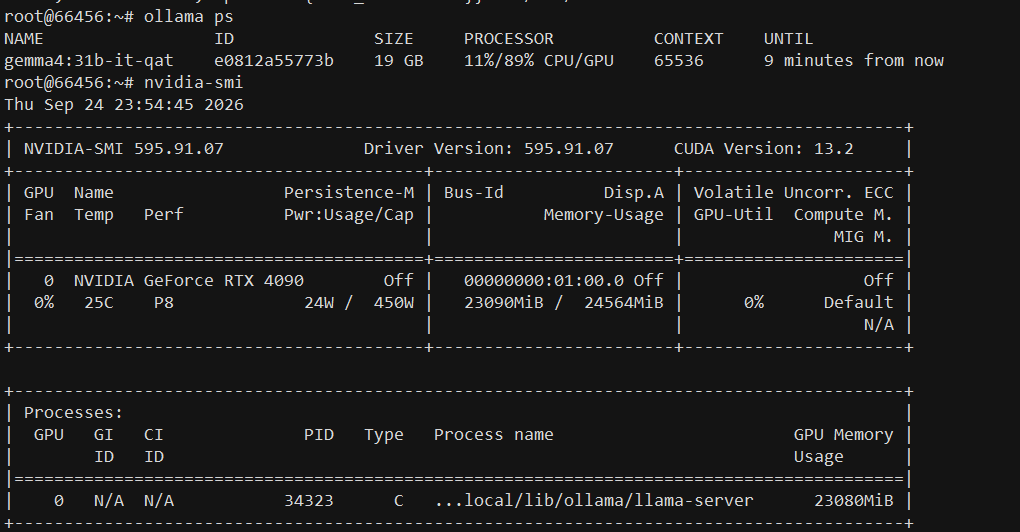
If the eval rate is far below the calculated bound and the model is partly running on the CPU, ollama ps will show it. On our RTX 4090 server, gemma4:31b-it-qat with a 65,536-token context used 23 of 24 GB of VRAM, and Ollama split it 11% in system RAM and 89% in VRAM. That shows how the model is placed, not how the computation is divided, but the layers left in system RAM run on the CPU and slow generation down. At this context length, a single 24 GB card was no longer enough even for a model with 4-bit weights, and generation slowed noticeably as a result.
Common Mistakes When Choosing a GPU
The most common mistake is choosing a card by TFLOPS, when for inference what matters more is whether the model fits in memory and how fast that memory can be read. Almost as common is comparing numbers in different formats, such as one card’s sparse FP4 against another’s FP16, and drawing far-reaching conclusions from it.
Teams often build a multi-GPU training server out of consumer cards without accounting for the lack of NVLink, and are then surprised that on workloads with frequent synchronization, four cards deliver much less than a fourfold speedup. The opposite mistake happens too: renting a data center card for an 8B model when an RTX 4090 would serve it almost as fast for a fraction of the price.
Finally, the rest of the server is often an afterthought, even though a slow disk, too few CPU cores, or too little system RAM can easily leave an expensive GPU waiting for data.
Key Takeaways for Choosing a GPU for AI
For training, what matters is BF16 and FP8 compute, memory capacity, and inter-GPU communication; for single-stream generation, it’s VRAM capacity and bandwidth; and QLoRA fine-tuning of 7–13B models often fits on a single 24 GB card. Convert marketing TFLOPS to dense BF16 before comparing cards, and base generation speed estimates on memory bandwidth.
The market is moving fast in 2027. Rubin is already shipping to large cloud providers, but neither it nor the MI450 will reach most renters right away, and rental prices for previous generations will keep falling. The specs in this article are rounded from vendor materials, so check them against NVIDIA’s and AMD’s pages before you buy. Estimating VRAM requirements for LLMs and comparing cards within NVIDIA’s lineup are beyond the scope of this article; we cover them in separate posts.