



 +31 20 820 3777
 Compliance
  Support
  Documentation
 Login
Login 





Imagine a codebase created long ago that hasn't undergone significant refactoring—only continuous feature additions and piecemeal updates. It lacks a REST or FastAPI implementation, and because it has been touched by many different developers over the years, extracting coherent documentation from them is a Herculean task (even when they try). Furthermore, since there is no REST API, standard tools like Swagger cannot be integrated.
Until recently, client documentation was written manually and became obsolete almost instantly. New methods appeared in the code daily, and documentation only happened if someone remembered to do it. Conversely, when methods were deleted, "ghost" methods remained in the documentation.
At the time of writing this article, the Invapi PHP backend used at HOSTKEY contains over 60 controller methods within the app/ directory. Each controller is a .php file that accepts an HTTP request, inspects the action parameter, and executes the corresponding code branch. The total number of calls is approaching 1,000, with several hundred available to the client. For example, if a client calls POST /ip.php with action=get_ip, the PHP controller executes the corresponding case block. All of this must be documented and, crucially, must remain accurate.
When I began automating documentation, the API presented an interesting challenge. I developed a system of Python scripts that analyze the Invapi PHP code from a Git repository using a local LLM (via Ollama). The system generates Markdown documentation, validates it against the source code, and automatically tracks changes in GitLab to determine what has changed and whether documentation updates are required.
In this article, I will explain how it all works under the hood.
High-Level Architecture: A Five-Agent Pipeline
The API documentation system is not a monolithic script; it is a pipeline consisting of five independent components:
- PHPFuncIndexer (LLM)
- Whitelist Export (LLM)
- Doc Generator (LLM)
- Validator (Regex + LLM)
- Monitor (GitLab API)
Each stage is a separate LLM call with a unique prompt, specific timeouts, and dedicated error-handling logic. This modularity allows any stage to be restarted independently—for instance, you can regenerate documentation for a single method without re-analyzing the entire whitelist or trigger the pipeline only when changes affect client-facing API methods.
Let's dive into each stage.
Phase 1: Function Indexing—Why the LLM Needs to Know What's in func/*.php
Invapi's PHP controllers heavily delegate logic. For example, the eq.php controller acts as a thin router that calls functions from func/func_eq.php. For an LLM to accurately describe what a method returns, it needs the code for both the controller and the functions being called.
The php_func_indexer.py scanner scans all .php function files and builds a signature index. Its simplified logic looks like this:
class PHPFuncIndexer:
    # Pattern to extract the function
    FUNC_PATTERN = re.compile(
        r'(\/\*\*.*?\*\/\s*)?'                          # optional docblock
        r'function\s+(\[a-zA-Z\_\]\[a-zA-Z0-9\_\]\*)\s*' # function name
        r'\(([^)]\*)\)'                                  # parameters
        r'(?:\s*:\s*(?:\??\s*\[a-zA-Z\_\]\[a-zA-Z0-9\_|\<\>\[\]\\\s\]\*))?' # return type
        r'\s*\{',                                       # opening brace {
        re.DOTALL
    )
    # Pattern to extract fields: $arr['key']
    FIELD_PATTERN = re.compile(
        r'\$[a-zA-Z\_\]\[a-zA-Z0-9\_\]*\s*\[\s*\[?'["\']([a-zA-Z\_\]\[a-zA-Z0-9\_\]*?)["\']\s*\]'
    )
The indexer does more than just collect function names. It extracts the keys of returned arrays ($out['server_id'], $result['price']) and constructs a compact snippet to provide context to the LLM:
def to_context_snippet(self) -> str:
    """Generates a compact snippet for LLM context"""
    fields = ", ".join(self.return_fields[:15]) if self.return_fields else "unknown"
    params_str = ", ".join(self.params[:5])
    if len(self.params) > 5:
        params_str += ", ..."
    doc = f"\n// {self.docblock.strip()}" if self.docblock.strip() else ""
    return (
        f"function {self.name}({params_str}) {{ ... }}{doc}\n"
        f"// Returns fields: {fields}"
    )
This snippet is passed to the LLM alongside the controller code. Consequently, the model doesn't just see raw PHP; it understands the response structure. The index is cached for 24 hours in .func_index_cache.json and reused for each method.
Phase 2: The Whitelist—Why the LLM Can't Just Find All Methods
A major challenge in API documentation is identifying all client-facing methods within a PHP file and distinguishing them from internal, service, or administrative methods. Take the ip.php file as an example. Although it isn't the largest file in the project (about 500 lines), it currently contains 35 callable methods implemented as case blocks within a single switch statement (a design choice I'll leave to the developers). Of these, only seven are available to the client:
|
Method |
Action |
Description |
|---|---|---|
|
get_client_ip |
Get client IP |
Returns the IP address of the client making the API request. |
|
get_ip |
Get IP info |
Returns full information for a specific IP address: network data, subnet mask, and other parameters. |
|
get_ptr |
Get PTR record |
Returns the current PTR record for the specified IP address, if assigned to a server in the given location. |
|
get_traffic |
Get traffic |
Returns network traffic data (in/out) for a specified IP over a selected period. Supports summary or detailed ticks. |
|
list_free_ip |
List free IPs |
Returns a list of unused IPv4 addresses for a specified location based on Route Reflector tags. Clients can only see subnets linked to their email or subaccount. |
|
set_main |
Set main IP |
Sets the specified IPv4 address as the primary (main) address for the server. Updates WHMCS billing data if necessary. |
|
update_ptr |
Update PTR |
Updates the PTR record for the IP assigned to the server. Verifies the link between the IP and Server ID before execution. |
Problem 1: Inconsistent Parameter Extraction
In api_keys.php, all parameters are wrapped in a $params container:
$params = $_POST['params'] ?? $_GET['params'] ?? [];
			'add' => api_keys_add($params, $res['customer_id'], $res['email'] ?? ''),
However, in ip.php, it's a different story. Parameters are scattered across the top level of the file:
$action = htmlspecialchars($_GET['action'] ?? $_POST['action'] ?? '');
$ip = htmlspecialchars($_POST['ip'] ?? $_GET['ip'] ?? "");
$ptr = htmlspecialchars($_GET['ptr'] ?? $_POST['ptr'] ?? "");
$location = htmlspecialchars($_GET['location'] ?? $_POST['location'] ?? "");
$vlan = htmlspecialchars($_GET['vlan'] ?? $_POST['vlan'] ?? -1);
$id = (int)($_GET['id'] ?? $_POST['id'] ?? -1);
$period_start = htmlspecialchars($_POST['period_start'] ?? $_GET['period_start'] ?? time() - 86400);
This results in 18 top-level variables. Not all are used in every case block. The get_ip method only uses $ip and $full. The get_traffic method uses $ip, $period_start, $period_stop, $summary, and $unbilled.
To ensure reliability, we use a hybrid approach of Regex and LLM.
The MethodValidator regex extracts $_POST/$_GET references:
class MethodValidator:
    INPUT_PATTERN = re.compile(
        r'(?:\$\_POST|\$\_GET|\$\_REQUEST|\$data|\$msg|\$params)'
        r'\s*\[\s*\[?["\']([a-zA-Z\_\]\[a-zA-Z0-9\_]*)["\']\s*\]'
    )
However, in ip.php, variables are extracted once at the top of the file, while the case blocks use the assigned variables like $ip or $ptr. Regex cannot resolve the link between $ip = $_POST['ip'] and if ($ip == ""). Therefore, parameter parsing must be delegated to the LLM.
Problem 2: Varying Response Styles
Again, it all depends on the code. If api_keys.php uses a single consistent structure:
$response = ['result' => 'OK', 'data' => match ($action) { ... }];
die(json_encode($response));
Then ip.php presents three different styles:
-
Style 1: die() — Terminates execution.
case "get_ip": die(json_encode($full ? ["data" => $res] + $response : $res + $response)); -
Style 2: echo() — Continues execution.
case "list_subnets": echo json_encode(['result' => 'OK', 'subnets' => $res]); -
Style 3: Mixed — A combination of both.
case "get_traffic":
    if (is_array($res))
        echo json_encode(["result" => "OK", "traffic" => $res]);
    else
        die(json_encode(["result" => -1, "message" => "..."]));
The system must understand that die(json_encode(...)) and echo json_encode(...) are functionally identical for the purpose of returning a JSON response. The PHP semantics differ, but the API behavior does not.
Problem 3: $action vs $msg["action"] and the Internal Callback Trap
In ip.php, this conflict is subtle, but in eq.php, it's blatant:
// Client API
switch ($action) {
    case 'on':           // ✅ Client: action=on
    case 'reboot':       // ✅ Client: action=reboot
}
// Internal Hypervisor Callback
if ($msg["action"] == "console") {     // ❌ Internal
if ($msg["action"] == "deploy_vm") {   // ❌ Internal
To solve this, our "Whitelist Generation" prompt includes a strict rule:
WHITELIST_ONLY_PROMPT = """...
⚠️ CRITICAL RULE:
IF a condition uses $msg["action"] OR $msg['action'] —
IT IS AN INTERNAL CALLBACK, NOT A CLIENT METHOD!
✅ INCLUDE ONLY if the condition uses the GLOBAL $action variable:
- switch ($action) { case "clear_pxe": ... } > ✅ "clear_pxe"
❌ EXCLUDE:
- switch ($msg["action"]) { case "get_status": ... } > ❌ SKIP
...
"""
Problem 4: _ADMIN_ONLY Methods
In ip.php, there are permission checks within case blocks:
case "bill_traffic":
    // No check — intended for server-side scripts only
    $jj_task = jenkins_journal_add("$module/$action", $_GET);
    // ... 50 lines of code
case "dhcp_report":
    if ($perm["customer"] == 1) throw new Exception("invalid request");
    // Admin-only
case "ip_history":
    if ($perm["customer"] == 1) throw new Exception("invalid request");

    // Admin-only
case "get_ip":
    // No check — available to everyone
    if (!filter_var($ip, FILTER_VALIDATE_IP)) throw new Exception("malformed IP");
During documentation generation, our system must correctly identify:
- bill_traffic is an internal method (no token check at this level, and it uses jenkins_journal_add).
- dhcp_report is an admin-only method (explicitly checks $perm["customer"] == 1).
- get_ip is a client method, but it's accessible to anyone with a valid token.
The heuristics for this are defined in the LLM prompt:
WHITELIST_ONLY_PROMPT = """...
✅ "client_methods" — A client can call if:
- Method is defined via GLOBAL $action (NOT $msg["action"])
- No explicit administrator role checks
- Uses auth_validate_token()
❌ "admin_methods" — Admin-only if:
- Checks exist: is_admin(), check_admin_role(), auth_check_permission() with admin role
- $perm["customer"] == 1 → throw Exception (client cannot call)
...
"""
However, there are mixed cases. In ip.php, the get_traffic method is a prime example:
case "get_traffic":
    if ($perm["customer"] == 1) {
        // Check if the IP belongs to the customer
        $id = ipv4_get_eq($ip);
        if (!in_array($id, $perm["servers"])) throw new Exception("invalid IP");
    }
    // Client can call it, but only for their own IPs
    $res = ipv4_get_traffic($ip, $period_start, $period_stop, $summary, $unbilled);
This is a client method with visibility restrictions. The LLM must recognize this and not categorize it as an admin-only method.
Problem 5: Parameter Requirements—empty() vs ?? vs Explicit Checks
This is another issue that can "break" an LLM's logic. In ip.php, requirement status is determined inconsistently:
-
Style 1: Direct check in case:
case "list_subnets": if ($location == "") throw new Exception("location required"); // location is REQUIRED -
Style 2: Default value at top level:
$location = htmlspecialchars($_GET['location'] ?? $_POST['location'] ?? ""); // $location defaults to "", but list_subnets checks for emptiness -
Style 3: Type checking:
case "get_vlan_ip": if ($vlan == -1) throw new Exception("vlan id required"); // $vlan is REQUIRED; -1 means "not provided" -
Style 4: Range checking:
case "get_range_ip": if ($id == -1) throw new Exception("range id required"); // $id is REQUIRED -
Style 5: No check or optional:
case "get_ip":
			// $ip is checked for validity, but not for existence
			if (!filter_var($ip, FILTER_VALIDATE_IP)) throw new Exception("malformed IP");
To handle these, the DOCUMENTATION_ONLY_PROMPT uses these heuristics:
DOCUMENTATION_ONLY_PROMPT = """...
- Required (required: true) if:
  - Check exists: if (empty($params['name'])) throw ...
  - Check exists: if ($location == "") throw ...
  - Check exists: if ($id == -1) throw ...
  - No ?? or ?: operator with a default value
- Optional (required: false) if:
  - Uses $params['active'] ?? 1 or $params['ip'] ?: ''
  - Uses default: $location = htmlspecialchars($_GET['location'] ?? "" ...)
  - Only checks type, not presence: if (!filter_var($ip, ...))
...
"""
There is also a nuance in ip.php: the default value $id = -1 is used as a signal that the parameter was missing, rather than representing a real value:
$id = (int)($_GET['id'] ?? $_POST['id'] ?? -1);
case "get_range_ip":
    if ($id == -1) throw new Exception("range id required"); // $id == -1 means "not provided"
case "set_main":
    if (!$id) throw new Exception("invalid request"); // $id == 0 also counts as "not provided"
The LLM must understand this convention and treat -1 as a sentinel value.
Problem 6: Multiple match/switch Blocks in One File
While ip.php only has one switch($action) for the entire file, api_keys.php contains three different match blocks:
-
Permission Mapping:
$permission = match ($action) { 'list', 'list_for_server', ... => 'view', 'add', 'edit', 'delete', ... => 'edit', }; -
Call Dispatching:
'data' => match ($action) { 'list' => api_keys_list($res['customer_id']), 'add' => api_keys_add($params, ...), }; -
Notification Localization:
$message = match($action) {
    "add" => ["header" => "New API Key", ...],
};
For this, I took the simplest approach: the system identifies the first match/switch pattern matching $action, as the primary dispatch in Invapi's architecture typically precedes auxiliary logic. However, this isn't guaranteed, so we supplement this with additional verification layers.
RBAC Filtering: API Permission Lookups and Fuzzy Name Matching
In addition to the code-level checks, client-facing functions are separated from internal system functions via Role-Based Access Control (RBAC).
To handle this, clean_adminonly_whitelist.py queries the Invapi RBAC API to retrieve a list of functions flagged with admin_only=1.
Extracting Case Blocks and Three LLM Calls per Method
Once the system identifies the list of methods within a specific .php file, it must extract the exact code for each method to pass it to the LLM for documentation. This is one of the most sophisticated features of the system. Its purpose is to isolate the specific case block from a large PHP file, providing the LLM with a minimized context. This optimization saves both execution time and processing overhead.
Consider ip.php as an example. If we pass the entire file, we would need 15 KB or approximately 4,000 tokens. But what if the file is 500 KB or larger? The LLM only needs one specific block—for instance, get_ip, which is just 15 lines of code.
The function operates in three stages:
- Locating the start of the case block
def extract_action_code(php_code: str, action_name: str, context_lines: int = 30) -> str:
    # Search for the line: case "get_ip": or case 'get_ip':
    case_pattern = re.compile(
        rf'^\s*case\s+["\']({re.escape(action_name)})["\']\s*:',
        re.MULTILINE
    )
    case_matches = list(case_pattern.finditer(php_code))
    if case_matches:
        match = case_matches[0]  # Take the first occurrence
        start_line = php_code[:match.start()].count('\n')  # Starting line number
Here, we use re.MULTILINE so that the ^ anchor matches the beginning of each line rather than just the start of the entire string. We also use re.escape(action_name) to ensure that any special characters in the method name don't break the regex.
- Locating the end of the case block — brace counting
In PHP, a case statement within a switch does not create its own scope:
switch ($action) {
    case "get_ip":                     // Start of block
        if (!filter_var($ip, ...)) {   // { — brace_depth = 1
            throw new Exception();     //
        }                              // } — brace_depth = 0
        $res = ipv4_get_network($ip);  // More code
        break;                         //
    case "set_main":                   // The next case marks the END of the previous one
        // ...
}
If we were to use a simple regex to find the next "case" string, we might accidentally capture extra code. To prevent this, the system tracks the brace nesting depth:
        next_case_re = re.compile(r'^\s*(case\s+|default\s*:)')
        brace_depth = 0  # Nesting depth of {} WITHIN the case
        end_line = start_line
        for i in range(start_line + 1, total):
            line = lines[i]
            stripped = line.strip()
            # Iterate through every character in the line
            for ch in line:
                if ch == '{':
                    brace_depth += 1      # Entering an if/else/for/while
                elif ch == '}':
                    if brace_depth > 0:
                        brace_depth -= 1  # Exiting a nested block
                    else:
                        # A } at level 0 is the closing brace for the switch
                        end_line = i - 1
                        break
The critical detail is that brace_depth == 0 indicates we are at the switch level, not inside a nested if statement. When a case or default: is encountered at this level, it marks the end of the current block:
# At the switch level (brace_depth == 0), check for case/default
            if brace_depth == 0 and next_case_re.match(stripped):
                end_line = i - 1
                break
This is vital for calls like ip.php/change_ip: the block contains if/else, try/catch, and foreach statements, resulting in multiple levels of nested braces. A simple regex looking for the next "case" would likely cut the code off prematurely.
- Assembling the result
Once the start and end points are found, the function assembles two fragments: the file header (the first 30 lines: use statements, require calls, variable declarations) and the target case block itself:
def _build_extracted_result(
    php_code, lines, start_line, end_line,
    action_name, context_lines, total
):
    result_parts = []
    # First N lines — declarations, use, namespace
    header_end = min(context_lines, total)
    result_parts.append("// === FILE HEADER (context) ===")
    result_parts.extend(lines[:header_end])
    # The extracted block
    result_parts.append(f"// === ACTION: {action_name} ===")
    result_parts.extend(lines[start_line:end_line + 1])
    extracted = '\n'.join(result_parts)
    log(f"extract_action_code: {original_tokens} -> {extracted_tokens} tokens")
    return extracted
The header is necessary so the LLM understands which use imports and variables are available. Without it, the model won't know that $ip is actually $_POST['ip'] or that PlatformException is an exception from HostKey\InvApi\Exceptions.
For the ip/get_ip method, the final output looks like this:
// === FILE HEADER (context) ===

use HostKey\InvApi\Exceptions\PlatformException;
require_once dirname(__DIR__) . "/init.php";
require_once __DIR__ . "/func/func.php";
...
$ip = htmlspecialchars($_POST['ip'] ?? $_GET['ip'] ?? "");
$full = (bool)($_POST['full'] ?? $_GET['full'] ?? false);
// === ACTION: get_ip ===
case "get_ip": {
    if (!filter_var($ip, FILTER_VALIDATE_IP)) throw new Exception("malformed IP=$ip");
    if ($ip == "127.0.0.1") die(json_encode(["result" => -1, "message" => "No data for loopback"]));
    $res = ipv4_get_network($ip);
    if (!is_array($res)) {
        throw new PlatformException("unknown IP $ip", -1, $module, $action);
    }
    die(json_encode($full ? ["data" => $res] + $response : $res + $response, JSON_THROW_ON_ERROR));
    break;
}
For files that do not use a switch statement, the system attempts to match a second pattern: if ($action == "name"):
    if_pattern = re.compile(
        rf'if\s*\(\s*\$action\s*==\s*["\']({re.escape(action_name)})["\']\s*\)',
        re.MULTILINE
    )
    if_match = if_pattern.search(php_code)
    if if_match:
        start_line = php_code[:if_match.start()].count('\n')
        # Look for the closing } for this if block
        brace_count = 0
        found_open = False
        for i in range(start_line, total):
            for ch in lines[i]:
                if ch == '{':
                    brace_count += 1
                    found_open = True
                elif ch == '}':
                    brace_count -= 1
                    if found_open and brace_count <= 0:
                        end_line = i
                        break
A third pattern is match ($action) { 'name' => ... }, which is used in PHP 8+.
    match_pattern = re.compile(
        rf'["\']({re.escape(action_name)})["\']\s*=>',
        re.MULTILINE
    )
    match_m = match_pattern.search(php_code)
    if match_m:
        start_line = php_code[:match_m.start()].count('\n')
        # Look for the end: the next '...' => or a closing }
        next_match_re = re.compile(r'^\s*["\'][^"\']+["\']\s*=>')
In some files (such as the aforementioned api_keys.php), all three patterns may be present, and the system will attempt each one sequentially.
As a result of these operations, the LLM identifies all client-side methods and generates a YAML file containing them—the so-called whitelist_config.yaml—as well as a method dictionary in JSON format.
Phase 3: Generating Markdown Documentation: From JSON to Final Text
By this stage, the system has gathered all the necessary metadata for the method: its name, description, parameter list (including types and required status), and response/error examples. However, this data currently exists only as a JSON object within a Python dictionary. The next step is to transform this into a polished Markdown document.
Where does the data come from?
In the previous phases, the LLM generated a JSON structure for each method. Here is an example for ip/get_ip:
{
  "action_name": "get_ip",
  "action_type": "ip information retrieval",
  "http_method": "POST",
  "description": "Returns full information about an IP address",
  "required_role": null,
  "parameters": [
    {"name": "token", "type": "string", "required": true, "description": "Authorization token"},
    {"name": "ip", "type": "string", "required": true, "description": "IPv4 address"}
  ],

  "success_response": {"result": "OK", "module": "ip", "action": "get_ip", "ip": "192.168.1.1", "network": "192.168.1.0"},
  "error_responses": {"code": -1, "message": "malformed IP"}
}
This data has already been validated. We have verified the structure using regex, and the LLM has cross-referenced it against the source code. Now, we assemble this data into a Markdown file through the following steps.
Step 1: Parameter Table
The script iterates through the method's parameter list to construct each table row. The first row is always the action with the method name as its value. We then append each parameter from the JSON. This results in a table like the one below:
|
Parameter |
Required |
Type |
Description |
|---|---|---|---|
|
action |
✅ |
string |
get_ip |
|
token |
✅ |
string |
Authorization token |
|
ip |
✅ |
string |
IPv4 address |
Step 2: curl Example
Next, the script constructs a curl command using the required parameters. For every parameter marked as required: true, a --data "name=value" line is added. The token parameter is replaced with a HOSTKEY_TOKEN placeholder instead of the actual value:
curl_params_parts = [f'  --data "action={action_name}"']
for param in method.get('parameters', []):
    param_name = param.get('name', '')
    if _is_required(param.get('required')):
        if param_name == 'token':
            curl_params_parts.append(f'  --data "{param_name}=HOSTKEY_TOKEN"')
        else:
            example = param.get('example', 'VALUE')
            curl_params_parts.append(f'  --data "{param_name}={example}"')
curl_params = ' \\\n'.join(curl_params_parts)
For arrays (is_array: true), the curl command uses repeated keys:
--data "tags[]=value1"
--data "tags[]=value2"
Step 3: JSON Responses
The success_response and error_responses objects are formatted using json.dumps with a 2-space indentation. Each line is further indented by two spaces because of MkDocs admonitions (like ??? success) require a 4-space indentation for code blocks contained within them:
success_response_json = json.dumps(
    method.get('success_response', {}), ensure_ascii=False, indent=2
)
# Add indentation for MkDocs admonition
success_response_json = '\n'.join(
    '  ' + line if line else line
    for line in success_response_json.split('\n')
)
Step 4: Prompt Assembly
All prepared components—the table, the curl command, the JSON responses, and errors—are injected into a template called MARKDOWN_ONLY_PROMPT. This prompt instructs the LLM: "Return ONLY markdown, no explanations," and provides the following skeleton:
markdown_prompt = MARKDOWN_ONLY_PROMPT.format(
    action_name=action_name,
    description=method.get('description', ''),
    http_method=method.get('http_method', 'POST'),
    params_table=params_table,
    curl_params=curl_params,
    success_response_json=success_response_json,
    error_responses_json=error_responses_json,
    api_base_url=api_base_url.rstrip('/'),
    filename=filename_no_ext,
    endpoint=f"{api_base_url}/{filename_no_ext}"
)
Step 5: LLM Refinement
The LLM receives this pre-structured data and generates the final Markdown, including descriptions, code examples, and formatting. As shown in the previous steps, the LLM isn't creating the content from scratch. Instead, it wraps the structured data into a consistent Markdown format like this:
## **ip/get_ip**

Returns full information about an IP address: network, mask, gateway, and location.

HTTP Method: POST

Parameters:


| Parameter | Required | Type | Description |
| :---- | :---- | :---- | :---- |
| action | ✅ | string | get\_ip |
| token | ✅ | string | Authorization token |
| ip | ✅ | string | IPv4 address for the request |

!!! question "Request Example"

```bash
curl -s "https://invapi.hostkey.com/ip.php" -X POST \
  --data "action=get_ip" \
  --data "token=HOSTKEY_TOKEN" \
  --data "ip=192.168.1.1"
```

??? success "Successful Response Example"

```json
{
  "result": "OK",
  "module": "ip",
  "action": "get_ip",
  "ip": "192.168.1.1",
  "network": "192.168.1.0",
  "netmask": "255.255.255.0",
  "gateway": "192.168.1.1",
  "location": "NL"
}
```

??? failure "Error Examples"

```json
{"code": -1, "message": "malformed IP=not-an-ip"}
```
This process is repeated for every .php file in the Invapi, forming a complete list of methods. We also generate a header structure and a master method index, eventually compiling everything into a single comprehensive API reference file.
The key takeaway is that we do not use the LLM to generate the Markdown in its entirety. By breaking the task into stages—where Python handles the programmatic assembly of tables, curl commands, and JSON—the LLM is only responsible for adding descriptions and final formatting.
This hybrid approach ensures documentation consistency and significantly reduces "hallucinations." For instance, if the LLM were generating the parameter table from scratch, it might skip a required parameter or misstate a data type. By using pre-validated JSON, the table is guaranteed to be accurate, leaving the LLM to handle only the descriptive prose.
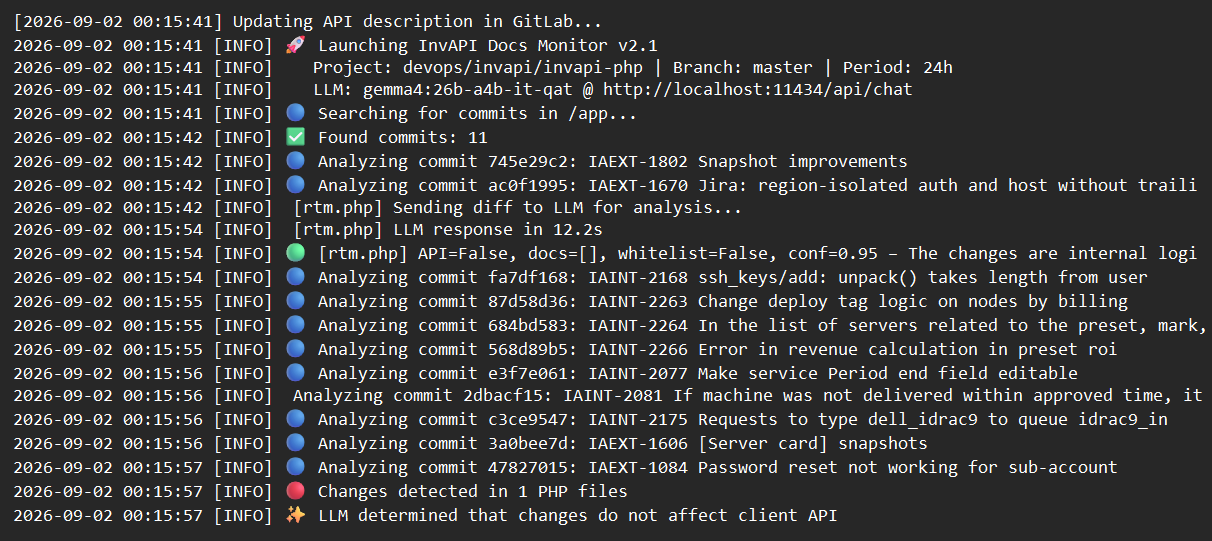
Phase 4: GitLab Monitoring. Using LLMs to Analyze Git Diffs
Generated documentation can become obsolete as soon as the next day due to code updates. To handle continuous code changes, the monitor_invapi_docs_llm.py script automates the process—it tracks GitLab commits and triggers automatic regeneration for any affected files.
The monitor polls the GitLab API for commits made within the last N hours (defaulting to 24). It applies a path filter for app/ to ensure the system ignores changes in tests, configurations, or frontend assets.
For every modified PHP file, the script extracts the git-diff and passes it to an LLM. The model is tasked with answering three key questions:
- Does the change affect the client API?
- Which methods have changed?
- Does the whitelist need an update?
We achieve this using the following prompt:
"""You are an expert analyst for changes in the InvAPI PHP repository.
Your task: determine whether the changes require an update to the client API documentation.
Respond ONLY with valid JSON:
{
"affects_client_api": true/false,
"files_to_update_docs": ["file1.php"],
"changed_methods": {"filename.php": ["method1", "method2"]},
"deleted_methods": {"filename.php": ["old_method"]},
"needs_whitelist_update": true/false,
"reason": "Brief explanation",
"confidence": 0.95
}
"""
The critical metric here is affects_client_api. If a developer merely updates logging or reformats code, the change does not affect clients, and the documentation remains untouched. However, if a new parameter is added or a response format is altered, affects_client_api returns true.
If the LLM fails to identify the changed methods—for instance, if the diff is too large or the model returns invalid JSON—the system falls back to a regex-based extraction to find function declarations in the added lines.
The most critical scenario is method deletion. If documentation describes a method that no longer exists, clients attempting to call it will encounter errors. My monitor tracks these deletions via the LLM and generates a Markdown report containing a checklist for manual review.
Notably, the system does not automatically delete documentation. This is a safety measure: developers might delete a method only to revert the change a few hours later, or the system might incorrectly flag a method as non-client-facing after subsequent edits.
Additionally, the monitor can be run in --dry-run mode before applying actual updates. This mode previews which files would be updated without writing any changes. This is highly useful for verifying that the LLM hasn't missed a critical change or that the fallback regex hasn't triggered a false positive.
The resulting LLM orchestration structure is as follows:
|
Stage |
Script |
Prompt |
Temperature |
Avg. Tokens Used |
|---|---|---|---|---|
|
Whitelisting |
Invapi_docs_agent.py |
WHITELIST_ONLY_PROMPT |
0.05 |
16,000 |
|
Method Analysis |
Invapi_docs_agent.py |
DOCUMENTATION_ONLY_PROMPT |
0.05 |
24,000 |
|
Regex Validation |
validator.py |
— |
— |
— |
|
LLM Validation |
Invapi_docs_agent.py |
VALIDATION_PROMPT |
0.10 |
8,000 |
|
Markdown Generation |
Invapi_docs_agent.py |
MARKDOWN_ONLY_PROMPT |
0.05 |
24,000 |
|
Commit Analysis |
monitor_Invapi_docs_llm.py |
(Hardcoded) |
0.10 |
1,500 |
All calls are directed to a local Ollama instance (localhost:11434) running the gemma4:26b-it-qat model. Setting OLLAMA_MAX_CTX=128000 is critical for handling large files like eq.php (~242 KB) or whmcs.php (~344 KB); this can be expanded up to the model's maximum support of 256K.
The system also includes dynamic context size calculation for optimal GPU utilization, targeted method patching to avoid full file rewrites, and performance optimizations like running two parallel threads across two Ollama instances. The entire pipeline runs on a server equipped with two Nvidia Tesla V100s (16 GB VRAM each).
Conclusion
This ~4,000-line Python system effectively solves the challenge of dynamic InvAPI documentation generation—starting from parsing complex PHP code and ending with a beautifully formatted section on the website. Combining programmatic checks with LLMs prevents most errors and saves our documentation team from the daily grind of manually parsing new merges.
While the system isn't perfect—occasional errors may require a manual trigger to regenerate a specific method—it is a necessary workaround until the developers deliver the promised REST API with built-in automated documentation builds. This system has been running daily since early May, successfully monitoring code changes and updating documentation for three months.
P.S. I used the same logic to build the full documentation generator for our corporate XWiki, which adds an extra step to convert Markdown to XWiki format and upload it via API.