



 +31 20 820 3777
 Support
  Documentation
 Login
Login 



By Alexander Kazantsev, Head of Documentation and Content at HOSTKEY
NVIDIA itself positions the RTX PRO 2000 Blackwell as a compact and energy-efficient solution for professional workstations that accelerates graphics and AI tasks. It promises maximum AI performance with FP4 support, DLSS 4, and optimizations for RTX Neural Shaders and Mega Geometry technologies. Additionally, it supports complex multi-application workflows such as generative AI, 8K video processing, real-time rendering, and CAD with ray tracing capabilities. In other words, this card is designed for use in content creation, 3D design, video editing, and CAD applications.
At HOSTKEY, we consider the RTX PRO 2000 Blackwell as a replacement for servers that no longer support the 1080Ti graphics cards, as well as an alternative to the more expensive 16GB A4000. But what exactly do you get for the price of €850?
Some Odd Specifications
Let’s start with the specifications. Since this card belongs to the Blackwell series, it can be compared to the RTX 6000 PRO Blackwell in terms of performance and features.
|
Feature |
NVIDIA RTX PRO 6000 Blackwell |
NVIDIA RTX PRO 2000 Blackwell |
|---|---|---|
|
Architecture |
Blackwell |
Blackwell |
|
CUDA Cores |
24,064 |
4,352 |
|
Tensor Cores |
752 (5th generation) |
136 (5th generation) |
|
RT Cores |
188 (4th generation) |
34 (4th generation) |
|
Memory |
96 GB GDDR7 ECC |
16 GB GDDR7 ECC |
|
Bandwidth |
1,597–1,792 GB/s |
288 GB/s |
|
TDP (Thermal Design Power) |
600 W |
70 W |
|
Interface |
PCIe 5.0 x16 |
PCIe 5.0 x8 |
|
AI Performance (TOPS) |
Up to 4,000 |
545 |
|
Form Factor |
FHFL (Full Height Full Length), dual-slot, passive cooling |
Compact SFF (Small Form Factor) |
As you can see, the reduction in performance is not even threefold; in fact, we are dealing with a card that has been significantly downgraded, with its capabilities reduced to only about one-fifth of those of the older server model.
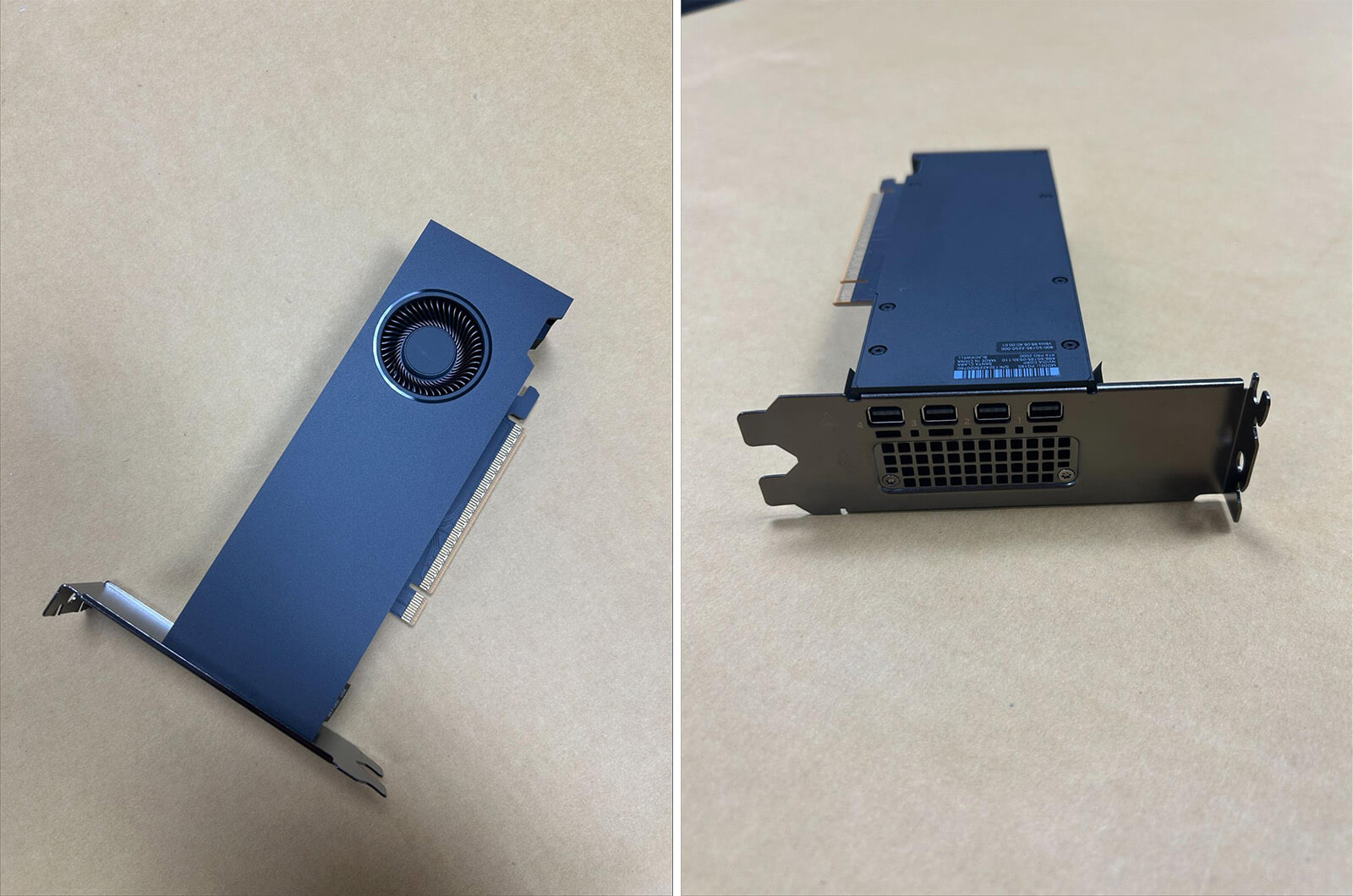
So, how does this card compare to the consumer segment? Given its specifications, one might assume it would be roughly on par with a 5060 Ti with 16GB of memory. However, the results were somewhat disheartening:
RTX PRO 2000 Blackwell, RTX 5060 Ti 16GB, and RTX 5060 – all these are GPUs based on the entry-level Blackwell architecture. They all utilize PCIe 5.0 x8 and GDDR7 memory.
Specification Comparison
|
Specification |
RTX PRO 2000 Blackwell |
RTX 5060 Ti 16GB |
RTX 5060 8GB |
|---|---|---|---|
|
CUDA Cores |
4352 |
4608 |
3840 |
|
Tensor Cores |
136 (5th generation) |
144 (5th generation) |
120 (5th generation) |
|
RT Cores |
34 (4th generation) |
36 (4th generation) |
30 (4th generation) |
|
Memory |
16GB GDDR7 ECC |
16GB GDDR7 |
8GB GDDR7 |
|
Bandwidth |
288GB/s |
448GB/s |
448GB/s |
|
TDP |
70W |
180W |
145W |
|
AI TOPS |
545 |
759 |
~500 |
|
FP32 Performance |
16.97 TFLOPS |
23.7 TFLOPS |
19.2 TFLOPS |
|
Form Factor |
Compact SFF |
2.5-slot |
2-2.5-slot |
In terms of specifications, our RTX PRO 2000 falls between the RTX 5060 Ti and RTX 5060; it outperforms the 5060 in AI tasks (although by a small margin), but lags behind in FP32 performance. However, it’s possible that the card’s power supply is restricting its performance, as its power consumption is less than half that of the 5060, and so is its bandwidth (although both use the same GDDR7 ECC memory, and the PCI-E bus is also limited in the same way as the 5060).
Finally, let’s compare it to the A4000. Starting with price: the A4000 can currently be found for around €1300. That means the RTX PRO 2000 Blackwell is 35% cheaper than the A4000. But what about performance numbers?
|
Feature |
NVIDIA RTX A4000 |
NVIDIA RTX PRO 2000 Blackwell |
|---|---|---|
|
Architecture |
Ampere |
Blackwell |
|
CUDA Cores |
6144 |
4352 |
|
Tensor Cores |
192 (3rd generation) |
136 (5th generation) |
|
RT Cores |
48 (2nd generation) |
34 (4th generation) |
|
Memory |
16 GB GDDR6 ECC |
16 GB GDDR7 ECC |
|
Bandwidth |
448 GB/s |
288 GB/s |
|
TDP (Thermal Design Power) |
140 W |
70 W |
|
Interface |
PCIe 4.0 x16 |
PCIe 5.0 x8 |
|
AI TOPS (Tensor Operations Per Second) |
Not specified |
545 |
|
Form Factor |
Single-slot |
Compact, SFF (Small Form Factor) |
As can be seen, the A4000 boasts better memory bandwidth, as well as a larger total number of cores (although they are from the previous generation of Ampere architecture), yet it consumes twice as much power as the RTX PRO 2000 Blackwell. Additionally, it utilizes 16 PCI-E lanes for data transfer, but these are Gen4 rather than Gen5.
Testing is necessary
We will be testing the card by comparing its performance in the same applications recommended by NVIDIA: large language models (LLMs), image and video generation, as well as checking its performance in Blender rendering.
For testing LLM inference, we will use our script based on Ollama.
Our server configuration is as follows: AMD Ryzen 9 5900X (3.7GHz, 12 cores), 64GB of RAM, 1TB NVMe SSD, and a PSU paired with the RTX PRO 2000.
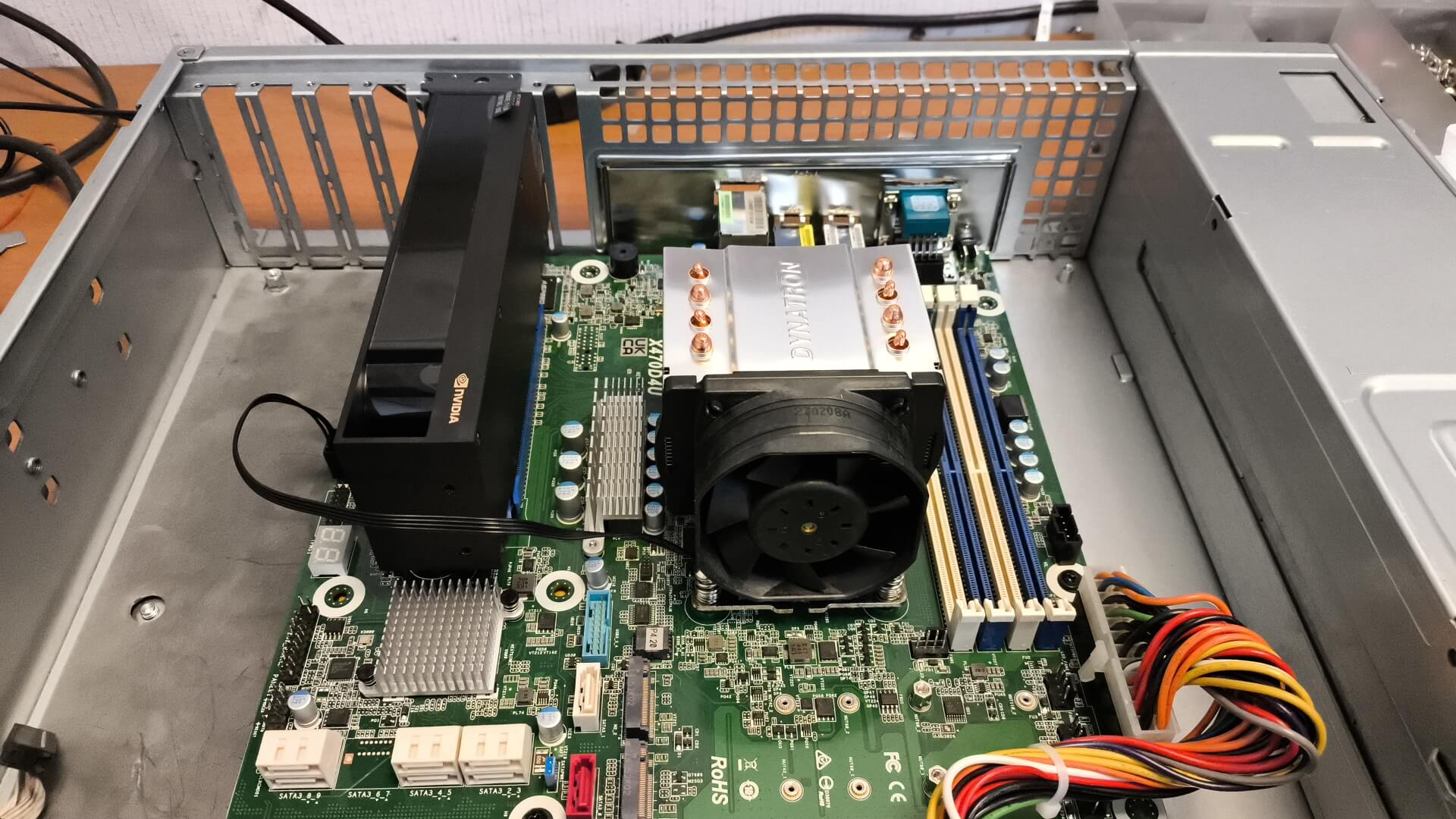
Although our test unit features a compact, short PCB, the reference design still results in a two-slot card that is approximately 6.6 inches in length and utilizes turbine cooling.
The “strange” black casing shown in the photo, which actually increases the size of our small card, allows air to be drawn from inside the enclosure and then blown outward, preventing hot air from accumulating around the processor and memory components.
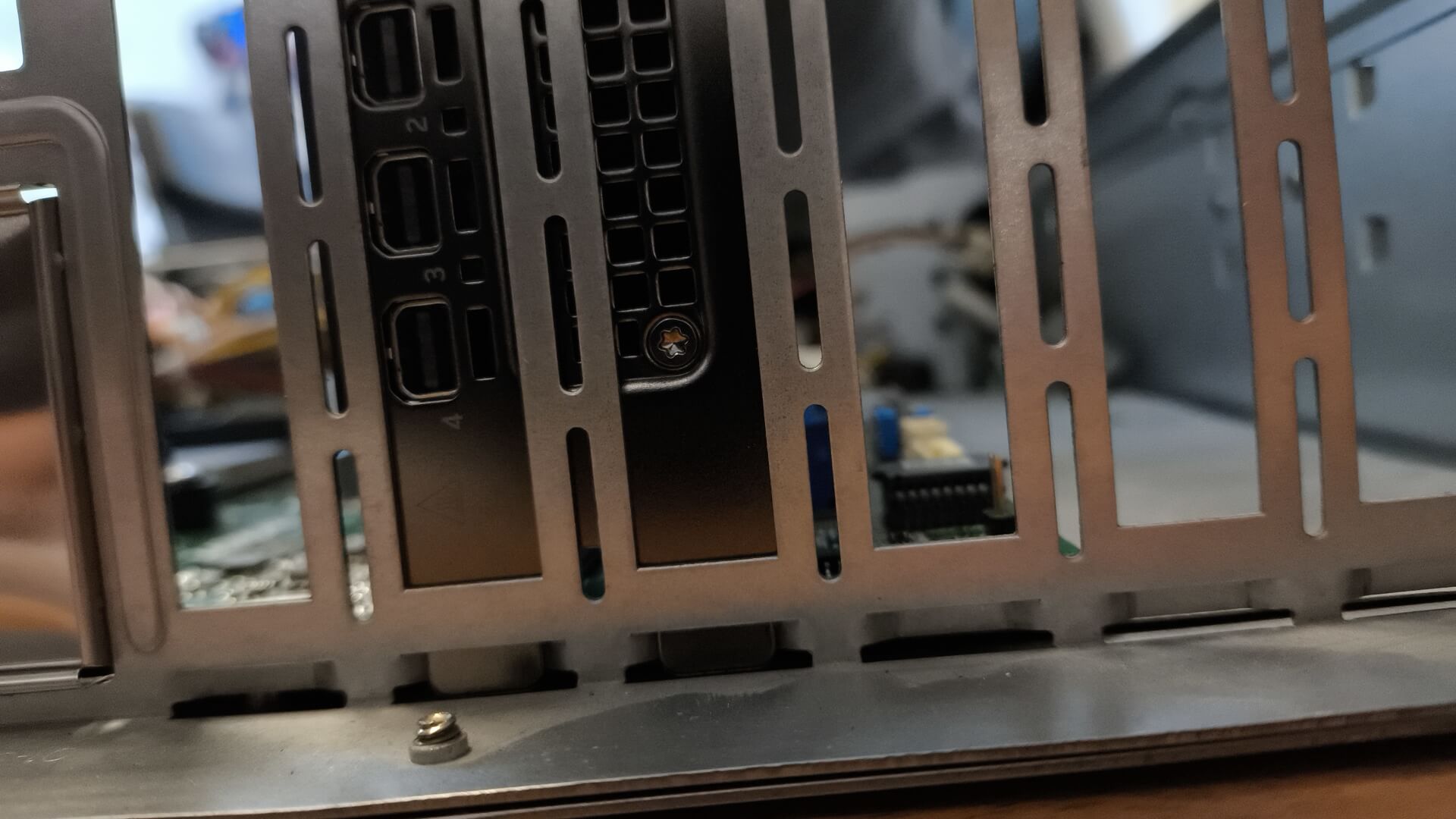
A similar configuration will be used for the A4000; however, the processor we used was a Ryzen 5950X running at 16x3.4 GHz. This specific processor does not participate in our tests and therefore does not affect the comparison results.
We install Ubuntu 22.04 on both machines and use our script to install the necessary drivers and CUDA software. For the RTX PRO 2000 Blackwell, we end up with the following specifications:
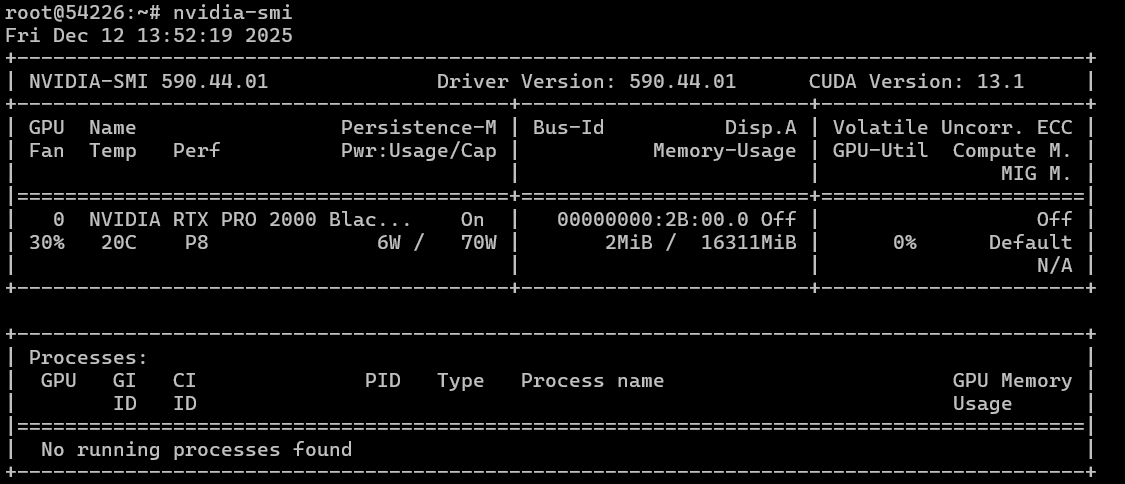
As can be seen, without any load, the performance of the model is merely at “room temperature” (i.e., very low). We will conduct testing on several models, including the older DeepSeek-R1:14B, the slightly more recent gpt-oss:20B with MOE, and the brand-new multimodal mixstral3:14B (which is also faster, at 8B), as well as its image recognition capability. All models utilize Q4 quantization.
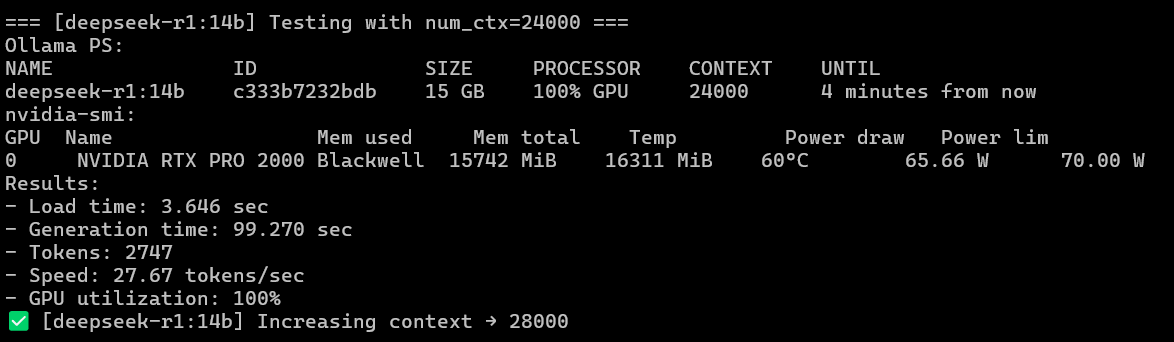
We will compile the final results into a table, including numbers for DeepSeek compared to those achieved on the RTX 6000 PRO Blackwell for comparison purposes.
|
GPU |
Model |
Tokens/sec (average) |
Max Context Size |
Load Time (sec, average) |
Generation Time (sec, average) |
Notes |
|---|---|---|---|---|---|---|
|
NVIDIA RTX 6000 PRO Blackwell (gen5) |
deepseek-r1:14b |
114.02 |
128,000 |
1.74 |
22.71 |
|
|
NVIDIA RTX A4000 (gen4) |
deepseek-r1:14b |
35.81 |
24,000 |
11.72 |
74.37 |
|
|
NVIDIA RTX PRO 2000 Blackwell |
deepseek-r1:14b |
27.79 |
24,000 |
3.68 |
91.91 |
|
|
NVIDIA RTX A4000 (gen4) |
ministral-3:8b |
65.42 |
64,000 |
12.92 |
44.98 |
Visual mode |
|
NVIDIA RTX PRO 2000 Blackwell |
ministral-3:8b |
48.21 |
68,000 |
3.17 |
63.97 |
Visual mode |
|
NVIDIA RTX A4000 (gen4) |
ministral-3:14b |
42.28 |
36,000 |
13.99 |
86.12 |
Visual mode |
|
NVIDIA RTX PRO 2000 Blackwell |
ministral-3:14b |
30.97 |
36,000 |
3.68 |
115.42 |
Visual mode |
|
NVIDIA RTX A4000 (gen4) |
gpt-oss:20b |
84.06 |
120,000 |
14.89 |
30.85 |
“Mixture of Experts” approach |
|
NVIDIA RTX PRO 2000 Blackwell |
gpt-oss:20b |
62.54 |
120,000 |
4.23 |
43.26 |
“Mixture of Experts” approach |
In summary, the RTX PRO 2000 Blackwell performs more slowly during inference tasks compared to the A4000. The only aspect in which the RTX PRO 2000 Blackwell has an advantage is in startup time, namely the time required for initial memory loading. The speed differences between the two models are as follows (in percentage terms, representing how much slower the A4000 is compared to the RTX PRO 2000 Blackwell in terms of inference performance per second):
- Deepseek-r1:14b: ~28%
- Ministral-3:8b: ~27%
- GPT-oss:20b: ~26%
As can be seen, the average speed difference is roughly the same for both traditional inference models and those that utilize the Mixture of Experts (MoE) architecture. Despite the unique characteristics of the MoE architecture, which activates only a small portion of the model’s parameters, allowing for better utilization of the A4000’s strengths—such as its high memory bandwidth (384 GB/s GDDR6 on 16 GB of memory) and large L2 cache—the RTX PRO 2000 Blackwell still manages to perform fairly well despite having less power. This is thanks to its new Tensor Cores.
However, under heavy load, the A4000 temperature rises to 83°C and consumes over 130 watts of power (out of a possible 140 watts), while the RTX PRO 2000 Blackwell remains at around 59°C with a power consumption of 65 watts (out of a possible 70 watts).
When comparing the RTX PRO 2000 Blackwell to NVIDIA’s older RTX PRO 6000 Blackwell in inference tasks, we get the following overall picture:
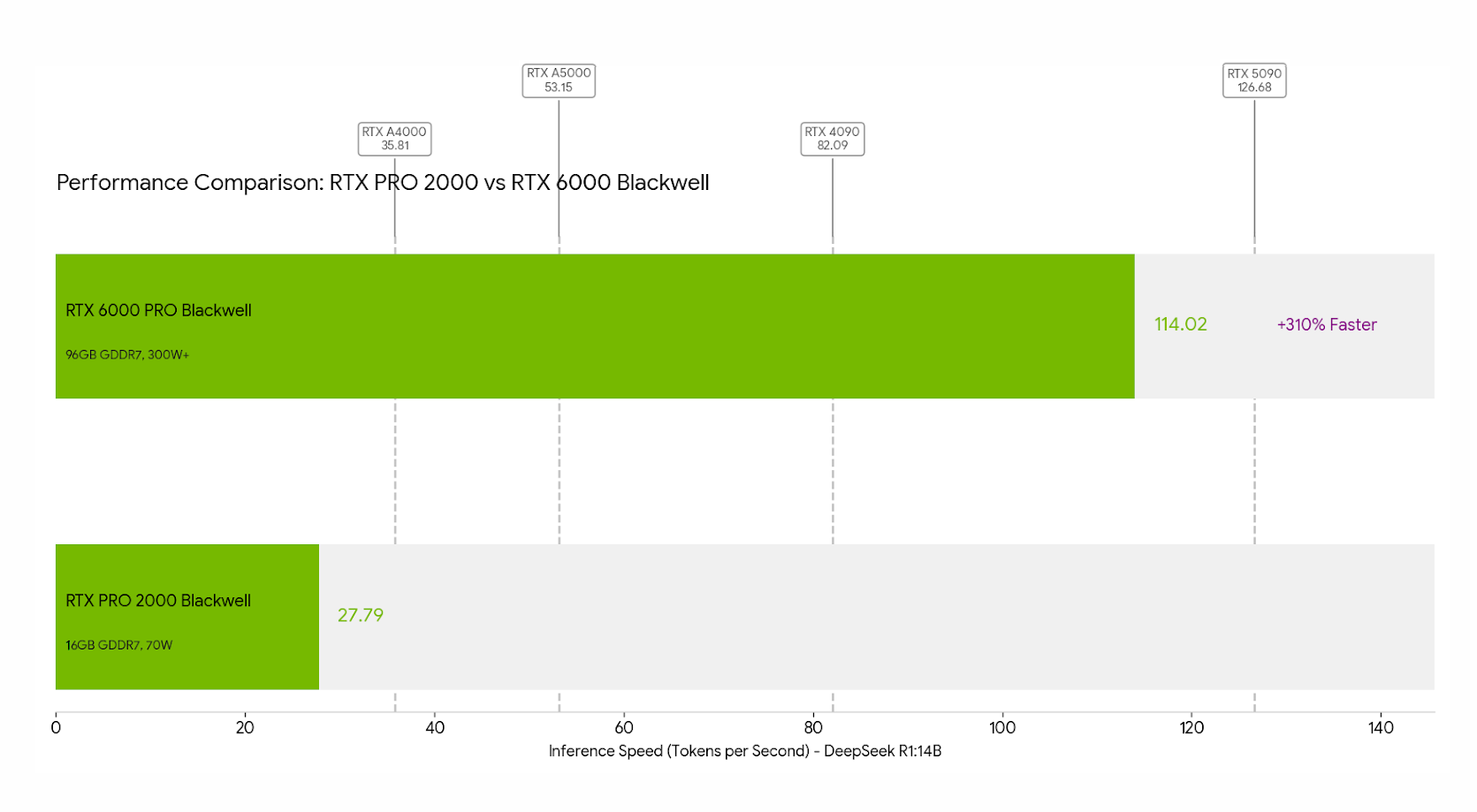
Image and Video Generation
Here, we will utilize ComfyUI to test image generation via Z-image Turbo, as well as video generation in the “text-to-video” and “image-to-video” modes using the Kandinsky 5 Lite model. To deploy ComfyUI on a server, you can follow these steps (for testing purposes, we set everything up from the root level without using a virtual environment):
#!/usr/bin/env bash
set -euo pipefail


COMFY_DIR="/root/comfy/ComfyUI"
LISTEN_IP="${LISTEN_IP:-0.0.0.0}"


export DEBIAN_FRONTEND=noninteractive
apt-get update -y
apt-get install -y git python3 python3-pip ca-certificates


# install/update ComfyUI
if [[ -d "${COMFY_DIR}/.git" ]]; then
  git -C "$COMFY_DIR" pull --ff-only
else
  mkdir -p "$(dirname "$COMFY_DIR")"
  git clone https://github.com/comfyanonymous/ComfyUI.git "$COMFY_DIR"
fi


# python deps (system-wide, since venv is not wanted)
cd "$COMFY_DIR"
python3 -m pip install --upgrade pip wheel
python3 -m pip install -r requirements.txt


# run
exec python3 main.py --listen "${LISTEN_IP}"
For quick installation of the Z-image Turbo model on the server (after installing ComfyUI), you can use the following script:
#!/usr/bin/env bash
set -euo pipefail


COMFY_DIR="/root/comfy/ComfyUI"
MODELS_DIR="${COMFY_DIR}/models"


# URL -> relative path inside ComfyUI/models/
declare -A FILES=(
  ["https://huggingface.co/Comfy-Org/z_image_turbo/resolve/main/split_files/text_encoders/qwen_3_4b.safetensors"]="text_encoders/qwen_3_4b.safetensors"
  ["https://huggingface.co/Comfy-Org/z_image_turbo/resolve/main/split_files/vae/ae.safetensors"]="vae/ae.safetensors"
  ["https://huggingface.co/Comfy-Org/z_image_turbo/resolve/main/split_files/diffusion_models/z_image_turbo_bf16.safetensors"]="diffusion_models/z_image_turbo_bf16.safetensors"
  ["https://huggingface.co/tarn59/pixel_art_style_lora_z_image_turbo/resolve/main/pixel_art_style_z_image_turbo.safetensors"]="loras/pixel_art_style_z_image_turbo.safetensors"
)


# sanity checks
if [[ ! -d "$COMFY_DIR" ]]; then
  echo "ERROR: ComfyUI dir not found: $COMFY_DIR"
  exit 1
fi


mkdir -p \
  "${MODELS_DIR}/text_encoders" \
  "${MODELS_DIR}/vae" \
  "${MODELS_DIR}/diffusion_models" \
  "${MODELS_DIR}/loras"


# downloader (aria2c preferred for resume + parallel chunks)
if command -v aria2c >/dev/null 2>&1; then
  DL="aria2c -c -x 8 -s 8 -k 1M --allow-overwrite=true --file-allocation=none"
else
  apt-get update -y
  apt-get install -y curl ca-certificates
  DL="curl -L --fail --retry 5 --retry-delay 2 -C - -o"
fi


for url in "${!FILES[@]}"; do
  rel="${FILES[$url]}"
  out="${MODELS_DIR}/${rel}"
  tmp="${out}.part"


  echo "==> ${rel}"
  mkdir -p "$(dirname "$out")"


  if command -v aria2c >/dev/null 2>&1; then
    # aria2c writes directly to target
    $DL -d "$(dirname "$out")" -o "$(basename "$out")" "$url"
  else
    $DL "$tmp" "$url"
    mv -f "$tmp" "$out"
  fi
done


echo
echo "Done. Files are in:"
echo "  ${MODELS_DIR}/text_encoders/"
echo "  ${MODELS_DIR}/vae/"
echo "  ${MODELS_DIR}/diffusion_models/"
echo "  ${MODELS_DIR}/loras/"
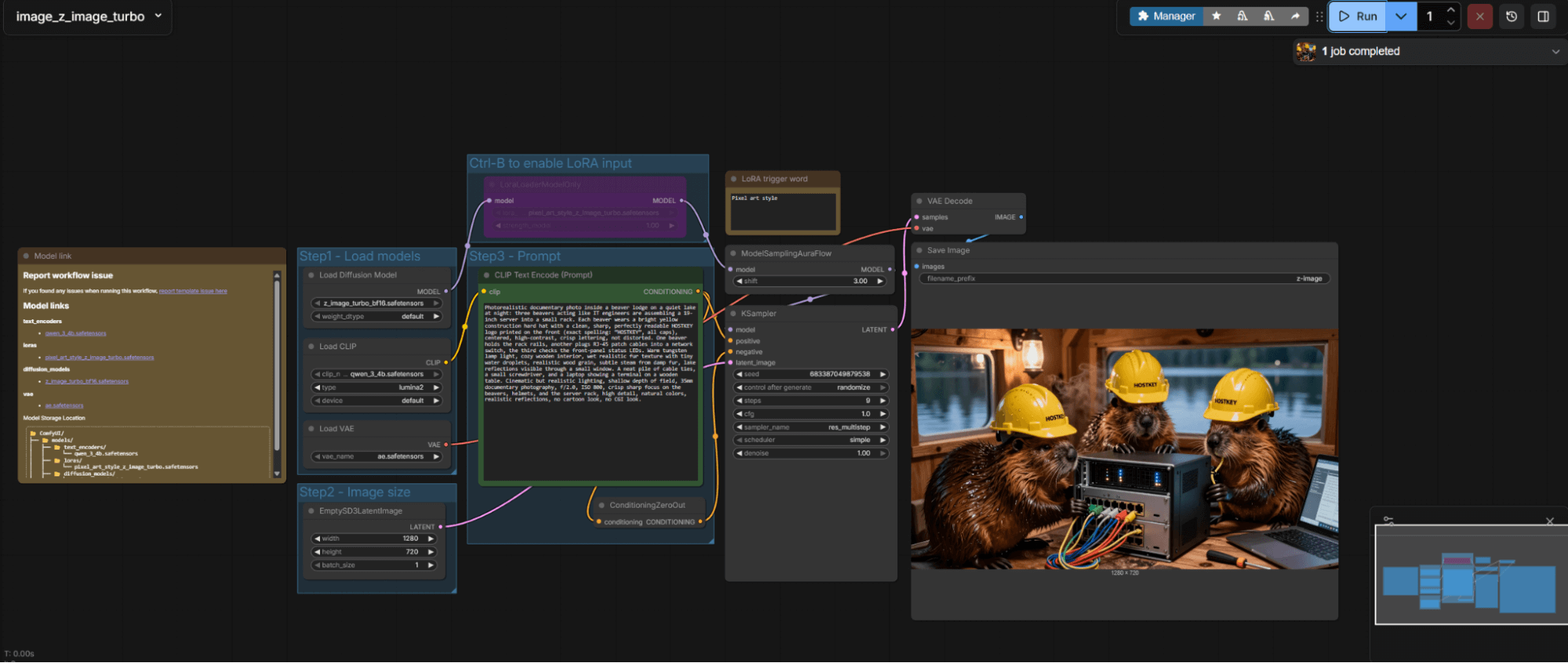
The prompt for generating an image is as follows:
We obtain the following results. This is a cold start (also known as the first run) in Z-image Turbo; all parameters are visible on the image.
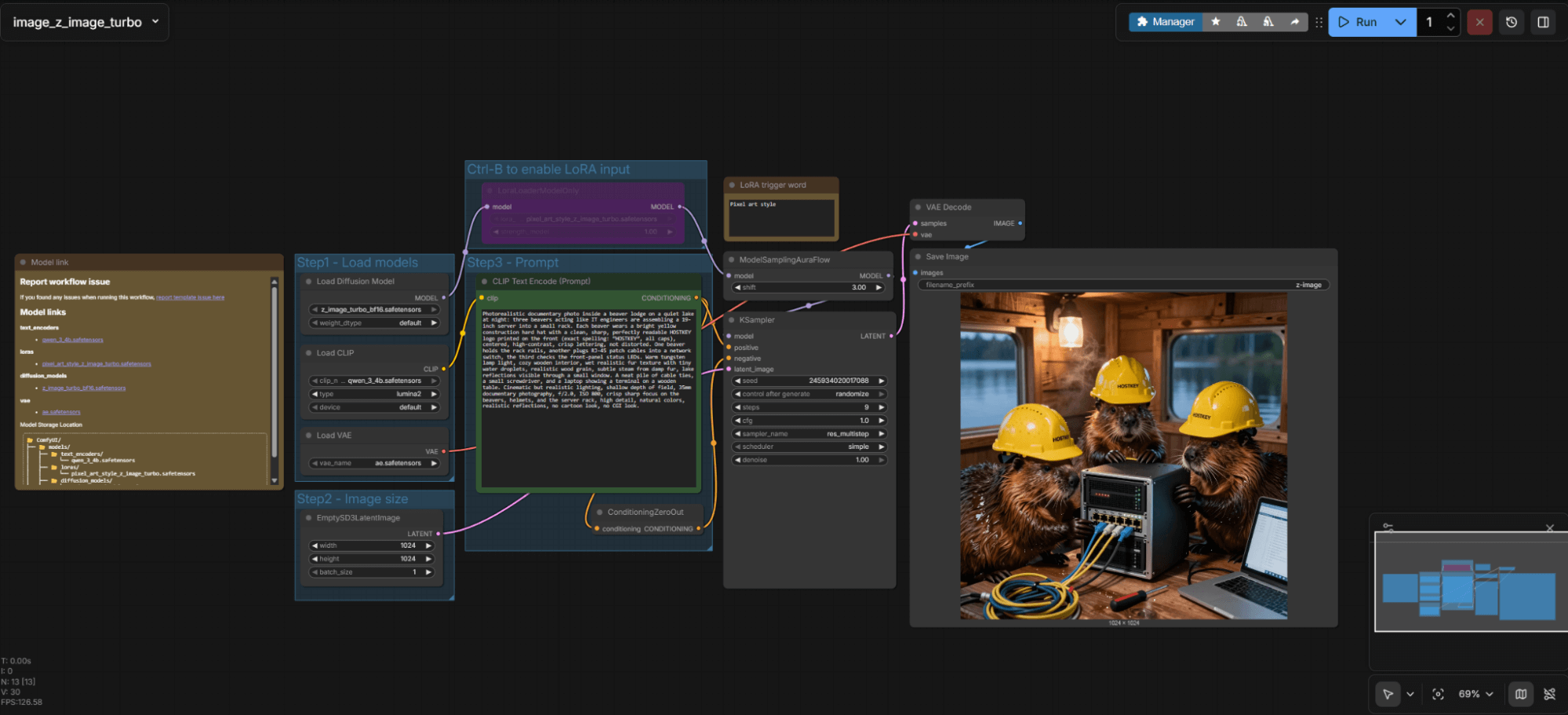
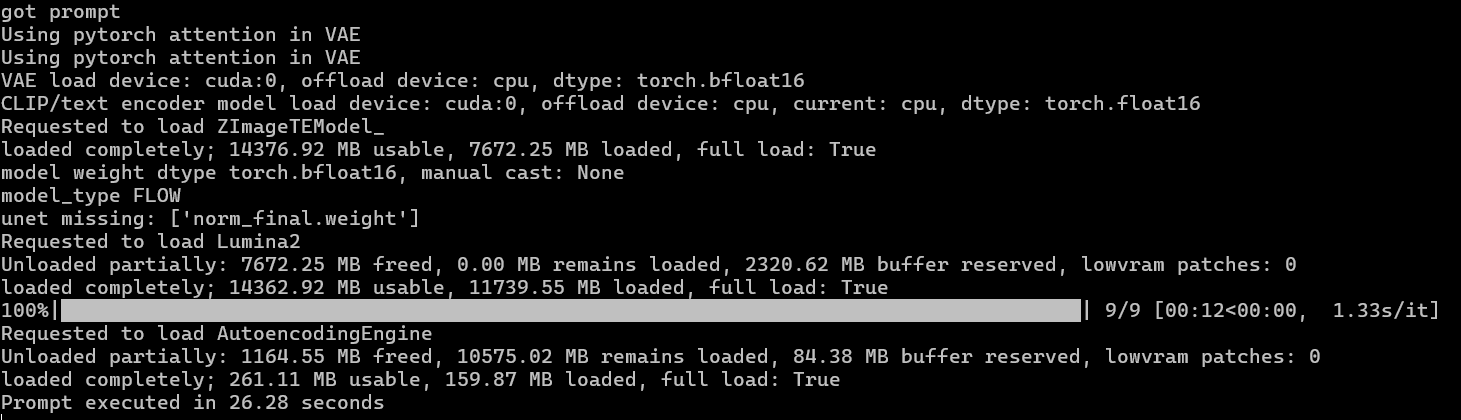
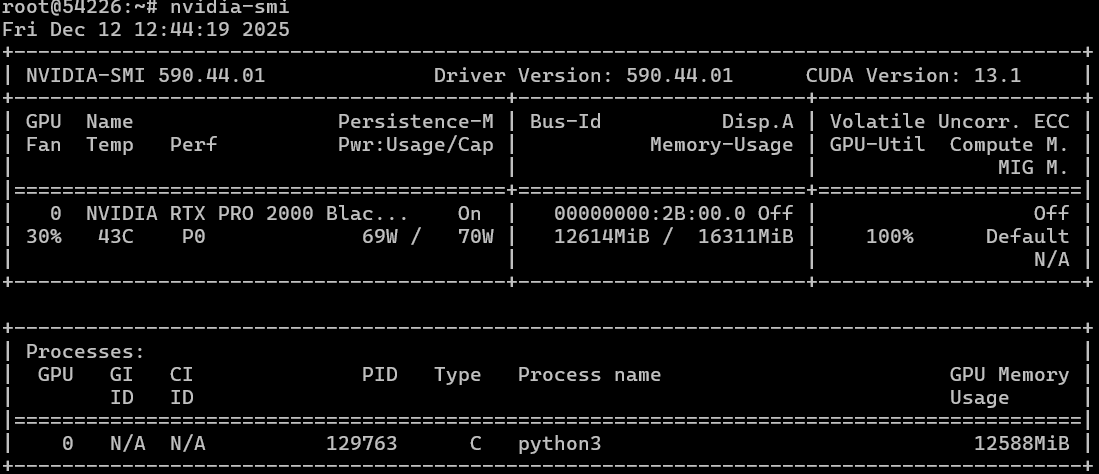
It takes 26 seconds to generate an image of 1024x1024 pixels with 9 iterations. Subsequent generations or changes in image size will be slightly faster. For example, let’s change the aspect ratio to 1280x720.

Now, let’s generate a video using Kandinsky 5 Lite. They promised us that the power of the RTX PRO 2000 Blackwell would be sufficient even for such a task.
First, let’s try our prompt in the “text-to-video” mode. We deploy the model using the following script:
#!/usr/bin/env bash
set -euo pipefail


COMFY_DIR="/root/comfy/ComfyUI"
MODELS_DIR="${COMFY_DIR}/models"


declare -A FILES=(
  ["https://huggingface.co/Comfy-Org/HunyuanVideo_1.5_repackaged/resolve/main/split_files/text_encoders/qwen_2.5_vl_7b_fp8_scaled.safetensors"]="text_encoders/qwen_2.5_vl_7b_fp8_scaled.safetensors"
  ["https://huggingface.co/comfyanonymous/flux_text_encoders/resolve/main/clip_l.safetensors?download=true"]="text_encoders/clip_l.safetensors"
  ["https://huggingface.co/Kijai/HunyuanVideo_comfy/resolve/main/hunyuan_video_vae_bf16.safetensors"]="vae/hunyuan_video_vae_bf16.safetensors"
  ["https://huggingface.co/kandinskylab/Kandinsky-5.0-T2V-Lite-sft-5s/resolve/main/model/kandinsky5lite_t2v_sft_5s.safetensors"]="diffusion_models/kandinsky5lite_t2v_sft_5s.safetensors"
)


if [[ ! -d "$COMFY_DIR" ]]; then
  echo "ERROR: ComfyUI dir not found: $COMFY_DIR"
  exit 1
fi


mkdir -p \
  "${MODELS_DIR}/text_encoders" \
  "${MODELS_DIR}/vae" \
  "${MODELS_DIR}/diffusion_models"


# Prefer aria2c for resume/large files
if command -v aria2c >/dev/null 2>&1; then
  DL_ARIA2=1
else
  apt-get update -y
  apt-get install -y aria2 ca-certificates
  DL_ARIA2=1
fi


for url in "${!FILES[@]}"; do
  rel="${FILES[$url]}"
  out="${MODELS_DIR}/${rel}"
  dir="$(dirname "$out")"
  name="$(basename "$out")"


  echo "==> ${rel}"
  mkdir -p "$dir"


  # -c resume, -x/-s connections, -k chunk size
  aria2c -c -x 8 -s 8 -k 1M --allow-overwrite=true --file-allocation=none \
    -d "$dir" -o "$name" "$url"
done


echo
echo "Done. Verify files exist:"
echo "  ${MODELS_DIR}/text_encoders/qwen_2.5_vl_7b_fp8_scaled.safetensors"
echo "  ${MODELS_DIR}/text_encoders/clip_l.safetensors"
echo "  ${MODELS_DIR}/vae/hunyuan_video_vae_bf16.safetensors"
echo "  ${MODELS_DIR}/diffusion_models/kandinsky5lite_t2v_sft_5s.safetensors"
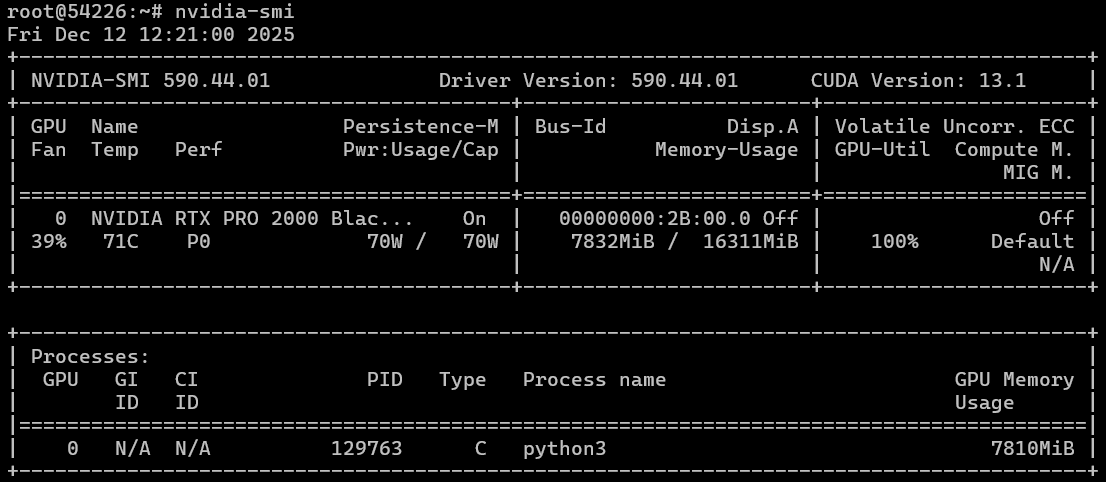
We were able to heat up the graphics card to nearly 70 degrees Celsius and utilize all available processing power.
Final result and time taken.
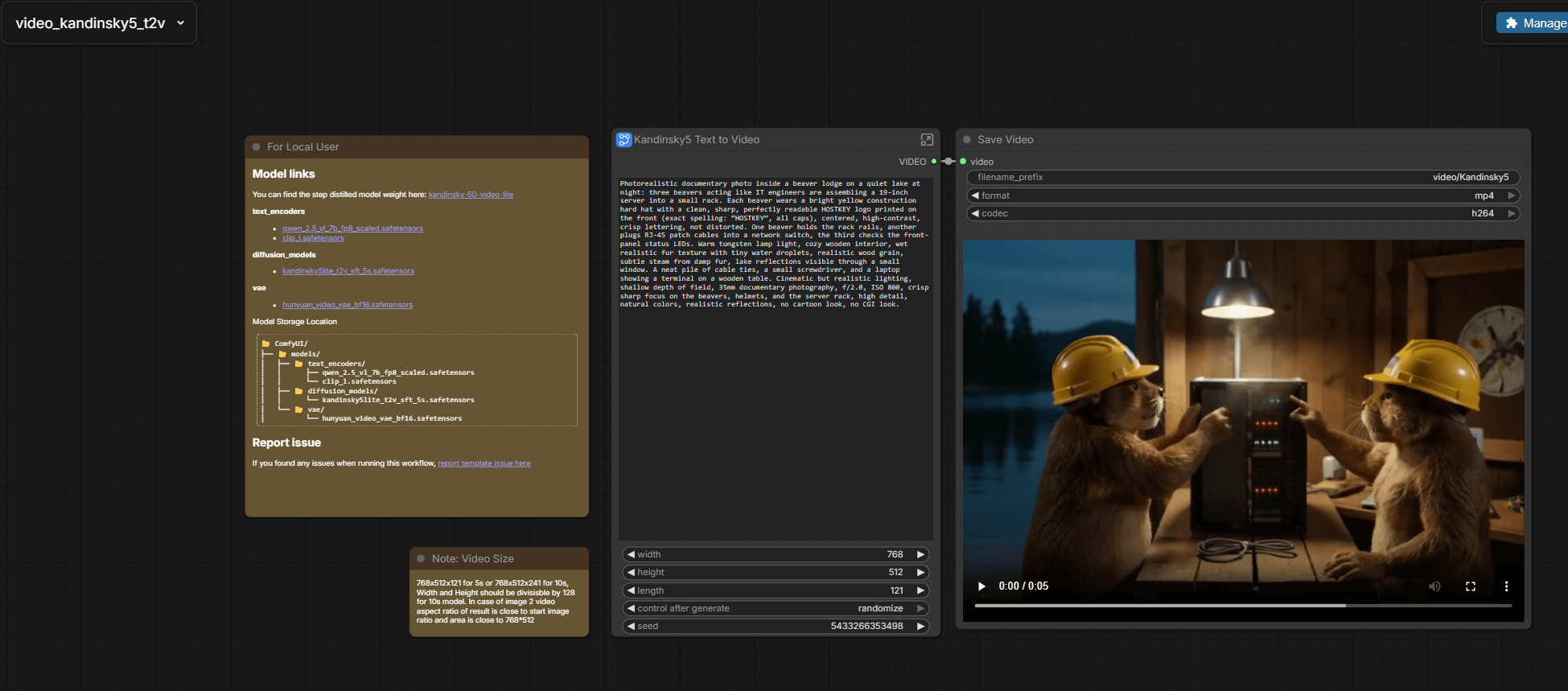

Over 24 minutes and 5 seconds in length, the video is in a resolution of 768x512.
Next, we’ll take the image that we generated earlier and try to bring it to life. We’ll add the missing parts necessary for it to function properly…
#!/usr/bin/env bash
set -euo pipefail


COMFY_DIR="/root/comfy/ComfyUI"
MODELS_DIR="${COMFY_DIR}/models"
URL="https://huggingface.co/kandinskylab/Kandinsky-5.0-I2V-Lite-5s/resolve/main/model/kandinsky5lite_i2v_5s.safetensors"
OUT="${MODELS_DIR}/diffusion_models/kandinsky5lite_i2v_5s.safetensors"


mkdir -p "$(dirname "$OUT")"


# aria2c preferred (resume + faster)
if command -v aria2c >/dev/null 2>&1; then
  aria2c -c -x 8 -s 8 -k 1M --allow-overwrite=true --file-allocation=none \
    -d "$(dirname "$OUT")" -o "$(basename "$OUT")" "$URL"
else
  apt-get update -y
  apt-get install -y curl ca-certificates
  curl -L --fail --retry 5 --retry-delay 2 -C - -o "$OUT" "$URL"
fi


echo "Installed: $OUT"
Then, we bring our image to life by using the following prompt:
ealistic beavers inside a wooden beaver lodge on a calm lake at
night, wearing bright yellow construction hard hats with a clean,
readable "HOSTKEY" logo. Keep the composition and identities
consistent with the input image: same beavers, same server rack and
cables, same laptop on the table, same
same warm tungsten lamp lighting and
lake view through the windows. Subtle natural motion: the beavers
blink and breathe, whiskers and wet fur gently move, slight head turns
and small paw movements as they plug and adjust Ethernet cables,
server LEDs softly flicker, tiny cable sway, faint steam drifting
upward. Gentle handheld camera micro-movement with a very slow push-in
(dolly-in), shallow depth of field, cinematic realism, high detail,
realistic reflections on the helmets, no scene changes.
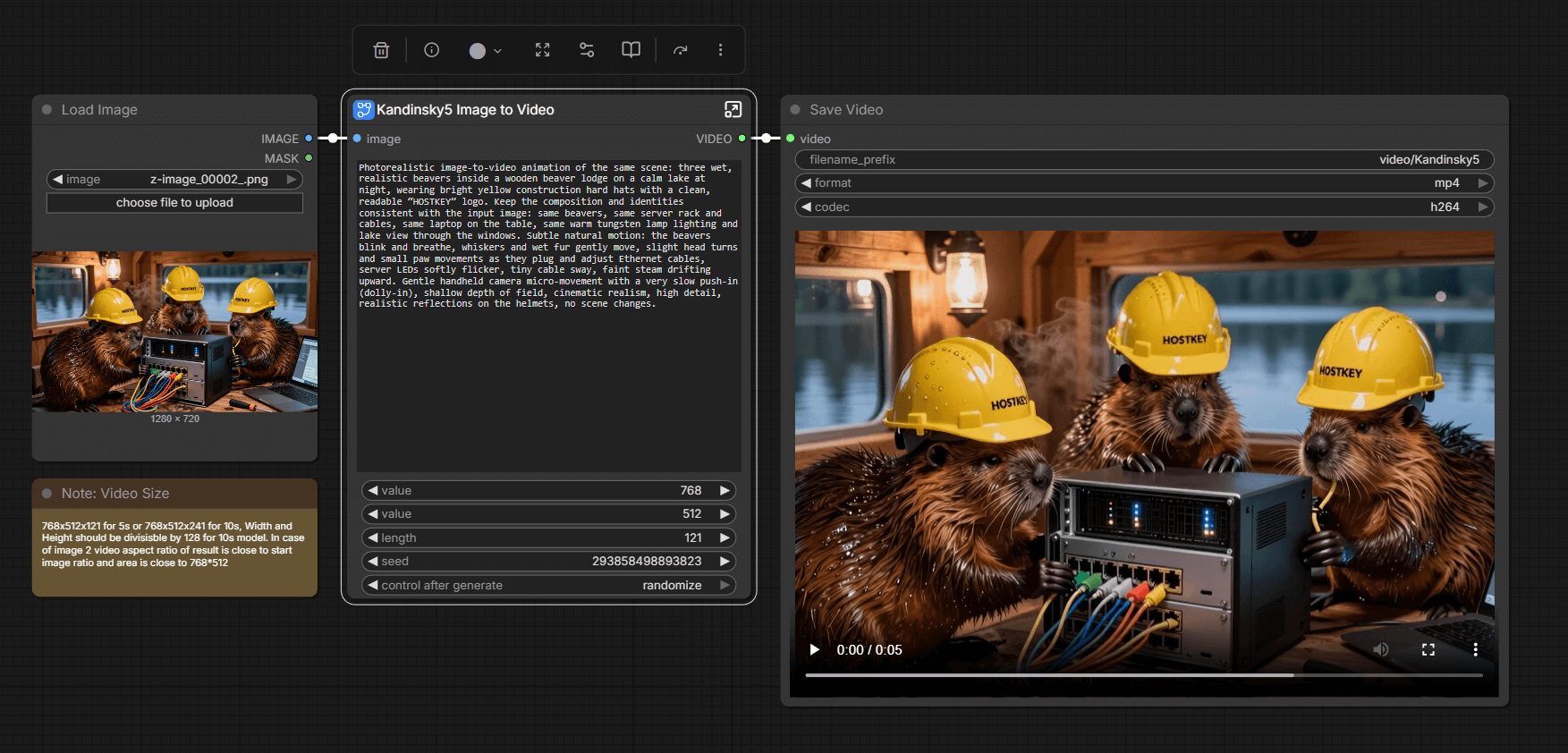

It’s still those same 24 minutes. On one hand, the results aren’t particularly impressive; on the other hand, the graphics card performs in this mode, albeit not at super-high speeds. For models that fit within 16 GB of memory, the card is quite suitable. Considering that on my A4000, I was unable to run the same video rendering due to certain architectural limitations, this card performs quite well in that regard.
Rendering in Blender
For testing, we will be using scripts from https://opendata.blender.org/. We install the latest version via Snap (we have already installed the new version 5), download the Linux benchmark from the website, extract it, and then run it.
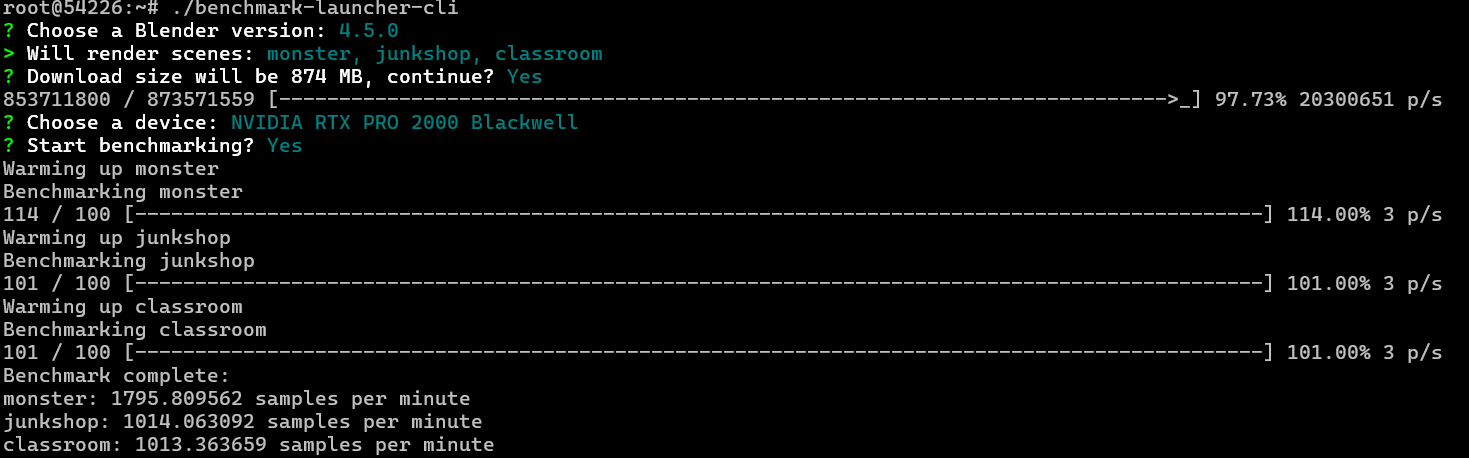
In the benchmark, the card also reached its full performance in terms of power consumption, but the temperature of the card remained low, as did its memory usage.
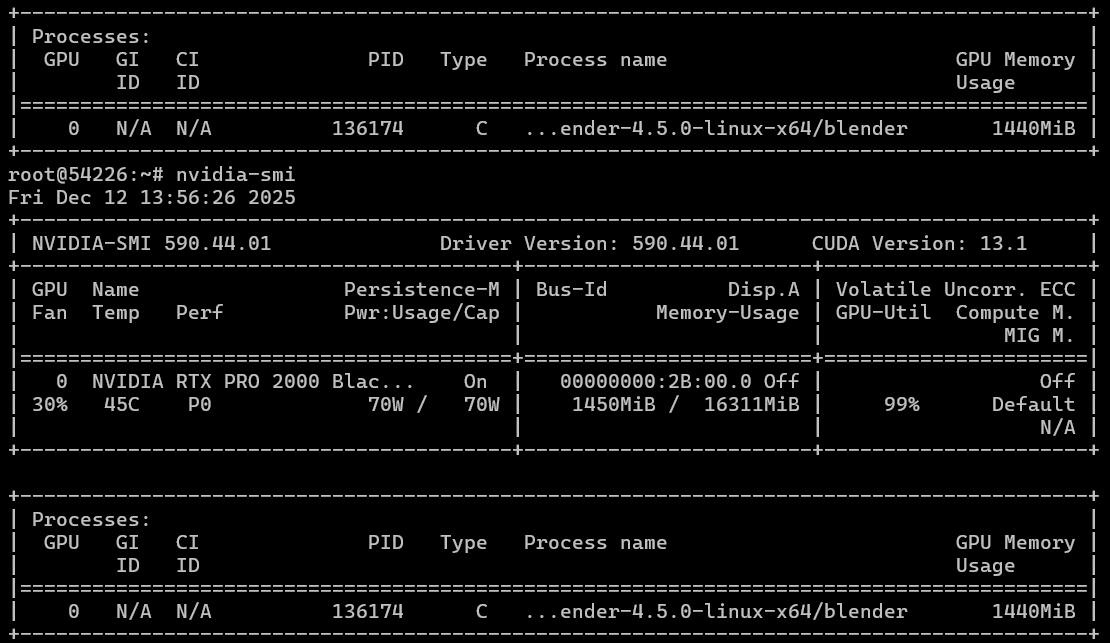
In summary, we obtained three results across three different scenarios:
- Monster: 1782.994259 samples per minute
- Junkshop: 1010.288134 samples per minute
- Classroom: 1008.595210 samples per minute
By adding these numbers together, we get an average score of 3801.877603 samples per minute, and this figure can now be compared with other results.
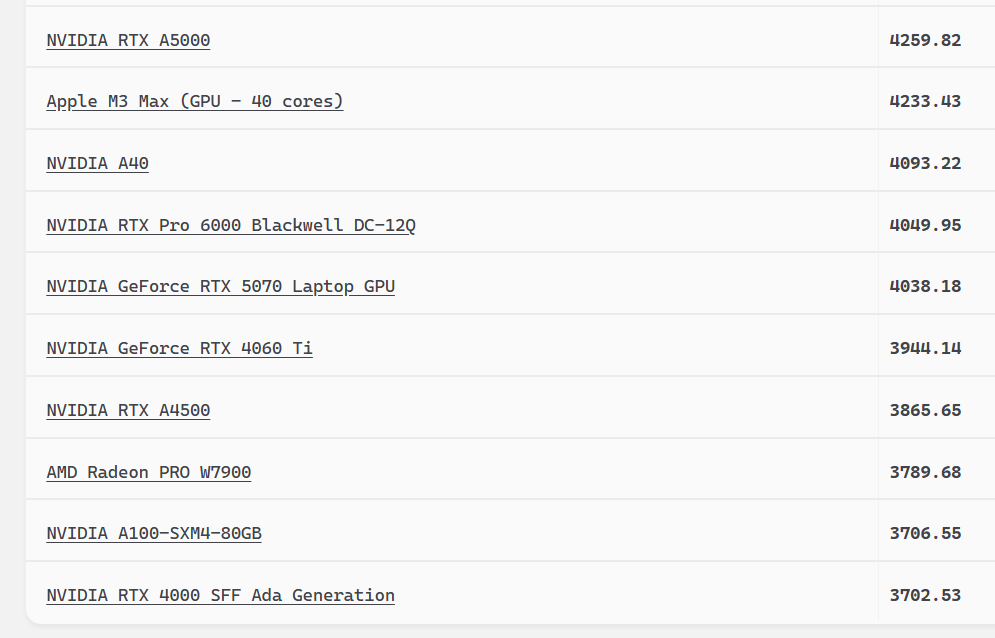
These numbers are just short of the performance level of the NVIDIA RTX A4500, but they are lower than those of the RTX 4060 Ti.
Again, we conducted our tests using Blender 5; however, these numbers refer to Blender 4.5.0. If we look at the tables, the results of other users are even lower.
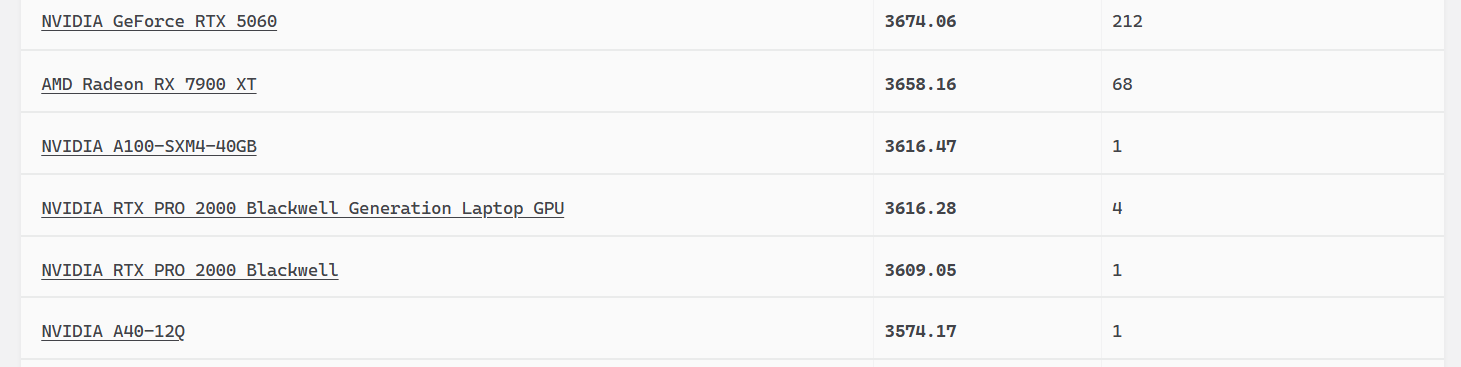
That is to say, our card performed much better in tests than others’. It’s possible that the new Blender software, as well as optimizations to the drivers and CUDA, played a role in this improved performance.
To sum things up
We have a compact, low-power card based on NVIDIA’s latest architecture. While it performs slightly less than its predecessor, the A4000, in terms of inference tasks, it costs half as much and consumes half as much energy. Therefore, it can be recommended for use in neural network tasks with light loads and for models with a size of up to 14B/20B (depending on the architecture). This is especially useful in scenarios where models need to be frequently updated; for example, the RTX PRO 2000 Blackwell can be switched in within 3-4 seconds.
Personally, I liked this card; it installed fairly smoothly, and the performance losses are more than made up for by its low power consumption, lower temperatures, and compact size.