



 +31 20 820 3777
 Support
  Documentation
 Login
Login 




In previous articles, we’ve progressed from using cloud-based VPS solutions for a few hundred euros to dedicated servers costing €45 each. The cloud offers flexibility and an easy entry point, while dedicated servers provide higher performance and predictable pricing. But what if you don’t have to choose between the two? What if you could use both approaches simultaneously?
Imagine this scenario: your project has grown, and you’ve moved to a dedicated server. The regular workload is stable, so the dedicated server is performing excellently. However, once a week, there are spikes in traffic—perhaps due to a marketing campaign, a blogger mentioning your service, or simply a busy Friday evening. During these times, the server becomes overwhelmed, causing delays for users. You sit nervously, watching the CPU usage charts and wondering, “Should I invest in a second dedicated server for €45 just to handle two hours of peak load per week?”
This is a classic example of a hybrid architecture case study.
What is Hybrid Architecture?
Hybrid architecture refers to a system where the stable, regular workload is processed on dedicated servers, while the peak load is handled by temporary cloud instances. The key difference between this approach and either pure cloud or dedicated server solutions lies in its flexibility according to demand. The core components of the system run continuously on hardware that you rent for an extended period. During peak times, additional cloud resources are activated based on your needs (which could last from minutes to hours) at a minimal cost. This setup ensures that you don’t overpay for unused processing power and avoids delays or slowdowns for users during peak usage periods.
Let’s compare it with other options:
|
Parameter |
Cloud Service |
Dedicated Server |
Hybrid (Cloud + Dedicated) |
|---|---|---|---|
|
Base Price (€/month) |
From 10 |
From 45 |
From 48 |
|
Cost during Peaks |
+ €10 × Number of hours of auto-scaling |
Does not change; resources may be insufficient |
+€2.6 × Number of workers × Hours |
|
Performance |
Medium, dependent on other instances in the hypervisor |
High and predictable |
High base performance with flexible scaling |
|
Configuration Difficulty |
Low (managed services) |
Medium (manual configuration) |
High (requires two separate infrastructure layers) |
|
Flexibility/Adaptability |
Maximum |
Minimum |
High |
|
Required Skills |
Basic DevOps knowledge |
Intermediate Linux/DB skills |
Advanced DevOps and networking expertise |
|
Scalability Time |
30-60 seconds (auto-scaling) |
Hours/day (additional hardware purchase) |
60-90 seconds (VPS creation) |
|
Management |
Through the cloud provider’s API/web interface |
Manual |
Using automated scripts |
|
Use Cases |
Startups with unpredictable growth, pilot projects, seasonal businesses |
Databases, CI/CD processes, internal services with consistent load |
Product environments with stable traffic and occasional spikes (e.g., sales campaigns, email notifications, reports) |
When and what makes it worthwhile to choose a particular solution:
- Cloud: Suitable for startups in the niche exploration phase, seasonal businesses (such as tourism or e-commerce before holidays), MVP (Minimum Viable Product) development, and experiments where it’s unclear what the load will be one hour or tomorrow.
- Dedicated Server: Ideal for databases, CI/CD (Continuous Integration/Continued Delivery) tools, internal company services, and any system where the load is constant and predictable 24/7. Load spikes, if they occur, are usually within the range of 20–30%.
- Hybrid Solution: This is the best choice for product systems with significant peak loads, such as online cinemas (during premiere times or evening hours), ticketing services (at the start of sales), educational platforms (at course commencement or deadline deadlines), marketing campaigns, email newsletters, and webinars. In these scenarios, you know in advance that the load will increase significantly.
Here are some key cases where a hybrid solution is the optimal choice:
|
Scenario |
Typical Examples |
Criteria for Choosing a Hybrid Approach |
Architectural Solution |
|---|---|---|---|
|
Low Latency and Close Proximity to Data |
FinTech/HFT, SCADA, gaming servers, equipment management |
Latency < 1–10 ms |
Critical services and databases on-premises; analytics and backups in the cloud |
|
“Data Gravity” |
Telecom, video platforms, industrial sensors |
Terabytes to petabytes of data; high outbound traffic |
Primary data stored locally; cloud used for aggregation and machine learning |
|
Regulation and residency requirements |
Banks, healthcare, government sectors (e.g., 152-FZ/GDPR) |
Data must not leave the jurisdiction |
Sensitive data on-premises; cloud for anonymization purposes |
|
Legacy systems |
ERP, CRM, banking processing, industrial controllers |
High risk of reengineering; reliance on hardware |
On-premises infrastructure with gradual migration of APIs to the cloud |
|
Peak Loads |
E-commerce (sales events), accounting (reporting periods), marketing campaigns |
Peak load > 2–3 times the average; stateful components on-premises, with auto-scaling in the cloud |
|
|
High Outbound Traffic |
Streaming services, video hosting, large-scale backups |
Constant data exchange > 10–20 TB/day |
“Hot” data stored locally; “cold” archives in the cloud |
|
Fault Tolerance and Georeplication |
Critical services with strict SLAs |
99.9% availability required; protection against local disasters (fire, flood, data center failures). RTO < 1 hour, RPO < 15 minutes |
Active-passive or active-active replication schemes; data synchronized in real-time or asynchronously to ensure durability |
|
Edge and IoT |
Factories, retail, autonomous systems |
Data processing at the source; aggregation in a central hub |
Edge nodes locally with cloud-based analytics |
|
Mergers and Acquisitions |
Integrating diverse infrastructures |
Rapid integration without complete migration |
Hybrid architecture for seamless integration and unified monitoring |
|
AI/ML pipelines |
Model training, scalable inference |
Large datasets on-premises; flexible data output to the cloud |
Data and GPU clusters on-premises; cloud-based inference with auto-scaling |
Architecture: Getting the best of both worlds
A fundamental difference in hybrid architecture is the separation of responsibilities between a stable infrastructure and flexible workers (services). Let’s examine a specific example of an auto-scaling architecture to see how this works in practice. We’ll use the food delivery service case from previous articles as an example.
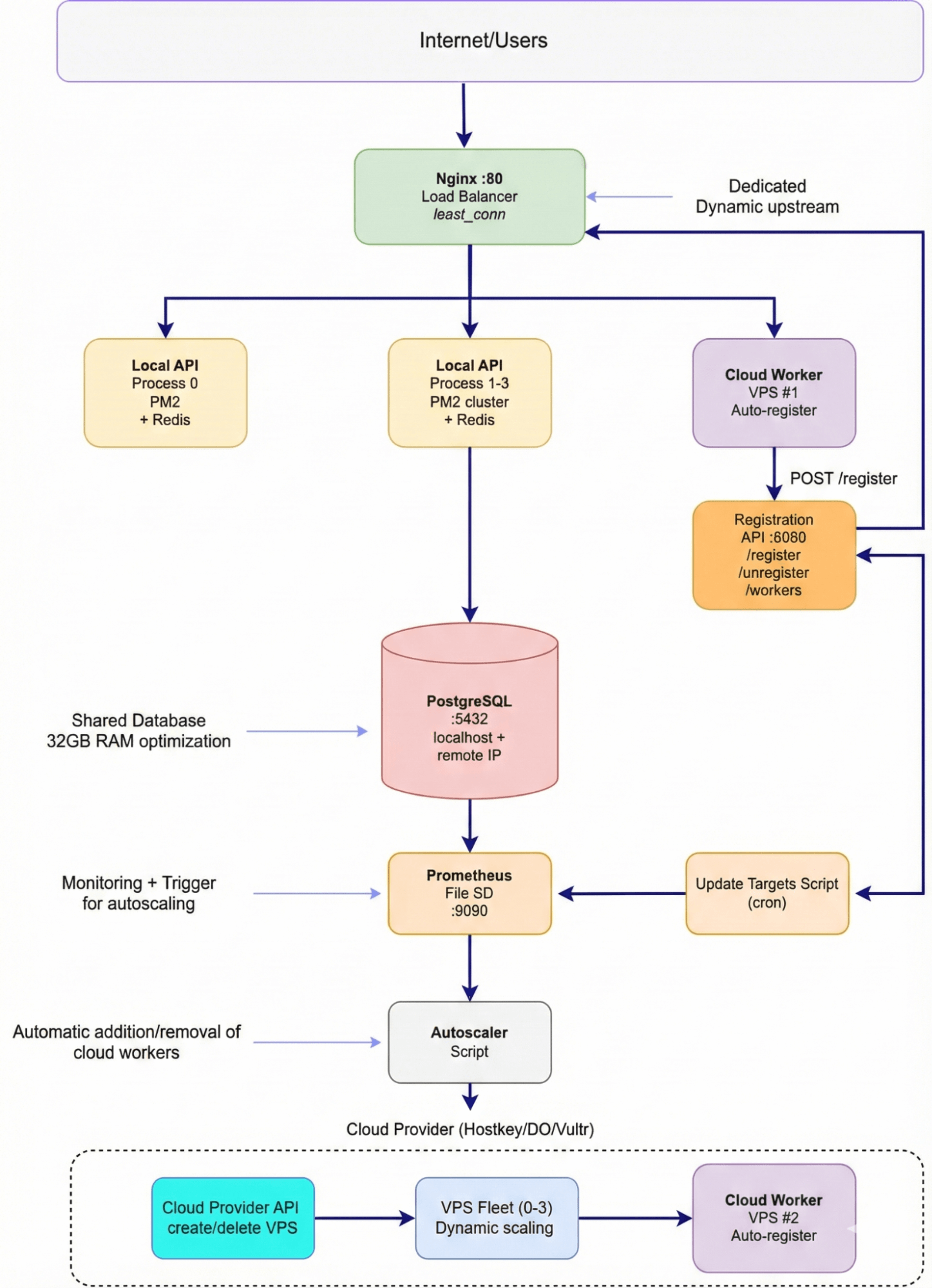
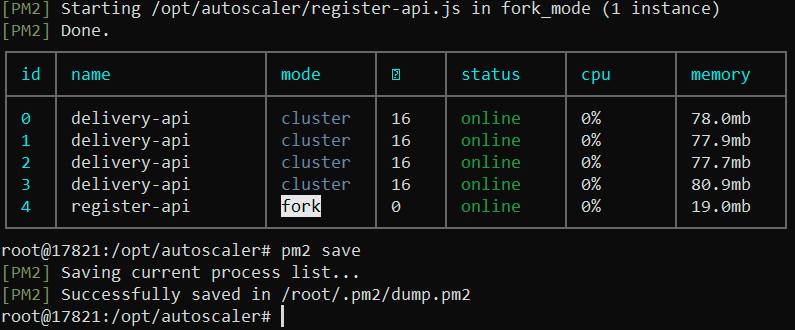
The base layer (the dedicated server) is the foundation of the system, costing €45 per month. PostgreSQL 16, optimized for use with 32GB of RAM, serves as the only stateful component of the system. Next to it, Redis is used to cache hot requests, such as /api/restaurants, with a TTL (Time-To-Live) of 60 seconds. Four Node.js processes, running through a PM2 cluster, handle the basic workload. Nginx acts as both a reverse proxy and a load balancer for the dynamic backend servers. Prometheus and Grafana are used to monitor the entire system.
This approach allows us to leverage the best features of both stable infrastructure and flexible, auto-scaling services, ensuring high availability and performance while minimizing costs.
The elastic layer (Cloud Workers) dynamically adds VPS instances (vm.nano, with 1 core and 1 GB of RAM) as needed. Each worker is a Node.js process that automatically registers with Nginx and connects to a dedicated PostgreSQL database on a separate server. Workers operate for durations ranging from 10 minutes to several hours, costing approximately €0.004 per hour (€2.6 per month divided by 720 hours).
The Worker Registration API (running on a dedicated server) serves as the brain of the system. It’s a simple Express server with three endpoints: for worker registration, removal from the load balancing mechanism, and retrieval of a list of active workers. Once a worker starts up, it sends a POST request to /register within 2 seconds. The API adds a line server ${ip}:${port} max_fails=3 fail_timeout=30s; to the /etc/nginx/conf.d/upstreams/cloud-workers.conf file, which then triggers nginx -s reload. After another 5 seconds, the worker is ready to receive traffic.
Nginx dynamically configures its upstream connections based on two files: local.conf (which defines four local processes with a weight=2 each) and cloud-workers.conf (which gets updated in real-time during auto-scaling). Nginx uses the “least_conn” load balancing strategy and performs a quick restart without any downtime after file modifications.
Cloud Workers essentially replicate the functionality of the local API but connect to a remote PostgreSQL database instead of using Redis. This adds a slight latency of 10–20 milliseconds, but it simplifies the overall architecture by providing a single data source for all workers. Upon startup, each worker waits for 2 seconds before automatically registering with Nginx via a fetch request. No manual configuration is required.

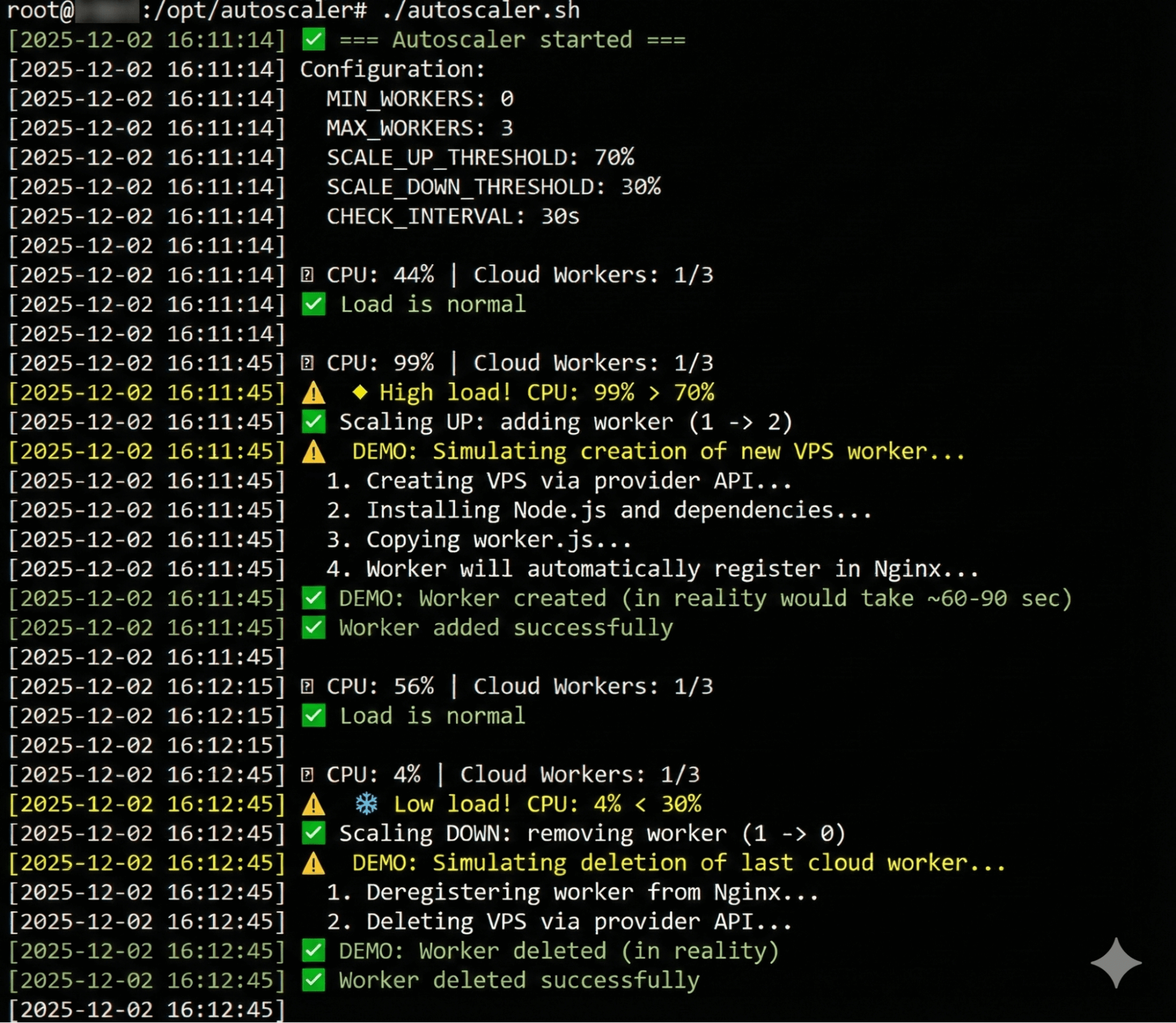
We activate the autoscaler and generate a high-intensity workload using wrk (8 threads, 400 connections). The system responds immediately: the CPU usage spikes from 44% to 99%. The autoscaler decides to scale up, which, in a production environment, would involve making an API call to the cloud provider to create a new VPS. This process takes 60–90 seconds as the worker loads and registers with Nginx. After 30 seconds, the CPU usage drops back to 56%, indicating that the workload has been distributed evenly across the system.
We then stop the load test, and the CPU usage falls to 4%. The system decides to scale down by terminating the unnecessary worker, saving €0.004 per hour of idle time. The autoscaler’s logic is effective: it monitors the actual workload through Prometheus, makes informed decisions, maintains the desired number of workers (within the defined MIN/MAX limits), and avoids panic in response to temporary spikes in load.
For a production environment, the only remaining step is to replace the demo-related functions with actual API calls to the cloud provider.
Configuration: An Honest Assessment of Complexity
Let’s be honest—setting up a hybrid architecture is more complicated than simply obtaining a VPS or buying a dedicated server. It requires an understanding of several technologies and the ability to integrate them effectively.
Installing PostgreSQL itself only takes about 5 minutes, but setting up secure remote access is another separate task that can take 1–2 hours. You need to change the listen_addresses setting from localhost to a specific IP address (not 0.0.0.0 for security reasons). You also have to configure pg_hba.conf to include only the IP addresses of your cloud servers in the “white list,” open port 5432 in the firewall only for those authorized IPs, and optimize the parameters for systems with 32 GB of RAM. Make even one mistake, and the server might fail to connect or anyone could potentially access it.
Configuring Nginx as a reverse proxy is relatively straightforward, but ensuring that it dynamically re-reads the list of backend servers without causing downtime requires knowledge of how the include directive works. You also need to understand why using nginx -s reload instead of nginxrestart is more efficient, and why least_conn scheduling algorithm is preferable in this context. This process can take another 1–2 hours as well.
Worker Registration API: Writing the API itself using Express takes about an hour, but ensuring its security is another matter altogether. It requires setting up listeners on the IP address 0.0.0.0, but only allowing access from known IPs through a firewall; additionally, it’s necessary to validate input data to prevent accidental deletion of files (e.g., using rm -rf /). Files should be written correctly using the root user’s privileges, and errors must be properly handled during Nginx reloads. Testing is also crucial to ensure that the failure of a worker doesn’t cause the entire load balancer to crash. Overall, this process takes around 2–3 hours.
For a cloud-based worker setup, creating a separate worker.js file instead of simply copying server.js is a better approach. This helps to reduce dependencies on Redis and allows for the inclusion of automatic registration logic at startup. Setting a server_type: 'cloud' in the configuration allows for easier tracking in metrics. However, keep in mind that cloud-based VPSs may use older versions of Node.js or different npm versions, which could potentially cause compatibility issues with Docker. We encountered this when using Node.js v12 instead of v20; updating it took another hour of effort.
Prometheus with file-based service discovery: For dynamic cloud workloads, it’s essential to understand how the file_sd_configs function works. We need to write a script that generates JSON data, add it to a crontab schedule, and ensure that Prometheus can detect new targets within 30 seconds. This will take another 1–2 hours.
The most challenging part of this process is implementing the autoscaler script, which will likely take 3–4 hours. The script will periodically (every 30 seconds) retrieve the average CPU usage from Prometheus using PromQL to determine whether a new workload should be created (if CPU usage exceeds 70%) or deleted (if it’s below 30%). It will also need to integrate with the cloud provider’s API, wait for the VPS to be created (about 60–90 seconds), and ensure that the new workload registers properly. The script should log all its actions and adhere to the predefined limits for `MIN_WORKERS` and `MAX_WorkERS`. We’ve created a demo version that doesn’t use an actual API; it simply simulates the creation/deletion of workloads. Integrating this with a specific cloud provider will add another 2–3 hours of development time.
In terms of actual time required: An experienced DevOps engineer familiar with Nginx, PostgreSQL, Prometheus, and cloud APIs should be able to complete this task in about 6–8 hours (excluding debugging). A developer with basic Linux knowledge who has to look up many commands online might take two to three days. For a beginner, it’s best to avoid trying this project unless they have prior experience with these technologies. Seriously—it’s better to first master each component individually (PostgreSQL, Nginx, Prometheus) before attempting to build a hybrid architecture. This is no trivial learning exercise; it involves a production-grade system that requires solid knowledge and practical skills.
Summary
Hybrid architecture isn’t a one-size-fits-all solution; it’s more of a tool tailored to specific circumstances. You may have a stable base load that performs well on a dedicated server, but occasionally you encounter peak times when performance issues arise.
The economics are straightforward: A dedicated server costs €45 per month. A cloud worker costs approximately €0.004 per hour, which amounts to €2.6 for a full month of use. Your needs are relatively low—just two workers for three hours on Friday evenings, one worker for an hour on Monday mornings, and four workers for two hours when a marketing campaign is launched. The total cost for additional flexibility is around €2–3 per month, compared to the €45 required for a second dedicated server that would be idle 90% of the time.
Yes, setting up this hybrid infrastructure can be complex; we’ve gone through the process and estimated the time involved. It’s not as simple as clicking a button in a panel or waiting two hours after work to make changes. You’ll need to handle tasks like PostgreSQL setup, remote access, Nginx configuration, dynamic scaling, Prometheus monitoring, and writing autoscaling scripts. The good news is that you only have to do this configuration once; afterward, the system takes care of itself—workers are deployed or removed as needed, and you can simply monitor its performance through Grafana.
What are the alternatives? You could buy another dedicated server for €45, but you’d be paying for hardware that’s largely inactive. Alternatively, you could move everything to the cloud and pay for automated scaling, but you’ll trade off some performance and stability (especially if you share resources with other users on the same hypervisor). You could also stick with the current setup and accept occasional slowdowns during peak times, though users might opt for competitors’ services instead.
This hybrid approach isn’t the end of the road. It’s just a transitional stage between having a single dedicated server and a fully managed Kubernetes cluster across multiple data centers. As your project grows, you’ll move on to more advanced technologies like container orchestration and service meshes. At that point, hybrid architecture will provide the best balance of efficiency and reliability, requiring only minimal effort once set up. You can then focus on running marketing campaigns with confidence, knowing your system can handle the load.