



 +31 20 820 3777
 Support
  Documentation
 Login
Login 



Author: Alexander Kazantsev, Head of Documentation and Content Development
When assembling GPU servers or dealing with issues reported by our clients, we need to test them. Since deploying LLM (Large Language Model) models using Ollama is one of the potential use cases for these servers, and we offer pre-built panels based on such models, we also need to verify the servers’ functionality and performance under load through Ollama. We need to have reliable test results for comparison purposes.
After searching for open-source solutions, we couldn’t find a suitable benchmark tool, so we decided to develop our own test. The testing algorithm was designed as follows:
- Install the Ollama software on the system.
- Determine the available video memory capacity and select the appropriate model based on that capacity. We found that the DeepSeek model with 14/32/70 billion parameters and a maximum context size of 128K performed well. We will be testing GPUs with video memory of 16 GB or more.
- Generate the same prompt multiple times (ideally, generate code to obtain the desired amount of output) on this model, gradually increasing the context size from 2000 tokens to the model’s maximum capacity in increments of 2000 tokens.
- Record the results, including the generation time and the number of tokens generated per second, as well as other relevant metrics from Ollama and the GPU performance data (from nvidia-smi).
- Analyze the relationship between the model parameters and context size, and determine baseline values for subsequent comparisons.
First Approach: Using Bash Script
We decided to create the script in Bash to avoid using more complex languages like Python. The only additional packages required are jq for processing JSON responses from Ollama and curl, which is included by default in Ubuntu 22.04 and 24.04.
To determine the video memory capacity, we’ll use the ollama serve command. However, there’s a slight issue: Ollama is designed as a service, so trying to run the command directly may cause conflicts with already running instances of Ollama. To resolve this, we need to:
- Stop any currently running Ollama instances.
- Start the ollama serve command.
- Extract the available memory information from the output and store it in an array.
- Use a regular expression to extract the relevant values.
The final code snippet shows how to do this:
grep -o 'available="[^"]*"' | grep -o '[0-9.]*'Then, we process the output using a regular expression to extract the memory size and calculate the total available video memory:
printf '%s GiB\n' "${available_memory[@]}"
total_available=$(echo "$log_output" | awk -F'available="' '/available="/ { gsub(/".*/, "", $2); sum += $2 } END { print sum+0'}
Although we could also use the nvidia-smi command to get the available GPU memory, ollama serve provides direct access to this information, making it more straightforward.
After stopping and starting the Ollama service, we can proceed with further testing using its API.
Next, based on the total amount of video memory available, you need to select the appropriate model according to the following criteria:
- Deepseek-r1:14b = 15 GiB (the values are provided in gigabytes, not gigabits)
- Deepseek-r1:32b = 23 GiB
- Deepseek-r1:70b = 48 GiB
You need to “warm up” the model by running Ollama with it. This is necessary to ensure that the benchmark results reflect performance without any delay caused by loading the model into memory.
curl -s http://localhost:11434/api/generate \
      -H "Content-Type: application/json" \
      -d '{"model":"'"$MODEL"'","prompt":"Hello","stream":false}' \
      >/dev/null
After that, you can proceed to run a loop that increases the context parameter (ctx) from 2000 to 128000, and then ask the neural network to generate a “Tetris game” for us using the prompt “Generate Tetris game on HTML and JS”.
curl -s --max-time 300 \
       -H "Content-Type: application/json" \
       -d '{
          "model": "'"$MODEL"'",
          "prompt": "'"$prompt"'",
          "stream": false,
          "options": {
                  "num_ctx": '"$num_ctx"'
           }
           }' \
        http://localhost:11434/api/generate > "$response_file"
local total_tokens=$(jq -r '.eval_count // 0' "$response_file")
local model_response=$(jq -r '.response // ""' "$response_file")
local eval_sec=$(echo "$eval_duration_ns / 1000000000" | bc -l)
local load_sec=$(echo "$load_duration_ns / 1000000000" | bc -l)
local tokens_per_sec=0
if (( $(echo "$eval_sec > 0.001" | bc -l) )); then
tokens_per_sec=$(echo "scale=2; $total_tokens / $eval_sec" | bc)
fiNext, we neatly display all the results on the screen, including the parameters output by nvidia-smi:
nvidia-smi --query-gpu=index,name,memory.used,memory.total,temperature.gpu,power.draw,power.limitWe stop the testing when the CPU starts to become overloaded.
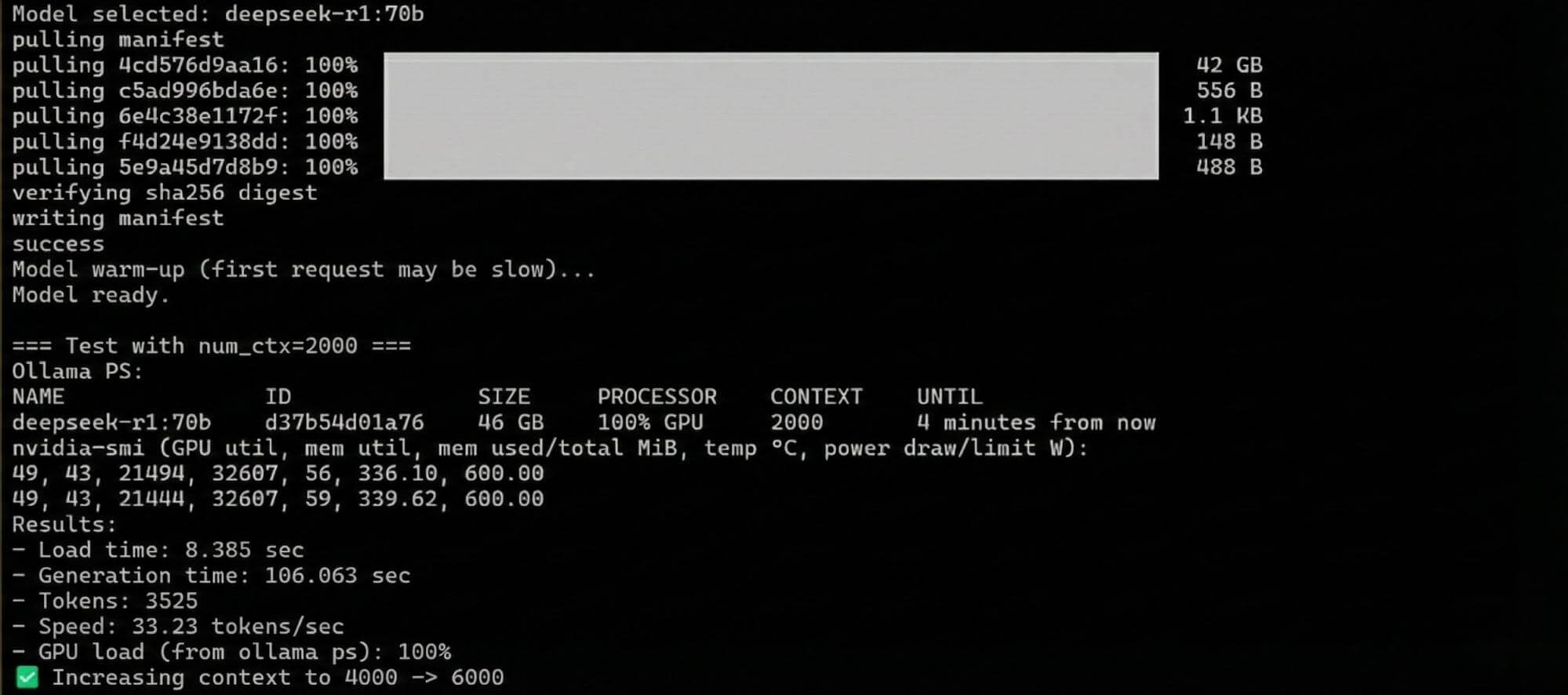
That’s it. The first version of the test only did this; it worked, but our requirements usually increase during the actual testing process. Therefore, our colleagues asked us to improve the test, and thus the second version was created.
Second Approach
There were quite a few changes made to the second version:
- In the first version, only one model that fit the available video memory capacity was selected; smaller models were simply ignored. However, this prevented us from comparing different server configurations with GPUs since the models used were varied. As a result, two modes were created: “max” and “test.” The “max” mode tested only the model that completely fitted the video memory, while the “test” mode tested all models in ascending order of size.
- The initial context parameter was increased to the default value for Ollama 4K.
- You can now provide your own prompt instead of using the default one for Tetris generation.
- You can now specify a particular model from the list of available ones.
- You can run tests with a custom context value without having to go through all options.
- You can choose a different group of models for testing; open-source models from OpenAI and Qwen have also been added.
- In the “test” mode, a final report is generated in HTML format.
All these options are now available by providing the necessary parameters when starting the test.
Options:
  -t MODE     Execution mode:
                max   — run the largest model from the group that fits in memory,
                        then test with increasing context (default)
                test  — test all models in the group from smallest to largest
  -p PROMPT   Prompt for generation (default: "Generate Tetris game on HTML and JS")
  -m MODEL    Run ONLY the specified model (ignores -t and -g)
  -c CTX      Use a fixed context size
  -g GROUP    Model group: deepseekr1 (default), gpt-oss, qwen3
  -h          Show this help and exit
The model table now looks like this:
|
Model |
Minimum Required Video Memory (GiB) |
|---|---|
|
deepseek-r1:14b |
15 |
|
deepseek-r1:32b |
23 |
|
deepseek-r1:70b |
48 |
|
gpt-oss:20b |
16 |
|
gpt-oss:120b |
70 |
|
qwen3:14b |
15 |
|
qwen3:32b |
23 |
It can be easily modified or expanded in the future, as it’s defined by the following code snippet:
declare -A MODEL_VRAM
MODEL_VRAM=(
    ["deepseek-r1:14b"]="15"
    ["deepseek-r1:32b"]="23"
    ["deepseek-r1:70b"]="48"
    ["gpt-oss:20b"]="16"
    ["gpt-oss:120b"]="70"
    ["qwen3:14b"]="15"
    ["qwen3:32b"]="23"
)

declare -A MODEL_GROUPS
MODEL_GROUPS["deepseekr1"]="deepseek-r1:14b deepseek-r1:32b deepseek-r1:70b"
MODEL_GROUPS["gpt-oss"]="gpt-oss:20b gpt-oss:120b"
MODEL_GROUPS["qwen3"]="qwen3:14b qwen3:32b"
Additionally, we made some minor improvements to the formatting and fixed some small bugs, such as issues with incorrect Ollama initialization when services were not specified or errors when determining the offloading mode.
Below is an example of the test results displayed on screen for the second version:
=== [deepseek-r1:70b] Test with num_ctx=30000 ===
Ollama PS:
NAME               ID              SIZE     PROCESSOR    CONTEXT    UNTIL
deepseek-r1:70b    d37b54d01a76    62 GB    100% GPU     30000      4 minutes from now
nvidia-smi:
GPU  Name                 Mem used     Mem total    Temp         Power draw   Power lim
0     NVIDIA GeForce RTX 5090  31447 MiB    32607 MiB    63°C        340.80 W     575.00 W
1     NVIDIA GeForce RTX 5090  31179 MiB    32607 MiB    58°C        295.09 W     575.00 W
Test results:
Loading time: 17.687 seconds
Generation time: 83.218 seconds
Tokens used: 2752
Model speed: 33.06 tokens per second
GPU utilization: 100%
✅ The deepseek-r1:70b model has been fully tested.
🏁 Results are saved in /root/gpu_test/
The full code for the script can be found and used in your own repository on GitHub at:
https://github.com/hkadm/ollama_gpu_test/tree/main/nvidia_test
Results
The test was successful; we ran it on multiple of our GPU servers. In the current implementation, we even discovered some interesting patterns:
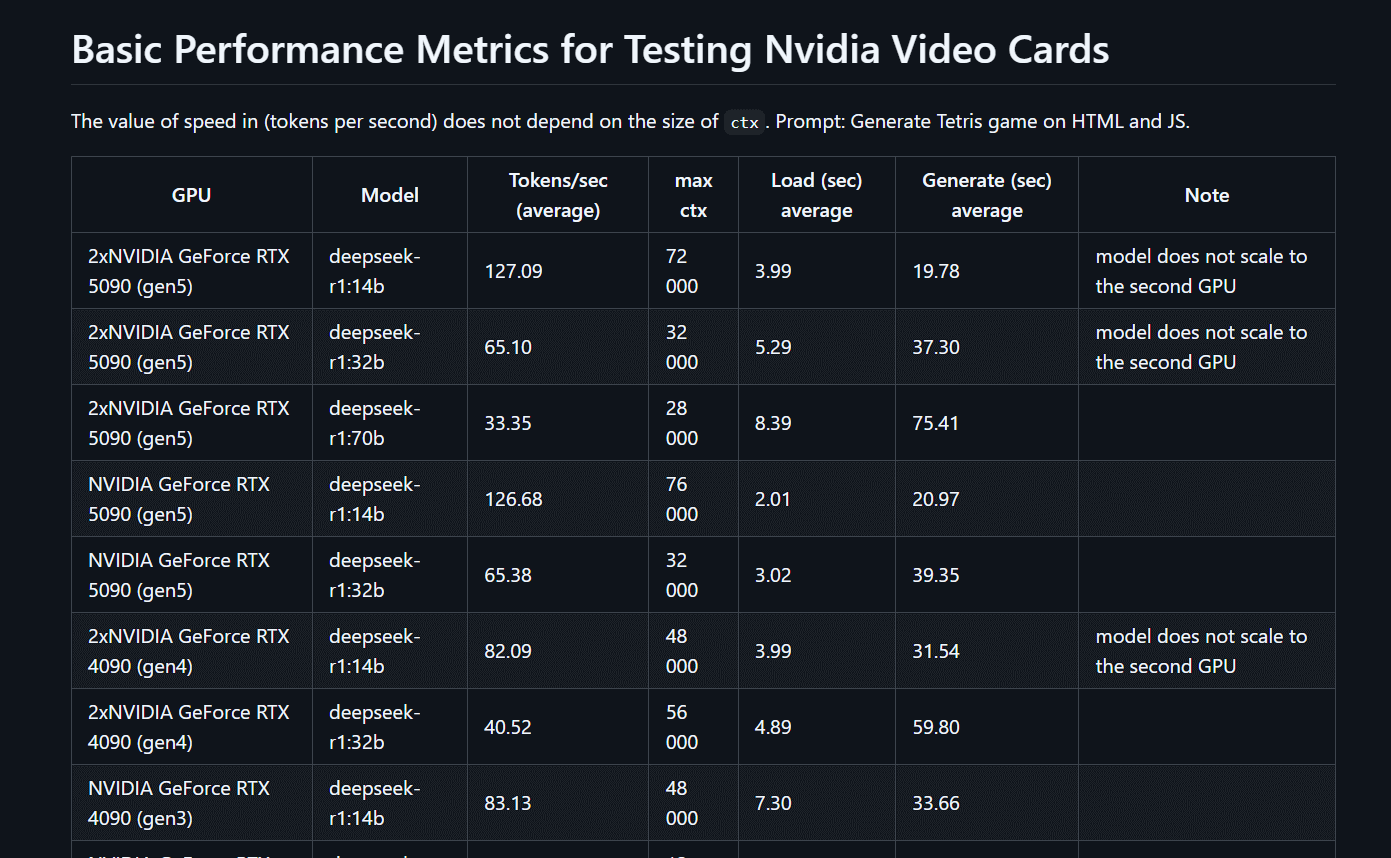
- Ollama is unable to distribute the workload across multiple GPUs when the ctx (context) size increases for smaller models. For us, small models simply crash with an error once they reach the memory capacity of a single GPU.
- The processing speed of the model does not depend on the ctx size under equal conditions; on average, it remains constant.
- Ollama does not parallelize the processing of neural network models but merely redistributes them across all available video memory. Therefore, you shouldn’t expect two NVIDIA RTX 5090 GPUs to work twice as fast as a single GPU. The speeds will be the same.
- Various environmental factors have almost no impact on the final result. We were only able to achieve a maximum of +1 token per second.
The current table showing the results of the tests with the GPUs we used (a4000, a5000, 4090, 5090, 2x4090, and 2x5090) in DeepSeek R1, with model sizes ranging from 7 to 70B, can also be found on GitHub at the following link: https://github.com/hkadm/ollama_gpu_test/blob/main/test_result/Test_total.md
Just to clarify, since Ollama is still in the active development phase, you might achieve better results yourself. We’d be happy if you tried our test and shared your findings with us!