从 CentOS 8 迁移到 Rocky Linux 的分步说明
在这篇文章中
步骤 1. 备份
备份服务器或服务器上的重要目录。
步骤 2:验证版本匹配
在运行迁移脚本之前,您应该检查操作系统的版本。CentOS 必须至少为 8.3。否则,您需要按照 步骤 3 段落中的说明注册包含更新包的镜像地址,并运行以下命令:
CentOS 镜像可以从 链接 下载。系统将升级至 CentOS Linux release 8.5.2111。
步骤 3. 添加镜像
您需要使用以下命令为 CentOS 8 添加镜像:
sudo sed -i -e "s|mirrorlist=|#mirrorlist=|g" /etc/yum.repos.d/CentOS-*
sudo sed -i -e "s|#baseurl=http://mirror.centos.org|baseurl=http://vault.centos.org|g" /etc/yum.repos.d/CentOS-*
步骤 4. 下载迁移脚本:
cd /tmp
curl -O https://raw.githubusercontent.com/rocky-linux/rocky-tools/main/migrate2rocky/migrate2rocky.sh
步骤 5. 授予脚本执行权限:
步骤 6. 执行脚本以开始下载和安装包:
步骤 7:安装完成并重启
如果安装成功,将出现以下消息:
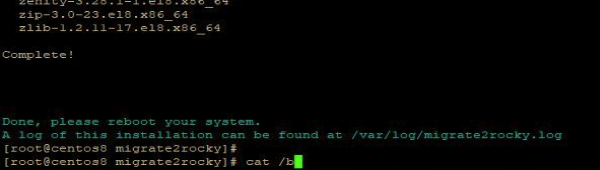
安装完成后,您应使用 reboot 命令重启系统。
如果迁移成功,在系统启动和内核选择时,Rocky Linux 将出现在列表中:

步骤 8. 查找错误
重启系统后,您需要检查错误以及系统的名称和版本:
cat /etc/redhat-release– 确认是否已切换到 RockyLinux;dmesg- 检查硬件错误;journalctl- 系统中的错误。
步骤 9. 验证服务运行状况
如果您正在迁移 GUI 系统,在从 CentOS 迁移到 Rocky Linux 的过程中可能会遇到问题。在执行迁移脚本时,如果系统未成功迁移到 RockyLinux,可能会出现包问题。这将损坏旧的 CentOS 包。当您尝试使用以下命令检查系统版本时:
将显示以下消息:
尝试执行以下命令时也会收到类似消息:
解决此问题的方法是通过从 存档镜像 vault 安装包,部分回滚到 CentOS 系统。 需要下载之前安装在系统上的版本的包(参见 步骤 2),即 CentOS 版本 8.5.2111。
运行以下命令序列:
cd /tmp
wget https://vault.centos.org/centos/8/BaseOS/x86_64/os/Packages/centos-linux-release-8.5-1.2111.el8.noarch.rpm
wget https://vault.centos.org/centos/8/BaseOS/x86_64/os/Packages/centos-linux-repos-8-3.el8.noarch.rpm
wget https://vault.centos.org/centos/8/BaseOS/x86_64/os/Packages/centos-gpg-keys-8-3.el8.noarch.rpm
rpm -ivh ./centos-gpg-keys-8-3.el8.noarch.rpm  --force
rpm -ivh ./centos-linux-release-8.5-1.2111.el8.noarch.rpm ./centos-linux-repos-8-3.el8.noarch.rpm --force
在执行迁移脚本之前,您必须预先安装所有依赖项。例如,以下是 6 个有问题的包列表:
Error: Check discovered 6 problem(s)
anaconda-gui-33.16.5.6-1.el8.x86_64 has missing requires of system-logos
firefox-91.4.0-1.el8_5.x86_64 has missing requires of redhat-indexhtml
gdm-1:40.0-15.el8.x86_64 has missing requires of system-logos
gnome-session-3.28.1-13.el8.x86_64 has missing requires of system-backgrounds
gnome-session-3.28.1-13.el8.x86_64 has missing requires of system-logos
plymouth-graphics-libs-0.9.4-10.20200615git1e36e30.el8.x86_64 has missing requires of system-logos
要解决此问题,您需要安装 3 个包:
按照这些步骤解决依赖问题后,您需要从 步骤 6 开始重复迁移步骤。