Network Speed test
Information
The Hostkey B.V. Speedtest service is designed to test the network connection speed between a user's device and Hostkey's servers.
Network testing methods
There are several ways for the user to check the quality of the data channel:
- using the graphical interface on the service page;
- Test with IPERF;
- Test with file download via HTTP, HTTPS, FTP (Linux);
- from the command line with the Librespeed-cli client.
Network Speedtest with the graphical interface of Hostkey B.V. Speedtest service page
The service page allows the user to select the location of Hostkey's servers. This locations are available:
- Netherlands, Amsterdam;
- Finland, Helsinki;
- Germany, Frankfurt;
- Iceland, Reykjavik;
- USA, New York;
- Turkey, Istanbul;
- United Kingdom, London;
- France, Paris;
- Spain, Madrid;
- Italy, Milan;
- Poland, Warsaw;
- Switzerland, Zurich.
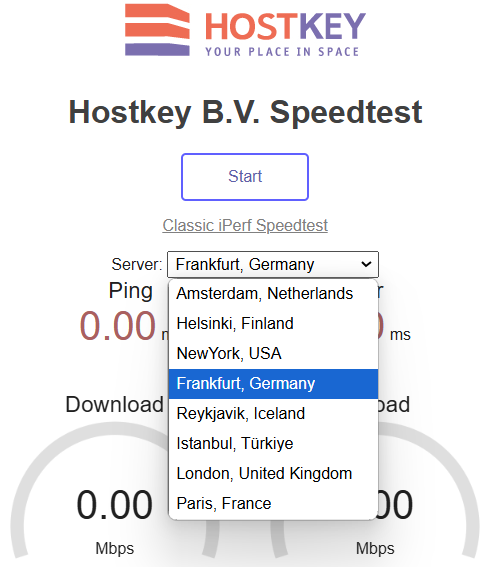
To run the test, select server and press the Start button.
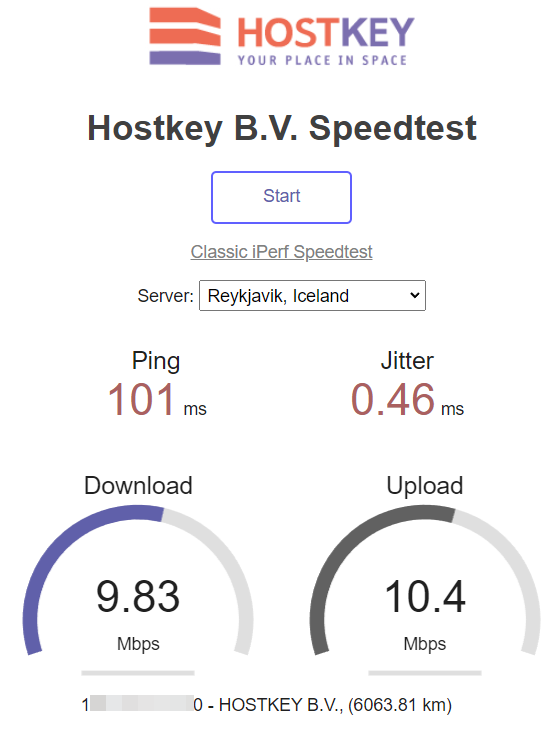
As a result of the test, the following data is displayed on the screen:
- Ping;
- Jitter;
- Download;
- Upload;
- The distance between the user's location and the company's servers;
- Internet service provider and IP address of the user.
Network IPERF test
Information
Iperf software and manuals can be found on the official website.
You can find the TCP throughput calculator on the official website.
Example IPERF3 (client sends, server receives):
-
IPv4 Netherlands, Amsterdam
-
IPv4 Finland, Helsinki
-
IPv4 USA, New York
-
IPv4 Germany, Frankfurt
-
IPv4 Iceland, Reykjavik
-
IPv4 Turkey, Istanbul
-
IPv4 United Kingdom, London
-
IPv4 France, Paris
-
IPv4 Spain, Madrid
-
IPv4 Italy, Milan
-
IPv4 Poland, Warsaw
-
IPv4 Switzerland, Zurich
-R reverse mode (server sends, client receives)
-
IPv4 Netherlands, Amsterdam
-
IPv4 Finland, Helsinki
-
IPv4 USA, New York
-
IPv4 Germany, Frankfurt
-
IPv4 Iceland, Reykjavik
- IPv4 Turkey, Istanbul -
IPv4 United Kingdom, London
-
IPv4 France, Paris
- IPv4 Spain, Madrid -
IPv4 Italy, Milan
-
IPv4 Poland, Warsaw
-
IPv4 Switzerland, Zurich
Example call for Windows (no syntax differences; specify the path to the unpacked iperf3.exe):
Note
The official iperf.fr website offers an outdated iperf 3.1.3 build for Windows. Newer iperf3 versions for Windows are distributed as third-party builds. For accurate results, it is recommended to use an up-to-date version of iperf3. On Linux, iperf3 is installed from the distribution repositories: sudo apt install iperf3 (Ubuntu / Debian), sudo yum install iperf3 (CentOS 7) or sudo dnf install iperf3 (AlmaLinux / Rocky Linux).
Network test with HTTP, HTTPS, FTP file download
- Netherlands, Amsterdam: 10mb.bin, 100mb.bin, 1000mb.bin, 2000mb.bin, 5000mb.bin, 10000mb.bin
- Finland, Helsinki: 10mb.bin, 100mb.bin, 1000mb.bin, 2000mb.bin, 5000mb.bin, 10000mb.bin
- USA, New York: 10mb.bin, 1000mb.bin, 2000mb.bin, 5000mb.bin, 10000mb.bin
- Germany, Frankfurt: 10mb.bin, 100mb.bin, 1000mb.bin, 2000mb.bin, 5000mb.bin, 10000mb.bin
- Iceland, Reykjavik: 10mb.bin, 100mb.bin, 1000mb.bin, 2000mb.bin, 5000mb.bin, 10000mb.bin
- Turkey, Istanbul: 10mb.bin, 100mb.bin, 1000mb.bin, 2000mb.bin, 5000mb.bin, 10000mb.bin
- United Kingdom, London: 10mb.bin, 100mb.bin, 1000mb.bin, 2000mb.bin, 5000mb.bin, 10000mb.bin
- France, Paris: 10mb.bin, 100mb.bin, 1000mb.bin, 2000mb.bin, 5000mb.bin, 10000mb.bin
- Spain, Madrid: 10mb.bin, 100mb.bin, 1000mb.bin, 2000mb.bin, 5000mb.bin, 10000mb.bin
- Italy, Milan: 10mb.bin, 100mb.bin, 1000mb.bin, 2000mb.bin, 5000mb.bin, 10000mb.bin
- Poland, Warsaw: 10mb.bin, 100mb.bin, 1000mb.bin, 2000mb.bin, 5000mb.bin, 10000mb.bin
- Switzerland, Zurich: 10mb.bin, 100mb.bin, 1000mb.bin, 2000mb.bin, 5000mb.bin, 10000mb.bin
For the test to work correctly, use the commands (for Warsaw and Zurich, files are available over HTTP; for other locations, over HTTPS):
-
IPv4 Netherlands, Amsterdam:
-
IPv4 Finland, Helsinki:
-
IPv4 USA, New York:
-
IPv4 Germany, Frankfurt:
-
IPv4 Iceland, Reykjavik:
-
IPv4 Turkey, Istanbul:
-
IPv4 United Kingdom, London:
-
IPv4 France, Paris:
-
IPv4 Spain, Madrid:
-
IPv4 Italy, Milan:
-
IPv4 Poland, Warsaw:
-
IPv4 Switzerland, Zurich:
Note
For Windows OS, you will need to download and install the console utility GNU Wget or use the curl utility built into Windows 10/11: curl.exe -4 -o NUL https://spd-nlsrv.hostkey.com/files/2000mb.bin.
When downloading over HTTPS, some CPU resources are spent on encryption, so on low-power devices the result may be slightly lower than over HTTP.
Testing Network with Librespeed Command Line client
Information
The user can download the command line client here.
After installing the command line client, the user can check the connection speed of their device to the HOSTKEY servers from the command line. The check consists of the following steps:
-
Getting a list of servers:
Retrieving server list from https://speedtest.hostkey.com/servers.json 1: Amsterdam, Netherlands (http://spd-nlsrv.hostkey.com/) 2: Helsinki, Finland (http://spd-fisrv.hostkey.com/) 3: NewYork, USA (http://spd-uswb.hostkey.com/) 4: Frankfurt, Germany (http://spd-desrv.hostkey.com/) 5: Reykjavik, Iceland (http://spd-icsrv.hostkey.com/) 6: Türkiy, Istanbul (http://spd-tr.hostkey.com/) 7: London, United Kingdom (http://spd-uksrv.hostkey.com/) 8: Paris, France (https://spd-frsrv.hostkey.com/) 9: Madrid, Spain (https://spd-essrv.hostkey.com/) 10: Milan, Italy (https://spd-itsrv.hostkey.com/) 11: Warsaw, Poland (http://spd-plsrv.hostkey.com/) 12: Zurich, Switzerland (http://spd-chsrv.hostkey.com/) -
Select a server to perform http tests on:
The server number is set according to the list obtained in the previous step. If you want to test for https, you can add --secure to the end of the command. For example: