Setting iptables basic Linux firewall
In this article
iptables is the built‑in framework for filtering and managing network traffic in the Linux kernel. It allows flexible control over incoming, outgoing, and transit connections based on rules.
Note
In modern distributions (AlmaLinux / Rocky Linux 8-10, Debian 11-13, Ubuntu 22.04 and newer), the kernel filtering subsystem is nftables, and the iptables command is the iptables-nft compatibility layer: the command syntax is the same, but the rules are written to nftables. The iptables -V command shows which variant is used (nf_tables or legacy). In AlmaLinux / Rocky Linux 9-10 the command may be missing - install the iptables-nft package.
Do not use iptables together with ufw / firewalld - the rules will conflict. Configuring ufw, firewalld and nftables is described in the article Firewall configuration: ufw, firewalld, nftables, Windows.
For cloud or VPS servers, configuring a firewall is critically important for security.
Core Concepts
Three chains (chains)
| Chain | Purpose |
|---|---|
INPUT | Incoming traffic to the server (SSH, HTTP, etc.) |
OUTPUT | Outgoing traffic from the server (updates, API requests) |
FORWARD | Traffic that passes through the server (only when routing/NAT) |
Note
Be careful with INPUT!
Blocking port 22 without permission can disconnect you from the server. Always review rules before applying.
How it works
- A packet enters the appropriate chain
INPUT,OUTPUT,FORWARD. - Rules are evaluated in order — as soon as a match is found, the specified action is taken.
- If no match is found, the default policy
policyis applied.
Actions (targets)
| Action | Behavior | Recommendation |
|---|---|---|
ACCEPT | Allow the packet | For trusted services (SSH, HTTP) |
DROP | Silently drop the packet (no reply) | Best choice for security — hides the existence of the port |
REJECT | Reject with an ICMP error (e.g., port-unreachable) | Use if you need feedback (e.g., for debugging) |
Note
Security rule
By default — deny everything, then allow only what is needed.
Basic command syntax
Main options:
| Option | Purpose |
|---|---|
-A | Append a rule to the end of the chain |
-I | Insert a rule at the beginning (or at a specific number: -I INPUT 1) |
-D | Delete a rule (by number or by copying the line) |
-L | List rules |
-F | Flush all rules in the chain |
-P | Set default policy (ACCEPT, DROP) |
Frequently used criteria:
| Option | Example | Description |
|---|---|---|
-p tcp/udp/icmp | -p tcp | Protocol |
--dport N | --dport 22 | Destination port |
-s IP/MASK | -s 192.168.1.5-s 203.0.113.0/24 | Source (IP or subnet) |
-i interface | -i eth0 | Incoming interface |
-m conntrack --ctstate NEW,ESTABLISHED | -m conntrack --ctstate NEW | Connection state |
-m connlimit | --connlimit-above 5 | Connection limit |
Viewing and troubleshooting
Display all rules (readable):
--n — do not resolve names (faster); - -v — verbose output; - --line-numbers — show rule numbers (useful for deletion). 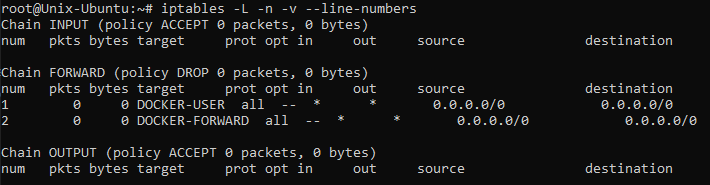
View default policies:
Practical rule examples
1. Secure basic setup (recommended!)
# 1. Allow all traffic on loopback
sudo iptables -A INPUT -i lo -j ACCEPT

# 2. Allow already established connections (important!)
sudo iptables -A INPUT -m conntrack --ctstate ESTABLISHED,RELATED -j ACCEPT

# 3. Allow SSH (replace 22 with your port if changed!)
sudo iptables -A INPUT -p tcp --dport 22 -j ACCEPT

# 4. Allow HTTP/HTTPS
sudo iptables -A INPUT -p tcp --dport 80 -j ACCEPT
sudo iptables -A INPUT -p tcp --dport 443 -j ACCEPT

# 5. Drop everything else by default
sudo iptables -P INPUT DROP
sudo iptables -P FORWARD DROP
sudo iptables -P OUTPUT ACCEPT   # ← usually allow outbound
2. Access restriction
# Allow MySQL (3306) only from one IP
sudo iptables -A INPUT -s 203.0.113.15 -p tcp --dport 3306 -j ACCEPT

# Block all traffic from a suspicious IP
sudo iptables -A INPUT -s 198.51.100.77 -j DROP
3. Attack protection
The rules in this section must come before the rules that allow ports, so they are inserted at the beginning of the chain (-I).
# Block malformed/invalid packets
sudo iptables -I INPUT 1 -m conntrack --ctstate INVALID -j DROP

# Protect against SYN flood: limit the rate of new TCP connections
sudo iptables -N SYN_FLOOD
sudo iptables -A SYN_FLOOD -m limit --limit 20/s --limit-burst 50 -j RETURN
sudo iptables -A SYN_FLOOD -j DROP
sudo iptables -I INPUT 2 -p tcp --syn -j SYN_FLOOD

# Limit connections to HTTP (no more than 20 concurrent from one IP)
sudo iptables -I INPUT 3 -p tcp --dport 80 -m connlimit --connlimit-above 20 --connlimit-mask 32 -j DROP
Note
The limit in the SYN_FLOOD chain is shared by all clients: adjust the values to your real load, otherwise legitimate connections will also be dropped during peaks. Also make sure SYN cookies are enabled in the kernel: sysctl net.ipv4.tcp_syncookies (value 1). A server firewall does not protect against volumetric DDoS attacks - the DDoS protection service is designed for that.
4. Logging
# Log attempts to connect to closed ports (first 5 per minute)
# These ports must not be allowed by the rules above, otherwise these rules will not match
sudo iptables -A INPUT -p tcp -m multiport --dports 23,3389,5900   -m limit --limit 5/min -j LOG --log-prefix "PORT-SCAN: " --log-level 4

# Then drop
sudo iptables -A INPUT -p tcp -m multiport --dports 23,3389,5900 -j DROP
Saving rules after reboot
iptables rules are not saved automatically — they only reside in kernel memory.
For RHEL / CentOS 7 and earlier:
Theservice iptables save command is available when the iptables-services package is installed. For AlmaLinux / Rocky Linux 8-10:
These systems use firewalld by default. To manage rules with iptables, save the current rules, disable firewalld and enable the iptables service, which loads the rules from /etc/sysconfig/iptables at startup:
sudo dnf install iptables-nft iptables-services
sudo iptables-save > /etc/sysconfig/iptables
sudo systemctl disable --now firewalld
sudo systemctl enable --now iptables
For Debian / Ubuntu:
Install the persistence package:
During installation the system will prompt to save the current rules—choose "Yes".Update saved rules later:
Note
Before rebooting, verify the rules:
The-t flag is only syntax checking, no application. Removing rules
Delete by number (see --line-numbers):
Delete by exact match:
Flush a chain:
Reset default policies:
Information
- Test rules locally or via the remote access console in Invapi (not SSH!), especially when changing
INPUT. - Use
screenortmuxso you don't lose the session on error. - Consider moving to more modern tools -
ufw(Ubuntu/Debian),firewalld(AlmaLinux, Rocky Linux, CentOS) ornftables. Their configuration is described in the article Firewall configuration: ufw, firewalld, nftables, Windows.