YOURLS
In this article
- YOURLS Key Features
- Deployment Features
- Getting Started After Deploying YOURLS as a Managed App
- Getting Started After YOURLS Deployment from the Marketplace
- Logging into the Administration Panel
- Creating Short Links
- Statistics and Analytics
- Bookmarklets
- YOURLS Plugins
- Ordering a Server with YOURLS via API
Information
YOURLS (Your Own URL Shortener) is free open-source software that allows you to create your own URL shortener on your server. YOURLS provides full control over links, detailed click statistics, plugin support, and an extensible architecture. The solution is written in PHP and uses a MySQL/MariaDB database. A YOURLS server is suitable for marketers, bloggers, business owners, and IT specialists who need to track links and manage short URLs.
YOURLS Key Features
- Full control over links: use your own domain or subdomain for short URLs, ensuring brand recognition;
- Detailed statistics and analytics: tracking the number of clicks, traffic sources, visitor geography, and other metrics for each short link;
- Custom keywords: the ability to set your own descriptive and memorable keywords for short links;
- Public and private links: creating open short URLs for wide distribution or private links with restricted access;
- Bookmarklets: quickly shortening links directly from your browser without needing to visit the YOURLS website;
- Developer API: a simple API for programmatic access, allowing you to integrate YOURLS with other applications and automate tasks;
- Plugin architecture: extending functionality by installing plugins available in the YOURLS ecosystem;
- Sequential or custom URL creation: the ability to generate sequential short URLs or use custom configurations;
- Secure user management: protected access to the administration interface using password hashing.
Note
You can deploy YOURLS as a Managed App. To do this, go to the Marketplace > Managed Apps section in the Invapi server control panel.
Deployment Features
| ID | Name of Software | Compatible OS | VM | BM | VGPU | GPU | Min CPU (Cores) | Min RAM (GB) | Min HDD/SDD (GB) | Custom Domain | Active |
|---|---|---|---|---|---|---|---|---|---|---|---|
| 630 | YOURLS | Ubuntu 22.04 | + | + | + | + | 1 | 2 | 15 | No | ORDER |
Information
You can find information regarding the deployment features of this software at this link
Note
Unless otherwise specified, we install the latest stable version of YOURLS from the official project repository by default.
Getting Started After Deploying YOURLS as a Managed App
After deploying YOURLS as a managed app, you will find the following in the My managed apps tab of the server control panel:
- an application link;
- login and password for access;
- information on service usage and management.
For more details on working with managed apps, see the instructions.
Getting Started After YOURLS Deployment from the Marketplace
After payment is completed, a notification regarding server readiness will be sent to the email address provided during registration. It will contain the VPS IP address, as well as the login and password for connection. Clients can manage their hardware through the server management panel and API — Invapi.
Authorization credentials can be found in the Configuration >> Tags tab of the server management panel or in the sent email:
- Link to access the YOURLS web interface: located in the webpanel tag;
- Username and Password for server management: sent via email once the server is delivered.
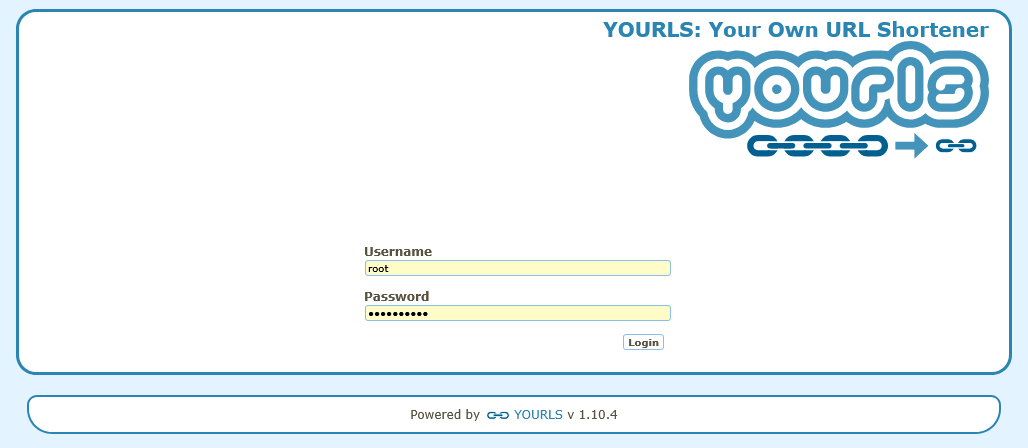
Logging into the Administration Panel
To access the YOURLS interface, follow these steps:
-
Open a web browser and go to:
https://yourls{Server_ID}.hostkey.com/admin; -
Upon your first visit, you will be directed to the login page. Enter your credentials:
- Username:
root - Password: the default password provided in the server readiness notification;
- Username:
-
Click the
Loginbutton.
Attention
It is recommended to change the administrator password immediately after your first login to ensure security.
Creating Short Links
After successfully logging into the administration panel, you will be directed to the home page, where you can create new short links:

-
In the Enter the URL here field, enter the full URL that needs to be shortened;
-
In the Custom short URL field (optional), specify a custom keyword for the short link. If you leave this field empty, a keyword will be generated automatically;
-
Click the
Shorten The URLbutton to create the short link; -
The result will be displayed on the page:
- Your short link - the completed short link;
- Original URL - the full version of the short link for copying;
- Copy - a button for quick copying to the clipboard.
Information
Use clear and descriptive keywords for short links so they are easy to remember and recognize, for example: yourdomain.com/summer-sale instead of a random set of characters.
Statistics and Analytics
YOURLS provides detailed statistics for all created short links:
-
To view detailed statistics for a specific link, hover your cursor over the link and click the statistics icon in the Actions field;

-
The statistics page displays:
- total number of clicks per link;
- a list of redirects including date and time;
- traffic sources (referrer);
- User-Agents;
- visitor geographic data;
-
Statistics allow you to:
- track link popularity;
- analyze the effectiveness of marketing campaigns;
- optimize traffic distribution.
Bookmarklets
Bookmarklets are special browser bookmarks that allow you to shorten links with a single click without navigating to the YOURLS website:
-
Go to the Tools section in the top YOURLS menu;
-
Drag and drop the desired shortcut onto your browser's bookmarks bar;
- Shorten - a shortcut to shorten the current page;
- Custom Shorten - a shortcut that allows you to specify a keyword;
-
While viewing an interesting page, click the corresponding icon on your bookmarks bar;
-
A dialog box will appear with the result — the ready short link.
Note
Bookmarklets work with any modern web browser and do not require additional software installation.
YOURLS Plugins
YOURLS supports extending functionality through a plugin system:
-
Go to the Plugins section in the administration panel;
-
The list of installed plugins is displayed on the page. To enable or disable a plugin, use the toggle switch next to its name;
-
To install a new plugin:
- download the plugin from the official YOURLS repository;
- extract the archive into the
user/plugins/directory; - the plugin will appear in the list of available plugins in the administration panel;
- activate the plugin by clicking the corresponding button;
-
Popular plugins include:
- GeoIP - identification of visitor geographic location;
- Click counter - advanced click counting;
- Social Sharing - integration with social networks;
- Password Protection - protecting links with a password;
- Expiry - automatic expiration of links.
A full list of recommended plugins is available in Awesome YOURLS on GitHub.
Note
Detailed information regarding the configuration and use of YOURLS can be found in the official documentation.
Ordering a Server with YOURLS via API
To install this software using the API, follow these instructions.