Snapshots of virtual servers
In this article
Information
A snapshot is a complete copy of the entire file system of a virtual server. Snapshot allows you to perform a full restoration of the server with maintaining RAM memory.
Attention
Performing a rollback operation to the specified snapshot will result in the irreversible deletion of all snapshots created after the selected restore point. It is recommended to ensure the correctness of your selection beforehand.
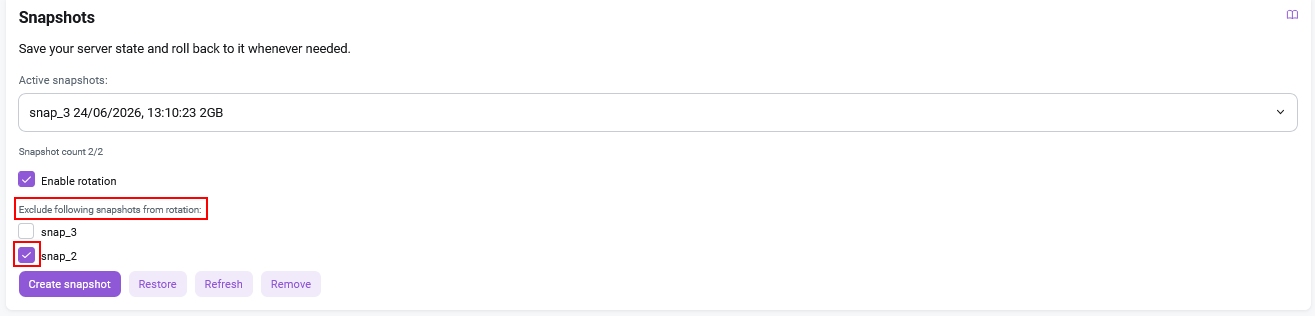
The Snapshots section in the Configuration tab is designed for managing virtual machine snapshots. It allows you to create snapshots and perform the following actions with them:
- Active snapshots - viewing the existing snapshots in the drop-down list;
Create snapshot- creating a snapshot.Restore- restoring from snapshot;Refresh- updating the list of snapshots;
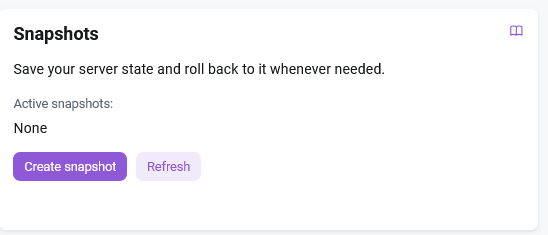
Create a snapshot
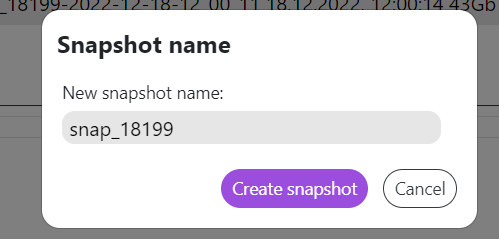
To create a snapshot, click on the Create snapshot, button, and then enter its name:
Important: Storage Limit
The maximum number of snapshots that can be stored is 4. Once this limit is reached, creating new snapshots will be impossible. To continue working, you must delete outdated snapshots.
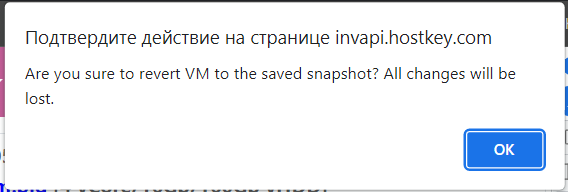
An additional message will be displayed on the screen while restoring the server from a snapshot or deleting an existing snapshot. You must confirm the action and click the OK button.
Attention
Before restoring the server from a snapshot or deleting it, you must go to the Power control tab and click on the Power off button. When the server is enabled (status Active), the Remove button does not appear.
Rotation Mechanism
A rotation mechanism is available in test mode for some VPS instances. It allows you to automatically replace the oldest snapshot when creating a new one without the need for manual deletion. To use this mechanism, you must check the Enable rotation checkbox.

Note
The rotation mechanism is being rolled out gradually; its availability on specific VPS instances is not guaranteed, and it cannot be manually enabled for a specific server.
An option for unconditional snapshot preservation is also implemented. To prevent a snapshot from being automatically deleted during rotation, place a checkmark next to the required snapshot in the Exclude following snapshots from rotation section.