Server Assistance (Remote Hands Request)
In this article
The Remote Hands Request functionality is designed to resolve issues with a leased server (dedicated or virtual) that cannot be addressed remotely over the network. It enables the engagement of technical specialists located in the data center to perform tasks such as connecting external storage devices, diagnosing hardware, and troubleshooting equipment failures.
Attention
The Remote Hands Request functionality should only be used when the server's remote management module is non-functional or unavailable. If the remote management module is operating normally, it is recommended to use it to resolve any issues.
Requesting "Remote Hands" Functionality**
To access the Remote Hands Request functionality, you must:
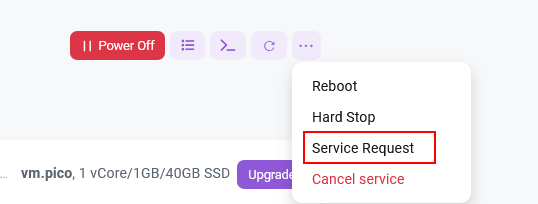
Navigate to the Invapi hardware control panel. In the server card, click ... on the right side of the information line (with the red button), then select Server Assistance:
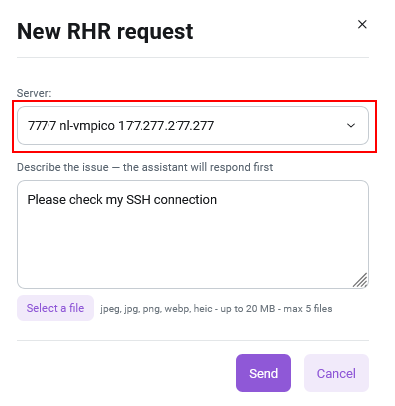
In the menu that opens, describe the problem as fully and accurately as possible, then click the Send button:
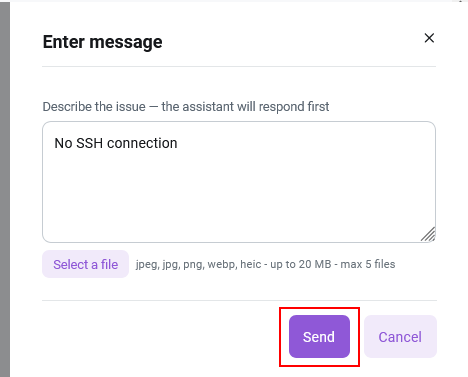
After this, the AI assistant will respond and suggest a solution to the problem.
Note
The AI assistant's response may take up to 2 minutes due to searching through our entire documentation base.
If the AI Assistant's response solves your problem, click the Issue Resolved button. If not, click Continue.
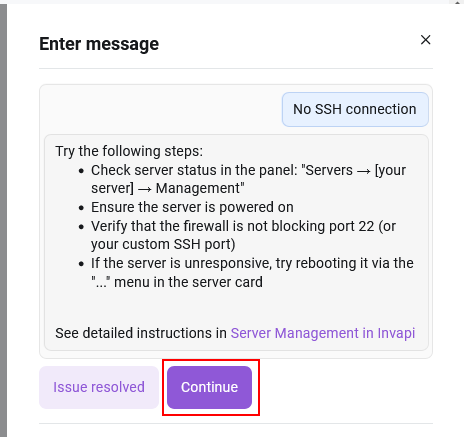
After this, a ticket will be created to resolve the issue. You can track the request status and communicate with technical support specialists via the Help Center menu in the Server requests section of the Invapi server management panel.
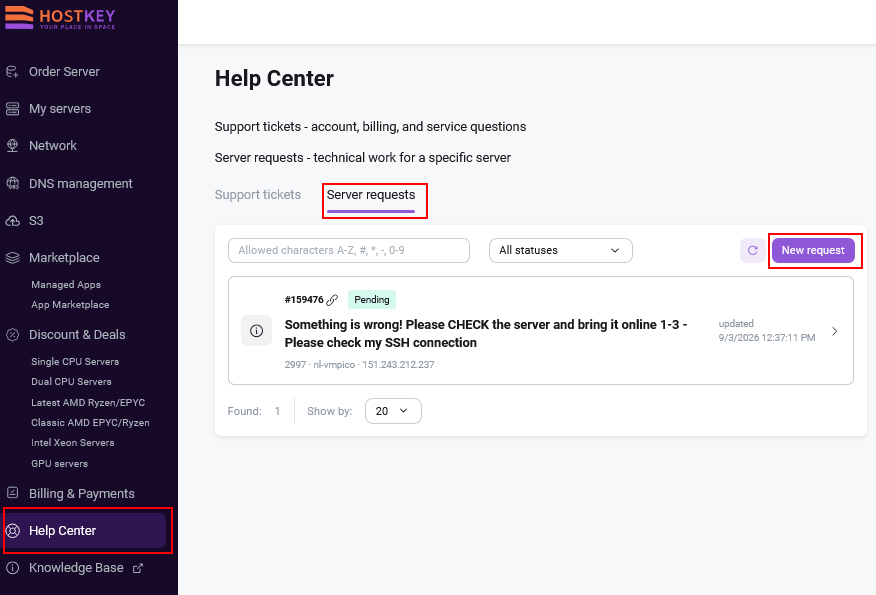
Once a specialist accepts the request, its status will change from Pending to Active.
When you receive new messages from technical support specialists, notifications will be sent to the email address provided during account registration.
You can also submit a request directly using the Help Center menu in the Server requests section of the Invapi server management panel. To do this, click the New request button and select the appropriate server from the dropdown list.
RHR Request Policy
Before submitting a request, ensure that the task falls within the scope of Remote Hands responsibility.
Remote Hands handles:
- Server availability: unresponsive, fails to boot, frozen, no access via SSH/RDP/KVM/IPMI;
- Reboot, power on, and power off upon request;
- Dedicated server hardware: diagnostics and component replacement, RAID/SMART errors, overheating, upgrades after payment confirmation;
- Networking: packet loss, latency, IP unavailability, additional IP/VLAN/private network, rDNS/PTR, DDoS, and provider blocks;
- OS: reinstallation, installation from a template or custom ISO, bootloader issues, rescue mode, root/administrator password reset;
- Administration — only if included in your service plan.
Not included in Remote Hands
If your task is not related to the server, network, or hardware, it is not handled via Remote Hands. Please submit a support ticket and select the appropriate topic:
- Billing — invoices, payments, refunds, plan changes, renewals, closing documents.
- Client Area — login, 2FA, access recovery, changing email/phone, interface errors.
- Contract and Legal Issues — change of ownership, billing details, verification.
- Sales — configuration selection, pricing, server availability, custom orders.
- Abuse — complaints regarding spam, phishing, or client violations.
- Client software on unmanaged plans — website code errors, application configuration. This is outside the scope of support or is resolved via paid administration services.
Edge Cases
Some situations fall between Remote Hands and other departments. To save time, use the following guidelines:
- Server blocked due to non-payment. This is not a malfunction, but a consequence of a billing block. First, resolve the payment issue through Billing; once resolved, support will unblock the server.
- Server powered off due to an abuse report. First, contact the Abuse department. Once the issue is resolved, support will power the server back on.
- Reboot button in the Client Area is not working. If the interface itself fails to load, this is a Client Area issue; contact support regarding your account. If the command is sent but the server does not respond, this is a Remote Hands task.
- Hardware upgrade. Payment and approval are handled through Billing, while the physical installation is performed by support as part of Remote Hands.
- Managed and unmanaged. On unmanaged plans, the provider's responsibility is limited to "hardware, network, and console access"—this is exactly what Remote Hands covers. Everything inside the OS (software configuration, website code errors, applications) is the client's responsibility.
If you are unsure which category your situation falls into, start by contacting support; they will advise you on where to direct your request.