Billing cycle settings
In this article
You can independently change the server billing frequency (monthly, quarterly, etc.) in your personal account.
Attention
- Changing the billing cycle to a new one is based on the current applicable tariffs at the time of change (see https://hostkey.com).
- Changing the billing cycle to a new one is only possible if there is no outstanding and unpaid invoice for service renewal under the old payment cycle;
Where to find this option
- In the Invapi control panel, go to My servers.
- Open the required server (server details card).
- Navigate to the Billing tab.
- In the Billing information section, find the line Recurring amount.
In this line you will see the current billing cycle and a dropdown list with other available options.
How to change the billing cycle
-
Click the
Change Periodbutton: -
Select the desired billing period (available options depend on the tariff). A price preview including discounts will be displayed.
Attention
You can change the billing cycle to only the longer duration (e.g., monthly to quarterly).
Note
To reduce the billing period (e.g., from 12 months to 6 months, etc.), you need to open a ticket in the Support.
-
If you agree with the calculation, click the
Updatebutton.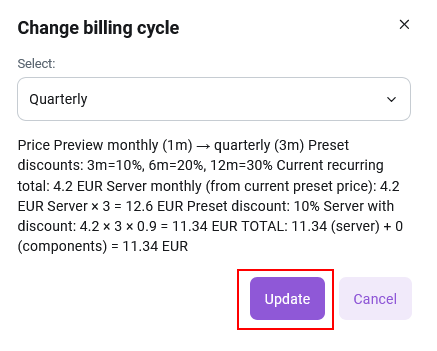
After confirmation, the new billing cycle will be used for future invoices for this server.
Attention
Changing the billing cycle to a new one will take effect from the next billing period, not from the date of the change!